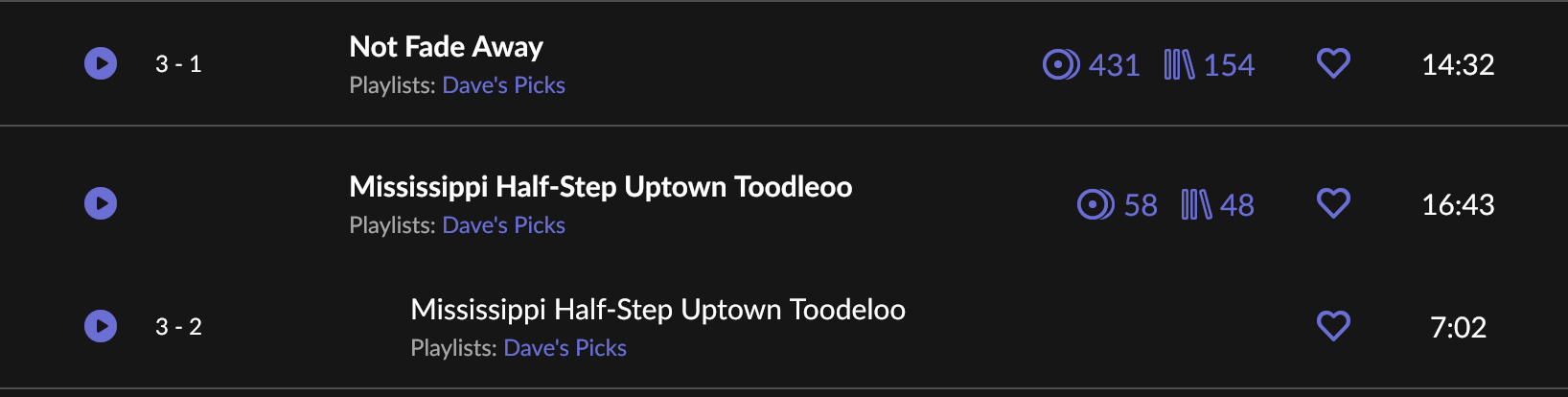
I’ve seen this happen as well. If I recall it was my local copy of Arcade Fire’s Funeral; 2 of the tracks were grouped under the same “composition.” I agree that it looks like a work/part relationships similar to classical groupings in Roon. Since it was a local copy I edited the album like I would a classical one, adding Work = Funeral and Part = title tags. It’s an unsatisfactory workaround, but it did work. Not sure what you can do if it is not an editable local copy, as Roon does not seem to have a native way to edit these situations in the app.
yeah, it’s a local file. A three-CD set, and I know multiple-disc sets can be tricky.
Weird thing is that there’s only one performance of Mississippi Half-Step on this set, but it appears twice, as two different parent/child groups within Roon. First instance is the correct song, second is where it’s supposed to be Big River. (Behavior is the same for both. Can’t edit.)
I could try to delete and re-import, just to see what might happen.
Unfortunately Qobuz doesn’t have streaming versions of the dave’s picks release to see how those are “tagged.” I have ripped copies of every Dave’s Picks release, and in general i use the work/section/part tags to separate out the main show form the extras that most of them include. It’s a bit of extra work but i like having the shows and sets correctly identified. That said it is understandably a step a lot of folks do not want to take, though it would fix this issue you have. Hopefully the delete and re-import works for you.