I’m currently running a whole how’s wired system which is also connected via LAN. Currently it’s consisted of a CasaTunes box which I believe serves as a DAC and two Dayton Audio DAX66 amplifiers serving the 12 zones. Where does a Roon Nucleus One fit into this? Does it replace the CasaTunes or does it work along side it? Can it replace the CasaTunes and provide individual audio to each zone? I’m a novice at this and would like to further understand how these components work together.
I’s suggest to start reading this (and links from there):
and
The Nucleus is NOT a DAC; it has no analog outputs. It is the central server and needs some kind of output device. This can be a DAC attached directly by USB or network streamer devices that can receive the data that the server sends over the network. They often have an internal DAC but can also connect digitally to other (DAC) gear. These network streamer devices might also have built-in amps, in some cases.
I did read the literature and viewed the various videos. OK this is how I thought it would work. So yes, the CasaTunes is a streamer (actually a mini PC) with decoding software. It also hosts streaming services. I’m simply not happy with the app. Does the Nucleus phone app all for selecting and streaming to different zones or is that strictly the purview of the streamer app? Do any streaming service apps provide for that? In IOS I can select where the audio goes as each zone appear as speakers on the interface.
Can you install software on it? This will be required to do any Roon things with it
- If you want to use it as a streamer, you will want to install Roon Bridge on it, to make it a Roon endpoint.
- Though if you can install software on it and if it is based on Intel hardware, you can maybe also install Roon Server on it, if it fulfills the hardware requirements. (Then you wouldn’t need a Nucleus)
Note that if you have 12 zones you will need 12 Roon endpoints, as far as I can tell.
You can control Roon with an app on PC (Windows, Mac), tablet (iPad, Android) or phone (iPhone, Android).
The PC app has the most features, the tablet app is nearly complete with just a few small limitations. E.g., only the PC and tablet apps have the options to edit metadata and to set up DSP settings.
The phone app is limited to replay features, but you can select DSP presets, set up various library filters, and you can select and manage output zones. You can choose different zones to play to, also in parallel, and group zones for simultaneous outputs.
As all streaming goes through the Roon server, and the Roon server counts as one streaming client, you can play several streaming tracks in parallel to different zones.
Looks like you can use the CasaTunes system or Roon. The Roon Nucleus is the Roon server and runs the Roon software. You can also run the Roon software on many other computer devices.
The Roon phone app is simply a client or control app for controlling a Roon Nucleus or other headless computer device such as a MacMini. It can also run Roon ARC which is Roon’s mobile app.
It’s not clear from the Casa Tunes docs, but on your iPhone / Mac can you see each Casa zone as a separate AirPlay speaker / zone?
ie. does the Casa appear as one, or multiple AirPlay outputs on your Mac / iPhone?
If the latter you could map each Casa AirPlay Zone up an individual Roon (AirPlay) output.
You could then send audio to each Casa zone via Roon.
(in this setup your Roon Nucleus server would be sending the audio to the Casa via Airplay and the Roon app on your phone would simply be acting as a remote control ie. your phone wouldn’t be using Airplay to send audio itself)
https://casatunes.zendesk.com/hc/en-us/articles/211637383-AirPlay-Page
On my phone I see each zone as a speaker set. I can choose an individual zone or any combination and send audio to them. I can also send different audio to different zone simultaneously. Each has full volume control thru the app. The Casa app also provides streaming services such as Tidal and Amazon Music and also has internet radio. It doesn’t have Apple Music and that’s what I use airplay for.
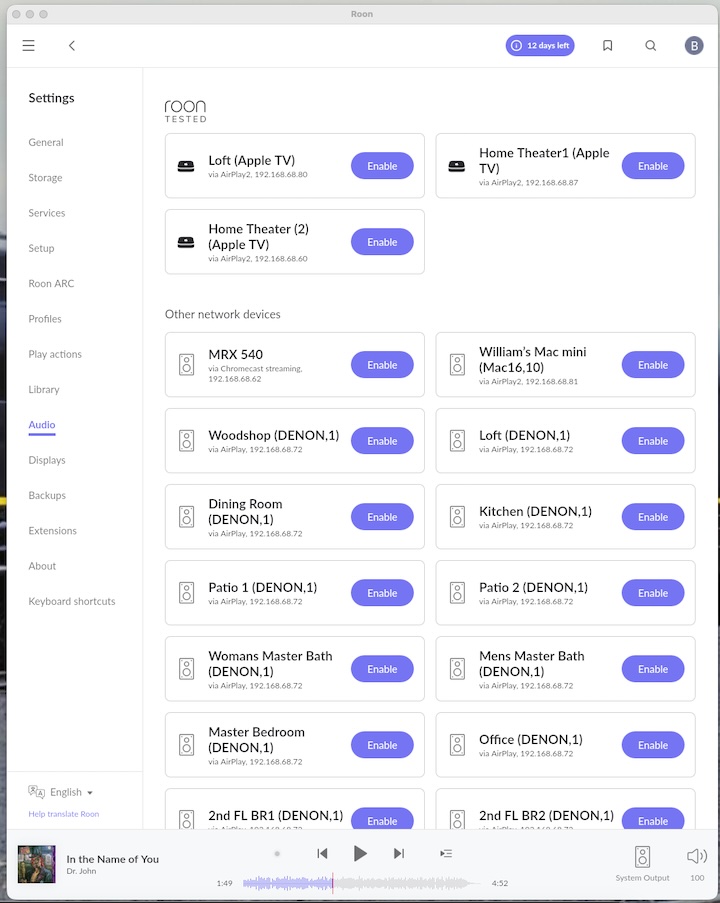
I’ve been playing the Roon server app? on my Mac. During setup it looked for audio devices on my network, but it didn’t discover the Casa unit. It did discover my Anthem AVR, my MacBook the 3 AppleTVs, LG monitor and a Mac Mini. It also discovered all of the speaker locations, but not the Casaserver individually. Oddly it has each speaker location labeled with the room name ie. Office, but after each room name it says (Denon,1). My Denon x4000 is in a closet in a box lol I can enable the Apple devices, but cannot enable the speakers or the Anthem.
From Suedkiez description of things, I may be in the woods when my Nucleus arrives. This I knew more about how all of this works together lol
If you want to use it as a native Roon zone, you will need Roon software on it:
Otherwise, you can use some other protocol that Roon and the Case both speak, like Airplay, Chromecast.
But is that via the native iOS Airplay output selector or just via the Casa app?
From the Casa manual it looks like you can enable each Casa zone as a ‘virtual’ Airplay speaker or zone ie. somewhere that you can send audio to via Apple Airplay (see above) — maybe you first need to enable AirPlay in your Casa server?
The reason I’m mentioning AirPlay is because I think that is the only way you will be able to send audio from Roon to your Casa Server and from there hopefully out to your audio zones connected to it.
To be clear, your Casa server isn’t natively Roon Ready — as in it doesn’t support Roon’s native (and proprietary) RAAT protocol — which would be the preferred route as it offers the highest resolution and other benefits.
But Roon does support outputting to Airplay devices, that’s why your Apple TV is being discovered. So if you can setup your Casa to receive audio via AirPlay as individual zones, you should be able see and enable those AirPlay zones in Roon’s audio settings.
If you wanted to completely replace your Casa streamer entirely then — in addition to the Nucleus — you’d either need a couple of Roon Ready multichannel streamers like the NAD CI 580 V2 or a single 2 channel Roon Ready streamer, like the WiiM Pro, one per zone (the WiiMs are probably the cheaper option and you can get 19" rack mounts that hold three units each). You’d then connect them up to your existing Dayton amplifiers.
Alternatively you could ditch both the Casa and Dayton amps and go with a couple of Roon Ready multichannel amplifiers with built in streaming support like the Marantz M4 which will work directly with Roon.
But both of those routes are a major investment, with potentially only minor benefits. If you can enable AirPlay on the Casa server, so that each zone appears a separate AirPlay zone, that should get you up and running using Roon as front-end interface / controller with your existing kit.
Try that first, maybe post some screenshots of your Roon Audio settings, along with the CasaServer AirPlay setup screen.
I believe the Casaserver enables the speakers as airplay speakers. I have a Mac Mini2. I could use as a Roon server with the Roon software installed. The Nucleus would be installed in my audio closet along with the rest of the equipment. Does that present any issues? I also think the Casaserver, being a mini PC would also be able to serve that purpose, but I’d prefer to stay with all Apple components - phones, computers and iPads.
One thing I’m not clear on is why would I need more than one streamer - ie. multiple Wiim. The Casaserver is connected to the two 6 zone amps on the rack and sees all of the different “rooms” or speaker sets and can direct audio to each independently. I hope I’m not traveling down the wrong path in trying to replace what already works. I know this shouldn’t be that complicated, but well I’m obviously not experienced in this. 
In an ideal roon multi-roon system you’d just pick up the roon app, choose the zone, play something and be able to adjust volume etc in the roon app.
Anything that needs to be turned on or any input chosen would happen automatically
A roon ready device (like the Marantz, or a WiiM) will do this (for 4 zones, or 1 zone respectively).
With a multi room system that isn’t roon ready you probably won’t get this degree of integration, and so even if you can connect roon to your system (and it will be possible with airplay or physically with multiple roon endpoints) you may end up needing to use two apps to get what you want to play to come out of the speakers.
The only way to find out is to try it and see.
My house has a multi-room system installed 20 years ago with wall mounted control panels. I’ve spent a lot of effort with a home automation system so I now have the seemless roon experience - but it’s been a lot of work!
If I were starting again I’d be very tempted by a few Marantz M4s!
If you want to control every zone independently, then either it will be a Roon Ready streamer (and amp) for each zone, i.e. the WiiM solution or similar, or your Casa needs to be able to present each of its zones independently to Roon, probably by AirPlay, as others have already explained.
Just so we are all clear, currently you have Roon Server running on a Mac and you can play music to your Apple TV and various other audio devices? But you can’t play music to the Casa zones? Have I got that correct?
If you can already play music to the Casa zones from Roon, what was the question again? 
Assuming you can’t currently play music to the Casa zones via Roon:
1/ Firstly, can you see the Casa Zones in your iPhone’s AirPlay selector?
This is a key point, you say “I believe the Casaserver enables the speakers as airplay speakers” but it would save everyone a lot of time if we could be sure.
Take a screenshot of your iPhone’s AirPlay dropdown menu if you can, it will help everyone understand what you are seeing.
If your iPhone can’t see the Casa as individual AirPlay zones, then Roon won’t be able to either. In which case you’ll need to do down the WiiM route or similar, but let’s not jump the gun yet.
If they do appear as AirPlay zones then the question is why you can’t play music to them via Roon.
2/ Post a screenshot of the audio settings screen in Roon.
This will help everyone understand what devices are appearing or not in Roon. No one can see what you see in front of you, unless you post a screenshot.
3/ Post a screenshot of the Casa AirPlay settings.
Not sure this will be much help as I don’t think there are any other Casa users here, but it might help someone help you.
Off-topic:
- Roon has a notion of one output device per zone, that can be a Roon Ready streamer, a built in PC sound card, an external DAC connected to a USB port or an Airplay or ChromeCast device.
- If your Casa Server can make each zone appear as an AirPlay (or Chromecast) output then that satisfies this requirement. But if the Casa simply appears as a single AirPlay zone then Roon can only send audio to that one output and will have no control over multi-room.
- I have no idea of the hardware underlying the Casa Server but from the photo on this page it looks like the Casa sever is simply using a standard PC sound card with four stereo outputs. So in theory if you wiped the Casa server completely and managed to install Roon Server on it, each of those four internal soundcard outputs should appear within Roon audio settings as an individual audio output you can control and send audio to. If you have a backup of the Casa OS and can easily reinstall it, then you could give it a go and see if it works, if not you might want to tread more carefully here / find out if other Casa users have ever done this successfully — does Casa have a forum?
- I say in theory above because I have suspicion that Casa is using basic, off-the-shelf 7.1 channel sound cards here and then mapping multiple stereo output to it in software. Without the Casa software or another OS to handle that mapping for you, Roon Server itself will simply see the underlying hardware for what it is, a single 7.1 channel sound card and only allow you to assign it to a single zone. There are ways around this, but probably off-topic for this thread right now.
- It sounds like you don’t need to do this, at least just yet. But if you went down the route of replacing your Casa with a bunch of standalone Roon Ready streamers like the WiiM Pro (or WiiM Amp) then you’d need one per Roon output/zone. If you only had one WiiM in your system you’d always be playing the same music via Roon across every zone in your house with no way to control the volume for individual rooms/zones within the Roon interface, you also wouldn’t be able to group or transfer music between rooms/zones. Roon needs multiple outputs (individual sound card outputs or streamers), one per zone, so you can control volume and group them per zone.
My system was about the same vintage - installed by the previous owner - wired speaker sets controlled by in-wall controls. I abandoned the wall controls. All of the speaker wires were pulled to a central location. These are now connected to Dayton Audio DAX66 amps which are unified by a ribbon cable (IDK what it’s technically called) The Casaserver can address each zone individually. I can change tracks, adjust the volume and play different sources in each zone via the Casa app. I can also select music from various streaming services and/or from locally stored music. It presents them in the app as separate speaker sets and named according to the room they are in. These speaker sets or rooms also appear as airplay speakers in OS and iOS. Everything is connected across the LAN.
I see the benefit of integrating the Nucleus as it presents a unified way of searching and selecting music across multiple sources including from my own library. The Casa app doesn’t allow for that. This is the reason I’m interested in Roon and I’m sure that is the reason most use it. I may check to see if I can use an older Mac Mini I have in place of the Casaserver and use the Nucleus as you say it can be used. That would be the perfect scenario. I guess to do this I need to load some kind of Roon drivers onto the Mac Mini?
Ah, so you can already send audio from Roon to your Casa zones? Sorry I got confused there.
Exactly, I think that is why a lot of us chose Roon as well.
I think there may be still be some confusion over what the Nucleus One does vs just running Roon Server on a Mac Mini.
In short, there is no difference, they both do the same thing, which is to run the Roon Server software. The Nucleus is nicer to look at and a little more maintenance free as it doesn’t require you to maintain an underlying operating system, like Mac OS or Windows. So, in that respect it’s more of a turnkey appliance. But other than that, the Nucleus One is just a Mini PC in a nice case running the Roon Sever software, same as a Mac Mini running that software.
However, and this is important if not clear already, the Nucleus One has no analogue audio outputs of its own, so you can’t use it as a drop-in replacement for the Casaserver.
So, in answer to your original question, the Nucleus or Roon Server running on a Mac Mini would sit alongside the Casa server and send audio to it via AirPlay.
If you wanted to move completely over to Roon (and drop the Casaserver and AirPlay link) then you’d need one or more Roon Ready devices with analog RCA outputs (like the WiiM Pro) that you could connect up to the analog inputs on your existing Dayton Audio DAX66 amps.
Alternatively, you could replace the Casaserver and Dayton amps with a couple of Roon Ready multichannel amps like the Marantz M4 which you’d wire directly up to your existing speakers. This would be the simplest and cleanest option of all, but obviously comes with a price tag.
You can’t directly replace the Casaserver with the Mac Mini, as the MacMini only has one stereo output port/socket and you need one output per zone if you want to control the volume of each zone independently in the Roon app.
(I guess you could send the same audio to every room/zone, at the same volume, but I am assuming you want to control each room individually?)
But you could use an old Mac Mini to run the Roon Server software in place of a Nucleus One if you wanted. No special drivers needed, you just download and install the same OSX Roon Server package that I assume you’re currently running on your other Mac. However as mentioned above, the Nucleus is a little easier to maintain long term in terms of operating system updates and is designed to be used without a monitor or keyboard attached.
But you’ll still need a device somewhere in the chain to output analog audio be that your current Casaserver, multiple WiiMs or a Roon Ready multichannel amp or streamer.
Thanks for a pretty concise response. I was under the impression that the Mini would downsample audio and couldn’t output hi-res. That’s a product of Apple Music/iTunes and not the computer processor itself.
After reading your post I did a little further digging and I was incorrect in a sense. Earlier Minis output at 96kHz. The more recent models have an optical output that can do 192kHz / 24-bit using the Audio Midi Setup app. My older Mini is a M2 which can output at that rate. I can also add a DAC dongle to upsample from there.
I think I found my solution as the amps do have optical in and I just have to provide that to one amp. The second is tethered to the first. I just have to see if the Mac sees all of the speakers as it does presently with the Casa connected. I think that will require a USB connection to the amp just as the Casa does. The only issue will be if it requires some kind of software to see them as individual zones.
@LiveSteam To be able to play independently to each set of speakers - you need a roon endpoint per speaker set.
Each endpoint links over the network to the Roon Core server- and provides a physical audio output to connect to an amplifier.
In most roon setups - each endpoint is a distinct piece of hardware (computer with audio output, audio streamer etc).
So a mac mini with an optical out will provide a single endpoint. This is good but it can only play a single playlist at a time.
What your Casaserver may be doing is providing multiple airplay endpoints - one for each set of speakers. This hopefully means that if you enable those airplay endpoints you can play different playlists to each room at the same time.
That says the fact that the are all called DENON.1 - might mean this doesn’t work. You’ll have to try and see.
If the Casaserver is doing that - it will save you a lot of cash buying multiple endpoints!
The Casaserver has a USB connected to the amps. It also has streaming services that stream audio directly into the amps and to any speaker set I choose. It also has a hard drive that stores music files and can also play them directly thru the 12 zones of the amps. Each zone can have different streams at different volumes.
I will have to pull the Casa and replace it with the Mini with the Roon server software and see what happens lol The Mini will act as the DAC. Hopefully each zone will be recognized by the Mini and the World will be good - well my music world will be It’s the Roon app that I’m after. The Casa is OK, but searching for artists, albums and such are not what the Roon can provide. The Roon appears to be seamless in that regard.
Edit: I hope you are wrong about the requirement to have a RR DAC for each set of speakers. That would be a shame. I may be the only person on the forum with a Casaserver, but I certainly can’t be the only one with whole house wired audio. Maybe Roon can develop their server to act as a whole house distributor of zoned music.
Roon sends digital signals to endpoints around the house. Each endpoint contains a streamer of some sort and a DAC.
As an example, my Roon setup includes a Raspberry Pi 4 connected to a Meridian Prime, an RPi4 connected to a Mojo 2, an Elac Z3, an Oppo 203 connected to a Bose Soundtouch 300, two iPads and an iPhone. Servers include a Nucleus, MacMini (late 2014), and NucBox G5. Each endpoint streamer is connected by ethernet or WIFI.
EDIT: Roon can also send digital out a USB port, but I don’t know if this is more than one stream to a single DAC. I guess it’s possible that if this went to a USB hub, Roon could send multiple digital signals, IDK.