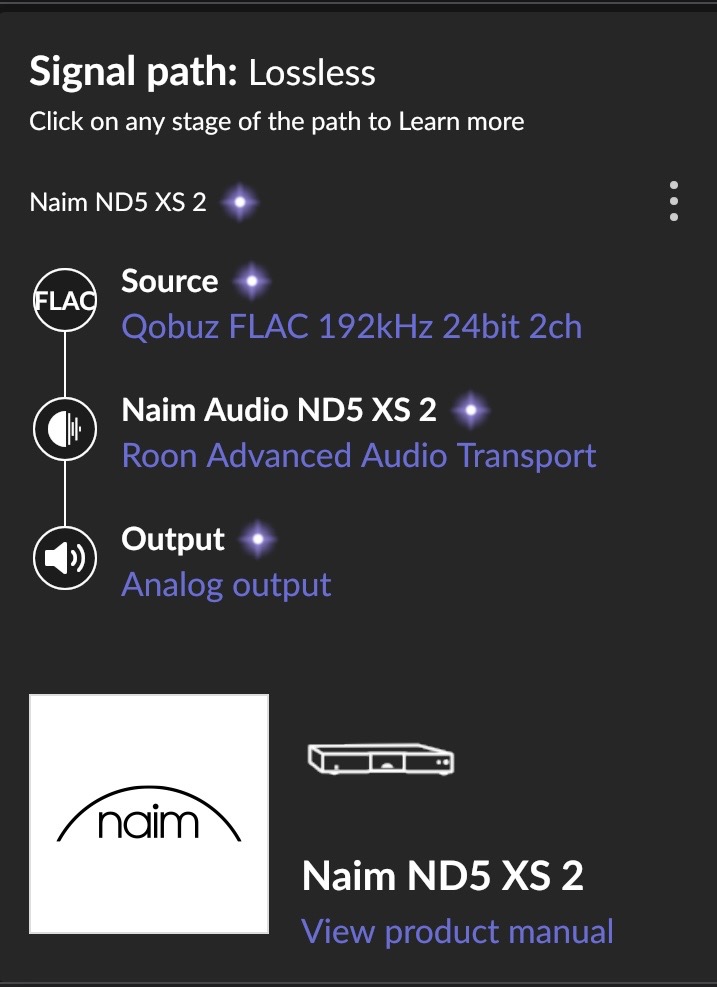
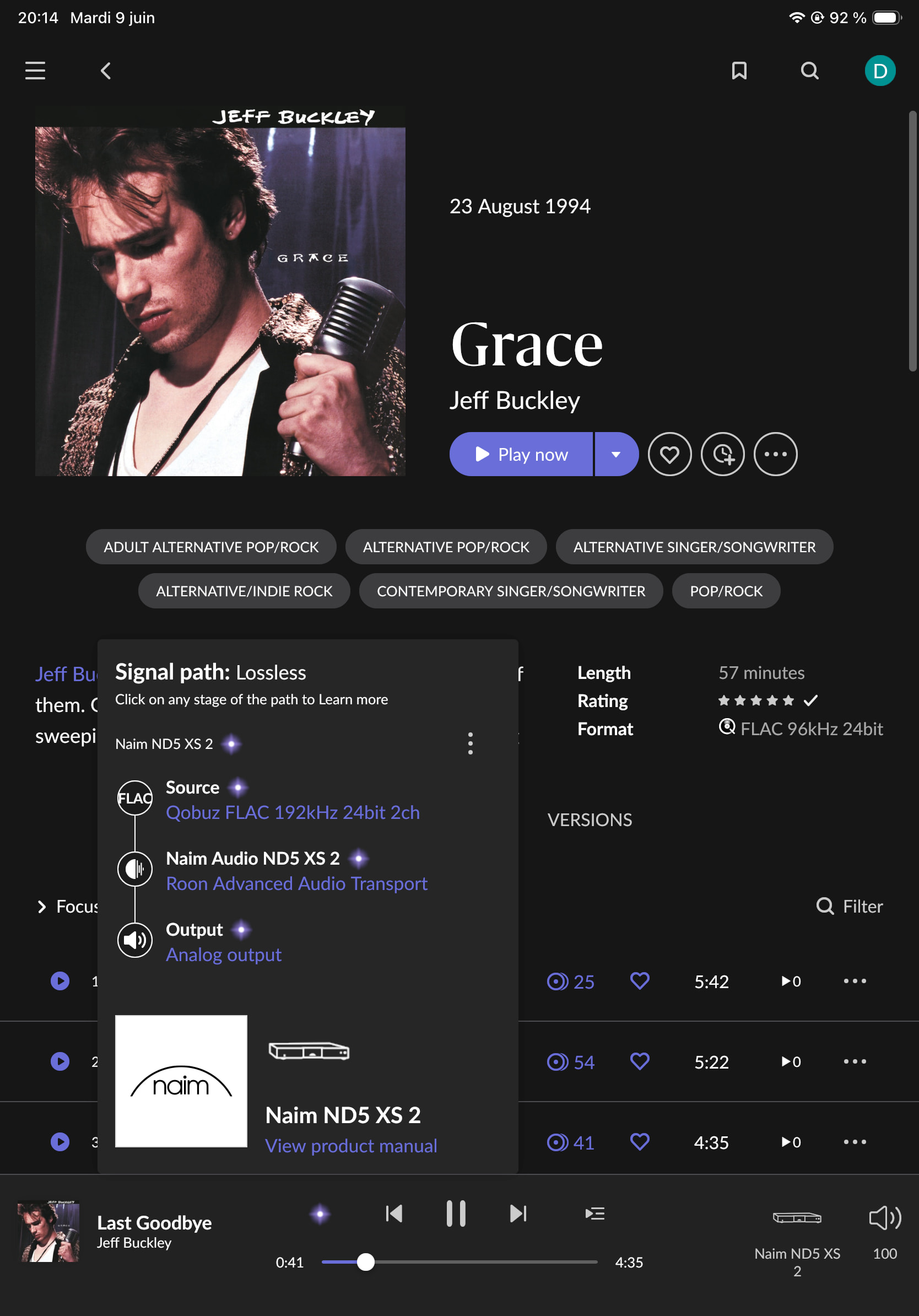
· Hi everyone, I am facing a very specific Qobuz Hi-Res playback issue that I need the technical team to investigate.
The Symptoms:
The 41-Second Skip (Universal): When streaming Last Goodbye from Jeff Buckley’s Grace album (Qobuz 24-bit Hi-Res), the playback stops abruptly at exactly 41 seconds and skips to the next track. This happens both on my main home system (Holo RED) AND on Roon ARC using cellular data (4G/5G) outside my house.
Local Cascade Failure: Once this specific track crashes on my home system, Roon completely loses the ability to play any other Hi-Res tracks from Qobuz, throwing the errors: Playback was interrupted because a track failed to load followed by *“Too many failures. Stopping playback.” (Note: Other Hi-Res tracks continue to play perfectly fine on Roon ARC; this cascade failure only locks up my home Core/endpoint setup once the Buckley track triggers the initial crash. I have to log out/in of Qobuz in Roon and reboot the Nucleus One to recover Hi-Res playback at home).
Exact Timestamp for Diagnostics: I successfully reproduced this entire behavior today June 6th, at around 6:30 PM (Paris Time / CEST). You should find the corresponding errors and timeout loops in my Nucleus One logs around this timestamp.
Diagnostic steps already taken: App Isolation: The exact same Buckley track plays perfectly from start to finish via the native Qobuz standalone application.
Cache & Account Reset: I have logged out/in of Qobuz within Roon, fully deleted the Qobuz cache folder from my Core directory, and rebooted the Nucleus One. The 41-second crash immediately returns if I touch that track.
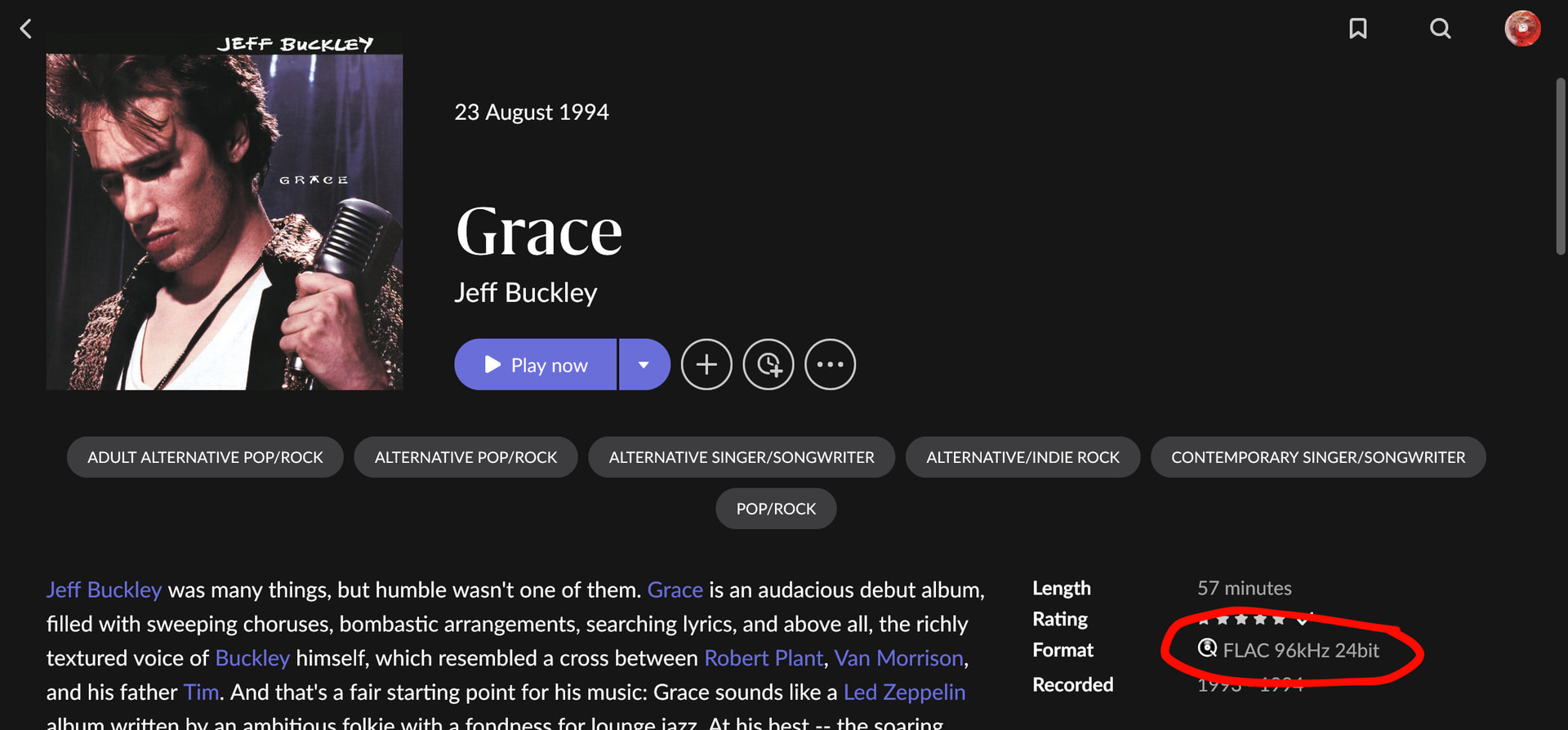
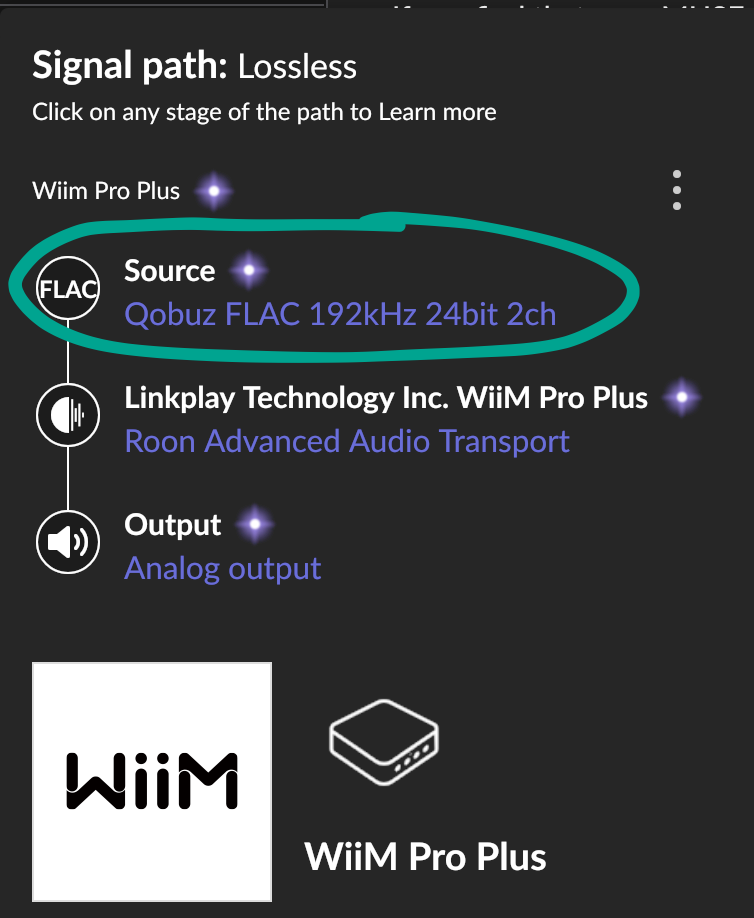
Metadata / Sync Oddity: Furthermore, when I look up this specific album from a Qobuz playlist within Roon, Roon persistently redirects me to a 24-bit/96kHz version, whereas the native Qobuz app clearly streams it in 24-bit/192kHz.
Conclusion: Since the 41-second crash happens identically on Roon ARC in the wild (cellular), this points directly to a corrupted file/chunk or broken metadata ID mapping on the Qobuz CDN that Roon’s decoder strictly rejects, which then causes my local home zone transport (RAAT) to completely freeze up with “Too many failures”.
Could the technical staff please review my diagnostics logs around 6:30 PM CEST, and check if there is a broken ID sync or a corrupted file for this specific release in my region?
Thank you for your help.
Roon Server : Roon Nucleus One Audio Endpoint(s) : Holo Audio RED streamer (connected via Ethernet, Roon Ready / RAAT protocol) → I2S → Holo Audio Spring DAC KTE Level 3. Networking Gear & Setup : High-speed connection (200 Mbps). Roon Nucleus One is hardwired via Ethernet directly to the main router. No Wi-Fi or Powerline (CPL) used for the audio chain.
Tell us about your home network
· ISP / Internet connection: VOO (Cable/Coaxial connection, stable 200 Mbps fiber-boosted coax). Modem/Router: Technicolor CGA4120. Network Switch: Silent Angel Bonn N8 audiophile switch. Signal Chain: Technicolor Router -> Ethernet -> Silent Angel Bonn N8 Switch -> Ethernet -> Roon Nucleus One & Holo Audio RED. No Wi-Fi or Powerline (CPL) adaptors are used anywhere in the audio chain.
I was intrigued and tried it, but FWIW the track played without problems for me on two different Roon Ready streamers and the local Mac output. It doesn’t matter if I have any resampling on in MUSE or not. (Server is ROCK, I am using Early Access versions). I know this doesn’t help you but just as a data point.
I am in Germany, and I have never experienced and of the Qobuz CDN problems of the past months, so I guess your hypotheses may well be on the mark.
Regarding this, the version string may be mislabeled. (EDIT: See the edit at the end)
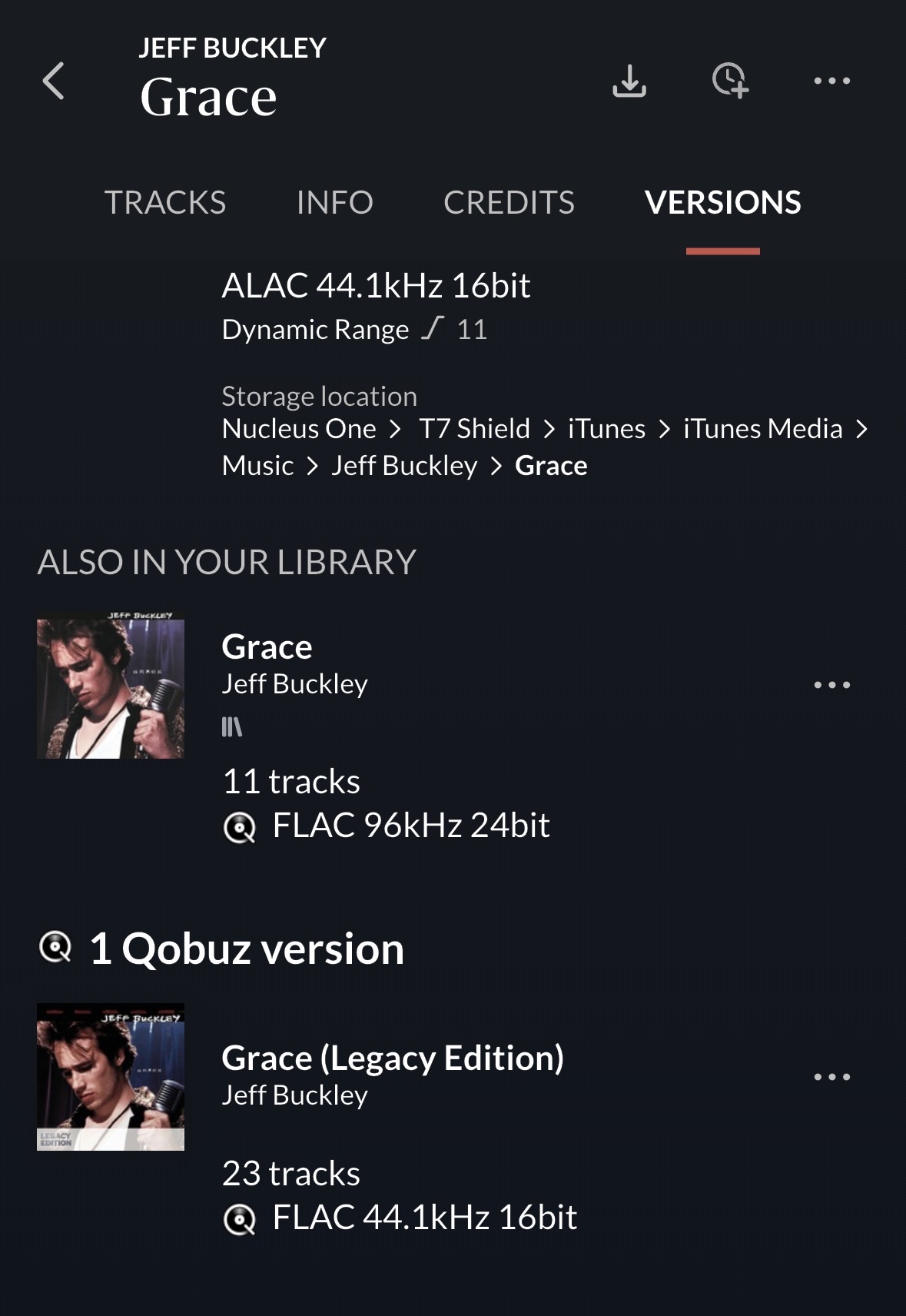
It shows as 96/24 on the album page. (This is the Qobuz album that I find through the Roon search. It’s not shown as in my library, although I have it):
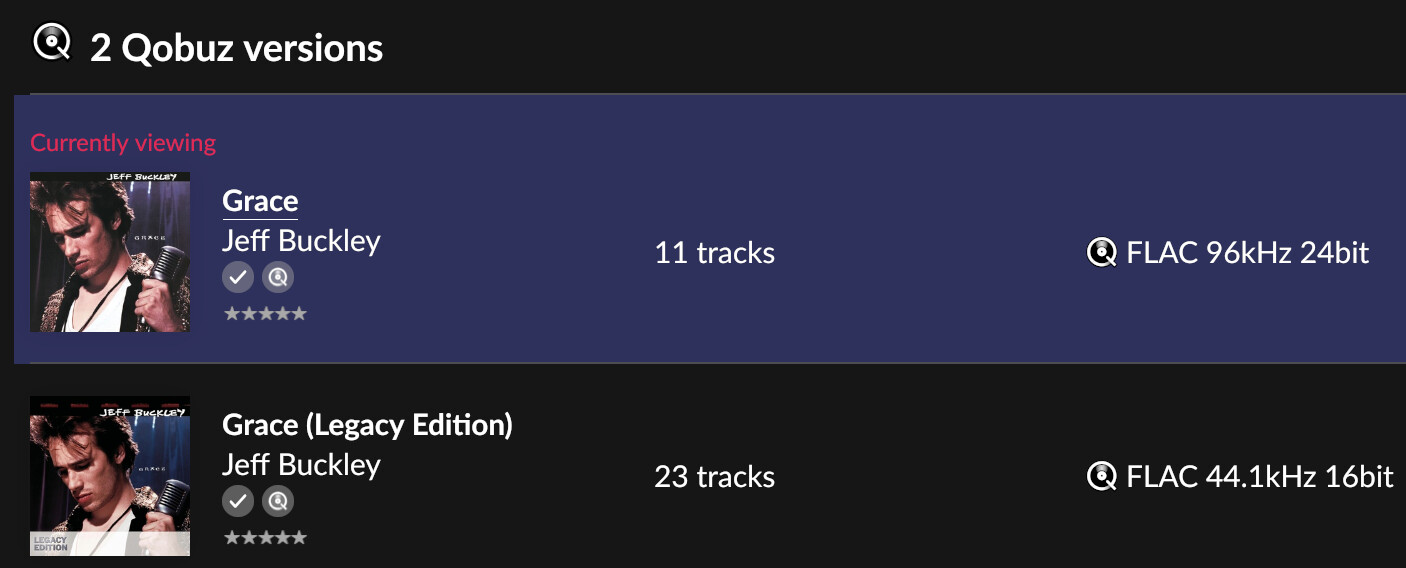
EDIT: As mentioned, I first went to the album through the Roon search. Now I reloaded the album by going to Jeff Buckley’s DISCOGRAPHY, and now I see my in-library copy. It shows a 192/24 in both places. So the non-library Qobuz version is mislabeled in the sidebar (I can reproduce this every time I go through the search - although no 24 bit-Qobuz version is listed under VERSIONS other than my in-library 192/24 one)
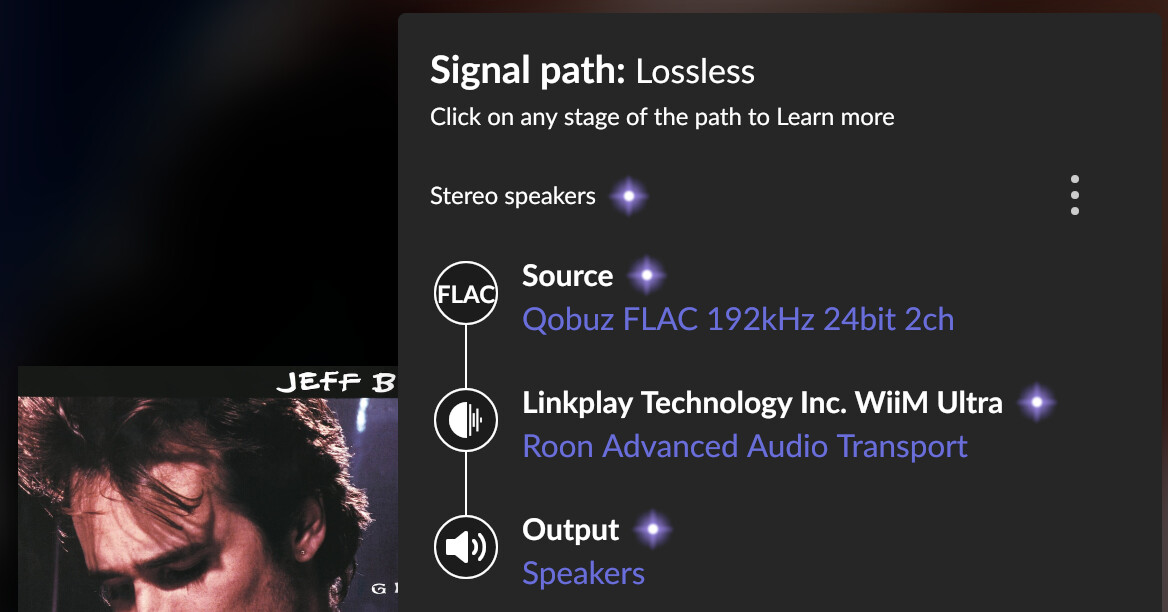
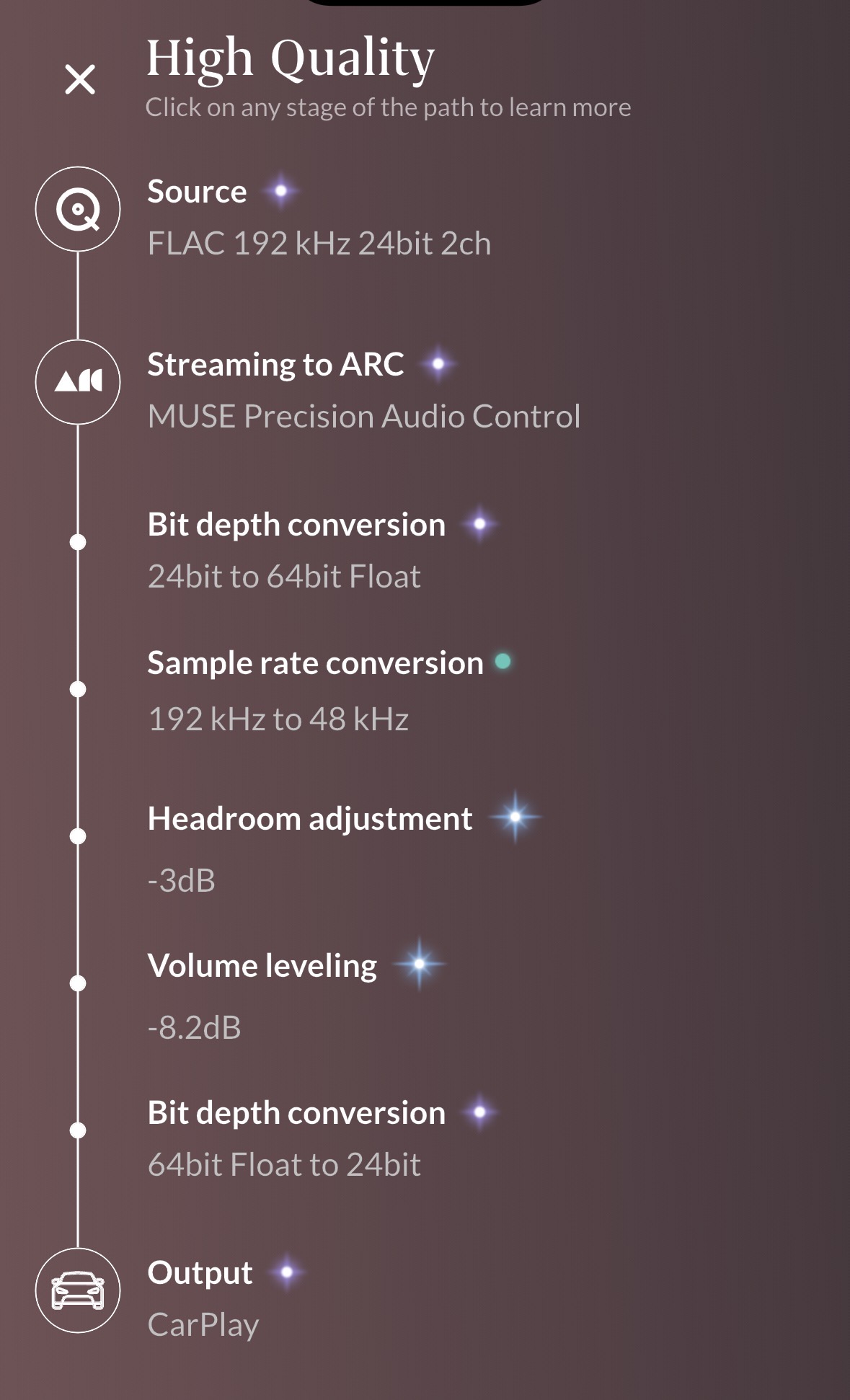
@David_Schmidt your post caught my eye because the sample rates Roon displays for album versions do not match what is actually streamed when I play the track. This is likely a Qobuz error - stating 2 album versions are available but then providing Roon with streaming content from a 3rd album version at 192kHz.
I agree with @Suedkiez that getting this in front of Roon support is the next step. Since they’re not working over the weekend and you seem technically capable (or curious), here are some additional self-diagnosis steps you could take.
For the following, I’m in Qobuz’s U.S. market so what I’m getting from their CDN may be different from what’s available in Paris.
Play a few seconds of the track “Grace” in Roon
View the Roon Server log and search for the most recent line that contains “streaming-qobuz” (in the U.S. the CDN URL begins with https://streaming-qobuz-std.akamaized.net/)
Using curl, download the FLAC file using the full URI in the log file
You should see relevant information at the top of the output
HTTP/1.1 200 OK
Content-Type: audio/flac
X-AK-FWD-ERROR: ERR_NONE
Content-Length: 236805103
Local Cascade Failure: Once this specific track crashes on my home system, Roon completely loses the ability to play any other Hi-Res tracks from Qobuz, throwing the errors: Playback was interrupted because a track failed to load followed by *“Too many failures. Stopping playback.”
(Note: Other Hi-Res tracks continue to play perfectly fine on Roon ARC; this cascade failure only locks up my home Core/endpoint setup once the Buckley track triggers the initial crash. I have to log out/in of Qobuz in Roon and reboot the Nucleus One to recover Hi-Res playback at home).
Because Roon ARC can continue streaming other music/albums (see New to ARC, a couple of questions please… - #7 by Dadoo for an example of how ARC streams audio separately from Roon Server), I would take a look in the logs for evidence of HTTP error codes > 400:
401: Unauthorized
404: Not Found
410: Permanently Unavailable
500: Internal Server Error
504: Gateway Timeout
503: Service Unavailable
502: Bad Gateway
If you see such errors, it could mean Qobuz’s CDN is temporarily having problems which has been a regular occurrence in the past 3 months. However, if Roon is sending cached streaming parameters to Qobuz and not recovering with a manual Qobuz login/logout and Nucleus restart, then that would be an issue that the Roon professionals can verify and resolve.
The OP opened a Support case already, where I found the same inconsistency in the version string as you (with a twist: adding the album to the Roon library seems to fix the version string):
Thanks @Suedkiez and @Dadoo for pointing that out from your respective locations.
I’d like to provide crucial updates to help the technical team pinpoint the exact scope of this metadata and CDN issue:
Geographic Location (CDN Scope): I live in Belgium, meaning my Roon Nucleus One and Roon ARC are hitting the Qobuz Benelux/Belgian CDN edge servers.
Recent Timeline: This track (Last Goodbye) was streaming perfectly fine without a single glitch just a couple of days ago. The corruption is very recent.
The Library & Metadata Loophole: In an attempt to fix the 41-second crash, I completely deleted the 24-bit/192kHz version of Grace from my Roon library, hoping to re-add a clean copy.
The Ghost 96kHz Version: After deleting it, the 24-bit/192kHz version completely disappeared from Jeff Buckley’s discography section within Roon. Instead, Roon now only surfaces a 24-bit/96kHz version of the album. However, this 96kHz version does not exist on the native Qobuz app (which only lists the 192kHz master).
Not an isolated case : I have just cross-referenced this with another Roon/Qobuz user based here in Belgium. He is experiencing the exact same thing: the 24-bit/192kHz version has vanished from his Roon interface, replaced by this unplayable 24-bit/96kHz ghost version : the track (Last Goodbye) stops at exactly 41 seconds. This other user has just confirmed that after encountering this Buckley track issue, his Roon system is now completely locked out of Qobuz streaming altogether. He is experiencing the exact same cascading failure I did—getting the “Too many failures” error loop and a total breakdown of Hi-Res playback. This proves the bug is reliably triggering a security/rate-limit lockout for multiple users in our region.
This confirms two correlated issues for the Benelux/Belgian region:
A physical file/chunk corruption on the local Qobuz CDN edge server at the 41-second mark.
A severe metadata/ID sync mismatch between Roon’s database mapping and Qobuz’s active live catalog, causing Roon to fallback on an obsolete 96kHz ID that triggers a transport freeze.
I hope these extra details help the engineering team trace the bad ID and force a metadata flush for this region!
Thanks a lot for this incredibly detailed breakdown!
You described my “Cascade Failure” exactly: once the Buckley track crashes the Nucleus One, all home Hi-Res playback is totally bricked until a full reboot/re-login, while Roon ARC magically keeps working on the side.
Since we are over the weekend, I’ll leave the logs and command-line diagnostics to the Roon support team when they open my ticket on Monday. But your explanation about how Roon Server gets deadlocked by the CDN compared to ARC makes perfect sense. This thread now has everything the engineers need to fix both the regional CDN issue and the global metadata mismatch!
Thank you for your post. We appreciate your diligent and thorough report. We should have this pinned down shortly. Roon doesn’t show any transport errors, so this is likely something malformed coming from upstream.
Do you happen to remember the date/time to initially reproduced this problem? We seem to have captured the event in diagnostics on June 3, but we’d like to verify with a second confirmed event.
Can you please attempt to play the “unplayable” version of “Last Goodbye” once more and share an approximate timestamp? We’ll have verbose logging enabled for your account.
I am currently away from my main home and just arrived at my second location in Brussels to perform the test on my Roon ROCK (Intel Nuc). I have a great news : issue is already completely gone!
Not only has the High-Res version of the album reappeared with the proper 24-bit/192kHz format, but Last Goodbye now plays perfectly past the 41-second mark without any transport errors.
A quick note on Roon ARC along the way:
Out of curiosity, while traveling to Brussels, I listened to the album via Roon ARC. As before, the track played fine, but I noticed the exact visual bug mentioned by @Suedkiez and @Dude: the album main page was labeled 24/96, but looking into the actual signal path, it was playing at 24/192 (I took a screenshot of this path mismatch).
However, right after my successful test on the Brussels ROCK core, I connected my ARC app to this ROCK core, and everything synchronized perfectly: the album now correctly displays 24/192 on the main page too.
It is clear that either your team or Qobuz flushed the corrupted cache and fixed the metadata mapping right after my report. Everything is back in perfect order.
Thank you so much for the incredibly fast reaction and stellar support!
The good news is that the track no longer freezes at the 41-second mark; it keeps playing smoothly despite the mismatched format label.
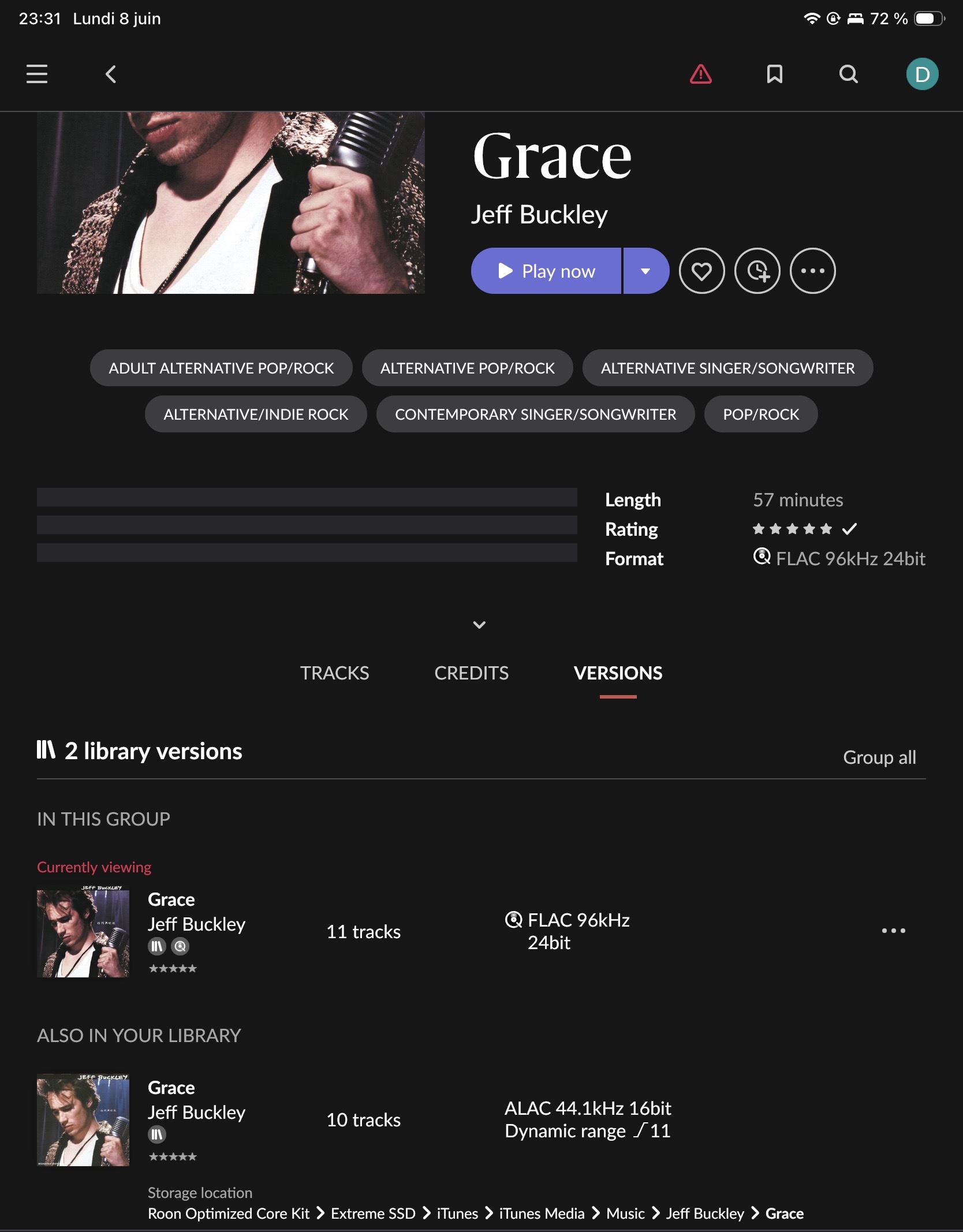
It feels like your team or Qobuz is actively working on the metadata mapping or CDN cache synchronization right now. This 11:31 PM timestamp should be a perfect marker for your logs!
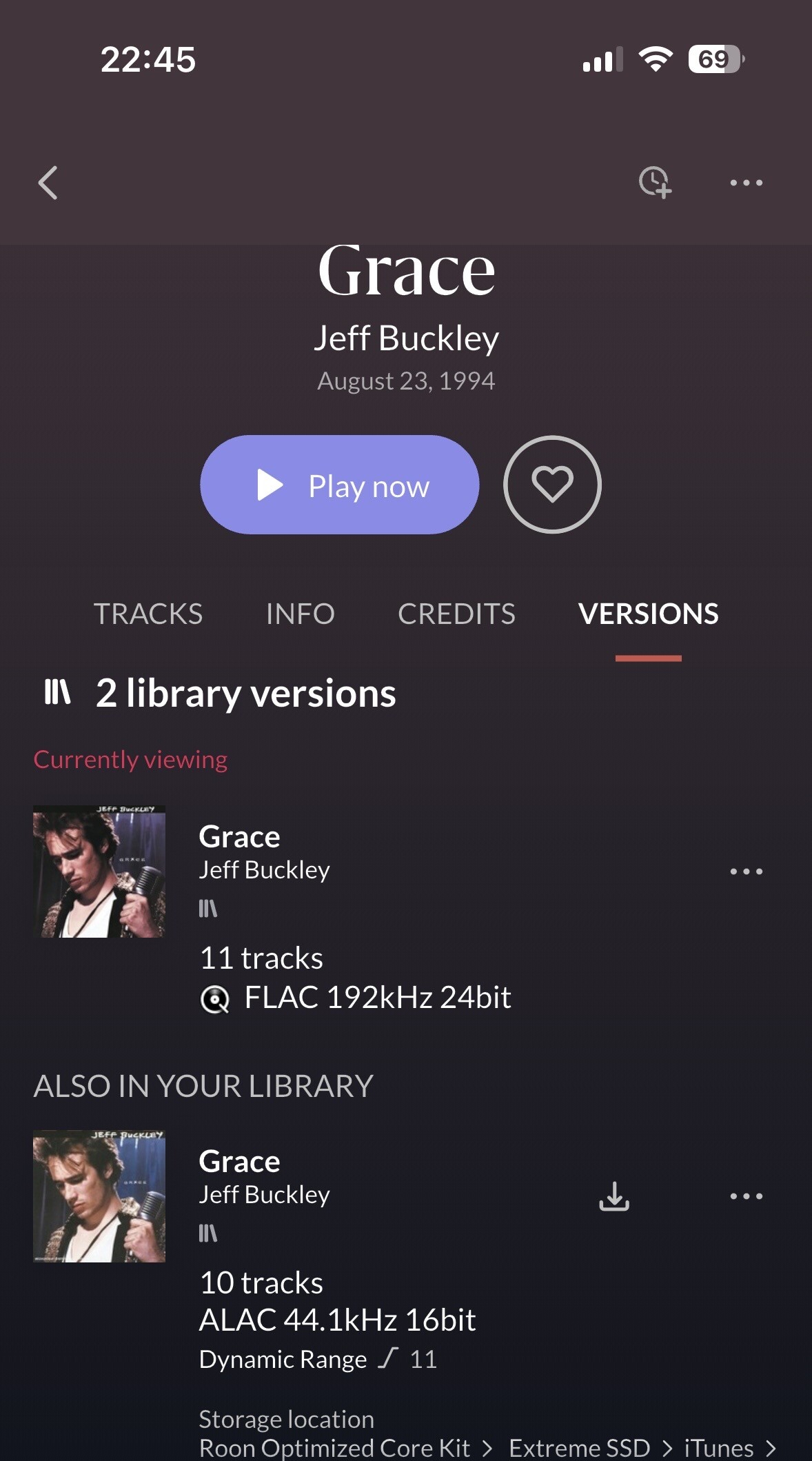
In this screenshot, the album is in your library, and it displays correctly as 192/24 there. However, if you look at the Qobuz (non-library) version under the VERSIONS tab, it probably still shows as 96/24 as in your other screenshot here:
Actually, it might be a bit different. In both cases, I was looking at the album within my library.
The screenshot where it shows 96/24 was taken via ARC while it was still connected to my home Nucleus. At that time, even under the “Versions” tab, the only High-Res version available anywhere on my Nucleus was that 96/24 one. I even tried deleting the album from my library and searching for it again, but Roon/Qobuz would only surface the 96/24 version.
When I arrived in Brussels and connected to my ROCK core, the album in my library initially displayed as 192/24.
However, last night before going to bed, that 192/24 label eventually vanished from my ROCK too, and was replaced by the 96/24 label. I suspect this might be due to a delayed synchronization. Since my ROCK had been offline for a while, it is highly possible that it initially displayed its old startup cache. Once the background cloud synchronization finally completed, it probably pulled the incorrect 96/24 metadata package from the servers, just like my Nucleus did.
So we are indeed experiencing the exact same visual bug, but anyhow the underlying audio stream itself seems to be fixed on the CDN side while the metadata is still catching up.
This exact timestamp should provide a perfect window to see the corrupt data stream hitting my core. The underlying issue on the CDN/Qobuz side is definitely not resolved. Back to square one!
This is now happening to me but with a different Hi-Res album (Megadeath - Coundtown to Extinction). I also see the mismatched format.
As for Qobuz showing many different versions in Roon (not just different masters), I believe it’s because they offer multiple levels of format selection on their app from 24/192, to 24/96, to CD 16/44.1.. If you change that setting on the Qobuz app from 192 to 96 as max rate, it will stream the 96kHz files instead of a doing any conversion on their server or locally. Same for CD rate. I am guessing the Qobuz API exposes all of them at once to devices hence why so many show.
Although Roon definitely showed the correct formats before (both on the album page and in Signal path).
Edit: The 24/96 variant plays through, but the 192 doesn’t. Maybe I will reboot everything again later and try again.
The Roon Signal Path is transparent and doesn’t have a mechanism to display incorrect data from the stream it’s receiving. One side note; Grace by Jeff Buckley underwent a catalog transition on the backend and Qobuz had not yet aligned the associated metadata and objects. We will report this to their team, because it’s a separate but exacerbating symptom of the CDN problem for that album.
The ongoing Qobuz CDN issue, from what we’re seeing in logs, is responsible for the rest of the track-specific failures in this thread.
The change Roon made iis to prevent these failures from cascading within the app and to instead display an error when the stream returns no data.In this case, the stream is returning impartial data rather than no data, so it’s a slightly different symptom within Roon.
We’ve shared this full report with the Qobuz team. We’ve confirmed with Qobuz that this is, unfortunately, still expected. Qobuz has not yet entirely resolved the underlying CDN issue, but it’s a top priority for the team and their efforts are ongoing.
Thank you for your patience. We’ll provide updates as they become available.
I wanted to take a moment to deeply thank the Roon support team for their transparency, their hard work, and this very detailed update.
As an audiophile running two separate high-end setups based around a Roon ROCK and a Roon Nucleus, seeing Roon step up to analyze logs, implement app protections, and communicate so clearly is just one of the many reasons—far from the only one—why I love this platform. Your efforts to prevent these empty/partial CDN streams from cascading and crashing our systems are highly appreciated. Thank you for not leaving us in the dark.
On the other hand, the contrast with Qobuz is staggering. Even if their technical teams are working on this “in the shadows,” their management shows an absolute lack of consideration for their subscribers.
I am a loyal Qobuz customer since 2018, and I recently renewed my trust in them by paying for a long-term commitment that runs until September 2028. It is deeply frustrating to pay years in advance for a premium service that I cannot fully enjoy today without encountering random playback errors and stream failures on my audio infrastructure.
Surprisingly, Qobuz has confirmed to Roon that these failures are “expected” on their end, yet they haven’t published a single official warning or apology to their customers. This is very disappointing. Silence is not a customer service strategy.
At the end of the day, I simply want to continue enjoying my music in Hi-Res, whether it is from my own collection or from a reliable streaming platform. To achieve this, I am left with no other choice than to turn to TIDAL and start a free trial, migrating my entire library over using Soundiiz. It’s a real shame to be forced away from Qobuz after 8 years, but music needs to play.
Thank you again to the Roon team for your continuous support and for keeping us informed.
There were several posts by Qobuz on their forum and Facebook, as sometimes copied on the long Qobuz CDN thread
Note that Roon will treat the Tidal versions as new and you will lose any personal metadata that was assigned to the Qobuz versions. And also be aware that in most cases only one on the Qobuz versions is affected by the CDN data problem while other versions of the album usually play fine
Thank you so much for pointing that out and sharing those details. I wasn’t aware that Qobuz had officially acknowledged the issue on their own forum and Facebook. It’s good to know they finally put it in writing somewhere.
Regarding your heads-up about losing metadata during the TIDAL transition, thank you for the warning. Fortunately for me, my critical metadata is tied to my own local collection, especially my extensive library of DSD/DSF files, which Roon allows me to manage beautifully. For streaming, my absolute priority and the most decisive factor is simply being able to listen to a full album in true high-resolution without a single random playback error.
While switching to an alternative or lower-quality version can be a temporary workaround, it defeats the purpose of paying for a Hi-Res streaming service integrated into Roon. Since my dual high-end setups are built around getting the best possible sound quality, I’ll stick to the TIDAL trial for now to keep the music playing in top format while the CDN issue with Qobuz is being resolved. Hopefully in the not-too-distant future…
Appreciate your helpful tips and technical insight!
They acknowledged it a long time ago and just reaffirmed. The central tracking thread for this has been pinned to the top of support here on the forum since March:
And the most recent update from Roon in the same thread: