$50 ESP32-S3 Knob Roon Controller

Inspired by the rooExtend controllers, I built a custom firmware + roon extension bridge to be able to control Roon using a Waveshare ESP32-S3 Knob into a dedicated Roon controller.

See this video demo from an earlier release.

Features

  • Real-time now playing with album artwork
  • Volume control with dB display (turn the knob)
  • Play/pause and prev/next (buttons to tap)
  • Art mode - full-screen album art (swipe up/down)
  • Multi-zone support (with a zone selector)
  • Automatic display dimming and sleep
  • Over-the-air firmware updates that are shipped with the extension.

What you need

  1. The Waveshare Knob (~$50)
  2. A Docker host (NAS, Raspberry Pi, etc.) to run the bridge extension — or use GitHub - TheAppgineer/roon-extension-manager: Roon Extension for managing Roon Extensions
  3. One-time USB firmware flash (then updates happen over WiFi), and a one-time connection to the knob in Access Point mode to configure your WiFi (2.4GHz only).

How it works

The knob connects to your WiFi and finds a Docker-based “bridge” extension via mDNS. The bridge talks to Roon Core and relays state/controls to the knob over HTTP.

The code is open source: GitHub - muness/roon-knob: Custom firmware and a Roon extension that turn a Waveshare ESP32-S3 Knob into a dedicated Roon controller.

Setup

  1. Flash the firmware — Open the Flash Roon Knob Firmware in Chrome/Edge, plug in the knob via USB-C, click flash. Done in 30 seconds.
  2. Run the bridge — Install via Extension Manager, or run the Docker image
  3. Authorize in Roon — Settings → Extensions → Enable “Roon Knob Bridge”
  4. Connect the knob to WiFi — Join the “roon-knob-setup” network, enter your 2.4GHz WiFi credentials

The knob finds the bridge automatically via mDNS. Future firmware updates happen over WiFi.

Known limitations:

  • mDNS discovery may not work on all networks (manual config available)
  • 2.4GHz WiFi only (hardware limitation)
  • Zone Groups not yet supported
12 Likes

I bought my ESP32-S3 Knob on Amazon. I found a used one for $46+tax. When it got to me it had no firmware, which is fine as I had to learn how to flash them.

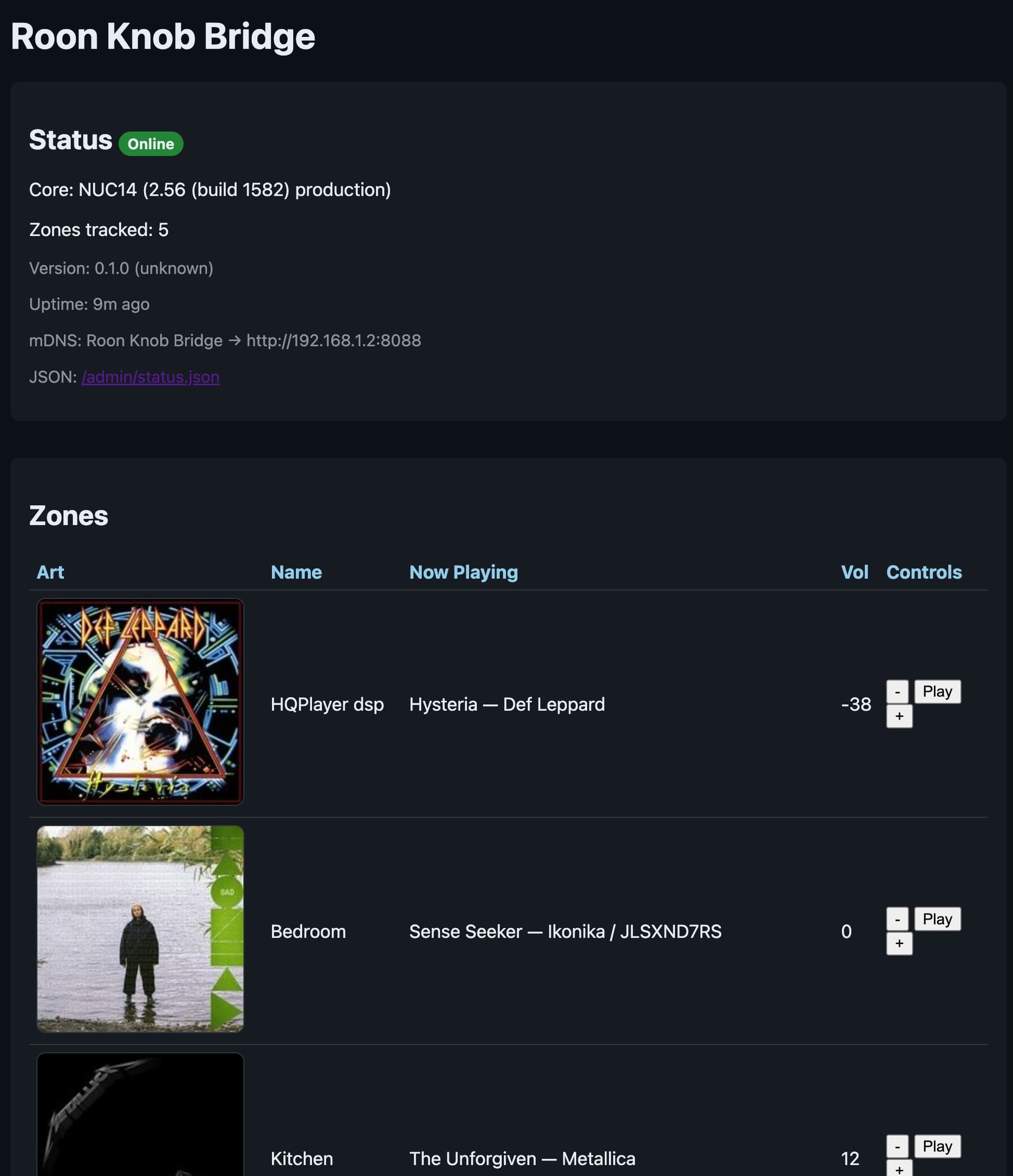
Roon Extension Bridge screenshot

1 Like

That’s a very interesting project! Thanks for sharing! I ordered one of these displays right away. Unfortunately, the item is currently out of stock. But as soon as it arrives, I hope to be able to recreate your project.
I’m looking forward to it!

1 Like

That’s awesome. Does the screen backlight turn off 100% when the screen is in standby? (I have a waveshare knockoff rpi display and it is better than the original except that it never turns the backlight off even when the screen is in standby).

1 Like

Yes, this one really turns off. It’s actually so easy to turn off (slide toggle) and boots so fast that’s also an option.

1 Like

This looks excellent! I bought one of these with the intent to fiddle around with a similar project that I think you’ve made that unnecessary. I’m traveling and won’t be back for the rest of the week, but I will most definitely install and give us a look when I get home. Thanks for doing this and for sharing it with the community!

1 Like

Let me know how it goes! I am eager to confirm that it works for other folks.

Hi, @Muness.

I’m giving this a try. I’ve got the device flashed and the bridge running. I don’t seem to be able to get the device to connect to WiFi.

Using an iPhone, I connect to the device’s WiFi and I get your captive login. I enter the SSID and password, and I get the “WiFi credentials saved!” screen, but the device doesn’t seem to connect.

The network I’m connecting to is 2.4GHz/5GHz. I have other 2.4GHz clients. It uses WPA2, but I’d be surprised if that’s the issue.

I’m fairly confident that it’s not connecting because I don’t see it show up as a WiFi client.

A couple of questions.

  • The bridge is running and working - I can see in it’s logs that it’s aware of events on the Roon server. Your post shows a UI for the bridge but I’m not sure how to access it. Is it on 8080? Doesn’t seem to be. I’m not using host network for the bridge, I use a macvlan and the bridge has its own IP. I don’t see how that would be an issue.

  • Your documentation and the knob say “Press knob to select zone”. Does that mean the outer ring? Is that actually pressable?

I’m looking forward to getting this working. I’m close!

1 Like

So exciting that I will have irl users soon! :smiley:

const SERVICE_PORT = parseInt(process.env.ROON_SERVICE_PORT || '9330', 10);

I default to port 9330, but you can override it with an env variable of ROON_SERVICE_PORT in your Docker config.

I should clarify that there’s a Zone selector area that you can touch! :doh:

hmm, once it boots up, if you hold on the top line (that’s actually the zone connector) it should show you the saved SSID and an IP (if it was able to connect).

I haven’t tried with a 2.4GHz/5GHz network, but the 5GHz side should just be irrelevant to it. Maybe I need to add better status.

Since you figured out flashing, you can swap the flash command with monitor and you’ll see the logs as it boots up.

Other ideas:

  • did you go to the Roon app and approve the Roon Knob bridge? I don’t have good error handling, so it might actually be trying to do things but doesn’t have access.
  • mDNS hasn’t been reliable for me. Once you see the knob connects and gets an IP address, you can see it in the zone-selector long hold menu. I run an http server on port 80 that you can set the roon bridge at.

It initially showed version v1.2.12, SSID: , IP: [no IP], …

I went through the captive portal flow again and monitored it. Here’s the relevant section.

I assume what you’ll be able to interpret is that it’s not getting an IP from my DHCP server. After going through the captive portal, if I press and hold the select zone text, the popup does show the correct SSID, but still no IP. If I power the device down and back up, it’s back to showing the SSID as unset.

Hopefully this helps

I (151403) captive_portal: Received config: ssid=<redacted>&pass=<redacted>&bridge=http%3A%2F%2F192.168.20.53%3A8080
I (151403) captive_portal: Configuring WiFi: SSID='<redacted', bridge='http://192.168.20.53:8080'
I (151413) platform_storage: Loaded config: bridge=(empty, will use mDNS/default) zone=(empty)
I (151433) captive_portal: Credentials saved, switching to STA mode in 2 seconds...
I (153433) wifi_mgr: Stopping AP mode to connect with new credentials
I (153433) wifi_mgr: Stopping AP mode, switching to STA
I (153433) captive_portal: Stopping captive portal
I (153433) dns_server: DNS server task stopped
I (153533) dns_server: DNS server stopped
I (177813) wifi:station: ca:93:21:c1:6d:8c leave, AID = 1, reason = 8, bss_flags is 33721443, bss:0x3c1da2dc
I (177813) wifi:new:<1,0>, old:<1,0>, ap:<1,0>, sta:<255,255>, prof:1, snd_ch_cfg:0x0
I (177823) wifi:<ba-del>idx:2, tid:0
I (177833) wifi:new:<1,1>, old:<1,0>, ap:<1,1>, sta:<255,255>, prof:1, snd_ch_cfg:0x0

Also, I think you may have a bug with how your bridge is handling your service port. I set it to 80 but it’s actually listening on 8088 according to the logs, and that’s the port that I can actually connect to. I see this in the docker log:

> roon-knob-bridge@0.1.0 start
> node app.js
fatal: not a git repository (or any of the parent directories): .git
[2025-12-12T19:20:05.797Z][Sidecar][INFO] Starting server {"version":"0.1.0","git_sha":"unknown"}
Setting up sood
Starting sood
[2025-12-12T19:20:05.821Z][Sidecar][INFO] Listening on 8088 {"service_port":80,"base":"http://03a79980a99f:8088"}
1 Like

Also…dang, sir. You can code. This was a ton of work!

On the bridge - is it possible that it’s not persisting the pairing key? Currently the pairing needs to be re-enabled each time the container starts. I don’t see anything in the data folder so it’s possible you’re trying to write it out but there’s a permission or path error in my setup.

Oh shoot, I thought I had documented that in the docker-compose.yml I’ll look it up and update the docs and let you know.

Thank you! I’m back to writing code after almost 10 years, it’s so much fun, and SO different in the world of LLM coding agents.

I just want to make sure you saw this, too. I’ve tried a bunch of things including standing up a 2.4GHz only network with a very simple SSID and password and all UniFi advanced features disabled. As far as I can tell, the device never actually tries to connect to WiFi after being given creds. And, on reboot, it always reports SSID empty. I think there may be a firmware bug.

Let me know if there’s anything else I can do otherwise I’m dead in the water.

Thanks for the bump. I’ll try to to reproduce the issue when I’m back at home this weekend and report back. I likely introduced a regression that I need to fix.

1 Like

Got home and it worked with my beta firmware (while on the road, and without a Roon controller handy, I decided to make it a Bluetooth controller too). I’ll put out a release in hopes that I’d already fixed the issue you saw in the 1.2.12

@Muness - I see the new release but I don’t understand the flashing instructions in your release notes.

On this page, it says to flash, then flip the usb-c cable, then flash something else.

The only artifact is your .bin file. So what’s the actual flashing requirement?

Thanks

Ah! I need to add the ESP32 firmware (the knob has an ESP32 and an ESP32-S3. I was only using the one).

Working on wifi debugging improvements, will fix this as well.