Another extremely satisfied Focus Fidelity user here - my only very minor complaint would be that I would like to be notified of any updates and the effect of any updates - so that I can decide whether there may be any improvements in re-doing the measurements and filter creation.
5 Likes
yes, that would be nice
How do we know what or why the update
Sam
Overdue newsletter has been sent out. Thanks for all the comments and feedback here.
4 Likes
Thank you for the update and the newsletter explaining in details, really appreciate it.
Sam
2 Likes
Hi
Today i bought Focus Fidelity. Trying to make a first measurment in impala i get this Error after creating a new project:
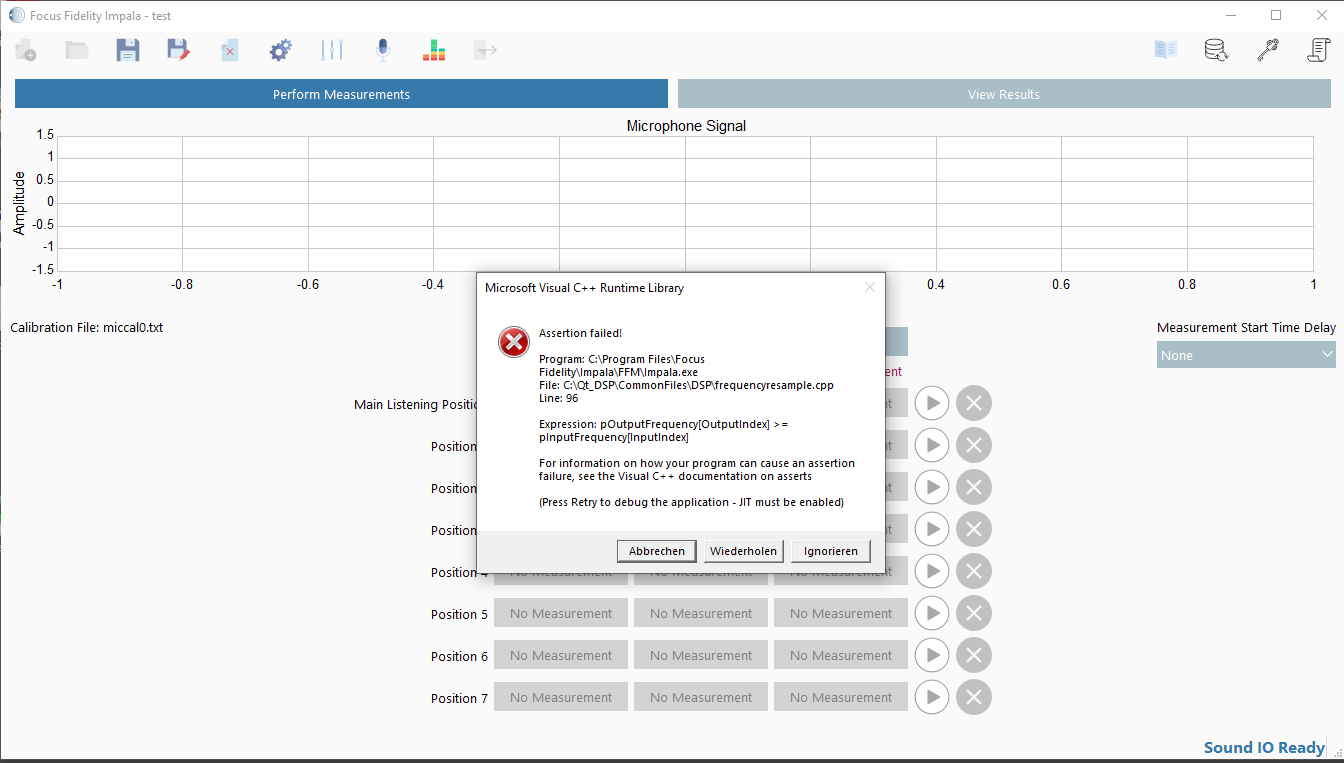
Any idea?
Audio Interface is RME FirefaceUC on Windows10.
… strange, just ignored the Error and saved the project… after reopening it seems to work 
Thank’s Christian
Hi @chriss0212 I’ve not seen this issue reported before and would like to get to the bottom of it, I have e-mailed you.
The fastest and most direct way to get support is via the contact page Focus Fidelity - Digital Room Correction or the support e-mail address.
I do not always seems to get notifications about messages on these threads.
Would you say similar or better results as compared to HAF filters?
I tried HAF and eventually gave up on it. For me it never really hit the spot and you can really only go back and ask for corrections so many times. With FF you can tweak it until you hear what is best for you.
2 Likes
I recently purchased Focus Fidelity and I’m very satisfied with the software and results. I previously had a convolution filter that I made with REW. The process is much easier and faster with Focus Fidelity, and in my case, the results are also audibly better. I mostly notice a better stereo image and more impactfull and cleaner bass (using a Harman curve tuned to my liking).
I’m not unfamiliar with many technical aspects of sound, but I’m far from an expert. So I have a question about the number of ‘taps’ shown under the convolution filter in Roon. What does this mean exactly ? Are these the number of eq points ? Previously I think I had around 130K taps with the filter I made with REW, now it’s “only” 33K taps in the new filter made with FF (which like I said, gives clearly better results, so I’m just complaining just wondering why such a big difference).

By the way, can I use these filters a such in my Eversolo DMP-A8 for other inputs than Roon? I don’t see why not but just checking. I know I need to use the 48khz one for Eversolo.
The number of taps represents the filter length (default value around 0.7 sec in Filter Designer IIRC), i.e. the number of samples in the filter wav-file,
So with higher sample rates you will see a higher tap count (66k taps for 88.2 kHz and so on) for the same filter lenght.
Obviously you created a much longer filter in REW. But longer doesn’t neccessarly mean better.
1 Like
Yes, FF is really very good and easy to use.
You can make multiple corrections with a wide range of settings. Taking measurements is simple with Impala; the biggest challenge is actually finding the ideal target curve… The rest is almost automatic  I’ve created dozens of target curves and I think I’ve found the one that suits me best (to my taste).
Couldn’t agree more
The software is very well designed and the default settings are spot on, making it both easy for the beginner to get good results and for the advanced user to tweak things even further.
Finding a target curve that suits your taste best is key. Again, the different templates provided by Filter Designer offer a great starting point to work from.
The latest version 2.1 of Imapla now also adds the ability to play test tones from file through your preferred player software in case you can’t make an USB conection to your DAC to play it directly from the PC with Impala.
Highly recommended!
Hello, After a long period thinking about DSP, I finally bought and installed Focus Fidelity. I was very surprised to see how easy it was to make a number of measurements, create filters….and deploy them in Roon. EASY!!!
Allow me few questions to anyone who have time to answer:
I have my audio in a relative normal room, 5 * 6 meter - well damped.
I have top end Auralic, Accuphase amp, B&W 805 Signature and 2 REL Subs….and Roon 
My focus with DSP was to get a better alignment in the bass area between speakers and subs. Focus Fidelity does a very good job getting that in control, Much better bass now.
- My question is….should I use Focus Fidelity to correct mid and top as well? Now it does. Or would I be better off and let the 805 do their job with no corrections in mid and top?
- If just bass….how do I get Focus Fidelity only to correct in the bass area (150 Hz and below)?
- I use a UMIK-1 mic. Should i upgrade to something better?
- And …. Is there a good book out there that explain how DSP works…in order to better understand what Focus Fidelity really does… and what Roon does?
Thank you, Bjarne
1 Like
- There are conflicting opinions on it, I’d try it both ways and see what you like best
- On the Filter Generation tab, bottom part – Filter Gain Constraints – has a vertical line on the right that you can drag to set the high limit.
- As long as you have the calibration file for it, it’s perfectly fine.
This affects less the correction for the room but more the speaker voicing itself. You may or may not like your speaker’s own voicing  but nothing wrong with trying it out.
Thank you. Got it. I moved the Filter Gain Constraints to 150hz. Right now, that is what I prefer. Focus Fidelity sorted the mess I had in the bass area.
But I will play with the options in Focus Fidelity and I might change my mind
Thanks.
You’re welcome. Makes sense, as this is about the range where room interactions are so important. I’d take a look at what Impala had measured above that, and as long as FR is reasonably smooth, if you like the way your speakers sound, there may be not much point in trying to change them.
I bought license for Focus Fidelity earlier this week. I’ve used room correction for around 5-6 years now and I’ve tried various different methods. I started everything when I borrowed UMIK-1 and downloaded REW back in 2020. I did my first measurements with @Magnus ‘ great tutorial mentioned in the first post of this thread and later moved to sweeps. Since then, I’ve done the corrections with REW EQ, Roon EQ, OCA’s Virtual Bass Array and OCA’s inversion method and before UMIK-1 + REW, I used Linn Space Optimisation (this sucks btw). I lived with the VBA correction for many years and liked what I heard, but Focus Fidelity is on a completely another level.
About a month ago I tried a new software called CamillaFIR, developed by a local enthusiast. I’ve been with close contact with him and helped him to test new options in the software. As the name suggest, it makes FIR filters but nowadays have tons of options for various different filters (min phase, mixed phase etc.). It was very good from the get go but has come a long distance since then and is very complete tool nowadays. I was deep in the rabbit hole of room correction after fiddling with CamillaFIR for a month, when I stumbled upon this thread. I’ve heard of Focus Fidelity several times but thought nothing about it before, until now. I read the reviews and this thread and decided to give it a go. It’s a small price to pay in this hobby.
I did the first correction with the same 3-point measurements I took in REW for CamillaFIR. Result was very good right away. After some trial and error, I think I’m pretty much done now. Today I also took new measurements with Impala, from 9 different points as was suggested in the manual. I prefer the filter made with this 9-point method.
I do the correction only between 25-250hz (bass only). I have a nasty room mode at 36hz which is the biggest reason I need DRC. I prefer the correction without mixed phase selected and the correction level at 4. I use Toole’s target curve with it slightly elevated from its calculated position and HPF with -12dB slope beginning from 30hz so the lower region won’t get unnecessarily boosted. With mixed phase, you get snappier and punchier bass with little bit edgier sound and better resolution/separation, but the flow/timing of the music sounds somehow unnatural compared to mixed phase unselected.
All in all, a great tool for anyone interested in DRC. Highly recommended!
Interesting, I always just went with default mixed phase enabled.
The tool tip says “Enables mixed phase correction resulting in improved time domain correction at the expense of latency.”
And the manual says “When selected, the filter will perform mixed-phase correction, mixed phase correction reverses crossover-induced phase distortions and some room effects. The default and recommended option for this setting is enabled.”
Anyways, I’ll create filters with it disabled and compare. Thanks for the tip.