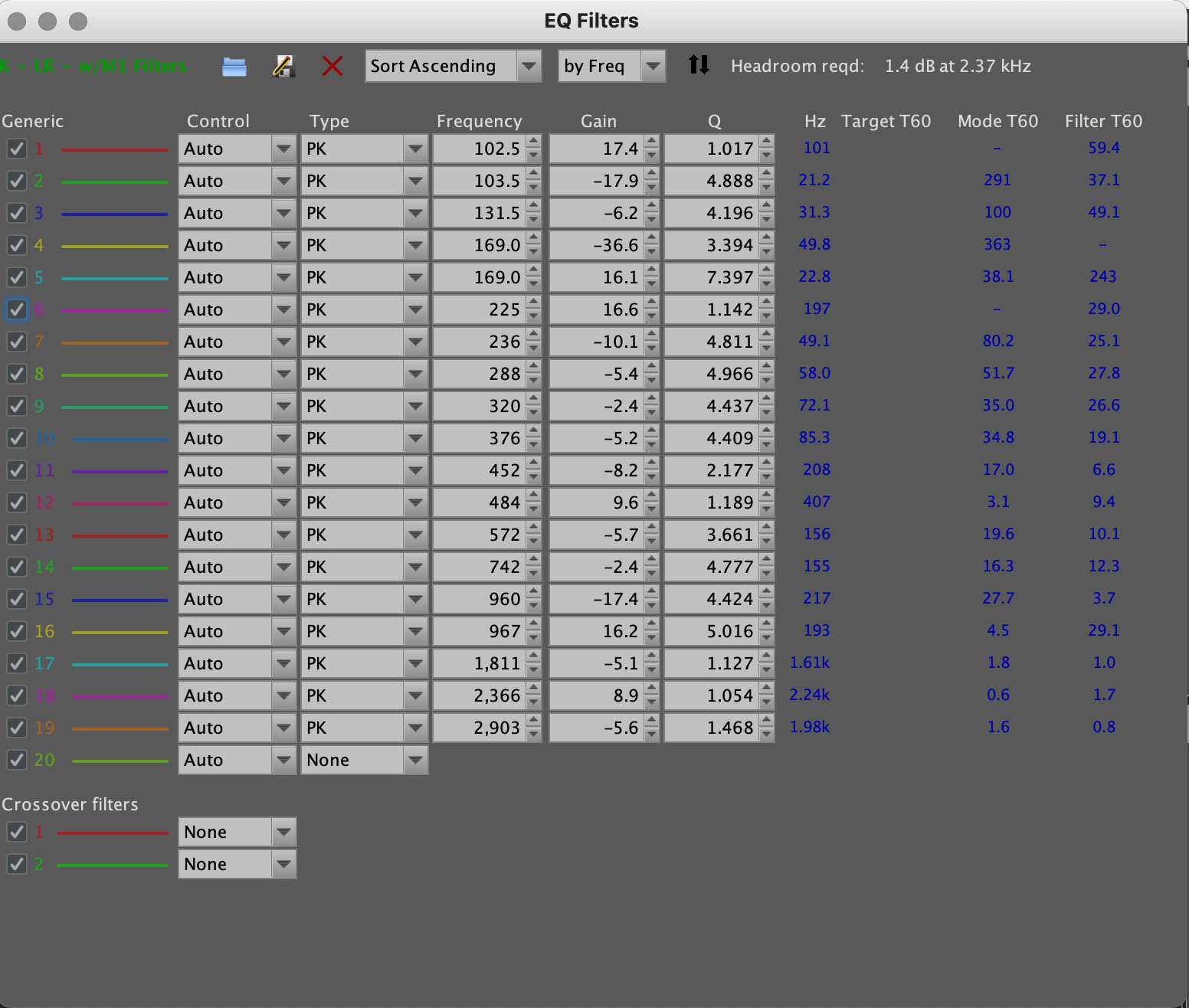
Played a bit today with room correction… Still tweaking with crossovers a little around 1200hz. Sounding pretty decent.
Rock > RPI4 > Motu MK5 lite > Multi channel amps. Running an active speaker setup in small square room.
Played a bit today with room correction… Still tweaking with crossovers a little around 1200hz. Sounding pretty decent.
Rock > RPI4 > Motu MK5 lite > Multi channel amps. Running an active speaker setup in small square room.
Thank you. Because in @Magnus original guide it says in step 14 to “select menu “File → Export → Export filter impulse response as wav” and save a wav file for each frequency you use in Roon.” If I only export the original measurements as you suggest, and import to roon, then would I not lose the eq correction filters?
That’s what I thought also initially but no, the EQ changes are in the original measurements. Remember to pick all the sample rates you use also. My Linn ADSM/3 supports 44,1-192khz so everything between them should be chosen when exporting.
Yes, good practice, but Roon is able to resample filters on-the-fly to fit any supported source sample rate.
Ok, didn’t know this one. I just picked all supported ones and zipped them all and exported to Roon convolution. Works like a charm here and sounds much better through convolution than manually entering similar values to Roon EQ.
That’s exactly how it works here.
Funny that others do it differently and get the correct outcome?

One absolutely needs to export the Filter Impulse Response and not the Measurement Response, because only the Filter Impulse Response alone contains the correction!

Open “EQ window” and check if you do indeed see the filters there, or hit the “EQ filters” button at the top of that window to see the filter list.
If filters are present you should be able to export as originally explained…

Generating filters for all supported sample rates saves Roon from having to resample on-the-fly.
Some “purists” might even audibly prefer less core computing load…

Well, for some reason today, the export worked as described in the instructions! I have no ideas what I did differently, except that I loaded the measurements from the saved file created yesterday. So…now the fun begins! Wondering what your thoughts are on:
After uploading files (32 -192 kHz) to Roon, I saw that the clipping indicator light was flashing on one track that required 16bit - 64bit upsampling. It was not flashing on the next (MQA) track requiring no upsampling. After enabling Volume Leveling the clipping indicator stopped flashing. Wondering if there might be “cleaner” ways of dealing with that clipping, so as not to require yet another process in the signal path? Sample Rate Conversion is disabled in DSP btw.
So, given that this is my first measure/correction, I’m wondering what you all think of the corrections performed by REW? It seems to have just inverted the original curve, rather than flattening. Am I seeing this correctly? When my wife and kids leave, I’ll take another measurement with filters applied. Perhaps I’ll see the “predicted” effect of the filters, acting to average out the original measurements? I’m assuming that’s how this all works? Maybe I need to read the manual, and glossary! Sorry if this is a dumb question.
There’s no better way. If you boost any frequencies, you need to give some headroom to the system. If you only cut, there’s no need for headroom.
I only correct 20-100hz and REW suggests two dips there. I don’t boost any frequencies.
Boosting is often fine, it’s just when there are sharp/deep dips you should avoid it (and obviously when outside your speaker frequency range unless you know what you do).
As @patouskii correctly states, if you choose to use a filter with boost, any signal within that filter’s range will be clipped when approaching full scale by more than the inverse of the value of boost applied - consequently you must lower headroom by the amount of the filter with the largest boost.
I can’t quite follow you on this one, since bit depth conversion from 16 (or 24) to 64bit float is always performed prior to any DSP to increase calculation precision.
I’m not using Tidal/MQA, but Roon definitely does not change from applying user selected DSP functions on a track by track basis.
Something smelly is going on here and needs further scrutiny…
All these manipulations are done with a calculation precision being many orders of magnitude more precise than any source signal - hence the bit depth conversion to 64bit float - so there’s no need to worry about audibly degrading your experience.
In order to arrive at the target curve, that’s what’s needed …
Should be close, yes.
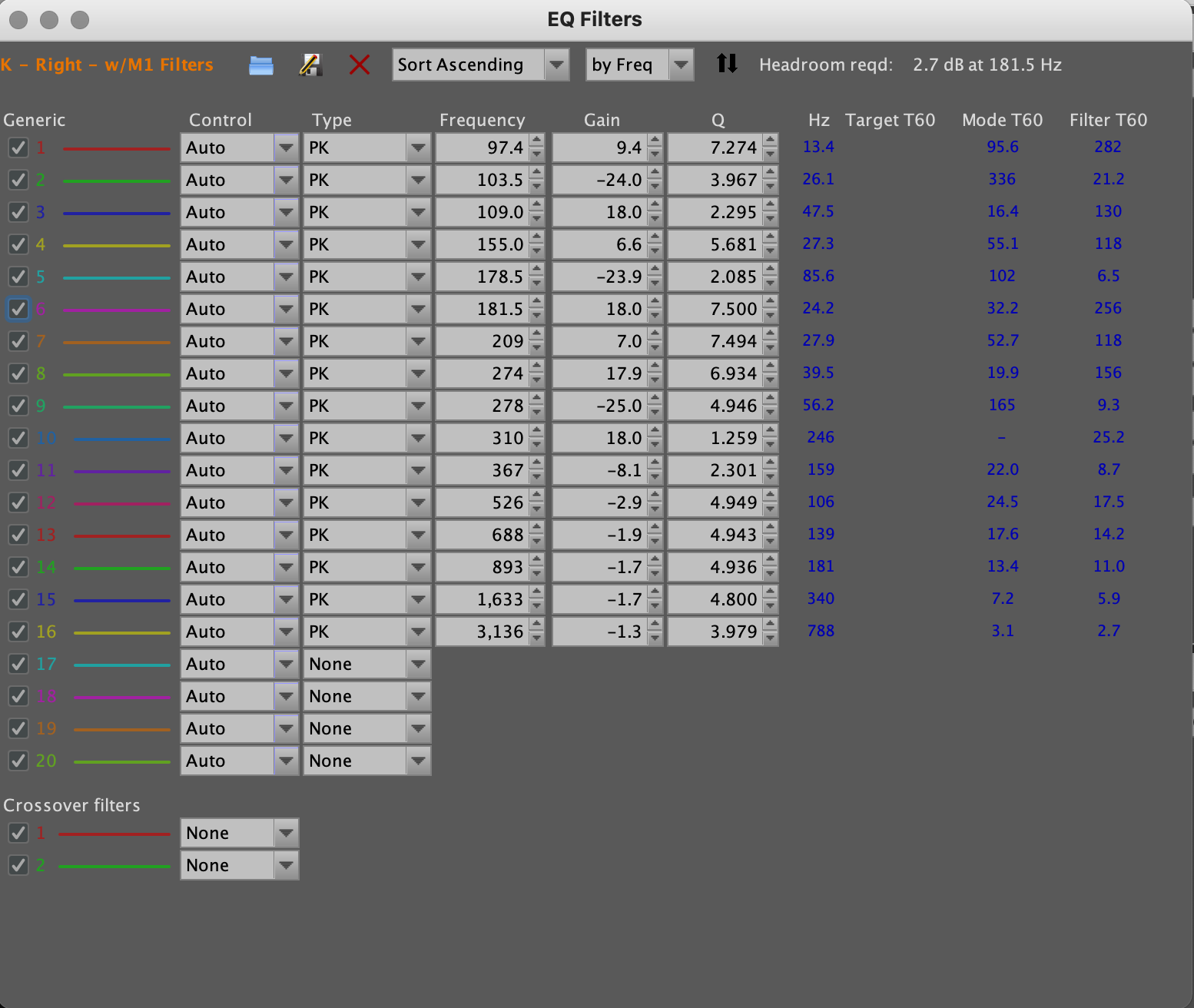
Thank you for the thoughtful responses! So, I see in my EQ filter values that the gain for some frequencies is up to 18, but the overall headroom reqd is around 8.8. Based on this article, I think I want to set the headroom in roon to -8.8 (the reqd value as stated in REW), rather than -18 (max gain).
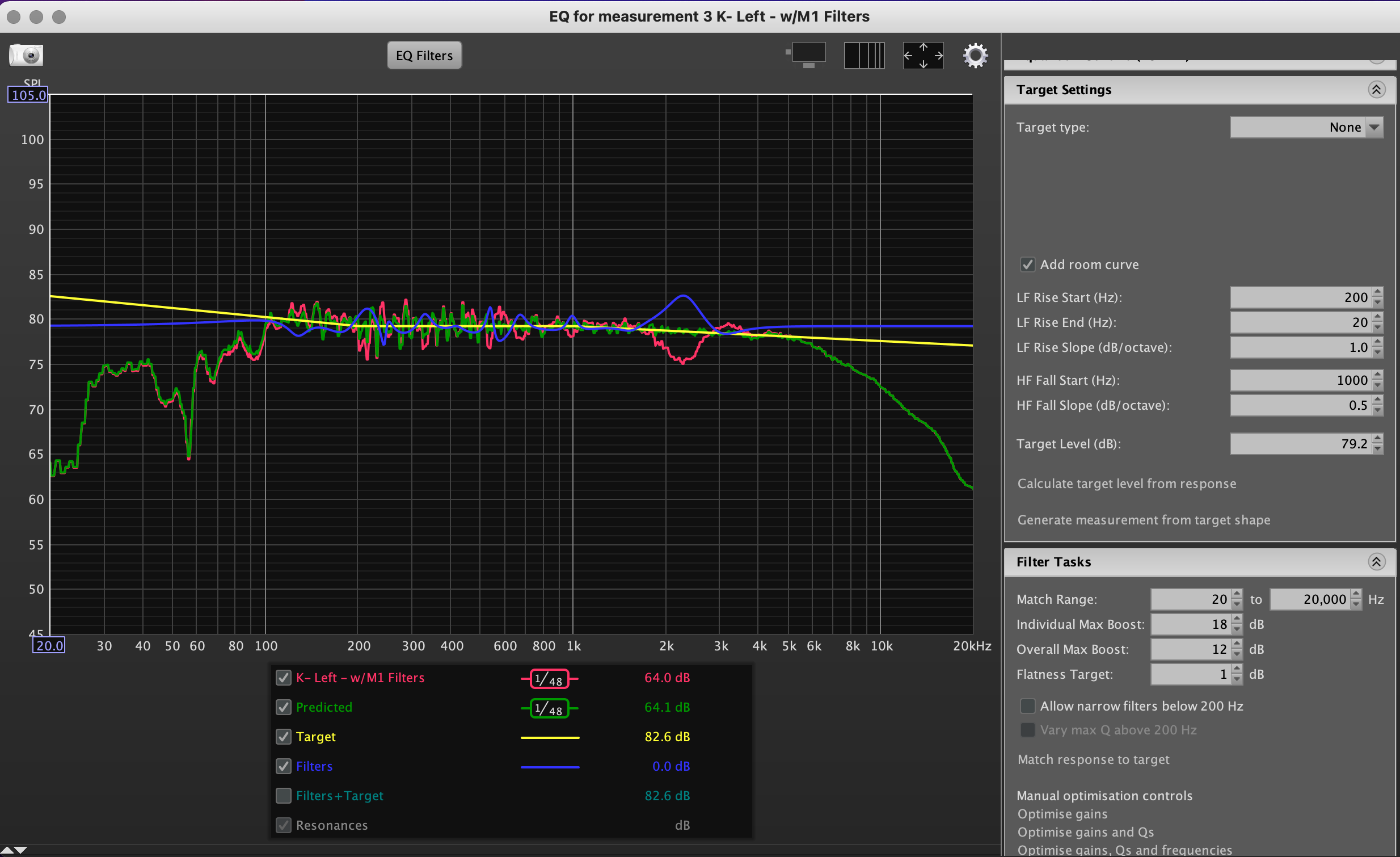
True, the largest positive difference between your yellow “Target” and blue “Filters” curves shows the headroom required.
I didn’t think long enough about it before posting otherwise - sorry for the confusion here.

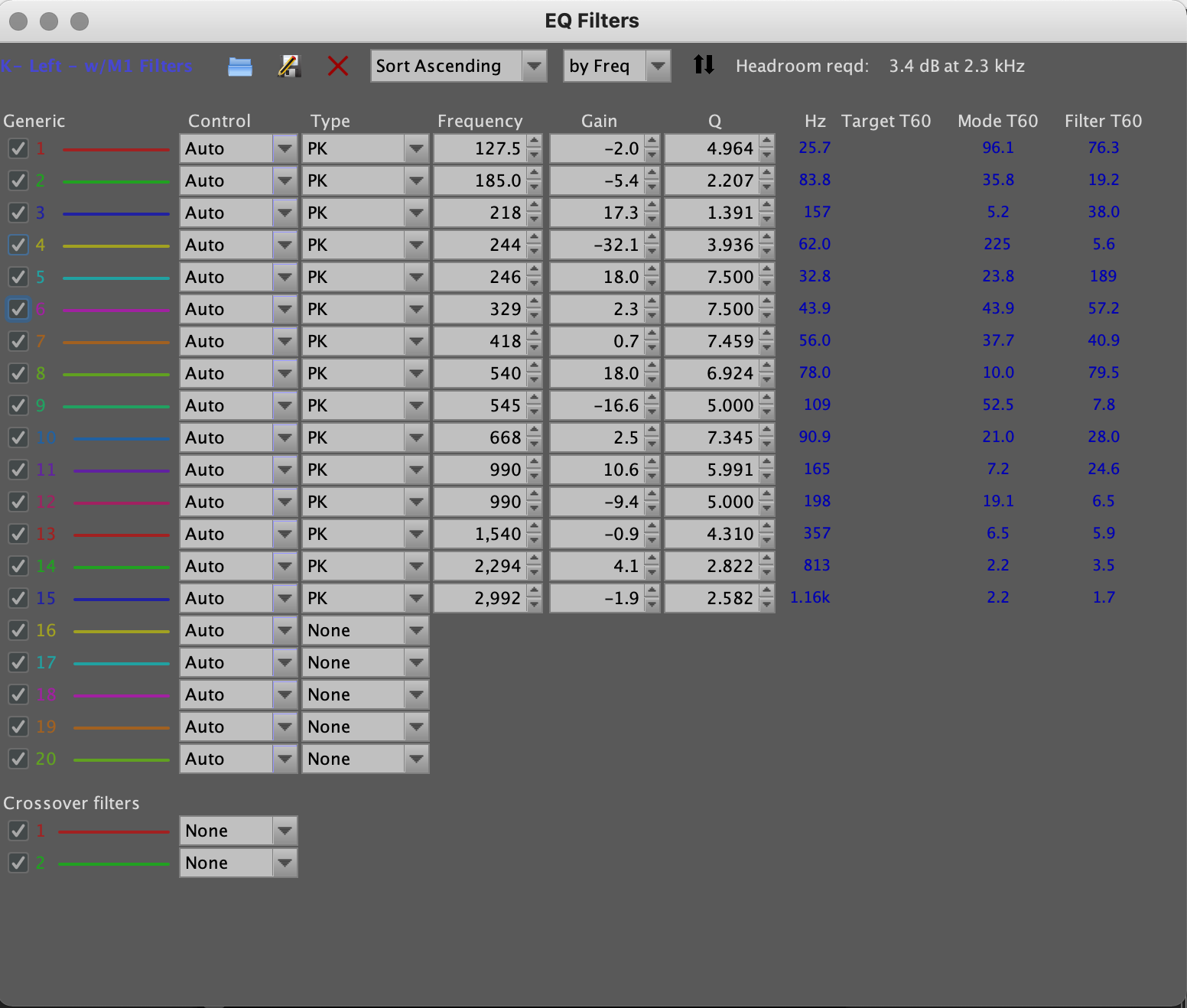
Before commenting on the measurement/correction graphs, I’d like to see your measurements of the corrected responses and screenshots of the filters lists first.
I have a hunch that they won’t follow the green “Predicted” curves, but let’s see them first.
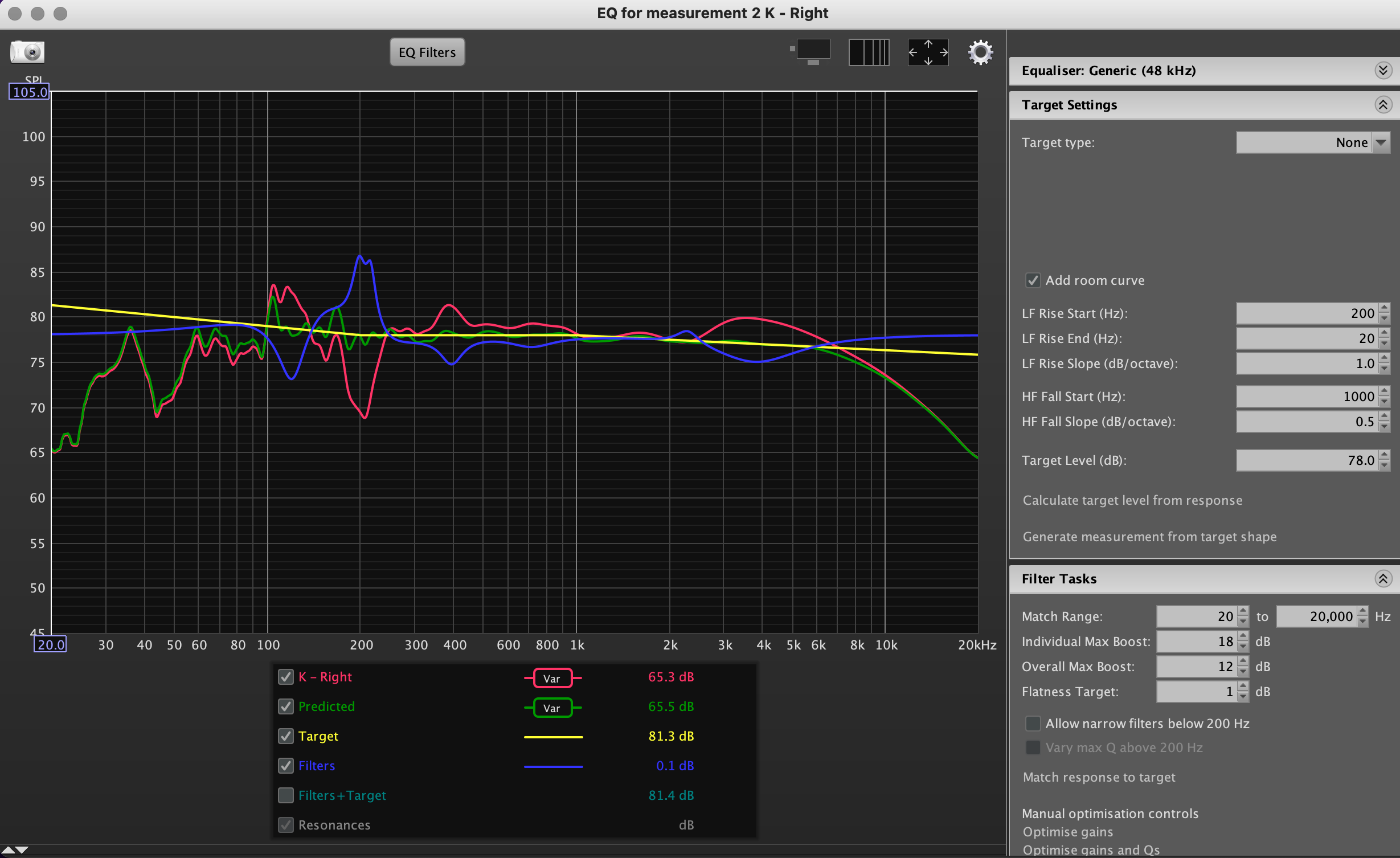
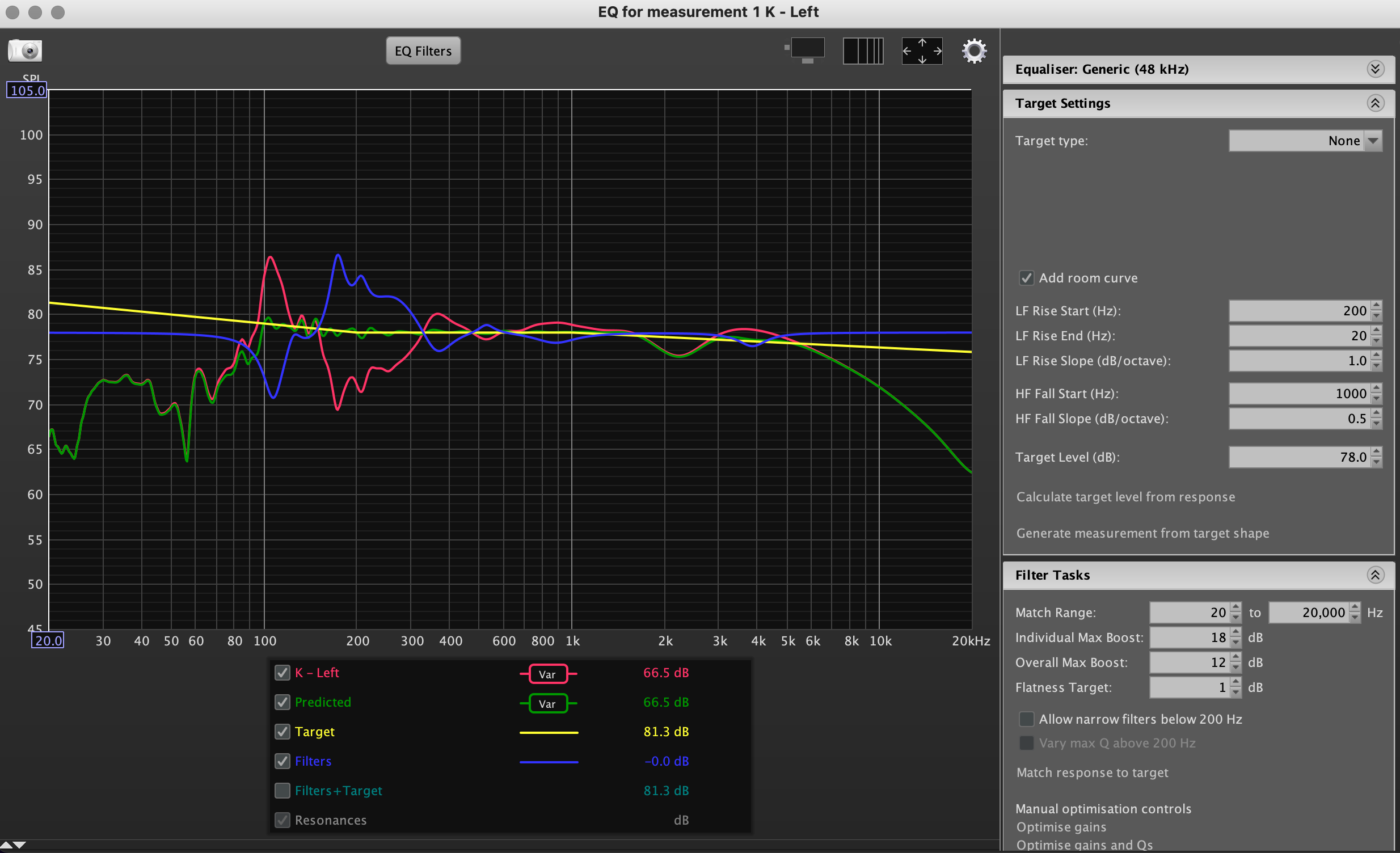
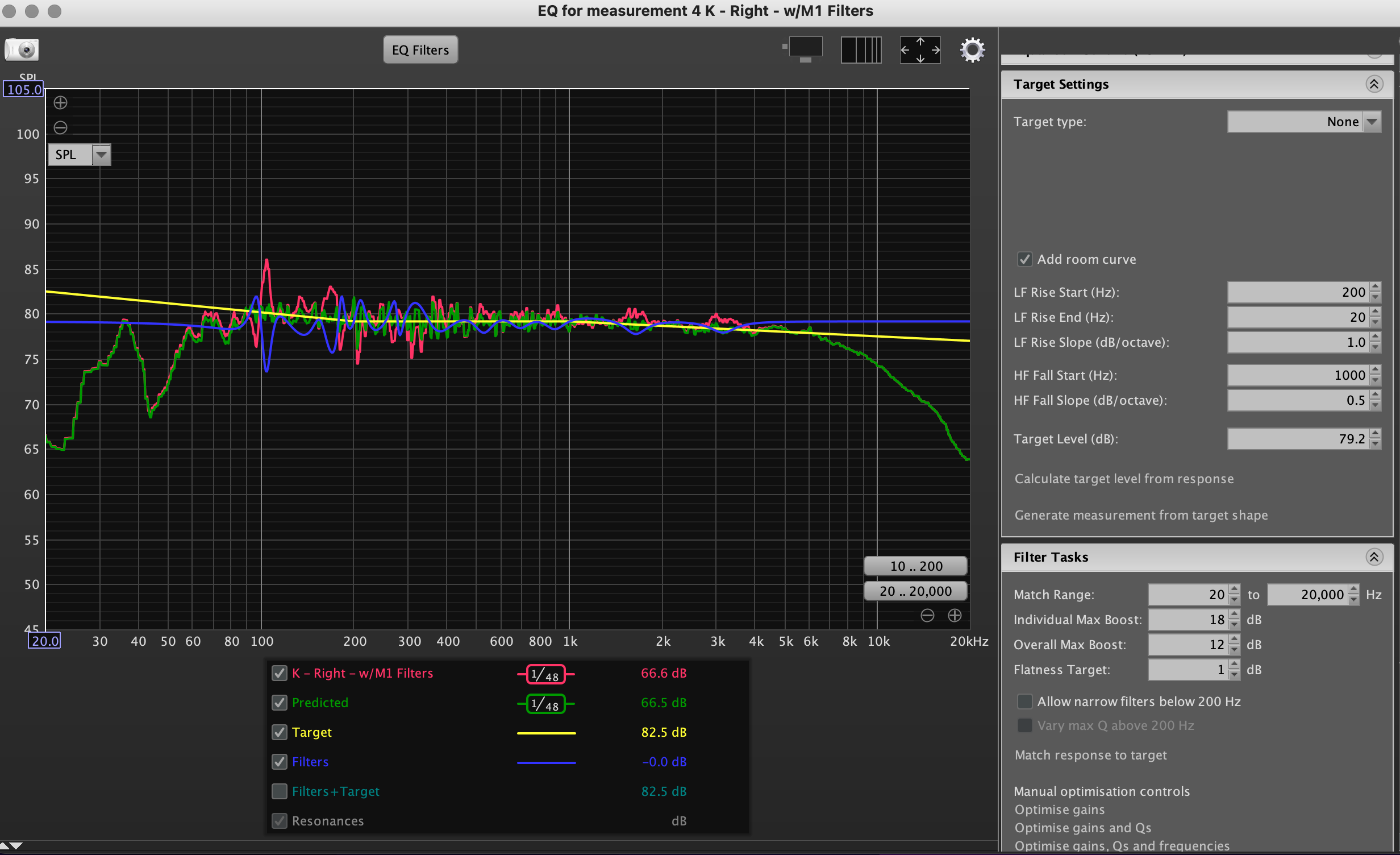
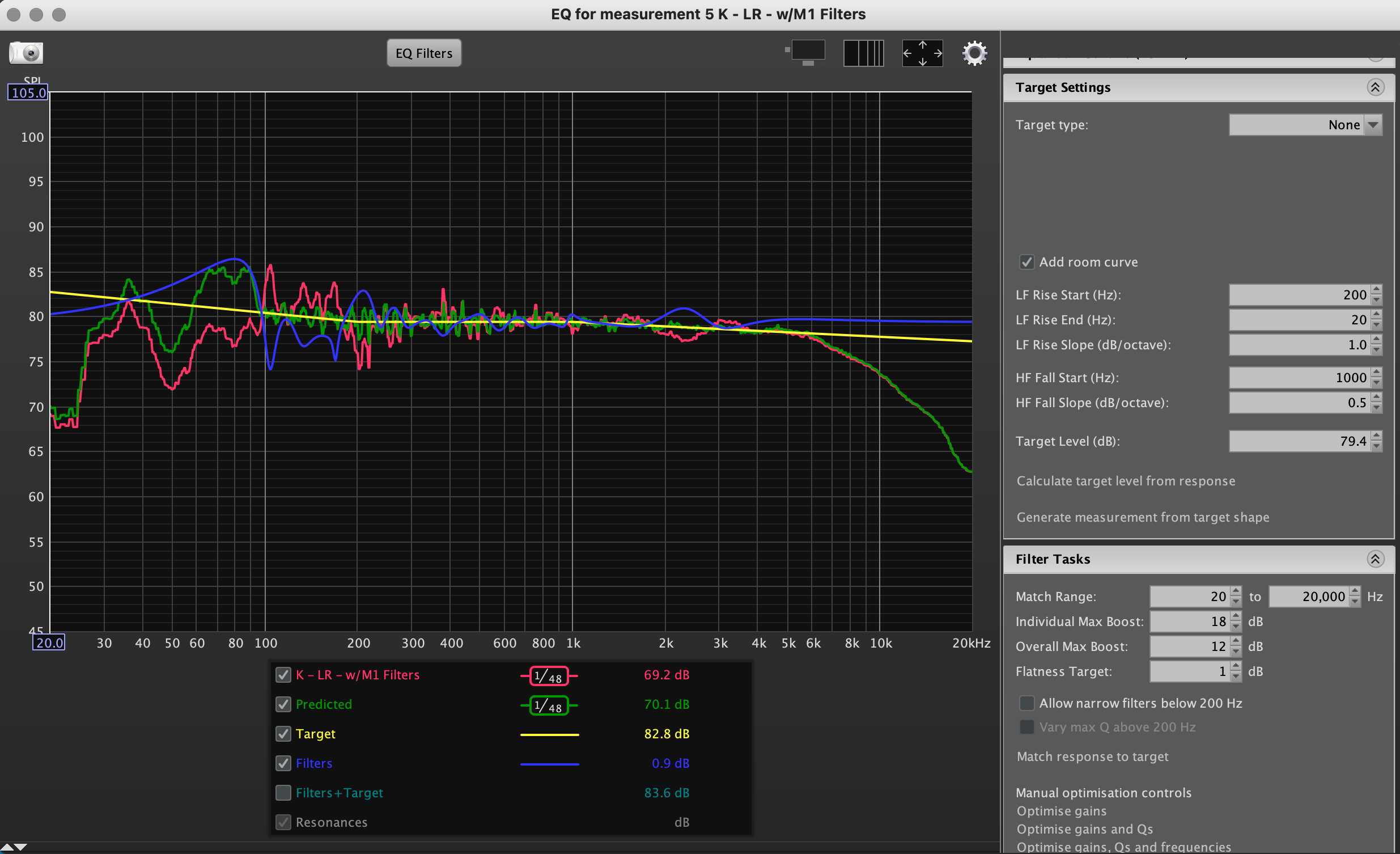
Thank you @Marin_Weigel. So I took new measurements, and ran the EQ again as you can see here. For good measure (pun intended), I’m also attaching the measurements and EQ of L/R combined. I was thinking to apply these EQ settings manually in PEQ as advised by the original guide. But curious to know your thoughts first!
RIGHT
LEFT
LEFT + RIGHT
Stark differences between your first and second measurements below about 400Hz make it hard to understand what you have changed in between.
Are you using the moving mic procedure and, if so, how wide and fast is your sway?
I’d recommend moving slow but at least as wide as an arm’s length all around your listening position to average out room modes and first reflections as best as possible.
What type averaging do you use?
I’d recommend psychoacoustic to help avoid getting filters only 2Hz apart but at 50dB gain difference, which very likely won’t sound good.
Last but not least, I’d set the target below the measurement, so that all filters become substractive only.
I think REW recommends variable smoothing for EQ. That’s what I used but then again I only corrected 20-100hz.
IMO, you should try correcting for missing HF, and see if you prefer the sound.
But then again this frequency response profile may suit your listening preference?
If not:
Do you have ample system gain/headroom at your preferred listening levels?
Could you give up 10 db? for correction.
~12db down at 20khz is a considerable loss of HF data.
If this was my setup, I would want to see flat out to 15-18khz.
I would also wonder why your system has this roll off. Speaker design? Amplifier selection, room, axis of measurement. etc
I guess this reply was for @waka_jawaka ?
Right, i think you’re referring to the L and R separate measurements as “first” and the L/R combined as “second”. Assuming that to be the case, then I do see what you mean.
So my space (and this project) strays a bit from the conventional critical listening space. I spend a lot of time listening to music in my kitchen, and want to optimize the experience to the best of my ability. So I am taking my measurements of the 16’ linear length of space behind my counter where I would be typically moving around. That listening (and cooking) space is 14’ away from the speakers, which are at ear level, on shelves on the directly opposing wall. So for each measurement I walked the length of the “listening” space once, from left to right, over the course of 40 seconds, accumulating roughly 75 averages for each. I held the mic in front of me and spiraled it slowly (I’d say one revolution every 4-5 seconds). I also followed the progress bar of the pink noise clip while playing and tried to match my position in the linear space to the progress bar’s position. This was my non-scientific way of spending no more time in one section of that 16’ space, over another.
I set smoothing in RTA to “No Smoothing”, because the original guide appears to have nothing selected for smoothing in the RTA window, only in the EQ window. Did I get that wrong?
I used REW’s “calculate target level from response”. So would you suggest, say, taking the target value calculated by REW, and then lowering it by 1? 2? The other tricky thing with my situation is that roughly 1/3 of my measurements are taken on the same side of the room as the speaker being measured, with higher SPL values, but then as I move away the SPL decreases. I’m not sure if that factors into your suggestion or not.
Thank you again for your responses!
So that’s been the second set of measurements, I presume, since the bass region is more averaged out - good.
This also explains the HF droop - good.
I’m not saying you are doing it wrong, but…
… my experience with generating filters from differently averaged measurements tells me, that using psychoacoustic averaging yields the most pleasant sounding filters when doing full spectrum correction, since it seems to best mimic how our hearing perceives the sound.
Using unsmoothed measurements will, of course, cause filters with high, and often opposing, amplitude, as well as high Q values being pretty close together, which to my ears guarantees for a murky sounding correction.
It’s free to try, so hear for yourself!
… until your target curve is not above any part of the averaged measurement that you intend to correct.
Of course, it would be best if both measurements’ averages do closely overlay in amplitude, but make sure you’re using the same setting for both channels.
Hope, that helps and good luck.
All of these messing around won’t be necessary if you use the Linn Space Optimisation technology.