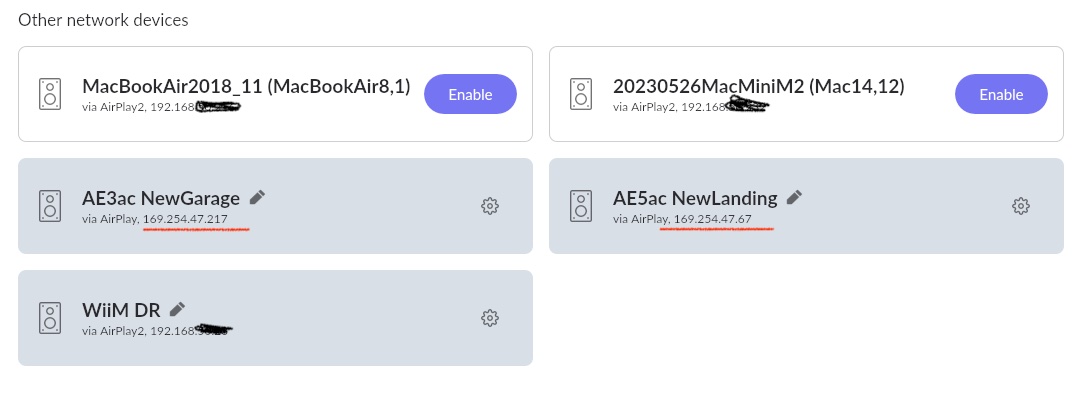
My old Apple AirPort Express that worked perfectly on Roon for years stopped working recently. After a battle and using the thread on adding it via Apple Home, I got it working again so this is more out of curiosity.
I now have three instances of the same AirPort showing up in Roon as available devices, although only one works. They also all show up in Roon with the same self-assigned 169.254.x.x IP address, even though I have given it a static IP address on 192.168.x.x. with AirPort Utility and also in the UniFi network management software.
I tried turning off mDNS but the ghosts remain in Roon. The AirPort has a wired connection to a UniFi switch like all the other Roon devices, which are all on the same VLAN. Any network experts with any thoughts?
Ok, next steps would be to do a full factory reset of the AirPort Express. This clears all the accumulated network identities. Use AirPort Utility, go to the AirPort’s settings > Base Station > Restore Default Settings. Then reconfigure it from scratch with your static IP. This should result in a single clean mDNS advertisement.
That gave me an additional, fourth clone. Except none of the options worked with Roon until I adopted the reset AirPort in Apple Home again, which gave me a fifth clone.
Thanks for the suggestions but I’m going to leave it now.
If you decide to further investigate or try something, it’s worth bearing in mind that you don’t need to add it to Apple Home should never be necessary to work with Roon, it’s an AirPlay 1 device, which Roon supports natively. The Apple Home step could also be a factor in what’s generating the extra ghost each time, because it registers an additional AirPlay 2 identity on top of the existing one. Try with it removed from Apple Home entirely and let Roon discover it natively.
As I mentioned in the original post, this worked for years without any need for Apple Home but that was the only way I could get it playing audio again. Apple haven’t updated the AE in a long time so I can only assume that a Roon update broke this.
I wasn’t going to pursue this any further but I decided to give it one last go and ssh’d into the USG to flush the mDNS cache. That removed all the old and new ghosts.
Roon still shows the AE as being on the 169 network but I suspect that is related to the Apple Home config and I am taking this as a win.
FWIW, I have had two AEs on my network for many years, and they both report a 169.254.47.xx IP in Roon. I’ve tried DHCP-assigned and manually-assigned IPs, but Roon still gives false IP readouts. I’ve never had the ghost problem. Everything works, so I stopped worrying about it.
Slightly OT, but you might be interested. I’ve never been able to get my AEs to work in Roon with Airplay 2. The workaround is to regress the AE firmware a couple of generations to force Airplay 1, and everything works.
Interesting. The Spanglish analogy made me chuckle. Looks like we have very similar use cases, I mostly stream direct to the AE from my phone when I’m in the garage but occasionally use Roon multiroom if I am moving round the house.
It was working fine on the latest AE firmware and was streaming AirPlay2 with no problems up until fairly recently. The Apple Home workaround appears to be pretty unstable though so I may end up reluctantly rolling back to the firmware.
Very similar. One of the AEs is in my garage (hardwired), and I control Roon with my phone when I’m working in there or BBQing outside. The 2nd unit gets used infrequently, mostly when we have a party and I want multiroom streaming.
Sounds like you read through the older thread. One person suggested Apple Home as a solution. I don’t have any need for Apple Home and have never used it. The AEs are mostly a convenience, and I don’t expect a high level of performance from them. So the firmware rollback works for me. Fortunately it is very easy and quick to change the firmware, provided Apple continues to make the older downloads available.
I’ve used various Airport Express/Extreme devices in my system since the first one came out twenty years ago. So there is an emotional factor for me. But if/when they croak I’ll probably replace them with Raspberry Pis.
Have you looked at changes on the Unifi side? 169.254.x.x suggest the AE advertised its service before DHCP completed. If the UniFi switch briefly isolates the port (RSTP convergence, IGMP/multicast handling, or port initialization), the AirPort may send Bonjour announcements in that state. Roon will discover and cache those advertisements, which can leave “ghost” endpoints pointing to the 169.254 address even after the device later comes up properly on its 192.168.x.x address.In that scenario the multiple devices you’re seeing are likely just stale Bonjour announcements rather than separate devices. On the UniFi side you mainly want to prevent the AirPort from advertising before DHCP completes. Make sure the switch port is configured as an edge/PortFast port so it goes straight to forwarding, and check IGMP snooping or multicast settings on the VLAN. It’s also worth checking whether DHCP relay is involved. If the DHCP server sits on another VLAN and requests have to be relayed, there can be a short delay before the lease is issued.
I’m sure the OP will respond, but I’ll weigh in with my situation which differs slightly from theirs. I don’t have the issue with ghost IPs, but I do have the situation where false IPs for my two Airport Express units appear only in Roon. In the Airport Utility app, in LanScan, and in the Asus router client list, the IPs appear correctly as 192.168.X.X. In Roon, they appear as 169.254.47.X. I’m not running a VLAN; the AEs are hardwired to the router. I’ve tried manually-assigned and DHCP-assigned IPs with the same results.
I’m no IT pro, but this suggests to me that it isn’t a DHCP problem in my case. Everything else works, so I ignore it. But my OCD side wants to know why.
It definitely looks like the AE is doing an mDNS (bonjour) announcement before it is configured with the DHCP address. A reserved address in the router/switch still uses the DHCP client on the host to set the configuration, have you tried a static IP address configured directly on the AE?
My AE has always been configured with a static IP in device via AirPort Utility. But it makes no difference, it still shows on 169.254.x.x. I got it working on AirPlay2 with Apple Home but it was flaky AF and every restart (I turn off the garage electrics at night) I got a ghost. So after a few ssh sessions to flush the mDNS cache I got bored of that and reverted AE firmware to AirPlay1. It has affected some functionality with how I most frequently use it, but on balance I can live with that because I don’t have to deal with it any more. Still showing on 169 but it works and no more ghost AEs.
Yes, I’ve tried all permutations with the same result:
Router reserved => AE DHCP (current config)
Router DHCP => AE static
Router reserved => AE static (matching IPs)
Router DHCP => AE DHCP.
Also tried variations of IPv6 on and off at router and AE (currently off on the AEs).
Clearly there’s an incompatibility with Roon going on somewhere in my system. Others on this forum have written that they have the same build AE running the latest firmware and playing nicely with Roon - Airplay 2 and no IP weirdness.
The last generation of AE came to market in 2012 and was discontinued in 2018, so it’s way past end-of-life. For what I need, they work well enough. I’ll continue to limp along until mine croak and then move on to something else.
FWIW, I’ve been experiencing the bogus IP addresses in Roon since at least 2019, when I was using these AEs with a different router - Apple Time Capsule.
Here’s a link to that old thread if anyone is interested. Post # 9 and 15 are relevant.
Apologies to @Reamonn_Lenkas for hijacking your thread, but I thought you might be intereested.