Until a few days ago, all my Albums by date added (my default screen) were fine and normal. Now, they are completely scrambled. There is no discernible rhyme or reason to the ordering now. But one thing is certain: They sure as Hell aren’t ordered by date added anymore, and I can’t fix it.
AceRimmer
("I’m not just a hero; I’m a legend!")
3
And you have tried rebooting the Roon Server and then trying a different sort order before going back to date added again?
Being a relatively non-technical idiot, I do not know the difference between “rebooting the Roon Server” and closing the Roon app on my desktop and rebooting it, assuming there is one, but yes, I have tried the latter and then switched re-sorting methods. Neither helps.
AceRimmer
("I’m not just a hero; I’m a legend!")
5
Is your Roon Server located on the laptop you mention or another PC?
If on the laptop then yes restarting the laptop will reboot the Roon Server.
They are all local albums. I don’t have any streaming services tied to Roon at present.
I wonder whether this has something to do with Roon’s switching recently to a new library or search service? I don’t remember the details, so I should probably take another look at that. But I would imagine that I would not be the only one affected, if that were the case, and I haven’t seen anybody else here yet mentioning this problem.
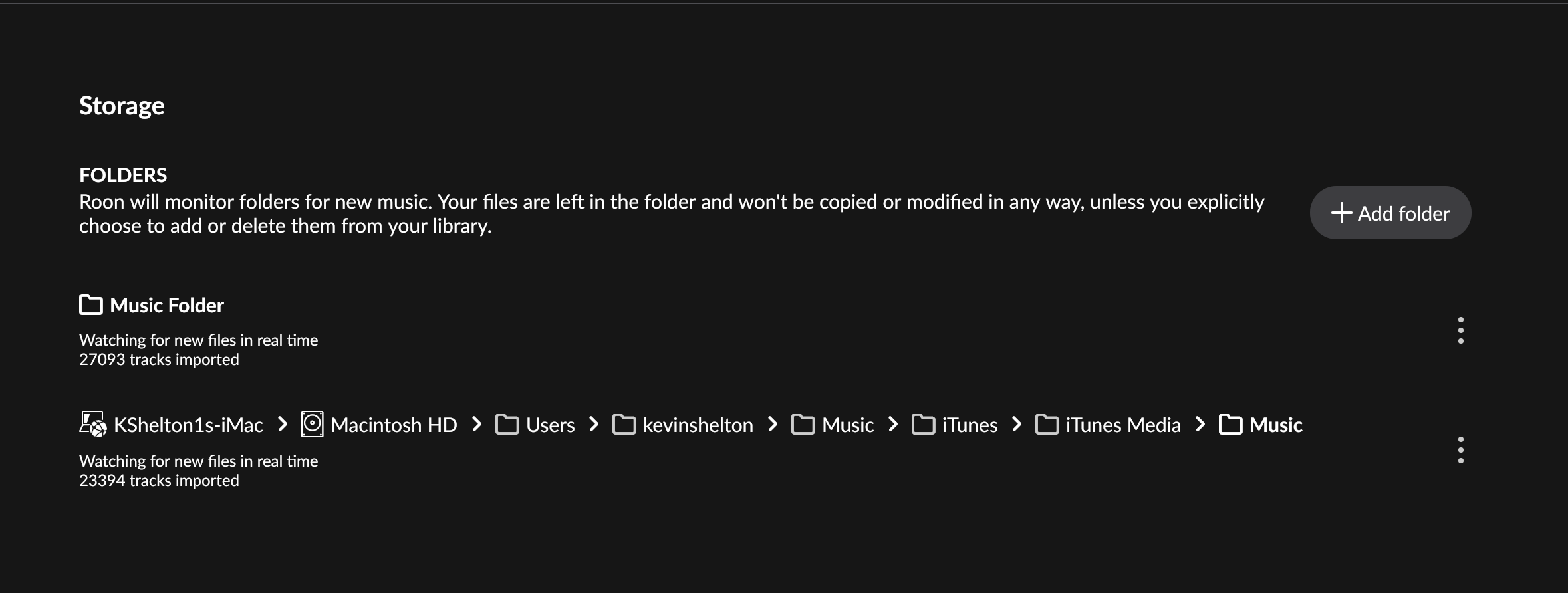
Can you please share a screenshot of the Settings → Storage page within Roon? Diagnostic logging shows that Roon’s pathway to the /Music location hosting your files has changed. It doesn’t see new files, but it sees the existing files (your music library) in what it considers to be a new location.
This can occur if you have two overlapping Watched Folders that are both pointing to the same /Music location on your MacOS computer. It can also occur if you’ve recently updated MacOS, restored a Time Machine backup, or taken other OS-level steps that might change the pathway or permissions to your standard Apple Music folder.
As a side note, we see Roon churning through thousands of samples from a DAW (LogicPro). Are the albums you’re attempting to import identified tracks, or are they samples from a music production library? We ask because the difference might have significance for import date and identification, as well as performance within Roon moving forward.
Thank you. Here is the screenshot that you requested. That’s actually interesting, both the data and what you are saying about the folders. I had not looked at this recently. And yes, Roon should definitely not be going through and adding my files for my personal music projects in Logic. That is peculiar.
I have not made any conscious or deliberate changes to folder path pointers, nor have there been recent OS updates of which I am aware. Likewise, no recent restored Time Machine backups.
Anyway, I hope that this helps to resolve the problem. The sudden change definitely has me puzzled.
One clarification: Roon doesn’t add anything to your files, it can only reflect what’s already sitting in a watched folder. So if it’s pulling in your Logic Pro samples, that means one of your watched folders now includes that directory somehow, which lines up with what Connor mentioned about overlapping folders or a changed path to your Music library.
While we sort out the folder path question, could you please check Settings → Backups and see if there’s an automatic backup from before this started? If there is one, restoring from it should get your library, and the added-date ordering, back to how it was. Please let us know which backup dates are available before restoring anything, so we can confirm which one predates the issue.
Here’s a screenshot of the Backups section. I don’t have any scheduled.
As to the Logic files, I need to check that later; very busy now with upcoming family obligations, unfortunately. They shouldn’t be in a file that Roon is watching, though.