Please try to restart your network setup by unplugging, waiting 30 seconds and then replugging in your networking gear.
· No, the issue remains the same
Please select how you've connected your Roon Server to the internet
· Roon Server is connected by *Ethernet*
Have you checked your firewall settings to ensure that Roon is allowed through?
· Roon still won't connect even after checking this aspect
Have you verified that Roon Server is on the same subnet as your Remotes?
· My Remotes and Server are on the same subnet and I still can't connect
Sometimes the issues can be resolved with a reinstall of your Roon Remote app. Let's try to perform a reinstall and see if it helps.
· I've reinstalled the Roon Remote but it did not help
What is the operating system of your Roon Server host machine?
· *Roon Optimized Core Kit* (ROCK)
Select any of the following components that are present in your local network setup
· None of the above
Describe the issue
Hello. My Android Tablet won't find my ROCK anymore. Recognized the problem yesterday for the first time. I tried almost everything. Reinstallation of the App and even my ROCK (Asus NUC ANHI7). Tried 3 Android devices. Rebooted and powercycled everything in my System. Changed a switch and simplyfied my network to the smallest possible setup. Only sometimes the App recognizes my ROCK for a short period of time when I type in the IP-Adress manually. But after a restart of the App it would not find the ROCK again. Win 11 PC with Remote installed works fine. ARC also works.
Describe your network setup
Fritz!Box 7582 on LAN1 --> D-Link DMS-108 8-Port Multi-Gigabit Unmanaged Desktop Switch, My ROCK Asus NUC ANHI7 and a D-Link DMS-105 5-Port Multi-Gigabit Unmanaged Desktop Switch is connected to the 8 port switch. 2 BluOS devices are connected to the 8 port switch, another 2 to the 5 port switch
Same problem for me across 5 phones and tablet’s in our house.
It only started after upgrading to the latest EA release though.
I had to select choose a new server and put the IP address in. They all then worked perfectly well
Thank you for your replies.
The Roon Server Version is 2.58 build 1608.
I found out if I switch of WLAN on my Router and switch it on again the ROCK will be recognized.
But if I close the App and start it again, the problem appears again too.
Same here with my Samsung 22 android phone after last update this week. Even introducing IP number of my Rock Nuc still doesn’t connect. Only a few times during the day, it connects. I reinstalled Roon in the phone, I restarted Rock, and still the same problem. I have two IPADs with same server operating perfectly. Cheers. Diego
Once I have set IP address all my devices connect fine, thought there is a slight delay of a second or so compared to how it was connecting before the update.
Mine was working perfectly on the version you have though
Thank you for the reports. Can you please confirm the Android operating system version impacted by this issue? Is there any pattern to the affected devices, other than they are running Android?
Can you please reproduce this issue and let us know when this action temporarily solves the issue? E.g. at 1:25PM on 2/9/26, I turned off/on WLAN and the connection started to work again. Please let us know this info and we can look to see if there are any errors tied to your account during that time.
@noris I will disconnect one of my devices when I am home and grab some screenshots for you.
For my household, they are all various versions of recent Google Pixel devices and all have either of the latest Android updates installed So Jan & Feb updates of Android 16
Additionally as mentioned by someone else, every time I open Roon it now waits a couple of seconds and looks like it will fail to connect and then suddenly connect and work fine. But it seems to drop off quicker. For me it was within an hour of moving to the latest EA version of Roon that I wanted to fix a particular issue with.
Having all the devices drop off in short order, they were all added back via IP address
Thanks for the timestamp! The logs show your Pixel 9 Pro XL connecting successfully, then suddenly losing the connection, followed by a series of “Connection refused” errors. This is a classic sign of Android Power Management killing the Roon background process.
Could you try the following:
On your Pixel and Lenovo devices, go to Settings > Apps > Roon.
Select Battery or App Battery Usage.
Change the setting from "Optimized" to "Unrestricted."
Also, ensure "Pause app activity if unused" is toggled OFF.
We’re also seeing “No route to host” errors for your Lenovo tablet means the Roon Server literally cannot find a path to that IP address (192.168.178.yy) at that moment.
Could you:
Log into your router and assign reserved/static IP addresses to your Android tablets and your Roon Server?
Check if your router has "IGMP Snooping" or "Multicast" settings. Ensure they are enabled. If you have "Airtime Fairness" enabled on your Wi-Fi, try disabling it, as it can drop packets for "slower" background devices like a tablet sitting idle.
If you’re able to force your wifi devices to 5GHz band, that would be good to test as well.
thanks for your answer.
Settings on my Android devices and also on my router were already set to your recommended ones, as I gave you the time stamps yesterday.
I doublechecked it again a few minutes ago.
I am using Roon since 2022 and never had problems with my android remote devices.
The Lenovo Tablet is quite same old or older than my Roon system. There were long time no updates for it anymore. If this only happend with my Pixel it doesn’t seems that strange to me…
BTW the only thing I changed in the last time: I threw out all powerline adapters before christmas. But that should make it work better, I guess. Everything is wired now.
Hi Benjamin if the Forums had been working I would have done this while I was home.
I have done some testing with removing the Android app and re-installing and coming out of the beta program, but it looks like it is something on the Mac version to me. I have been on an M4 Mac Pro (24GB of memory) since the beginning of Jan and it has run fairly smoothly until this update. I guess I could go back to the previous production version and test that. I probably also have the early Jan version I downloaded as well.
I will do some more testing with maybe removing the EA version and try older versions and see how they perform and create a ticket
So @benjamin I re-installed the Roon I downloaded on the 10th Jan (2.57) and the same thing happened with that with the 2.58 client as well as the 2.59 EA client and server.
Something fishy here, as this happened several years ago when I seem to remember something was broken on MDNS, but not seen this in a long time. My main Android phone (Pixel 9 Pro Fold) is now back on 2.58 production build and that definitely seems to be better, at least once the IP address is put in.
I am back on 2.59 EA server now for the better performance after adding new music and I will monitor the channels for any updates
To help us narrow down the root cause of these Android discovery issues, could those of you experiencing this problem please share a brief overview of your network setup?
We are looking for commonalities in hardware that might be handling multicast discovery differently. Please include:
Hi @vadim from my perspective the setup is as follows
My Phones are mostly Google Pixel devices in 9 Pro Fold, Pixel 9A, Pixel Tablet and similar devices.
There are no issues with my Windows or Mac laptop or PC’s and no issues with my iPad,
I have a very simple setup made up of Netgear Orbi RBR760 router and 2 Satelites
I run basic Netgear unmanaged switches.
Pretty much all devices are connected via Ethernet
As mentioned previously I tried rolling back both server and client version without success once the update had taken place. Everything works fine with an IP address entered with minor delays
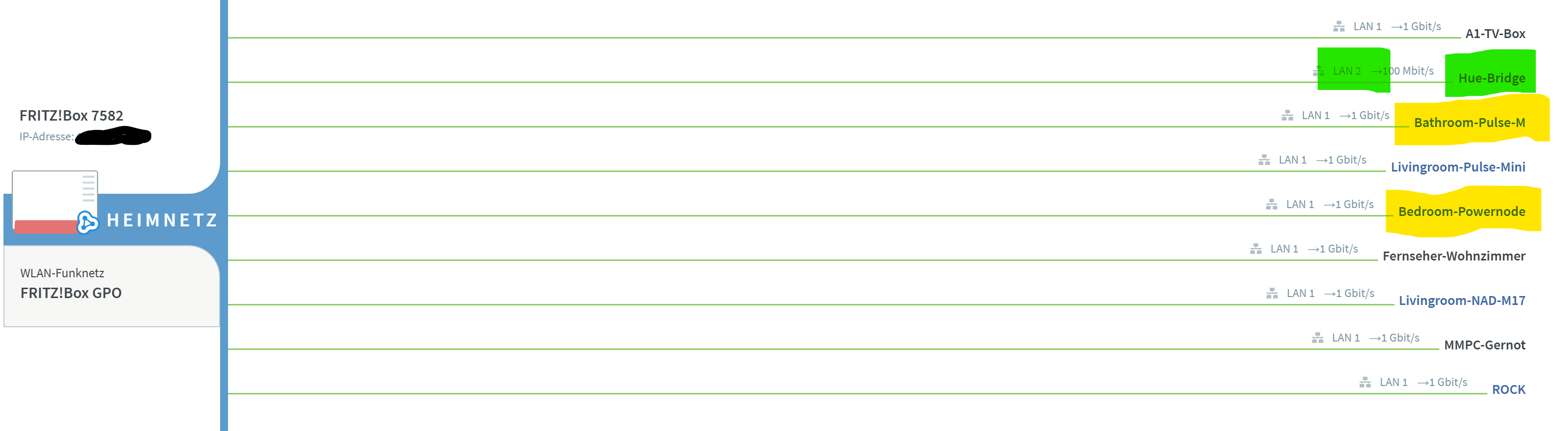
Here my LAN Setup (everything is connected to LAN1 via an 8-port switch, except the Hue Bridge, the yellow marked devices are connected to a 5-port switch which is connected to the 8-port switch)
PS: Today I made the upgrade to 2.60 build 1629. At first glance it looked great for me. The App on my Lenovo Tablet started quick, quite like before the troubles. But then I saw the overview is building up very, very slow. So I tried to make a reboot of my router and ROCK. After that the same problems with the android devices appeared again. And it got even worse because now ARC ist out of order and will not connect. ARC-Test in Remotes also fails. And the Overview stayed slow and is incorrect (wrong mixes etc.)
With error code 526, I guess. This is currently a wide-spread problem related to the ongoing Roon cloud issues (lots of other posts about it). It seems to only affect the diagnostic error display but ARC is working anyway. Ignore until Roon Labs fixes it.