· The ARC iOS app would not connect to our Nucleus+. After exhausting other options, I disconnected and then reconnected. At that point, I couldn't see any of the 600GB of downloaded music. However, the memory was still allocated to the app. Details: * Symptom: Arc does not check for existing downloads when reconnecting to Nucleus * Action that created this situation: Disconnect/reconnect * Root Cause: Did not scan phone for files already downloaded * Mitigation: Redownload (a painful process). Side-effect: Redownloading is duplicating albums in phone memory * My biggest frustration: I've been forced to uninstall and reinstall Arc, then download music, multiple times.
Finally, can I also talk to a human that can provide insight and help me improve the performance of the Nucleus+ so ARC won’t have trouble connecting?
From your description it looks like you have multiple routers in your house that are causing double NAT situation which complicates the connection from your phone to Roon Server.
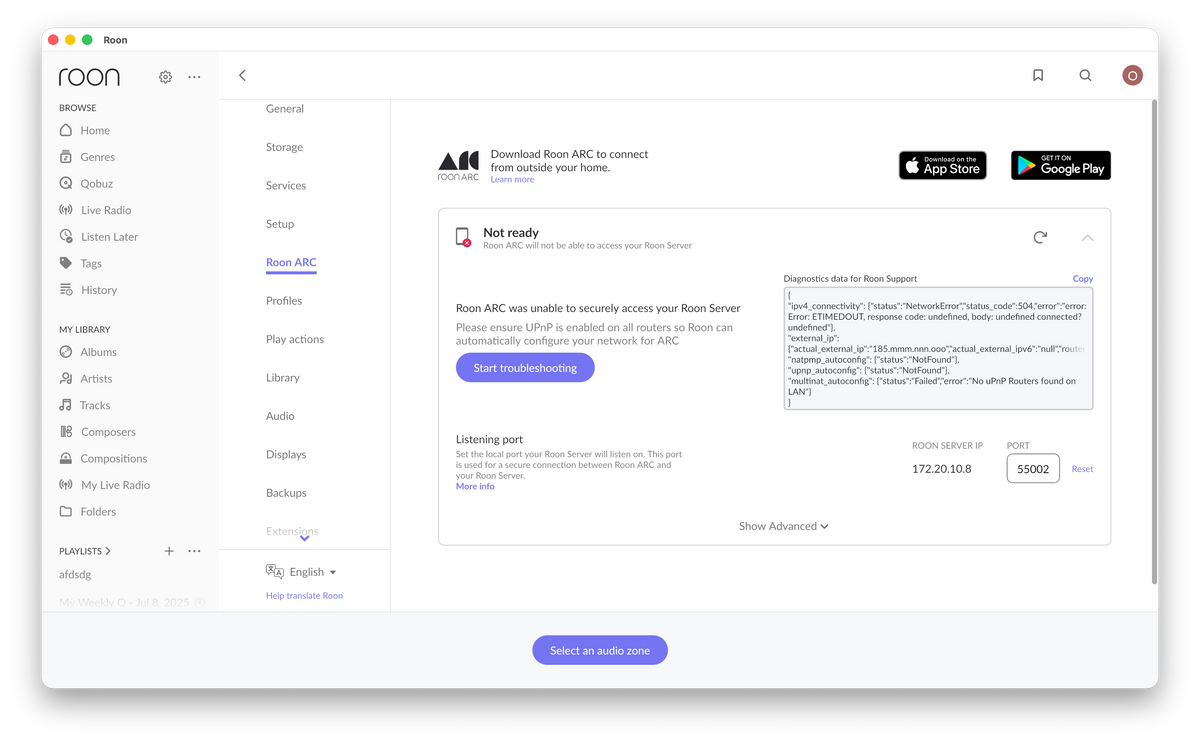
Can you please go to the settings of Roon App on the desktop and open “Roon ARC” tab and share a screenshot from there ?
IT should look like this :
Also, did you manage to forward any ports yourself ?
The other solution to your problem might be to stick to usage of Tailscale VPN which is natively supported by Nucleus. It will allow you to bypass the network complications. You can check instruction here .
I appreciate any effort to find root cause for connectivity.
I’m also hoping for a patch so I can access my downloads, or at least prevent losing the downloads when I disconnect and reconnect from ARC. Without a patch I’ll need to uninstall and reinstall ARC to free up that 600GB.
Our audio consultants manage the network. So, I’ve distanced myself from how it is configured. As a retired software engineer, this has been a relief.
It often takes a while to connect to Roon from our phones (we leave the app open on our Mac Studio). As a result we need to restart the Nucleus at least weekly and reinstall the OS about once a quarter.
We are still slowly removing and replacing the Tidal tracks from our playlists after importing from Apple Music
We used to have an export of our old Apple Music library on a hard disk that was plugged into the Nucleus.
While I can certainly understand this, it may prove difficult to pin down the root cause of your issues, as it seems to be network-related at this time.
This, unfortunately, isn’t available at this time. When disconnecting and re-connecting to your Roon Server, Arc will need to re-download any previously downloaded content. Our team is aware of this downside and are actively investigating ways to improve this situation.
As a next step in troubleshooting your Nucleus-related issues, I’d temporarily set up a simplified network connection - and get a direct ethernet connection from the Nucleus to your primary router.
Feel free to share a more specific date, time, and name of track playing the next time you experience an issue. Thank you!
Thank you for the update — that sounds like a good plan.
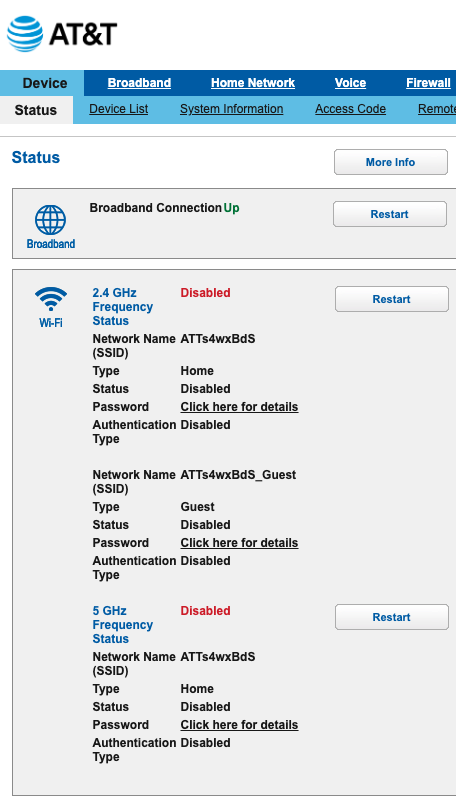
Using Tailscale and ensuring the AT&T modem is in true bridge/bypass mode should help eliminate the connectivity instability you’ve been seeing with ARC and the Nucleus. A simplified network path (Nucleus → primary router) is the most reliable way to operate ARC.
Regarding the downloaded music: at the moment, ARC does not retain or reattach existing downloads after a disconnect/reconnect to a Core. We understand how frustrating this is, especially with large libraries, and the team is actively working on improvements in this area. For now, uninstalling and reinstalling ARC is the only way to reclaim the storage if downloads become orphaned. Your feedback is very valuable here, and please do not hesitate to leave it in Feedback > Feature Suggestions for visibility to the Product Team.
Once your consultants have reviewed the network or if you see further connection issues, feel free to share a timestamp and track name and we can look into diagnostics on our side.
We have a Nucleus+ and we’ve seen comments that others can’t get TailScale configured to reach to create a VPN for that device. Since I don’t have any other problems with my network, including using Roon and ARC on wifi, we’ll buy a new music server to run Roon.
I don’t see a relevant feature request for recovering ARC Downloads after a Disconnect/Connect, so I’ll open a feature.
I welcome any other suggestions, but I fear this effort has run it’s course.
You are correct here - Tailscale is not supported on early Nucleus versions, unfortunately. It is only available on Nucleus One, Nucleus Titan, and ROCK servers.
That said, there is a potential for you to set up another device for subnet routing to the Tailnet.
You’d basically set up another device in this ecosystem to route local network traffic to Tailscale. This will allow the Nucleus+ to join the Tailnet (and reach ARC) without having Tailscale installed directly.