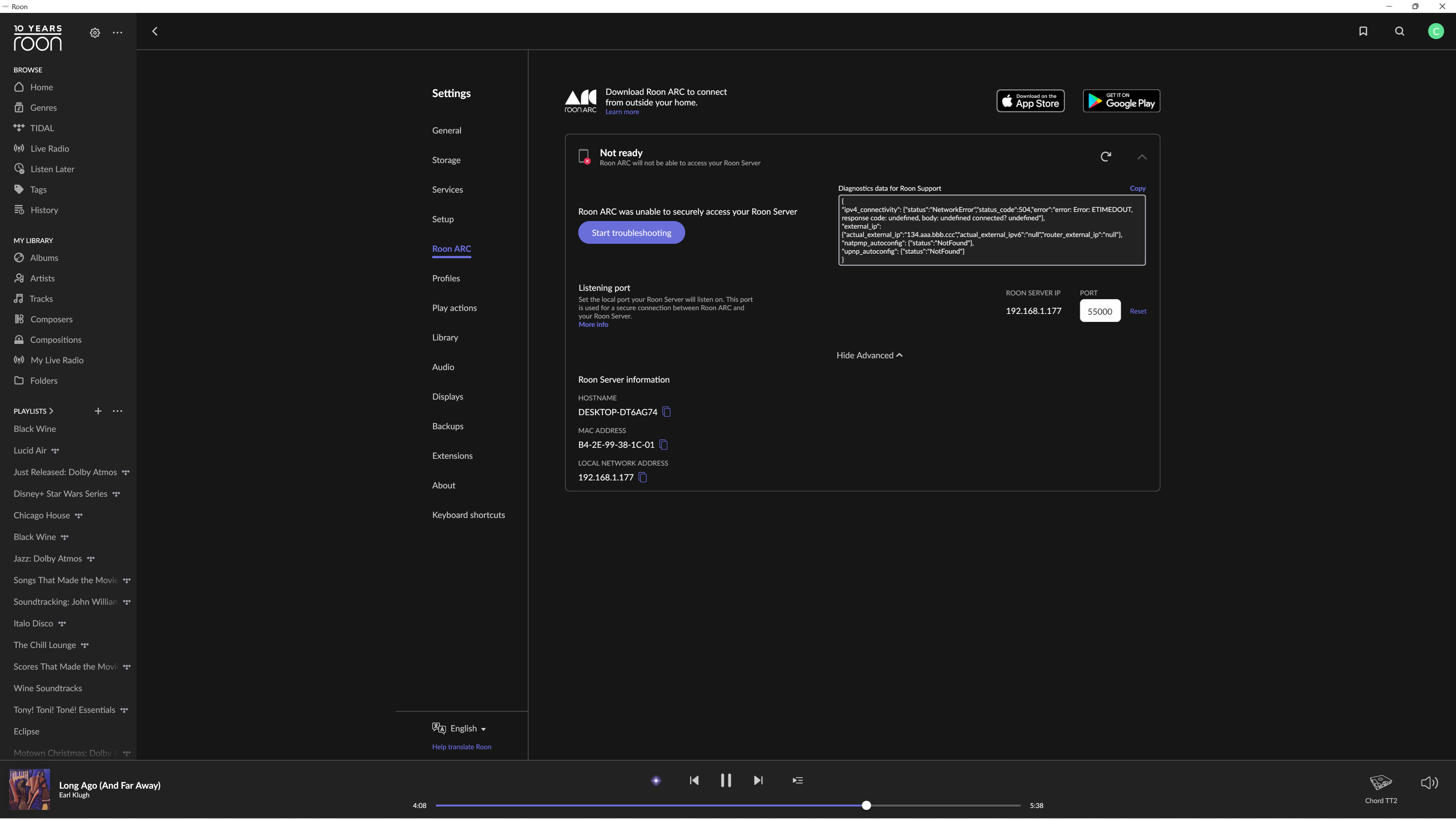
I am using Unifi Router and have set up the proper port forwarding but ARC is not working. I also turned on Upnp on the router as well and it still isn't working. I turned off all my antivirus and still nothing.
Describe your network setup
Unifi UDM Pro computer is hardwired. Phone is on same network on Wi-Fi. DAP is on same Wi-Fi and connects using Roon app on device but Roon ARC isn't working
I had the same issue. In my case the solution was actully quite simple Enter your router settings page. go to your web browser and type 192.168.1 to access it and log in. Go to advance settings
and manually enter the port number which for Roon is a default 55000.
I’m no network expert but following the instructions on the knowledge base makes it a snap. They 6 you step by step. For me the only source of difficulty was logging in to the router since I had changed the default password… Two hours later…
In case if you are sure that the port forwarding is set up correctly, then it might be a problem with the internet service provider’s networking side.
You can reach out directly to your service provider to ask if they support port forwarding; this question will often enough to prompt them to explain whether or not the carrier-grade NAT they’ve implemented can function with ARC.
More specifically, you can pass along the following questions:
Have you implemented carrier-grade NAT for my account level?
Have you fully implemented IPv6, or do you have IPv4 addresses available?
Can I request a static IPv4 address to support port forwarding?
Are there any ports you have reserved at the ISP level I should be aware of?
I decided to use the Synology NAS as Roon Server directly. I have external SSD connected. I followed the instructions from @chrisrieke So Roon OS is running. I selected the music files location which is not on the SSD. I have two resulting issues. The file location is not showing when I log into Roon OS, its showing me other file locations. I went into permissions and under “System Internal User” I selected Read and its still not showing my files.
Roon ARC still doesn’t work but Roon app does, just no music.
Thanks for letting us know. Can you please share a screenshot of your Roon Settings → Storage tab? Just to clarify here, the music on the NAS itself shows up and works as expected? Have you been able to set up a manual port forwarding rule in your router for ARC?
It appears right now my NAS is below the requirements so its running slow. All music shows up but I had to create a new share folder. I have no idea why Roon only saw 6 out of the 12 shared folders. It appears the SSD is powering down after not being in use so I need to find that setting in the Synology settings to stop that behavior.
Thanks for keeping us updated on the situation. Please let us know how things go after you modify that setting on your Synology—we’ll be standing by to assist if anything comes up!
We wanted to check in since some time has passed. This thread will auto-close without a response from the OP in a few days, but we’re eager to ensure that you’ve been able to use ARC remotely and that your Roon storage is functioning as expected in the meantime.