rbononi
January 10, 2026, 3:14pm
1
Hi! What’s not quite right with Roon? · None of the above quite fits
None of the above quite fits · None of these quite match
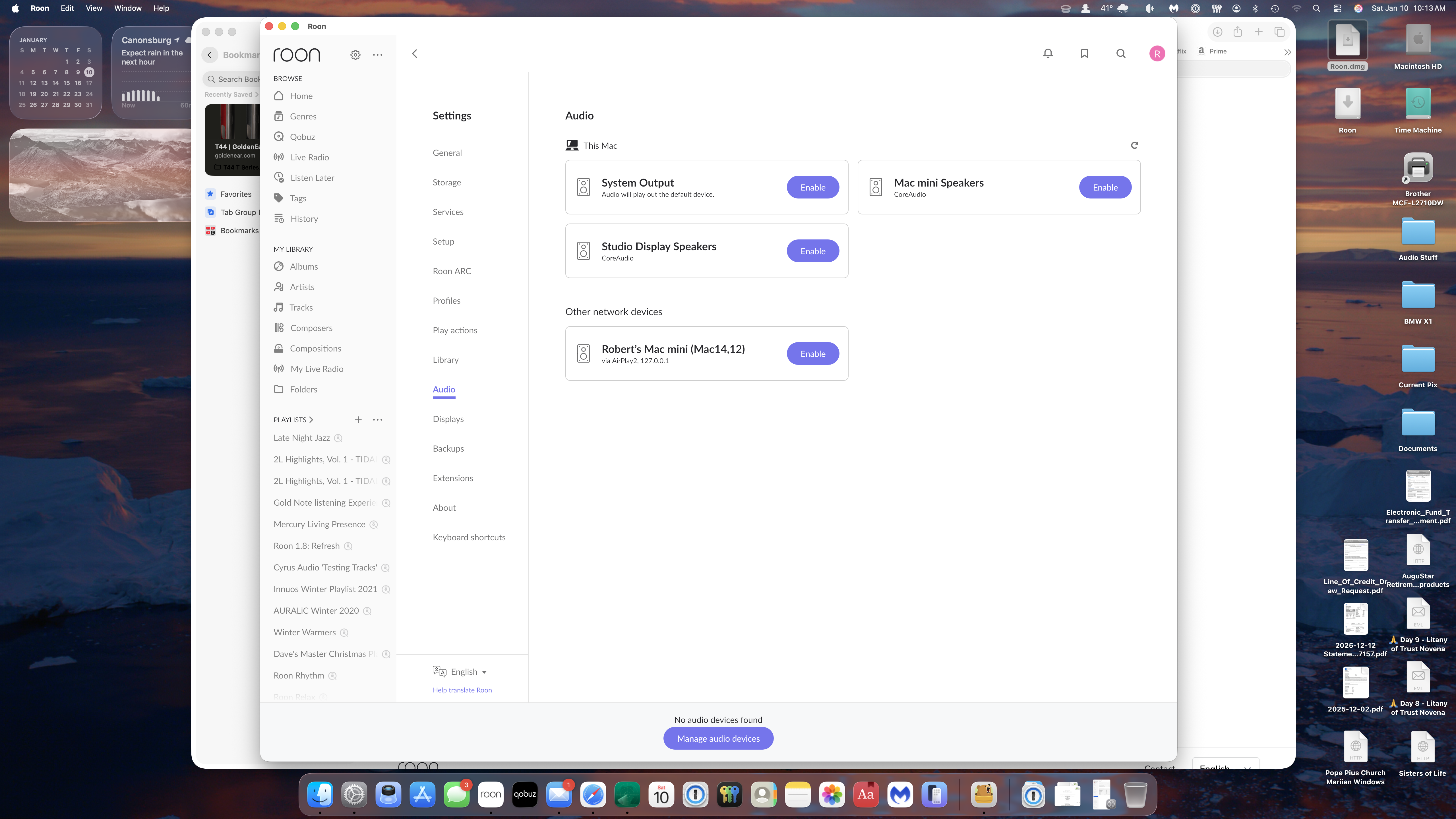
Tell us what's going on · Upgraded my Mac mini M2 to Tahoe 26.2. Now Roon 2.57 will not recognize any of my Audio devices. The "Enable" button only recognizes the Mac mini. Refreshing the page does not do anything. What am I missing here?
Tell us about your home network · Verizon FiOS Router about 2 years old. Gig speed. The Mac mini is hard wired into the router but can also run on Wifi. Everything Roon worked fine until the OS update.
Suedkiez
January 10, 2026, 3:43pm
2
Try this, it’s still necessary once after every update
2 Likes
rbononi
January 10, 2026, 9:31pm
3
Thank you so very much. Everything working as before! You saved me lots of trial and error hair pulling! Enjoy the rest of your weekend!
1 Like
noris
January 12, 2026, 3:51pm
4
Hello @rbononi ,
Glad to hear that everything is working properly once more, we wish you a pleasant continued Roon experience!
system
January 13, 2026, 3:51pm
5
This topic was automatically closed 24 hours after the last reply. New replies are no longer allowed.