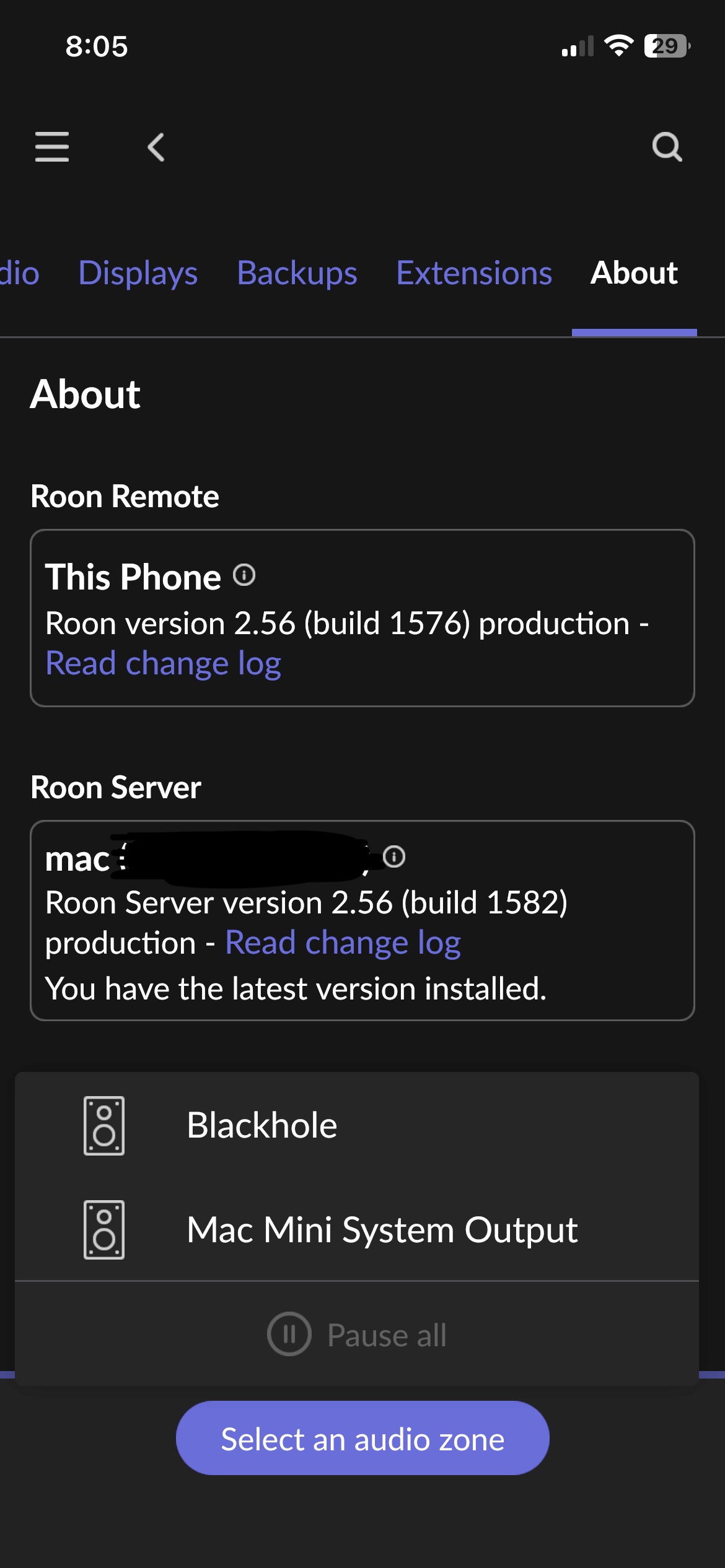
I read the change log for 2.56 (Build 1582) and noticed that an issue where audio zones are lost during Roon’s update process on MacOS was resolved. I’m unfortunately still having the same issue, and have consistently for the year I’ve used my Mac as a Roon server. Following an update of Roon, the server comes back online but Roon remotes only display the Mac’s own output. I have to shutdown Roon server via the Menu Bar icon at the top of the display on the system running the Roon server, then relaunch the service.
Describe your network setup
Mac -> (very close to) TP-Link Omada EAP650 wireless AP -> TP-Link Omada managed Switch -> Firewalla Purple router -> ISP cable modem. Local wireless network sustains 700Mbps up/down where the Mac is located. Wireless APs are connected to the switch via Ethernet.
Network endpoints are Apple TV and Cambridge Audio AXN10 streamer, both connected wirelessly.
The next step here is to gather more detailed diagnostics so our technical team can take a closer look. Before we enable diagnostic mode on your account, we’d like to make sure we capture the correct event.
Please reproduce the issue once more and note the exact time (including date and timezone) when it occurs. Then reply back here with that timestamp — this will help us correlate the correct entries in the logs.
In addition, please also send us a copy of your logs:
Sounds good! Happy to have logging turned on. It looks like updates go out roughly monthly, so is there a way to rollback the current update to create a reproducer sooner than the next official release?
We see dropouts between RoonServer and local/upstream addresses throughout diagnostics logging associated with your account. These aren’t limited to device discovery traffic between RoonServer and endpoints/remotes.
Have you ensured that Roon’s processes are safelisted in the Firewalla router security settings? Please also ensure that multicast forwarding is enabled in any managed network components.
Where are your networked endpoints and remotes connected relative to RoonServer? Do they share an access point or are there hops in between?
Ooh, interesting. I don’t see anything specifically Roon-related getting blocked, but I also haven’t specifically whitelisted any behavior. I just did a quick observation while streaming and everything looked okay, but there may be random attempts getting blocked? I’d love to try and correlate the Roon and Firewalla logs to see if there’s something that needs to be allowed through.
In terms of placement, the machine running Roon and an Apple TV are definitely serviced by the same AP. There’s another streamer (AXN10) on another AP. But both APs are on the same VLAN and devices can communicate without any issues. I’ve tried to keep the individual VLANs as close to a standard network as possible, devices just can’t communicate across VLANs. Also, both APs are wired to the same switch.
In terms of reproducing when restarting the machine, I’ll try and see what happens! If I can read my logs, I can also try to correlate the failures you mentioned.
Monitoring is currently disabled for the system running Roon Server and the AXN10, which should be the equivalent of shutting off the firewall specifically for these two devices.
Well, I think I reproduced the behavior? If I shut Roon down before restarting my system, it’s fine and ends gracefully and finds all my endpoints when the machine is online.
I restarted my system with Roon still running, which caused Roon to unexpectedly shutdown (~16:38 timestamp). When it came back online, Roon couldn’t see any network devices. It eventually found AirPlay devices, and only found the AXN10 when I opened the Roon Remote on my phone around 17:00.
If you wanted to check Firewalla logs to see if device discovery traffic was intercepted, check for content related to RAAT on port 9003 or 9100-9200. This range covers most of RAAT’s mDNS device discovery and control traffic.
Roon relies on dynamic port assignment for Cast, Airplay, UPnP, and other integral protocols. It’s tricky to try and create rules that cover the full range; if you can instead whitelist Roon and RAAT in any stateful security it might help.
The fact that opening Roon Remote prompted the server to discover your AXN10 in the last report is possibly good news. When the Remote shook hands with the server, it likely initiated the server to initiate network device discovery cycle, which discovered the AXN10 without issue.
This smells suspiciously like MacOS not allocating RAATServer socket access after waking from sleep or when the server has been backgrounded. The team hsa a ticket in the pipeline to make Zone retention more robust on MacOS.
However, in most cases, all devices (including coreaudio-managed devices like Blackhole or System Output) would disappear, which is why we needed to troubleshoot the stateful security.
We’d need to investigate another device discovery failure event to be sure. Let us know if you’ve had any issues in the last few days. Thanks!
I can only filter Firewalla logs for the last 24 hours of blocked network flows, but that port range didn’t come up. I’ve added a rule that will “allow” all traffic within the VLAN to communicate over those ports so I can monitor to see how many times that rule is hit. That will at least provide a sense as to whether Firewalla is even detecting this inter-network traffic. I think it should, given that I can see it block Apple-to-Apple device discovery from one VLAN to a different VLAN, which is intentional. But all traffic within a VLAN should be fair game.
I might be able to observe the network discovery of things like the AXN10 get blocked if I restarted the Mac running Roon, since I don’t see any discovery-related traffic with Roon currently streaming to the AXN10. It’s just “working,” so to speak, now that the endpoints are visible. But I do recall reviewing the Roon logs to see what was happening when it couldn’t find the AXN10 right after I launched Roon last week. It failed because there was “no route to host,” which I found odd because the Mac running Roon could AirPlay to the AXN10 at that moment.
As a test, I did just try using a pkill -9 Roon command to try and get it to fail, but it was graceful and didn’t reproduce the discover issue, so the mechanism the OS uses when I try to restart must be more aggressive…
Your thread is scheduled for auto-closure shortly, we wanted to check in with you to see if you still need assistance? If so, please let us know the information that @benjamin requested above, thank you!
We haven’t seen a response to this thread in some time, and we’re going to allow it to auto-close under the assumption that the issue was resolved offline. If you require further troubleshooting, you can reactivate the conversation by submitting a new technical support request. Our team will merge threads accordingly. Thank you!