Ok. That worked. Going to do a run. Heading to Mexico will see if it’s worked when I get back.
Hi Paul, back from my trip to Mexico (perfect timing to leave Texas) and saw there was a 7.1 update. I installed the update and when trying to run the SongKong gui I get "Failed to launch JVM). I have Java installed. Has anyone else reported this issue and do we know what I should do?
Hi,not aware of any such issue, I would suggest try reinstall, did you modify anything else ?
I hadn’t. The only non-stock changes were involving the command line entries from above. I’m going to see if I can put 7.0 back without issue.
Ah, forgot about that, that is probably the issue. I would remove the junction link, install 7.1 and check it starts okay and recreate the link.
How did your 7.0 run go anyway?
I think it did just fine. I flew to Mexico and then Texas lost power so the system shut down while I was gone. But seems like it did well. I’ll fiddle with the command line in a bit.
Hi @paultaylor,
I just bought the pro version of SongKong, I and I am enjoying it very much, thanks for this amazing piece of software!
For matching, it did OK, although I must admit I hopped its matching success rate would be a bit higher. My library (mainly Classical and Jazz) contains roughly 1500 albums, but SongKong were unable to match about 200 releases. For the sake of comparison, Roon only failed to identify about 10 of those same releases. (I would be very curious to know what databases Roon uses apart from MusicBrainz).
Anyways, for the 1300 albums SK was able to match, it added quality data to my classical titles, and I am quite happy with it!
That being said, there is a bug I would like to report to you, aswell as to the Roon staff. I tried the “add RoonAlbumTag to albums identified as box sets” feature, and I didn’t like it (and saw no use for it) so I deleted all the tags under “my tags”, but the tags are still showing in individual album pages, although the tags no longer exist (in Roon, under my tags).
Is there a way to solve this issue? Perhaps by removing the “RoonAlbumTag” values at the file level? Can I do that in SK? I tried in Jriver which I also own, but it did not display “RoonAlbumTag”.
Thanks in advance for your help.
Best regards,
I have hardly used JRiver but I think you can configure it to display custom tags such as RoonAlbumTag. But you could also rerun Fix Songs and add Roon Album tag to Delete all metadata from these fields and that should remove it, Fix Songs will run quicker this time round.
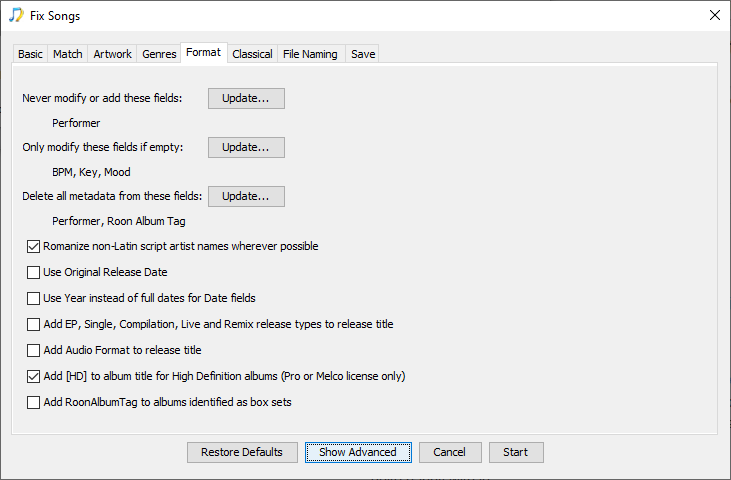
SongKong uses MusicBrainz, Discogs and AcoustId databases, I think Roon uses MusicBrainz and AllMusic, its true MusicBrainz is not as good for Classical and Jazz as RockPop. But there are probably albums matched by SongKong that Roon would not match without the information added by SongKong, and also albums still not identified by Roon but at least it show the information added by SongKong.
Hi @paultaylor,
I should have thought about that delete from field function! I the meantime, I simply exported an Excel sheet to see which albums had the RoonAlbumTags and manually removed them with that little app I’ve found called kid3 (lovely open source app, btw, if anyone needs to edit tags offline, and easily).
Anyways, I really want to thank you for your prompt answer, that means a lot to me and I’m sure to a lot of other customers: you stand by your product and that alone comforts me into thinking that I made a good decision when I decided to purchase a licence.
I was also wondering, If I may, what would be, according to you (and knowing that I mainly listen to classical and jazz) the best settings in Roon> Library> Import settings.
From what I gather, the “prefer” approach means that Roon first checks A, than B if no data was found in A. Now, I thought I could let Roon choose everything, except where there is a “merge Roon and file option”.
Any thoughts?
Thanks again!
Hi, Roon will read and store both values, it is only a matter of display so maybe just stick to the defaults and then adjust on a per album basis if there was a particular issue. But there are roon customers on this forum that use roon to a much greater degree than me and maybe able to give more direction.
Hi @paultaylor,
So I’ve tried every option, and it would seem that Roon reads the file credits whatever Library> Import settings one chooses.
That creates annoying redundancies like those in the screenshots which show a typical example, in that case, Purcell’s King Arthur by Alfred Deller. Alfred Deller will appear twice (1. “Alfred Deller”, Roon version with picture and 2. “Afred Deller (Countertenor Vocals)” SK modified file, no picture). For some albums credit will show as much as 3 times, for example: Artist A, A (solo), A (Cello).
Any idea how I can fix that without having to edit every single album manually?
I have certainly overlooked something. Right now, the best option seems to be “Roon” instead of “Files”, but even then, it creates duplicates for most albums.
Edit 1 : I just checked my Jazz albums, it does exactly the same thing as classical ones.
Thanks again for your help.
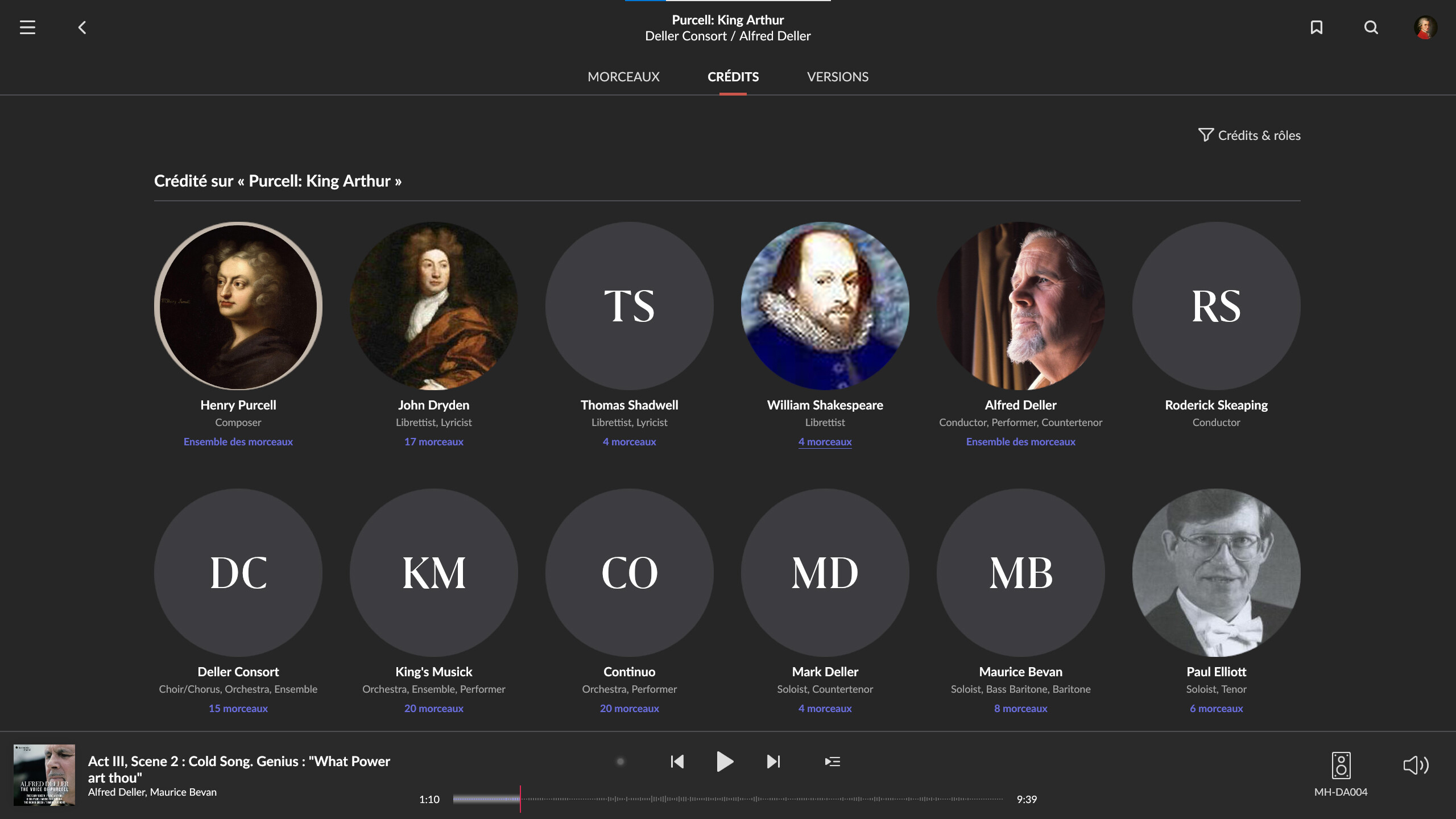
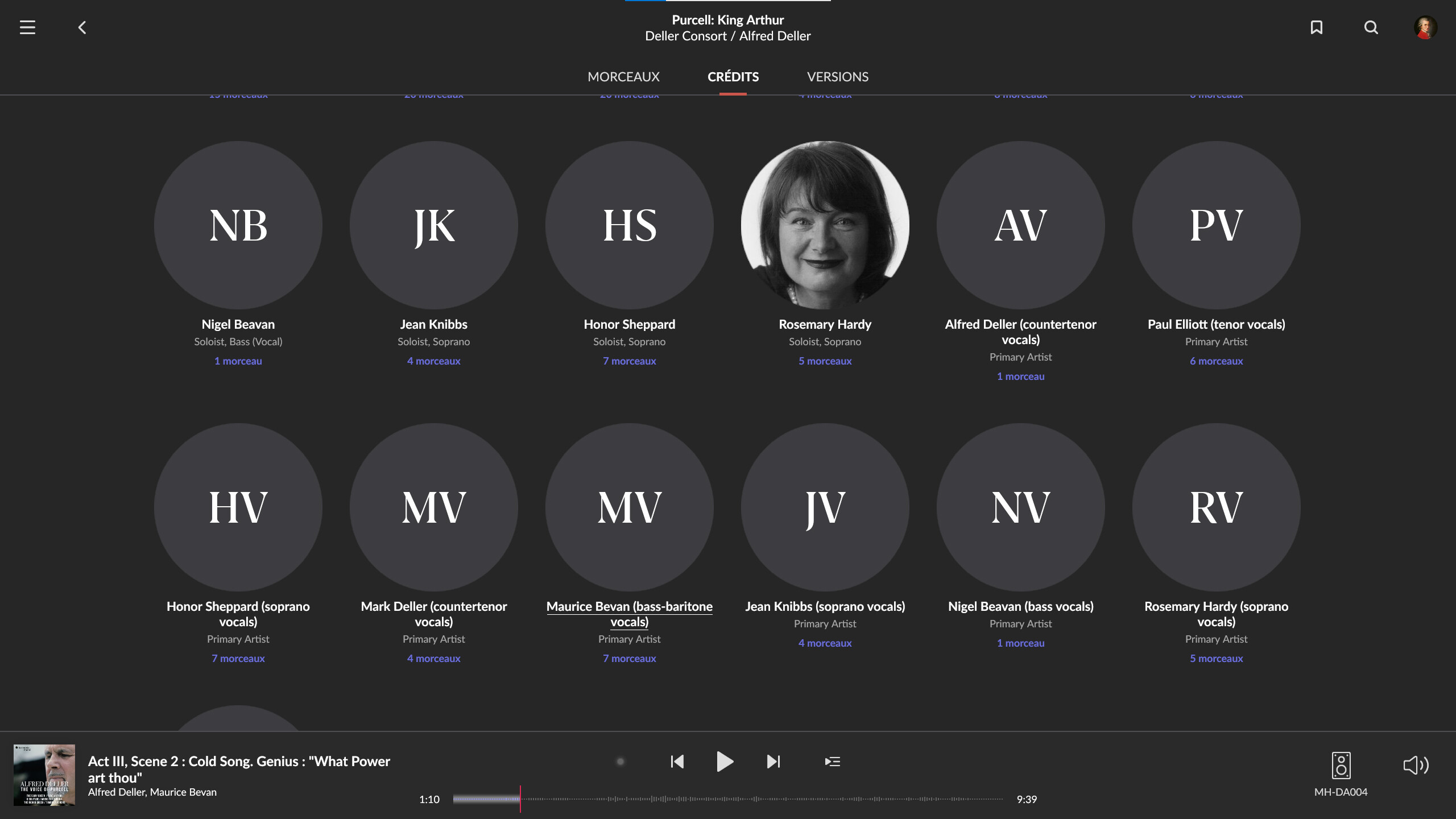
Edit 2: Ok, so I’ve checked the post-fix-song excel spreadsheet, and the fields that seem to be responsible for duplicates are “involved people” and “performers”. Those fields contain parenthesis like: Alfred Deller (countertenor vocals); Paul Elliott (tenor vocals); Honor Sheppard (soprano vocals), etc. Maybe ticking “never add” and “delete” these fields in SK fix songs options will do the trick for Roon users?
The issue is the performer field because Roon uses it in a non-standard way, but this is all sorted for you if you use the Fix Songs, Roon profile, I think the issue is you ran with the Default profile, if you rerun Fix Songs with the Fix Songs, Roon profile that should sort it out - Basic clean up of Music library for use with Roon - SongKong with Roon - SongKong and Jaikoz Music Tagger Community Forum
Thanks for the clarification, @paultaylor,
To be sure I am also adding the 'involved people" field because many classical or Jazz titles have parenthesis in it like Artist A (violin), etc., ending up with potentially 3 displays of the same credit, like in this title for exemple : https://www.discogs.com/fr/Ophélie-Gaillard-Pulcinella-Orchestra-Antonio-Vivaldi-Vivaldi-I-Colori-DellOmbra/release/16205412
Can I suggest you do it without adding involved people because if you do that SongKong will add very few credits and this means (amongst things) that for albums SongKong can identify but Roon still cannot you will only see the album metadata without credits. I think you will find just running Fix Songs, Roon profile should fix this issue, if there are still a few issues I can address them for you but I would need your SongKong support files, and a roon screenshot to see how it manifested itself, Discogs link on its own is not very useful.
More information about the performers issue at Why does Primary Artist contain non Primary Artists with their role? - SongKong with Roon - SongKong and Jaikoz Music Tagger Community Forum
Many thanks for that helpful information.
Hi. To me it seems that SongKong can do just what I need. I’ve been using LOTS of other software to get my library in good shape. I really hope SongKong can do the job 
After Mac OS update SongKong is soooo slow. What changed
Guys, once I4ll get my music stored locally (still downloading it), I will give songkong a try ! it looks so promising ! my main goal is to get rid of several thousand of duplicate albums I have.
Question, is there a way to try the songkong pro version in order to have an idea about speed improvements it brings before I buy it ?
Not aware of any issue, is this M1 or Intel chip?
With Lite you can run in preview mode and see he results you would get with pro. Speed is going to be similar, with pro lookups are quicker but then unike preview if you are actually modifying the audio files that will slow things down a little.