Thanks Harry,
I’ve updated without any problems, but I’ve noticed one other “issue” with this build and 4219. The API that I was using to retrieve running version and pending update etc isn’t working anymore (but CPU temperature still does). I know you’ve started making changes to the API and this might be expected, but when you go to :8080 it then links to a page that doesn’t exist https://docs.verox.audio/advanced-topics/local-api/ .
Thanks James, and good to hear the update went smoothly! Yes, that’s expected: from 2026.10 on, only a small set of API calls answers from the network, and the rest only work on the device itself. Version and update status are still there, under these calls:
http://<device>:8080/api/get_version_v2: the running version (full,semver,channel)http://<device>:8080/api/get_state_v1: whether an update is ready (update_available,update_info,update_installing)http://<device>:8080/api/get_system_info_v2: the system information
The documentation page the API page links to goes live with the 2026.10 stable release. That’s why it’s a dead link for now, sorry about that.
Hi-
I just came back to Ropieee, I mean wait, Verox, after a while running a different RPi Roon OS. Good to be back. Immediately got onto beta channel. All looks great so far.
Wanted to try Plexamp/Caldera. I tried the same approach I had for NAA across VLANs to figure out discovery and how to configure my relay. But… looks like lots of people say it’s impossible to get it to work. So what’s the deal - actually impossible to run across VLANs?
Welcome back, good to have you here again!
Honest answer: I haven’t tested Caldera across VLANs myself, so I can’t tell you for sure. Here’s what I know about how Plexamp finds it, which should help you set it up:
- Local discovery: Caldera answers Plex’s own discovery (GDM) on UDP 32412. That’s broadcast traffic, not mDNS, so an mDNS reflector won’t carry it to another VLAN. You’d need a UDP broadcast relay for port 32412, similar to what you did for NAA.
- Through your Plex account: Caldera also registers its address with plex.tv, so Plexamp can learn about it that way too. For that to work, the VLAN with your phone or computer must be able to reach the Verox device on TCP 32500. The Verox device itself must be able to reach your Plex Media Server, on TCP 32400 by default.
Make sure you control it from the Plexamp app, not the regular Plex app, which doesn’t cast to it properly.
If you get it working, I’d love to hear what it took!
Please add a Pibuz renderer:
Thanks for the advice, this got it working from desktop Plexamp, and I found an iOS bug.
Setup: Caldera 1.2.0-beta.9 on VLAN 60 (/24), controllers on a separate VLAN that is a /23.
Desktop works, with a UDP relay for 32412 plus firewall rules for the GDM replies, TCP 32500 and TCP 32400. It plays end to end.
iOS doesn’t. Plexamp on iPhone sends its GDM M-SEARCH to x.x.10.255, the /24 broadcast address, but the subnet is a /23, so the real broadcast is x.x.11.255. The packet never leaves the phone: it just ARPs for an address nobody owns. When I temporarily assigned that address to a host, the M-SEARCH packets arrived on UDP 32412. Desktop Plexamp on the same subnet uses the correct broadcast address.
Who knows… Could the iOS app compute the broadcast address from the actual netmask? This would hit anyone on a subnet larger than /24, not only across VLANs.
But honestly, if I can plexamp to caldera from my MacBook or mini, I’m in business! Do you know where I can report the weird asymmetry? Anyways, awesome!
Also, looks like there was a bug on the mobile so it was arping based on assumption that it was on a /24 even if it wasn’t. Not sure if that was it, but I’ve got it working from an old production build on my Mac playing just fine with that relay set-up.
Elan confirmed:
One more funny thing @spockfish - caldera is playing at a FAR higher volume than RAAT or NAA or Spotify on the same box. Makes tuning Plexamp volume hard given the volume slider is over on the way left side. Guessing this is a plexamp / caldera problem not a Verox problem, but thought I’d ask if you could make any sense of that? Do you have any thoughts?
Here’s what I wrote to the great Elan…
Thanks!
caldera has a hybrid volume curve that ranges between 0 and roughly -64dB … compared to roon’s flat log curve (0 to -80 ?), the total range is smaller … it’s a bit steeper at the low end and a bit shallower near the top end … if your setup needs 40dB+ of software volume attenuation, that would put you down near the steep bottom end of the caldera curve while roon’s curve might put you closer to the middle of the range
but you’re running roon at roughly -14dB … that’s nowhere near 10% on the caldera curve (roughly -45dB) … are there additional software attenuation steps you’re using in roon etc ? headroom, volume leveling, etc ?
Super helpful - I did not realize they had different volume curves, that’s very very interesting & helpful for a start.
Nope, not using DSP or volume leveling (outside of HQPlayer, which when I use it is in DSD which has a ~6dB boost vs PCM as far as I understand it.
Your feedback on plex forum helped me get up to 20% which is FAR better.
yes the volume curves are quite different … caldera’s was chosen to be less steep over most of its range, which tends to work well when controlling a slider with your thumb 
still sounds like there might be more attenuation in your roon setup that’s not yet accounted for (signal path comparison might help highlight any remaining differences)
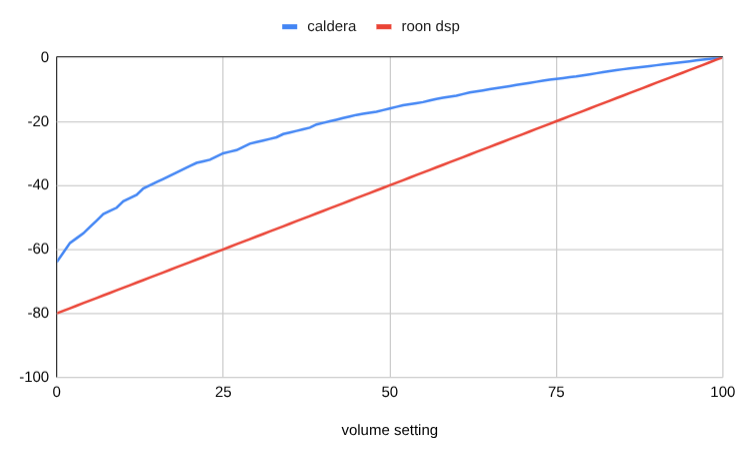
That is smart & awesome that it’s a log curve - the rationale and user experience makes perfect sense…
the ironic thing is that I’m actually stuck on the portion of that curve which is steeper than linear, which is I guess why I’m complaining about it! Sorry to Harry, because I know that this is not Verox related (unless it’s something very specific about the Verox implementation of caldera headless, which I highly doubt).
Thanks for the follow-up… You think Elan would ever implement negative pre-amp values?
yes, might be helpful for setups like yours
(tho relying so heavily on software attenuation while cranking up the physical preamp volume … i’d live in fear of stray full-scale signals getting thru  )
I hear you! It does frighten me.
But what’s so odd is that every other source requires me to keep pre-amp at ~60% in order to have “truly uncomfortable volume but not damaging” be at -3dB. So if I could normalize them I’d be quite happy.