Long story short, I recently uninstalled the Chord Hugo 2 driver from my computer completely, the improvement of the sound quality is day and night, plus no more noise issue that I had before with the higher sample rate. So if you are not satisfied with the sound quality or experiencing noise/crackling sound issue with your Hugo 2 via USB connection before, give this solution a try.
I thought that the Chord Hugo drivers were essential to the correct functioning of the device?
I would aslo think a reinstall of drivers would be more appropriate if there’s an obvious issue.
Which driver is your post about?
ASIO or WASAPI ?
Which did you uninstall?
Uninstall both Chord drivers, you should see them when you open control panel->uninstall program, after that just use the default WASAPI from Windows.
this is what’s on my the other computer, there should be another one named Chord ASIO version 1.0.5

I thought so too before, until when I set up a new PC during the weekend and I decided to try without the Chord driver, I was shocked how good it sounds, just to compare, I installed the Chord driver on my new PC after, but it sounds like a downgrade to me, and the worst part of the Chord driver is the strange white noise/crackling sound when play with high sample rate sound tracks.
Thanks for the information, I’ll give it a try…
I don’t have any issues with Hugo2 and Chord’s ASIO driver. I was just curious what the issue is.
I mostly use Hugo2 with macOS though, which doesn’t need additional drivers.
Since Win10 natively supported UAC2 , then it should be fine without Chord’s driver, just like macOS and Linux.
Hi all,
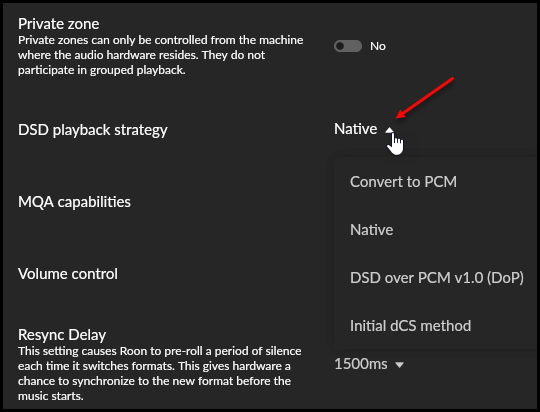
I know that this post is an older one, I have the Hugo2 and was using it from my Windows 11 laptop which was acting as my Roon Server. The Chord ASIO driver is only needed to listen to DSD tracks Natively I believe or use windows drivers specifically designed for the Hugo2 by Chord. WASAPI only does Convert to PCM or DoP (DSD over PCM) for the Hugo2. There is no option to listen to DSD natively with WASAPI for the Hugo2, only with the Chord supplied ASIO driver in windows.
So, if you do not want to listen to DSD in native format (which if you read the plethora of posts on what the hugo2 does to a native DSD signal you may choose not to) then you only need the native windows WASAPI driver.
There is a BUG/Defect in that driver which I found and reported. Chord have repro’d (reproduced the error) and have created a newer version that has been tested that has been sent to MS to approve so that it can be released.
The issue I found was when tracks in a specific playlist change from hi-res PCM 24 & 32 bit 352.8 & 384 where the next track is DSD512 (native) the playback signal corrupts resulting in static noise & not music.
I myself have stopped listening to the Hugo2 from a windows laptop & instead built an ASUS Intel NUC as a R.O.C.K (64GB DD4 3200Mhz RAM & 4.5 TB storage). As this is a cutdown headless Linux OS there are only ALSA drivers which means for the Chord Hugo2 there is NO native DSD playback only DoP or convert to PCM. My iFi xDSD Gryphon has native DSD on the ALSA driver not the Hugo2.
So, @Junhua_Huang the question about the ASIO vs WASAPI is valid. The Chord supplied driver for the Hugo2 is believe is only ASIO. When I had it installed, I never saw an Audio output device in Windows for that driver as WASAPI only ASIO.
Did you listen to DSD tracks as Native with the Chord ASIO driver or did you select DoP or convert to PCM in the Audio device setup?
Cheers
V/-