· I have a Roon Nucleus One with Devialet speakers. I am using the QOBUZ streaming service. I also have a GBL GO3 portable speaker, not connected to my system. Can I connect this old speaker? If so, how? I a not very literate with these matters.
The only input method for the Go3 is Bluetooth, but simply install Roon or Roon ARC on your phone and pair the phone’s Bluetooth with the Go3.
If using the Roon app, you can control it from the Roon app on the phone or any other Roon control device as well, just choose the phone as the Roon zone. If using ARC, you will only control it from the ARC app on the phone.
ARC would have the advantage that its streaming connection is more resilient to poor network connection, if you want to use the Go3 in such an area of your house. And of course ARC can be used on cell connections as well, if that’s properly configured.
As Suedkiez correctly explained, the JBL GO3 connects via Bluetooth only. Here are a few ways to use it with Roon:
Option 1 - Phone (simplest): Install the Roon app on your phone, pair the phone’s Bluetooth with the GO3, and select your phone as the playback zone in Roon.
Option 2 - Computer: If you have a PC or Mac with Bluetooth, pair the GO3 with it and enable that computer as a Roon zone under Settings → Audio.
Option 3 - Raspberry Pi with RoPieee: If you want a dedicated solution, a Raspberry Pi running RoPieee with a Bluetooth dongle can act as a Roon Bridge endpoint and stream directly to the GO3.
Just checking in on this. Were you able to try the options we mentioned for the JBL GO3, pairing it to your phone running the Roon app, connecting it to a Bluetooth-enabled Mac or PC and enabling that machine in Settings → Audio, or setting up a Raspberry Pi with RoPieee and a Bluetooth dongle? If you’ve tested any of those, let us know what happened and we can take it from there, thanks.
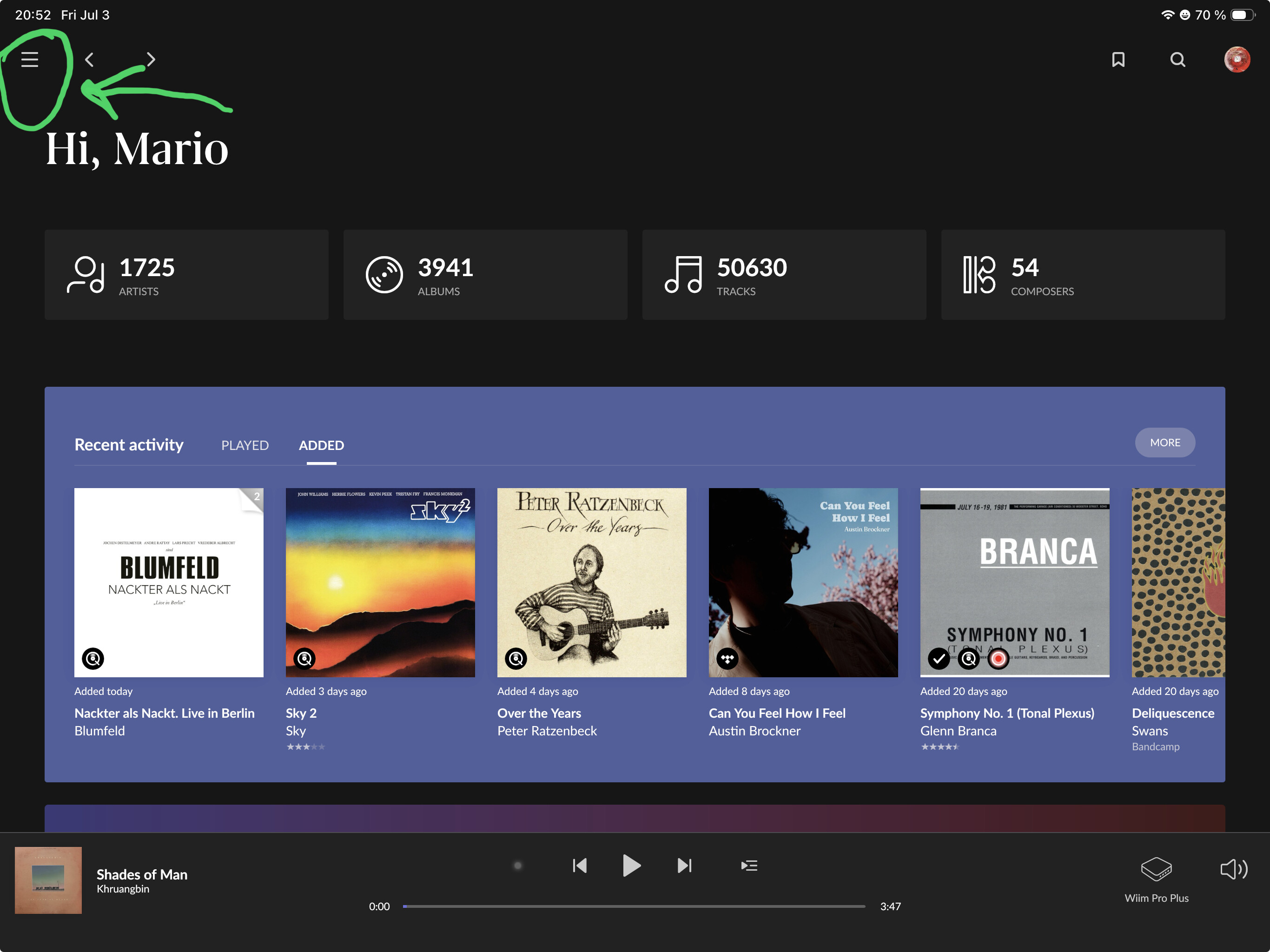
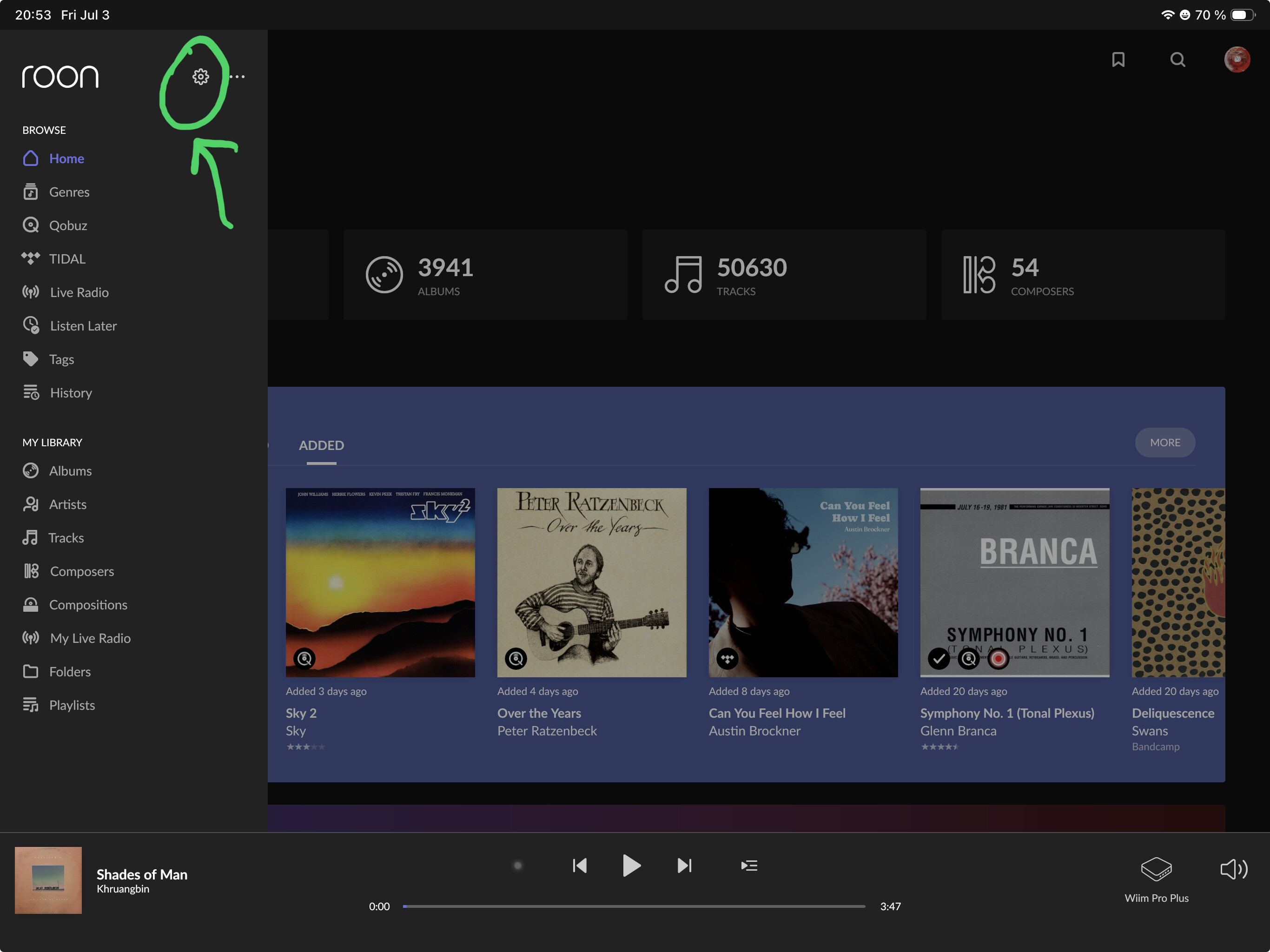
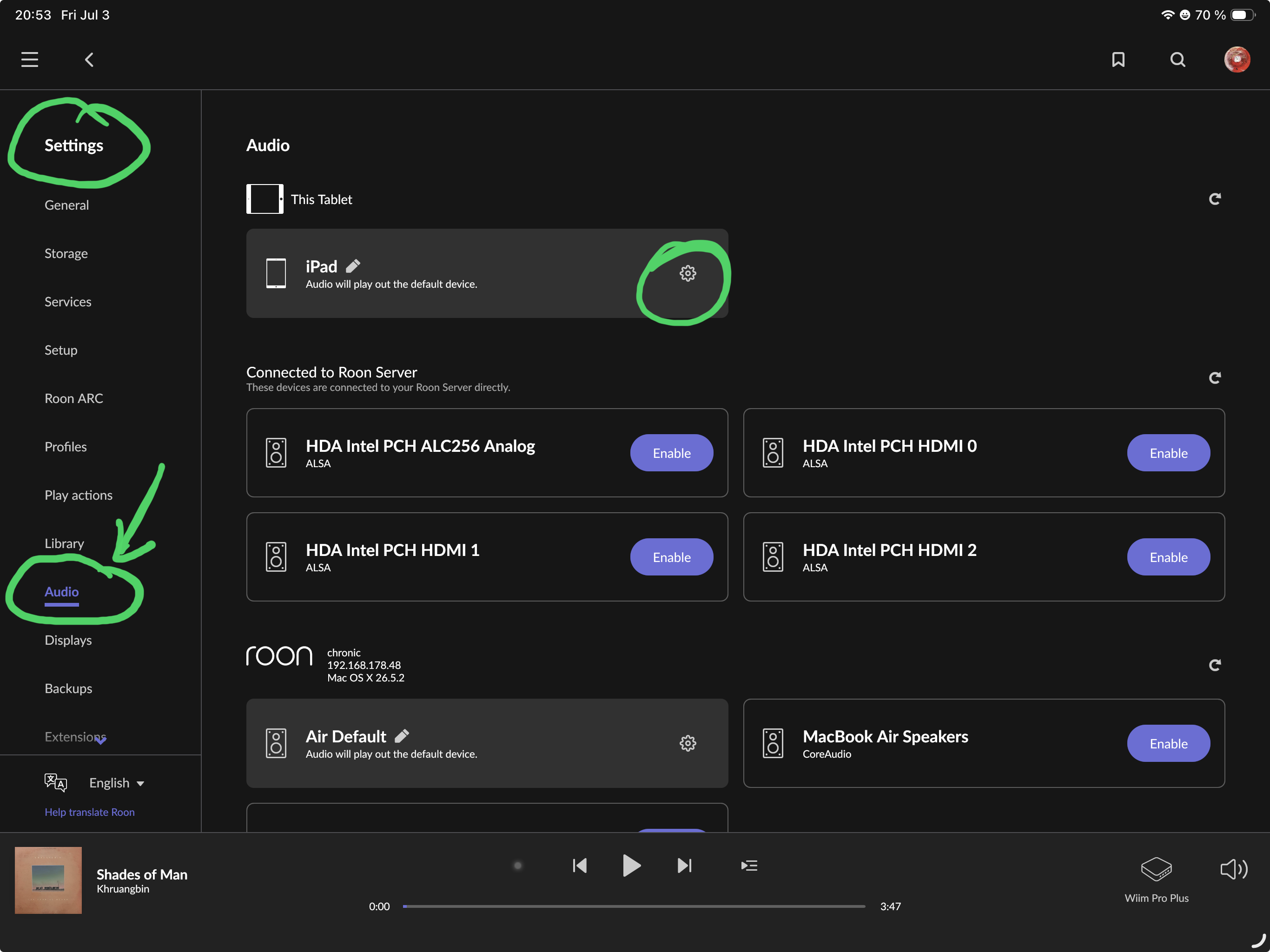
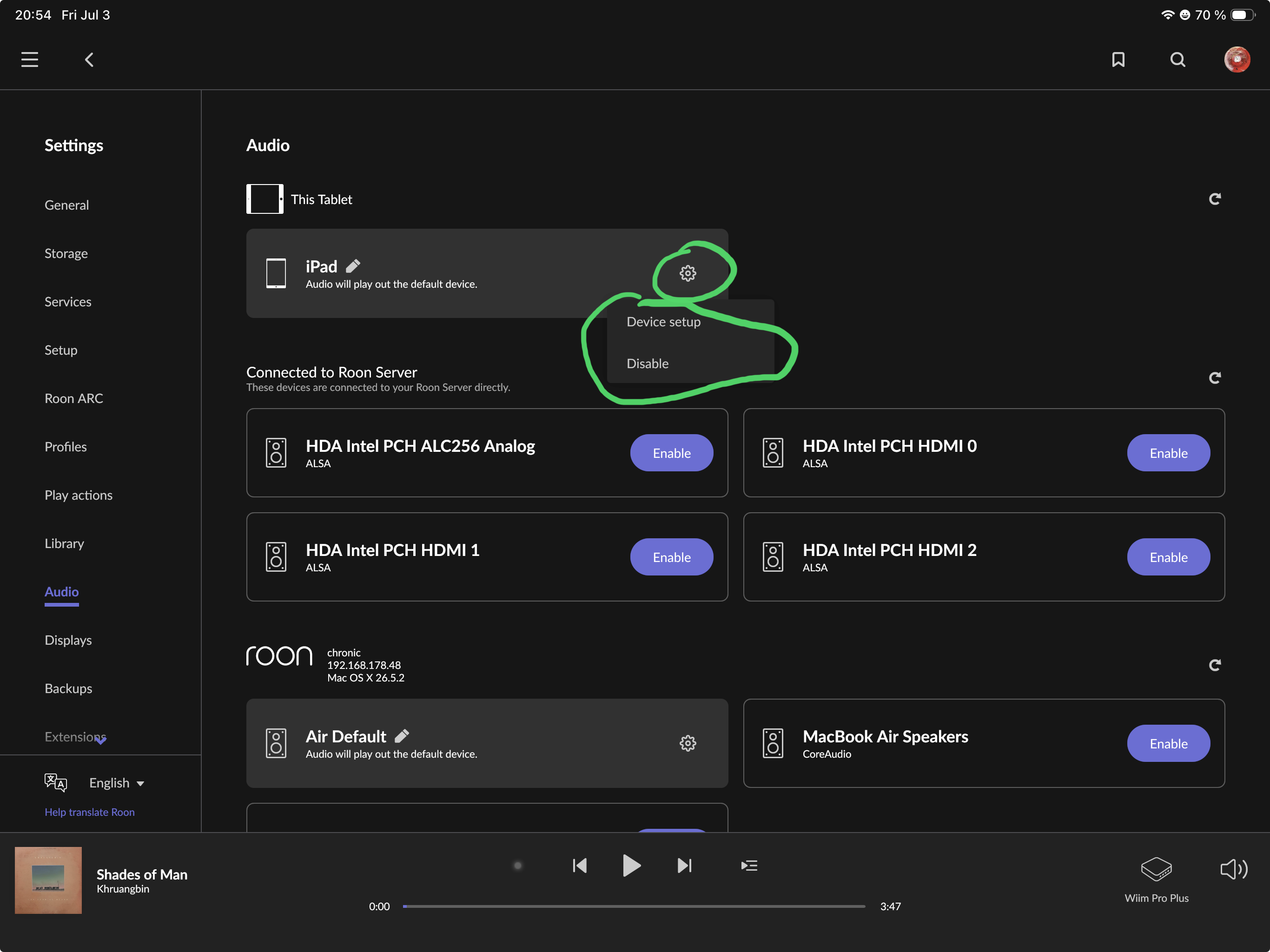
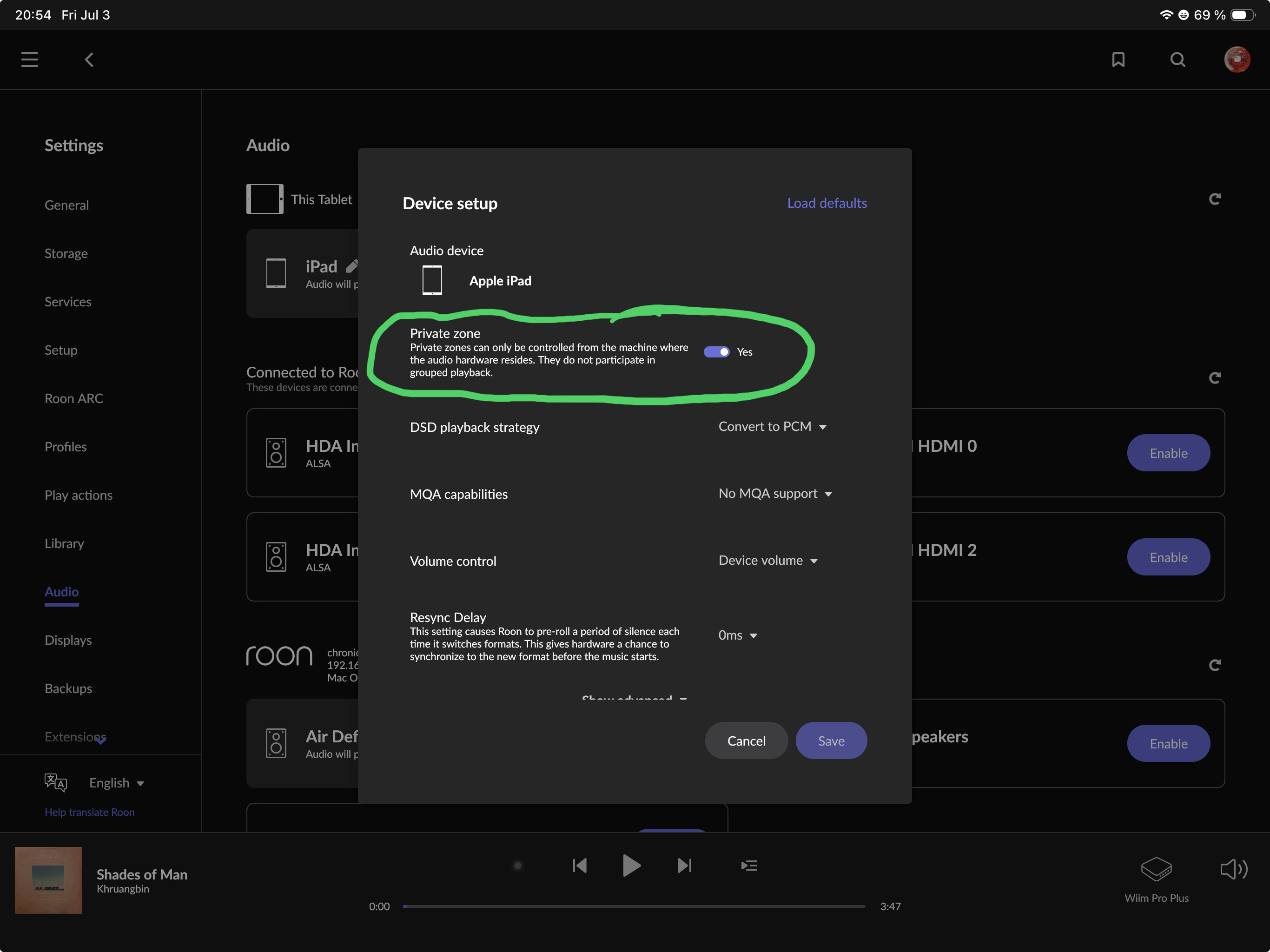
The iPad and iPhone is configured as a private zone by default, so you can’t see them from other Roon devices. Go to Roon > Settings > Audio on the iPad itself and turn off „Private“ to make them visible for other devices:
And note that you will never see the JBL device itself from Roon because it’s not Roon Ready. You have to enable Bluetooth on the iPad, connect the iPad and JBL by Bluetooth, then choose the Roon output zone to be the iPad.
As @Suedkiez explained, the iPad is set as a Private Zone by default which is why you cannot see it from other devices. On the iPad itself, go to Settings → Audio, find your iPad in the list and turn off “Private” - then it will be visible as a zone from any Roon remote.
And just to confirm: you will never see the JBL GO3 directly in Roon’s audio sources - that is expected. You just need to select the iPad as your zone, and since the GO3 is already paired via Bluetooth, the audio will play through it automatically.
Just checking in on this. Were you able to go into the iPad’s Settings → Audio and turn off Private for that device so it shows up as a zone in Roon Remote? Also, as we mentioned, the JBL GO3 itself won’t appear as an audio source in Roon, so the iPad should be the zone you select while the Bluetooth speaker handles playback. Let us know what you find, thanks.
Thanks for the message. No, I can’t find Private Off anywhere in the audio settings. In fact to get to audio I have do a search in Settings. My iPad is fairly new. Frustrating.
As Suedkiez suggested, please follow the Private Zones guide and share a screenshot of what you see in Settings → Audio on your iPad. That will help us pinpoint exactly where you are getting stuck.
Just checking in on this. Were you able to follow the Private Zones guide and the guide provided by @Suedkiez? Have you been able to create the screenshots on your iPad so we can see where things are getting stuck? If you have that handy, reply with the screenshot or any updates. Thanks.
Thoroughly frustrated. This is obviously beyond me. Took some screen shots, but sure how to include them in this reply.
I have set my Roon private zones at YES. I am unable to get my iPad Air anywhere near audio. Heading in for knee replacement surgery in a couple of weeks. So I think I will end this now and see if my local equipment provider can help me.
If it’s set to Yes, you can only choose the iPad output directly on the iPad.
If you want to be able to choose the iPad output from another Roon control device, set the private zone on the iPad to No.
The idea is that a mobile device that is configured as a private zone shall not selectable from elsewhere to avoid accidentally blasting music to another household member’s mobile.
This is all explained on the help page I posted days ago:
Thanks for the update, and I am sorry this has been such a frustrating experience. Given that your Roon private zones are set to Yes, please try setting the Private Zone to No and let us know how this goes.
That should allow the iPad output to be selected from another Roon control device. If you can, please report back with the result.
 icon.
icon.