What is the operating system of your Roon Server host machine?
· Roon on a NAS (Synology, QNAP, ASUSTOR)
What kind of device are you using to perform the login?
· Mac
Where are you trying to login?
· I can't log into Roon
Have you been redirected to [https://account.roon.app](https://account.roon.app) (the Roon login page) in your browser?
· Yes
Please try clearing the browser cache and cookies for the [l](https://account.roon.app/)ogin page where you have been redirected
· No, the issue remains the same
Content / Popup Blockers
· No, the issue remains the same
Temporarily try to use a different browser
· No, the issue remains the same
Please try to restart your Roon Server by closing the Roon Server app in the taskbar (MacOS), task manager (Windows) or rebooting your Roon Server machine.
· No, the issue remains the same
Different device
· I am able to switch to the diffrent device
Are you still facing the issue on the different device
· No, the issue remains the same
Record the timestamp
· Waiting for Roon Server: 2026-05-18 2:36:51
Describe the issue
Unable to connect since the latest update on NAS QNAP version QTS 5.2.9.345
The Roon Server package no longer works, please switch to the official Docker image to run Roon Server on your NAS. See also:
You can use the forum search to find answers to questions that arise when switching to the Docker installation as already some time has passed since the change so most of the questions have already been asked and answered since then.
Welcome to the community, and thank you for reaching out with those details and the timestamp!
As @BlackJack correctly pointed out, the root of this connection issue is that the old native QNAP application (the QPKG file you previously installed) is no longer supported following our recent updates. The software requirements have changed, and the native app will no longer successfully launch on your NAS.
Moving forward, Roon Server must be run on your QNAP using Docker via QNAP’s built-in Container Station app.
I understand that switching to a Docker container might sound a bit intimidating if you haven’t used it before, but please rest assured that your underlying music files are completely safe. We have a step-by-step guide with pictures to walk you through the entire process here: Installing RoonServer on QNAP with Docker
Please take a look at the guide and start the transition. If you run into any roadblocks, error messages, or just want us to double-check a setting before you click “Create,” please stop, take a screenshot, and reply directly to this thread. We are more than happy to hold your hand through the setup process!
Hi Vadim & BlackJack. thanks for the solution. I started the installation. I am unable to complete step 1.
At the Container station installation I keep on getting the screen to start. I never get the step 2 screen. I must have an inadequate QNAP configuration; Pease let me know what is missing in my QNAP: TVS 471 i3 : 3 disks 8TB, 7000 RPM ironWolf Raid 5 = 14TB + 1SSD 240GB + 4GB RAM; RoonServer is on SSD drive.
You mean, Container Station app in your app center is not running or not installable?
Hardware is absolutely sufficient to run Container Station. 4GB RAM is not much but should work.
One remark: Having the previous Roon Server installation on SSD, is unrelated to where you will run Container Station and containerized roon with its database. Before you start the installation process, you might want to make sure that the shared top-level folder /Container is mounted on the SSD volume, not the magnetic discs. You can check and alter in QTS desktop under System preferences > Shared folders.
Container station seems partially installed. It is in the shared folders, on an SSD volume & Drive ( where the old RoonServer is installed).
Every time I start the Container station App, I get the message to start. It looks like partial installation. May be I am missing some prerequisites. See attached:
The process requires to do a backup. But I am unable to start Roon to make a recent backup. I have copied the whole folder on my QNAP other Volume where the music files reside
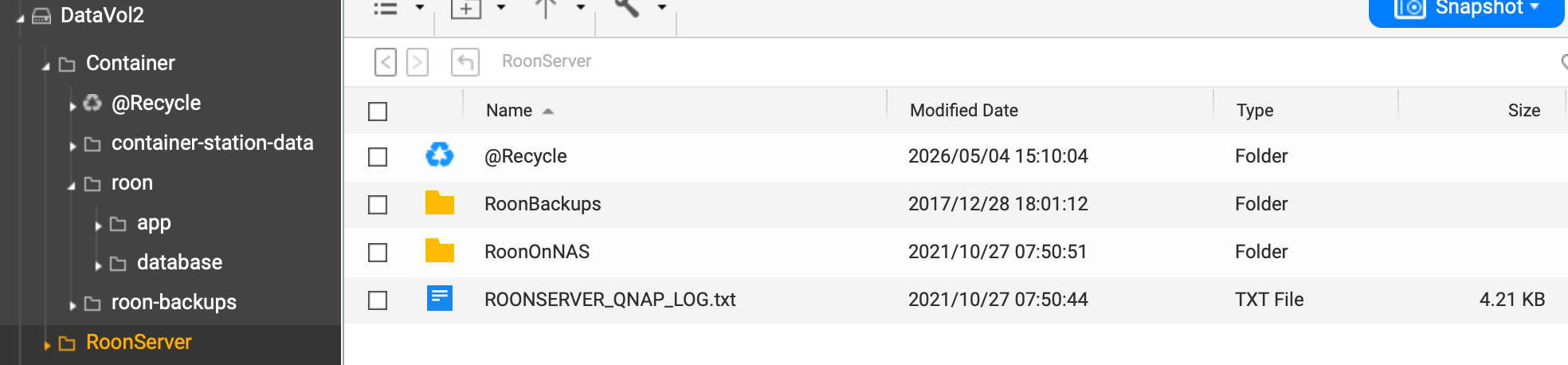
Thanks for sharing screenshots. It looks like Container Station is either not capable of accessing the shared Container folder, or something is blocking it from writing in there (maybe remnants of a previous install, or corrupted folders of the same name). The folder has only 44K and one file in it. That should be rather in the hundreds of Megabytes and thousands of files.
I suggest to deinstall Container Station and empty the /Container folder fully (including its @Recycle), subsequently editing its properties under > Shared Folders that any user or process is allowed to read and write, and checking that the DataVol2 has enough of free space. Then try to install Container Station again and see what it writes in the /Container folder on startup. A folder called /container-station-data should appear there with a subfolder called /lib which includes a lot of files.
You don´t have any backup from previous installation?
According to Roonlabs staff, it is possible to copy the whole internal database from RoonOnNas installation to containerized roon, once the latter is properly installed, running under Container Station, and (important!) paused. That should replace a backup.
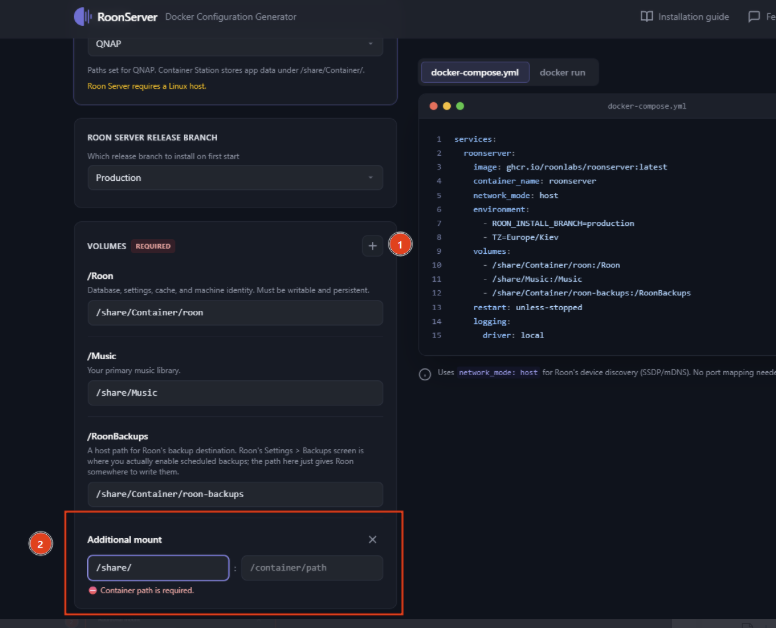
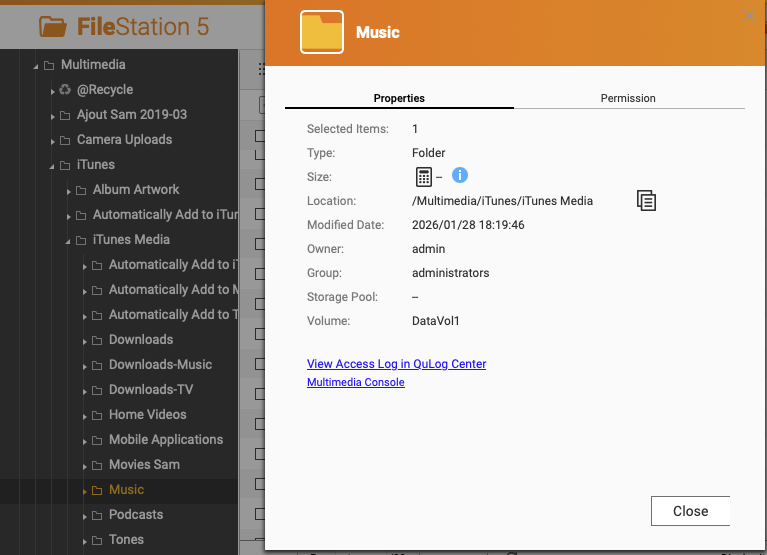
That´s neither the correct path nor syntax, it must always start with /share and the logical volume name does not help here. Try to insert:
/share/Multimedia/iTunes/iTunes Media
so the resulting line in docker compose script should read:
/share/Multimedia/iTunes/iTunes Media:/Music
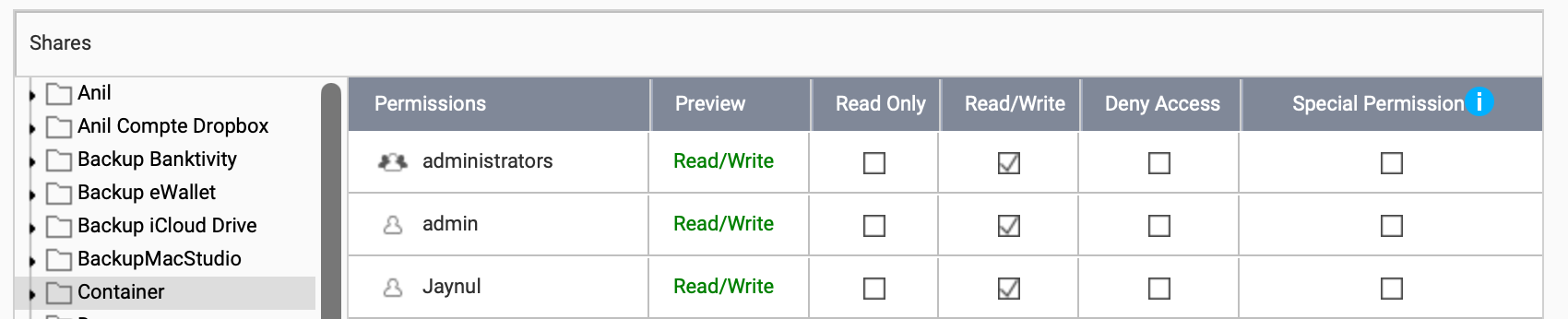
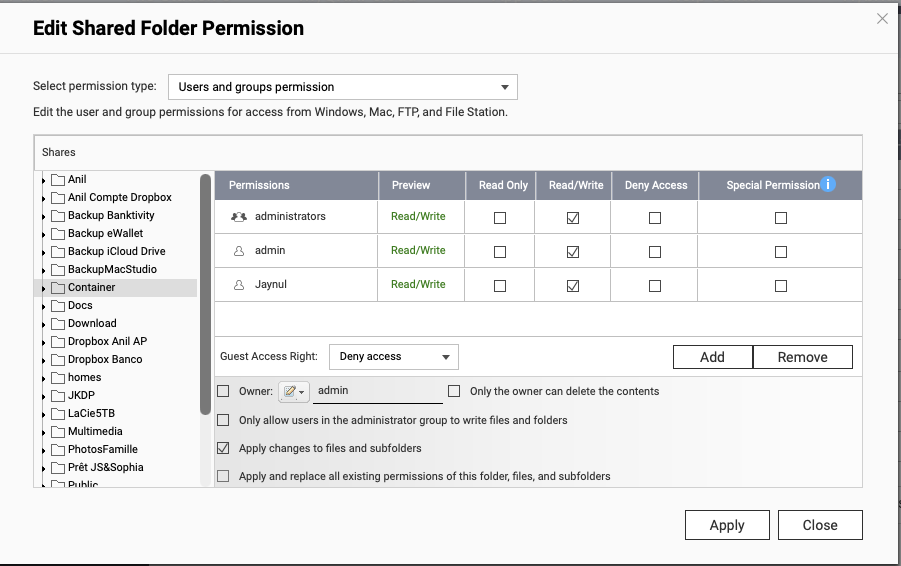
Don´t know exactly what to make out of permission thing, but under Control Panel > Shared Folder this looks healthy. Maybe try as an additional option “Guest access rights: Read/Write” instead of “Deny”.
I was able to install the Container version of Roon.
On Steep 6, I did not get the option to restore from Backup
From my iPad: Eventually, Roon started fresh and I had to put again the path to my Music
So now I can see and listen to my music . But of course, None of my configurations, playlists, genres… is there.
There is a copy of my Old Roon in another place of the QNAP NAS, and I saw there is a very old backup (2017) on my SSD. I have added lots of music since and made lots of customizations.
There is a backup file elsewhere but Since I could not access the old Roon, I do not know how there is a file dated is 2026-05-31 (today just after I started the new Roon)
Maybe I did a backup in 2020-08-23
You said:
You don´t have any backup from previous installation?
According to Roonlabs staff, it is possible to copy the whole internal database from RoonOnNas installation to containerized roon, once the latter is properly installed, running under Container Station, and (important!) paused. That should replace a backup.
Can you be more specific how should I do this? Is it possible to extract from the previous RoonServer?
If you have successfully restored a previous backup, or managed to copy the whole legacy database (while containerized roon is stopped) into the new database folder, you should see all playlists. Are none visible?
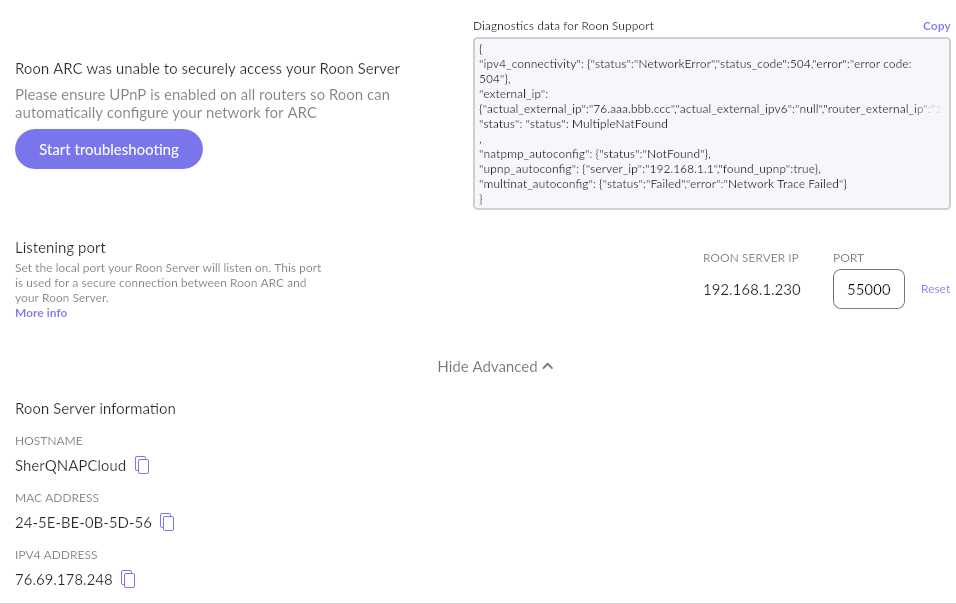
This is a typical error occurring in case several routers/modems, or your router plus your ISP, trying to translate public IP into private one, leading to an IP contradiction. Unfortunately I cannot tell you what to do in your specific case, but I would assume, the same thing you had done when getting ARC running in the first place. It can be putting the router to bridge/bypass mode, establishing port-forwarding routines with fixed IP, really don´t know. Did you try altering the port in Roon ARC setting to the one which you have defined in your router settings? I see port 41586 open there, while Roon tries to communicate via port 55000.
None of the playlist came back from restoring the database.
In the past, I had several “attacks” on mas QNAP NAS. From recommendations:
I closed all unnecessary processes & networks.
Made my username = admin group
disabled QNAP admin
changed the QNAP port
To avoid any permission problems when I started the Roon Container setup:
I enabled the admin account and installed the new RoonServer under container
As described: I copied the legacy database from the old RoonServer to the new one but QNAP did not replaced the existing initial database. To avoid confusion I renamed the original database = Database (Old), but did not remove it.
Should I delete the “old” database? Is Thera any other way to restore my playlists?
May be I repeat the process but I delete the database before copying it from the previous legacy RoonServer?
For Roon Arc:
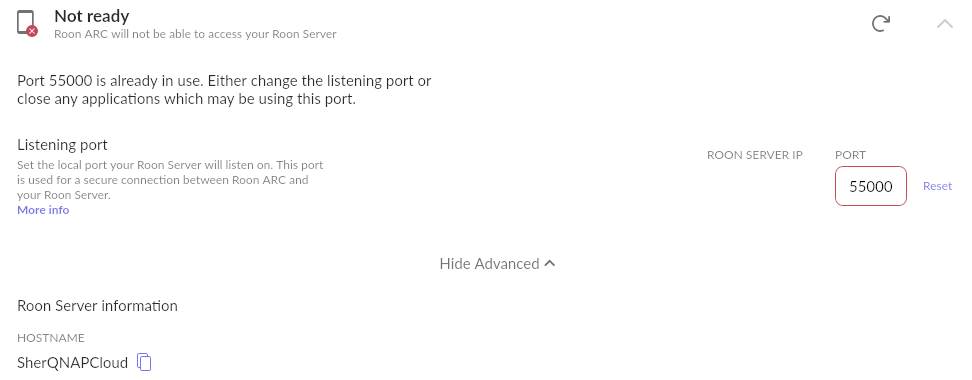
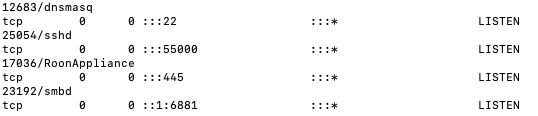
Did you try altering the port in Roon ARC setting to the one which you have defined in your router settings? I see port 41586 open there, while Roon tries to communicate via port 55000. I set my Router to 55000. Everything else is the same as previous setupI still get an error message:
My apologies if this has been glazed over, but have you performed a simple reboot of your router? I would do this, then delete Arc and perform a fresh install, and see if that helps.
If not, perhaps you can test out using a different port number, like 55010, for example. Update the port number both within your Roon Settings > Roon Arc as well as the port forwarding rule within your router settings, and let us know how it goes.







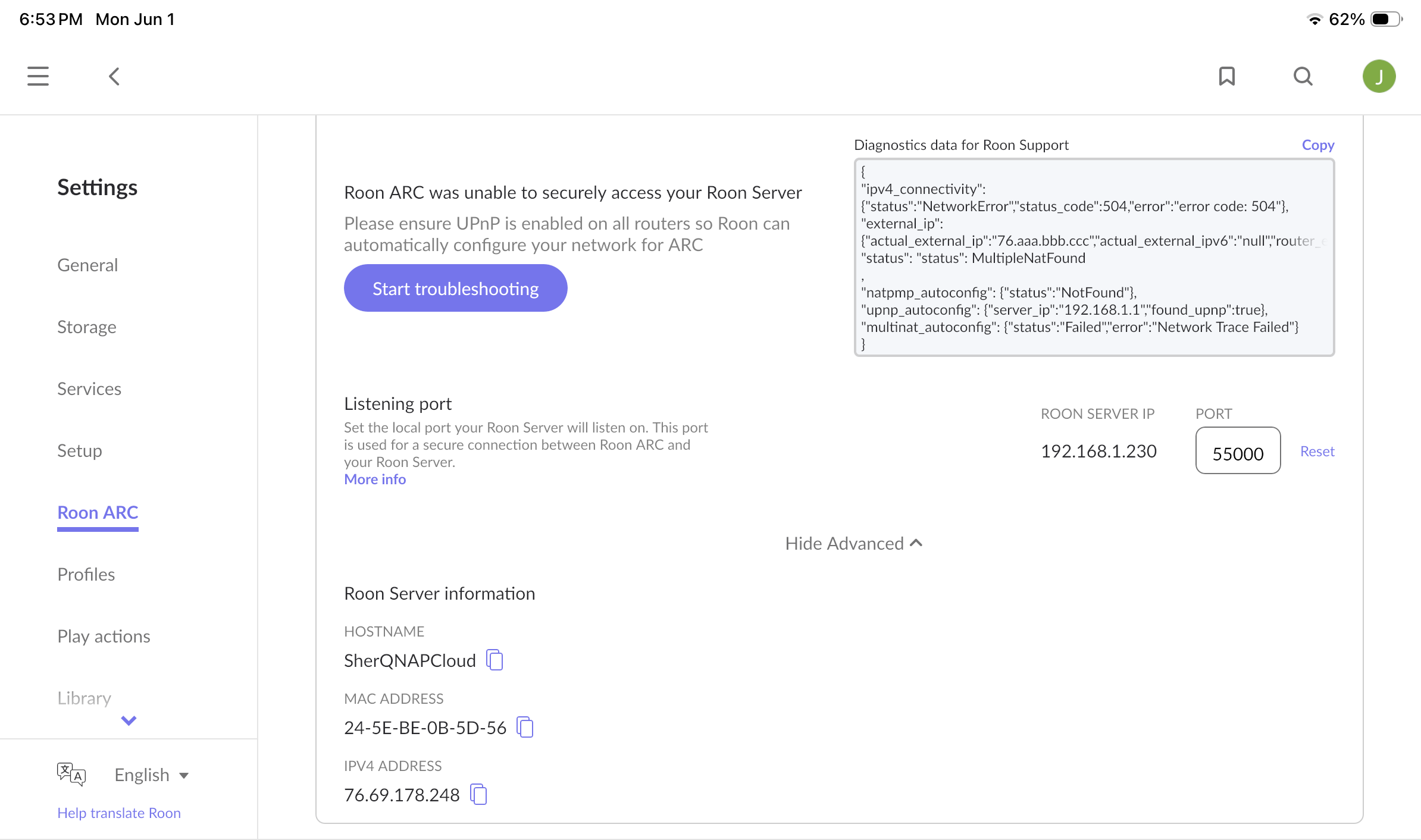
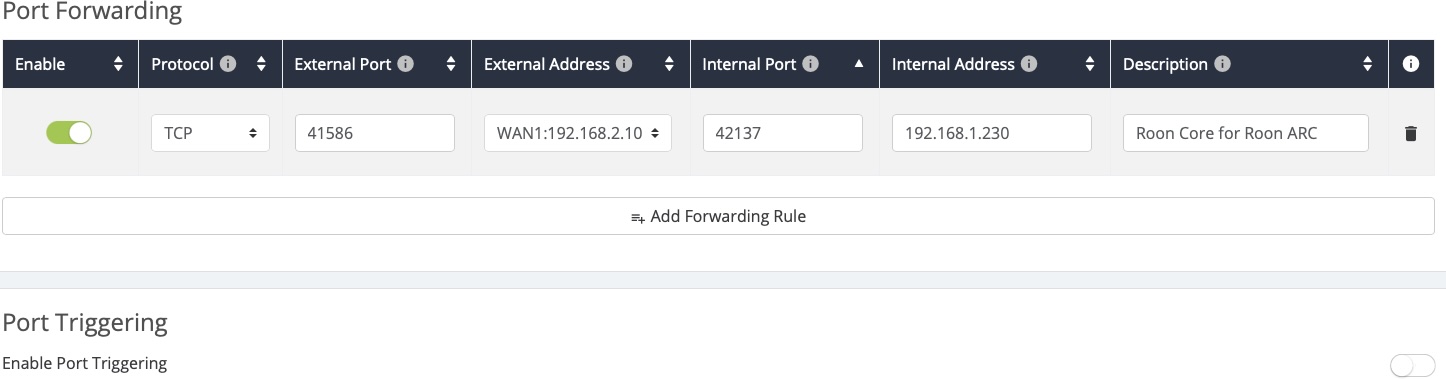

 I set my Router to 55000. Everything else is the same as previous setupI still get an error message: