Container backup issue on QNAP not working (ref#HVO5IJ)

Hi! What’s not quite right with Roon?

· None of the above quite fits

None of the above quite fits

· None of these quite match

Tell us what's going on

· problem with container and qnap backup don't work

Tell us about your home network

· Fritz! box 7590

I think I have the same problem. Restore backup doesn’t find local files. I hope support can sort this out….

Hello @m.minoli and @martingh,

Because the new Docker container is isolated from the rest of your QNAP NAS, it cannot automatically search your entire NAS for backup files. It can only “see” the specific directories you explicitly mapped to it during setup (such as your designated /music folder).

If your Roon Backups are stored in a different shared folder, the container will not be able to find them when you try to restore.

Here are the two ways to resolve this:

Option 1: Move the backups to a visible folder (Easiest)

  • Open the File Station app on your QNAP.
  • Locate your Roon Backups folder.
  • Copy or move this backup folder into the folder you already mapped as your music directory for the Roon container.
  • In the Roon Remote restore screen, navigate to your music folder to find and select the backup.

Option 2: Map the backup folder in Docker

  • If you are comfortable editing your container setup, you can modify your YAML configuration file.
  • Add a new volume binding that points directly to the folder where your backups are stored (e.g., - /share/Public/RoonBackups:/backups).
  • Recreate the container, and the /backups folder will now be visible in Roon.

Please give Option 1 a try and let us know if you are able to successfully locate and restore your local files!

1 Like

Thanks. I carried out option 1. This only restored files that I have previously added to my library from Qobuz, none of my local files.

Did you make sure your :Music path in the docker generator is correctly routed to the container, and the new Music Folder appearing under Settings > Storages, is enabled?

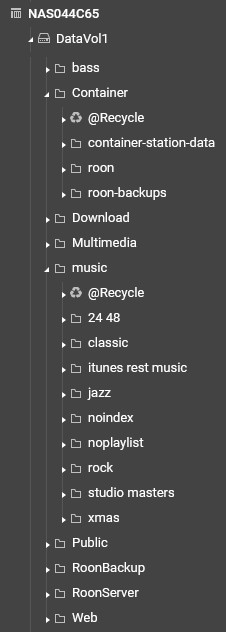
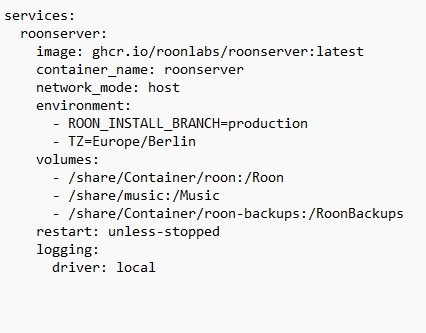
I think I must have something wrong in the configurator. I copied the backup files as you suggested and they are visible in Roon. Just as the local files are, but I can only reindex them. BUT, the local files are not being found when I carry out a restore. Enclosed is my QNAP directory tree and a copy of the YML file.

Your folder logic and share paths look reasonable and match the structure in File Station.

After restoring a backup, under Settings > Storages you might find 2 folder paths: the new share called “Music”, and the non-existent remnants of the folder paths (which roon probably marks as ´not found´). My method was to first restore the backup, keeping all folders disabled, then remove/delete the remnants of the old path structure, and only then enable the new “Music” path. That caused roon to re-indentify the vast majority of tracks which I previously had in other folders.

Does your method ensure that the date added remains as in the previous database? When I have tried enabling the new “Music” path, Roon simply reindexes everything it could find there. (I did not remove the old remnants, but they were disabled)

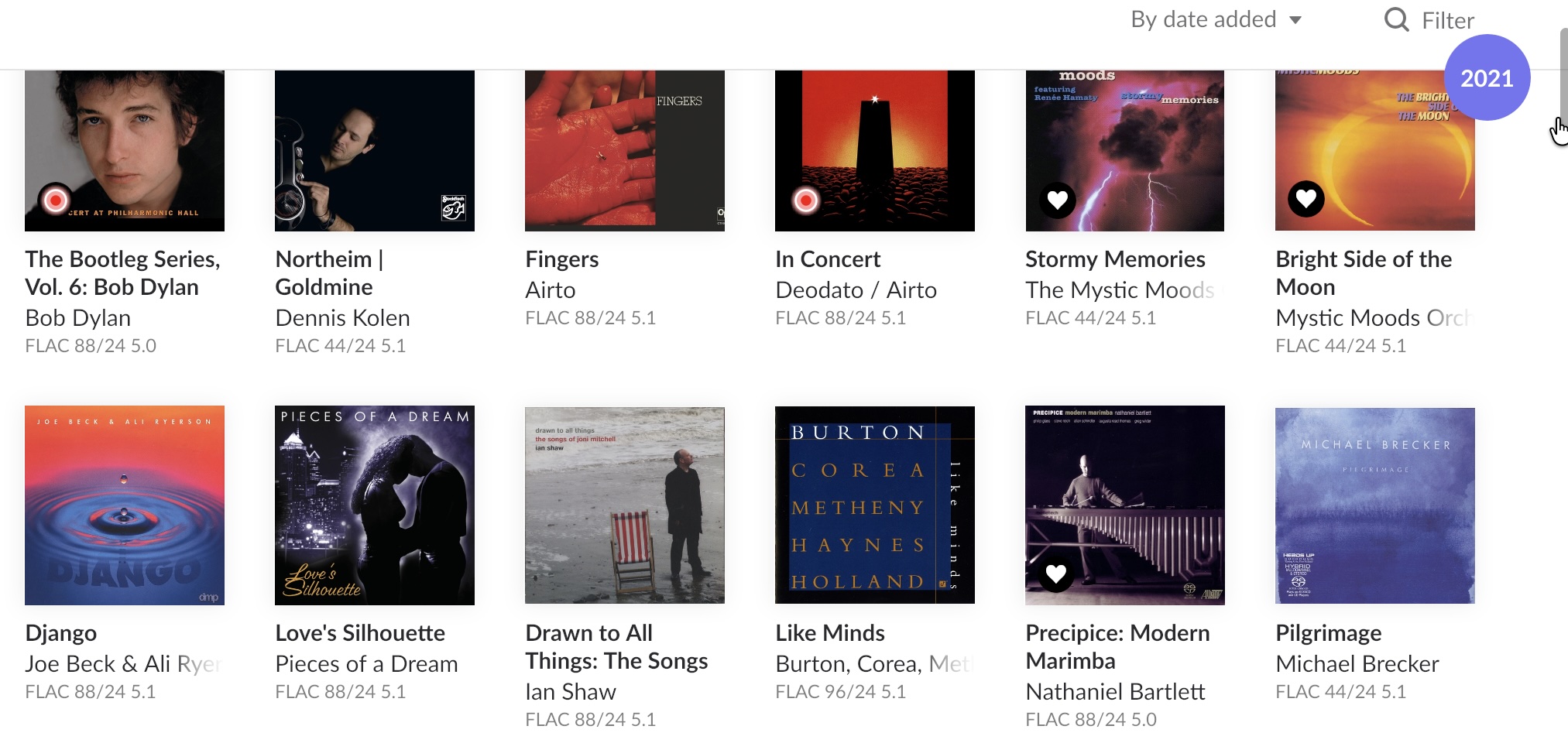
If the albums are identified as the previous ones, just moved into a new folder, this should be the case. In my case, less than 10 albums out of 3,900 were not correctly identified, the rest bears the same date/year added as before the backup:

Albums added in 2021, as an example.

If the old remnants of the paths are still existing, roon expects you to point it manually to the new location of these subfolders, and seemingly did not recognize the same albums as being moved to the new “Music Folder”. Deleting the old folders, before enabling the new one, helped in my case.

Thanks very much for your help!

I finally got it to work! I would not have been able to do it without your help!

The key for me seemed to be to delete the old paths to folders in the Settings>Storage page BEFORE restoring the back up.

I hope someone will be improving the user instructions. This has taken me forever (with much help) to find what is a trivial change to make. Very annoying!

1 Like

No outcome with both options

  • Restore from backup

  • File restoration up to 100%

Then restart

  • Login page

  • Start free trial

  • Restore from backup

Is a factory reset possible?

Container log

Initializing

Started

[Sentry] Initialized for RoonServer (appliance), release: roonserver@206601658+production

Not responding

aac_fixed decoder found, checking libavcodec version…

has mp3float: 1, aac_fixed: 1

Running

Not running

Initializing

Started

[Sentry] Initialized for RoonServer (appliance), release: roonserver@206601658+production

Not responding

aac_fixed decoder found, checking libavcodec version…

has mp3float: 1, aac_fixed: 1

Running

Roon Docker image 1.0.6 starting.

Detected existing RoonServer install (branch: production).

Resolved ROON_INSTALL_BRANCH=‘production’.

Installed branch ‘production’ matches requested branch; no reinstall needed.

Image: 1.0.6

Branch: production

Roon: 2.66 (build 1658) production

00:00:00.001 Info: get lock file path: /tmp/.rnsgem0-

00:00:00.008 Info: GetLockFile, fd: 74

00:00:00.009 Info: GetLockFile, res: 0

00:00:00.010 Trace: Nope, we are the only one running

Initializing

Started

[Sentry] Initialized for RoonServer (appliance), release: roonserver@206601658+production

aac_fixed decoder found, checking libavcodec version…

has mp3float: 1, aac_fixed: 1

Running
Roon Docker image 1.0.6 starting.

Detected existing RoonServer install (branch: production).

Resolved ROON_INSTALL_BRANCH=‘production’.

Installed branch ‘production’ matches requested branch; no reinstall needed.

Image: 1.0.6

Branch: production

Roon: 2.66 (build 1658) production

00:00:00.001 Info: get lock file path: /tmp/.rnsgem0-

00:00:00.010 Info: GetLockFile, fd: 74

00:00:00.011 Info: GetLockFile, res: 0

00:00:00.011 Trace: Nope, we are the only one running

Initializing

Started

[Sentry] Initialized for RoonServer (appliance), release: roonserver@206601658+production

aac_fixed decoder found, checking libavcodec version…

has mp3float: 1, aac_fixed: 1

Running
Roon Docker image 1.0.6 starting.

Detected existing RoonServer install (branch: production).

Resolved ROON_INSTALL_BRANCH=‘production’.

Installed branch ‘production’ matches requested branch; no reinstall needed.

Image: 1.0.6

Branch: production

Roon: 2.66 (build 1658) production

00:00:00.001 Info: get lock file path: /tmp/.rnsgem0-

00:00:00.007 Info: GetLockFile, fd: 74

00:00:00.008 Info: GetLockFile, res: 0

00:00:00.009 Trace: Nope, we are the only one running

Initializing

Started

[Sentry] Initialized for RoonServer (appliance), release: roonserver@206601658+production

aac_fixed decoder found, checking libavcodec version…

has mp3float: 1, aac_fixed: 1

Running
Roon Docker image 1.0.6 starting.

No existing RoonServer install found under /Roon/app/RoonServer.

Resolved ROON_INSTALL_BRANCH=‘production’.

No install present; installing branch ‘production’.

Downloading from https://download.roonlabs.net/builds/production/RoonServer_linuxx64.tar.bz2

######################################################################## 100.0%

Extracting to /Roon/app…

Roon Docker image 1.0.6 starting.

No existing RoonServer install found under /Roon/app/RoonServer.

Resolved ROON_INSTALL_BRANCH=‘production’.

No install present; installing branch ‘production’.

Downloading from https://download.roonlabs.net/builds/production/RoonServer_linuxx64.tar.bz2

######################################################################## 100.0%

Extracting to /Roon/app…

RoonServer installed successfully.

Image: 1.0.6

Branch: production

Roon: 2.66 (build 1658) production

00:00:00.001 Info: get lock file path: /tmp/.rnsgem0-

00:00:00.007 Info: GetLockFile, fd: 74

00:00:00.007 Info: GetLockFile, res: 0

00:00:00.008 Trace: Nope, we are the only one running

Initializing

Started

[Sentry] Initialized for RoonServer (appliance), release: roonserver@206601658+production

aac_fixed decoder found, checking libavcodec version…

has mp3float: 1, aac_fixed: 1

Running
Hello @martingh and @Arindal: The “Edit” vs. “Delete” Method

While deleting old paths and adding new ones can work for identification, it often triggers a full re-index that treats your files as “new,”

The Quick Tip to preserve all metadata (Date Added, Playlists, Hearts):
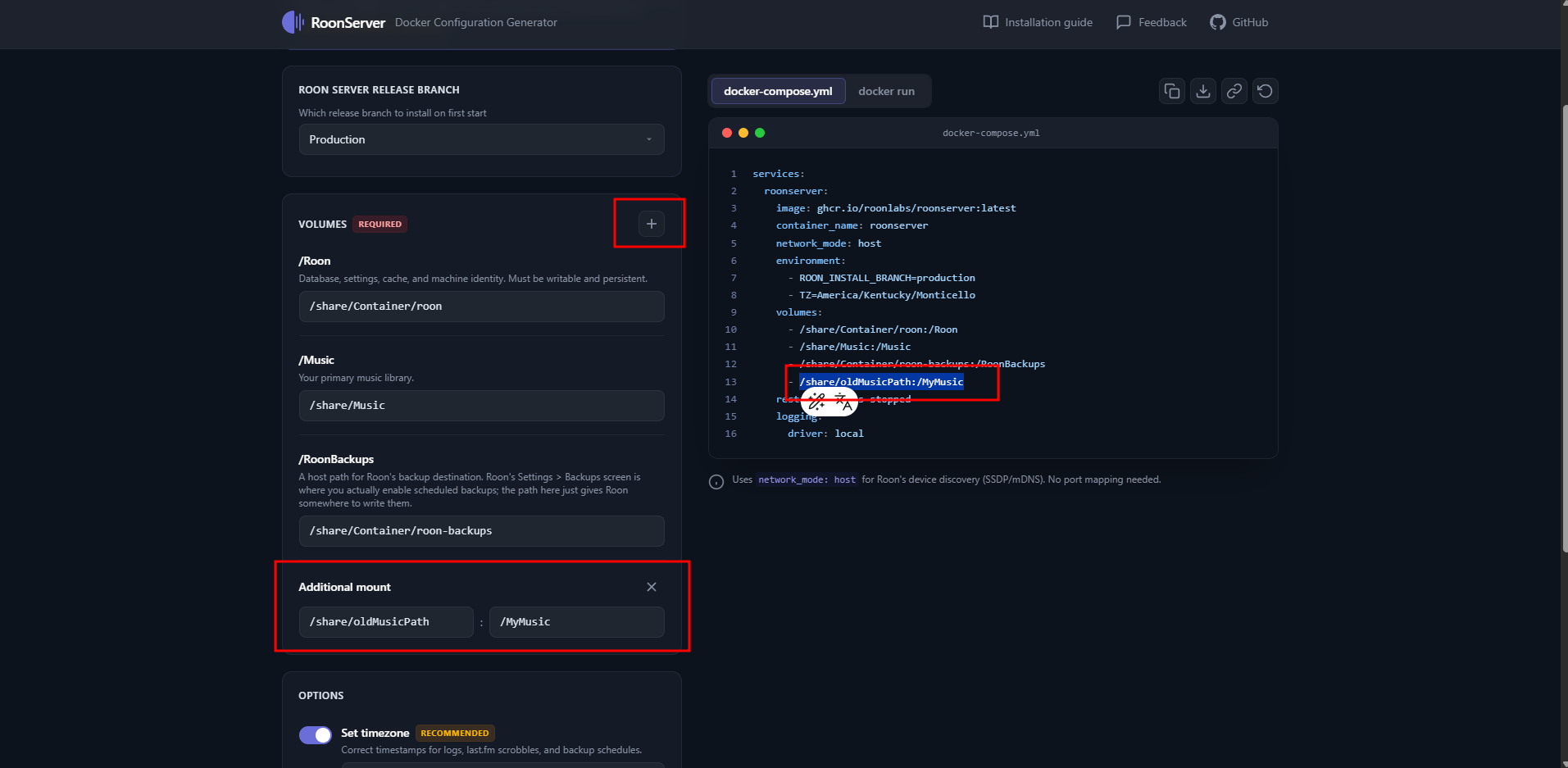
Configure the Docker Container (The “Dummy” Mapping)

Before starting the container, set up your volume mappings to prevent Roon from triggering an automatic clean scan:

  • Map the default folder to a “dummy” path: Create an empty folder in QNAP File Station and map the default container music path to it.
    • Example: /share/EmptyFolder/Music
  • Add your actual music as an additional path: Map the folder where your music truly lives to a unique mount point.

2. The Roon Storage “Healing” Process

Once your Roon Server is running and you have connected via a Remote app:

  • CRITICAL: Do Not Delete Old Paths: Navigate to Settings > Storage. You will likely see your old folders marked as “Unavailable” in red. Do not click the “Remove” or “Delete” button. If you do, Roon will permanently scrub the history associated with those files.
  • Use the “Edit” Maneuver: Click the three dots next to the red, unavailable path and select Edit.
  • Point to the New Mount: In the browser window that appears, navigate to and select the unique path you created in Step 1 (e.g., the /MyMusic folder inside the container).

By editing the path instead of replacing it, you are telling Roon: “These aren’t new files; they are the same files, just at a different address.” This instantly heals the database links, preserving your edit history perfectly.


Hello @m.minoli: Installation Hang/Crash

Based on the logs and the “kicked out” behavior, your Roon container is likely failing during initialization because it cannot write to the disk. This usually happens for two reasons:

  • Permission Denied: The folder you selected for the container’s /roon or /database paths doesn’t have the correct read/write permissions for the Docker user.
  • Disk Space/Volume Issue: If you installed Container Station on a small system partition or a full volume, the database can’t expand, causing the process to crash immediately.

Recommendation:

Please create a separate support thread and include the following details so we don’t clutter this discussion:

  1. Which QNAP volume is Container Station installed on?
  2. How much free space is left on that volume?
  3. A screenshot of your Volume Mappings in the container settings.

In the meantime, try reinstalling Container Station on a different, larger volume (e.g., move it from your system drive to your main data pool) to see if that clears the initialization hang.

Hallo @vadim and @Arindal ,

Things seem to OK now. I did in fact delete the Old Paths, but then added new ones corresponding to the old ones. So maybe this has a similar effect as the edit maneuver. In any case the added dates were maintained from the restored backup.

But, what seemed to be important and was not mentioned in the guidelines was that in order to find the backups correctly, Roon needs not only the path for the folders but also the file: **roon_backup_root **to be present in the folder with the copied backup folders. In the beginning I did not have this present and the backup did not work. After I had copied to the folder, everything worked as expected.

In general the process works, but the user guidelines need to be improved and extended to take care of the different installations that users have.

Thanks for your help along the way. I would not have been able to get this working on my own.

1 Like