Core experiencing long pauses between tracks and sluggish performance (ref#5FR3O8)

What app are you having the slowness issue with?

· Roon

What kind of performance/speed issue are you experiencing?

· Tracks take a long time to play

Please try to reboot your Roon Server

· No, the issue is still the same even immediately after a reboot

Please try to reboot your networking gear (Router/Switches/etc.)

· No, the issue is still the same even after a reboot

Is there any change in behavior if you try to navigate to Roon Settings -> Library and set both Background and On-Demand Audio Analysis to Throttled or Off?

· No, the issue is still the same

Does the issue happen on multiple Roon Remotes (controllers) or just one?

· I only have one Roon remote to test with

Please try to restart your Roon Remote (controller) app

· No, the issue is still the same even after a restart

What is the operating system of your Roon Remote (controller)?

· iOS

Reinstall Mobile Roon Remote App

· No, I am still having the issue even after reinstalling

Router Domain Name System (DNS) change

· I don't know how to do this

What is the operating system of your Roon Server host machine?

· Prebuilt Branded Roon Server (SonicTransporter, Innous, Merging...)

Timestamp of issue occurrences

· I usually listen to a two hour playlist between 11 am and 1 pm every day, and the last week or so it has been happening between almost every track

Describe the issue

My core has started struggling, on playlist there is a long pause between tracks, also often there is a long pause between tracks in an album. Also if I just pick another trick to play in my library there is a long pause before playing. During this time the sound wave line is flat, sometimes remaining flat during the first few seconds of playback when the track eventually starts. Also in the app, sometimes when I a different page or go back to the previous Page, the room logo appears while it thinks about it, sometimes for quite a long time, and sometimes so much I have to quit the app and reopen it again. This behaviour has only started in the last week or so. I have tried restarting everything, Sonictransporter, network and iPad. I have tried deleting the Roon core software from the sonictransporter and reinstalling it, which fixed it for a day but now it's back being sluggish again. I have also tried deleting the Roon app and reinstalling that, but no joy.
I have noticed when looking at the processor usage in Sonicorbiter web settings that one of the cores maxes out to 100% when Roon changes tracks.
I don't do any upsampling, just Play the tracks as they are straight to my hi-fi rose RS130.

Describe your network setup

Sky fibre with Wi-Fi switched off, Amazon eero pro 6e, English Electrical 8Switch, English Electrical EE1, OpticalModule Deluxe, hi-fi Rose RS130 to T+A DAC 200. But I also experienced this problem playing to a marantz stereo receiver in another room.

Hello @Quark

Thank you for the detailed description of the issue and your setup.

Based on your observations and the high CPU usage during track changes, this could be related to the background audio analysis process putting a high load on your core.

Could you please try disabling the Background Audio Analysis feature in your Roon Core settings? This can help reduce CPU load and potentially improve playback responsiveness.

Here is how you can do it:

  1. Open the Roon app.
  2. Go to Settings > Library.
  3. Find the Background Audio Analysis option and set it to throttle or off.

Please let us know if this improves the situation. If the problem persists, we can continue troubleshooting further.

Hi Vadim,
Thank you for your reply.
That setting was already on throttled, but I tried with it turned off, and I also tried with “on demand audio analysis” turned off.
At first it seemed a little better when I just selected tracks, but after a minute it got a little worse and then when change tracks in a playlist it took so long that Roon ended up pausing.
Checking the processor usage on the sonic transporter still indicated one of the cores maxing out to 100% when trying to move from one track to the next.

Hi @Quark,

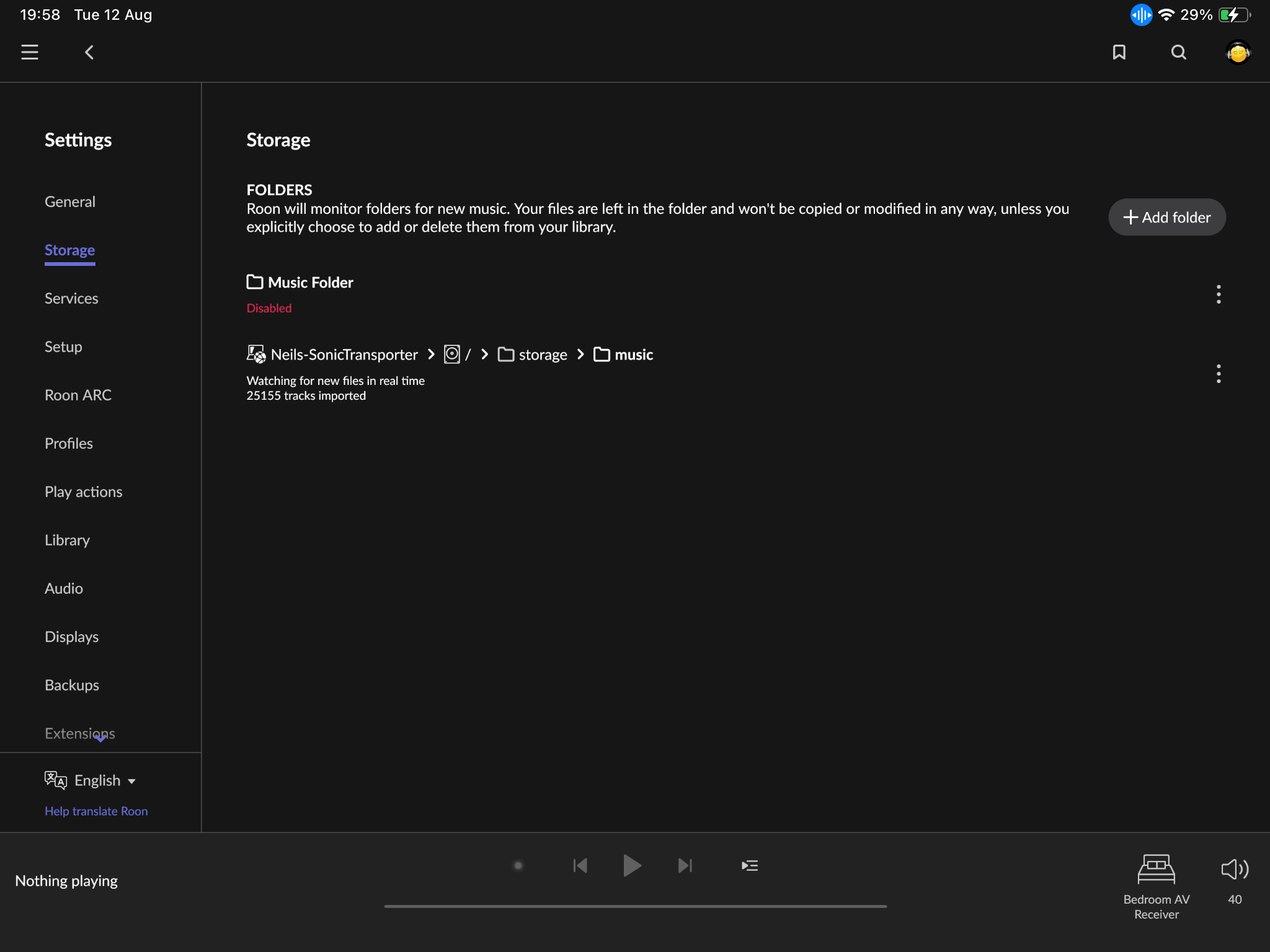
Thanks for the update and additional information! If you could, please share a screenshot of your settings > storage.

With that, could you also navigate to your Roon Settings > Library > Click the ‘clean up library’ and share a screenshot of this window? Don’t perform an actual library clean-up, we’re just curious to see what the numbers look like there.

If you haven’t yet, I’d also create a fresh backup, or a few if you can, just to be safe.

From your description and the fact that you’re seeing one CPU core pegged at 100% every time Roon changes tracks, this doesn’t sound like a network issue, it’s more likely your Roon Core is getting CPU-bound during track transitions, possibly due to:

  • Background processing (audio analysis, waveform generation, library rescans, metadata fetching).
  • Database performance issues (fragmentation or corruption in Roon’s database can cause huge slowdowns when it’s queried).
  • Single-thread bottleneck - many of Roon’s track-change tasks run on a single CPU thread, so even with plenty of cores, one bad choke point can cause delays.
Do you have another machine you could temporarily run Roon Server on? It may be worth restoring a fresh backup on a completely fresh (but temporary) machine to see if you experience the same issues across different servers.

We’ll be monitoring for your reply! :raising_hands:

Hi Benjamin,
Thanks for the reply.

I have the screenshots and I have backups scheduled every four days, the latest completed today.
Unfortunately I don’t have another machine to try, sorry.
Thank you again for your help.

Good day @Quark !

I hope you’re doing well today.

We have just enabled the diagnostic data on your installation and after reviewing today’s and few days before details we could see that your tracks are being played one after another with 1 second which is not considered as a problem.

Could you please share with us some more exact time stamp (date and time) of the problem occurrence so we can analyze that part of the time more precisely ?

Regards

Hi Alex,
Thank you for your reply.
Yes, it has been working okay this morning only because I switched off the sonictransporter completely overnight, which fixes it for a while. I did this a few days ago also and everything was alright to begin with and then the next day the problem was back again.
So, I will leave it on now and report back with a time period. when the problem inevitably starts again.
Just for added clarity, when I play to the hi-fi rose RS130 there is three or four seconds between tracks where it pauses momentarily before playing the next track. But when I play to my Marantz stereo receiver, often the tracks take so long to change Roon pauses completely and I have to press play to start it again. This was happening last night roughly between about 8:15 pm and 9 pm.
Thank you

Good day, @Quark !

Considering what you have just said about switching it overnight bumps us to think that your roon server device might experience an overheating and as consequence throttling issue which leads to decreased performance.

Could you please check if your machine heats up significantly during the continuous power on time and let us know please ?

Also, we would greatly appreciate if you could provide us with the exact time and day of when you experience the issue and if possible the name of the track that was played or was about to be played.

Thanks!

Regards.

Hi Alex,
Thank you for your reply.
Just to let you know that the problem hasn’t come back yet since switching the sonictransporter off for the night on Tuesday. Although the problem has started again the last few times I did this, it hasn’t yet. But I have suspected there may be a problem with my sonictransporter for quite a while as the Roon app often had blank screens when going to a different page, and about 10 months after I got it I had to send it back for repair because it just suddenly stopped working and when Andrew from SGC kindly repaired it under warranty (I had to send it back to you the USA from the UK), he did mention that he’d not seen a sonictransporter behave that way before
But I would just like to find out if it is or not.
When the problem starts happening again I will reply with specific times, if not lovely, but it has every time before so probably will this time too.

Thank you for update @Quark !

Based on the symptoms we assume that the problem might be caused by memory nodes.

If it ever comes again we recommend you to contact your local PC repair shop and perform a diagnostics of RAM and your SSD/HDD.

As of now we’re gonna mark this thread as resolved but in case of necessity please feel free to reopen this thread or create a new one

Have a nice day !

Regards.

This topic was automatically closed 24 hours after the last reply. New replies are no longer allowed.