Cracking and Popping Playback Issue on 2018 Mac Mini with AES16e (ref#S5DSPM)

Hi! What’s not quite right with Roon?

· None of the above quite fits

None of the above quite fits

· None of these quite match

Tell us what's going on

· I have a 2018 Intel i3 Mac Mini as my core. It has 16GB of ram and a 512GB SSD. My local files are on an 8TB external SSD. I have an AES16e PICe card in a thunderbolt expansion bay that is connected to my DAC and is being used for playback. During playback I get cracks and pops. I have tried the Tidal app in exclusive mode outputting to the card and it works flawlessly. I’ve tried multiple settings in Roon but can’t get rid of the cracking and popping. Between local files and streaming, my library is 7300 albums. Any help you can provide would be appreciated.

Tell us about your home network

· Wired into an ATT fiber modem/router. Latest WiFi 7 model.

Hello @John_Collins ,

We are sorry to see you have this problem.

Can you please record a short video demonstration the audial issue and upload it to our Media Storage ?

Also, as a first step of troubleshooting we’d recommend you to do the following:

  1. go to the settings of this audio endpoint and set a resync delay to around 500 ms value

2)limit temporarily max sample rate and bits per sample to 48/16

  1. Disable any DSP if enabled.

  2. if you see an option in settings for Buffer Size please increase it

  3. Test local vs Streaming playback. Does it act the same ?

  4. Disable Background audio analysis (set to off temporarily)

Let us know please whether this set up reduces or removes those artifacts .

Regards.

Hi Alex,

I’ve enabled the settings you recommended and uploaded a video. When I stream via Tidal in Roon no issue. When I force the downsampling I get clicks and pops streaming and local album playback.

Thanks,
John

Hi @John_Collins,

Are you using any control/console software with this audio interface (mixer software from Lynx, etc)? What’s the actual audio path outside of Roon (are you routing into a monitoring chain, into a DAW, etc)?

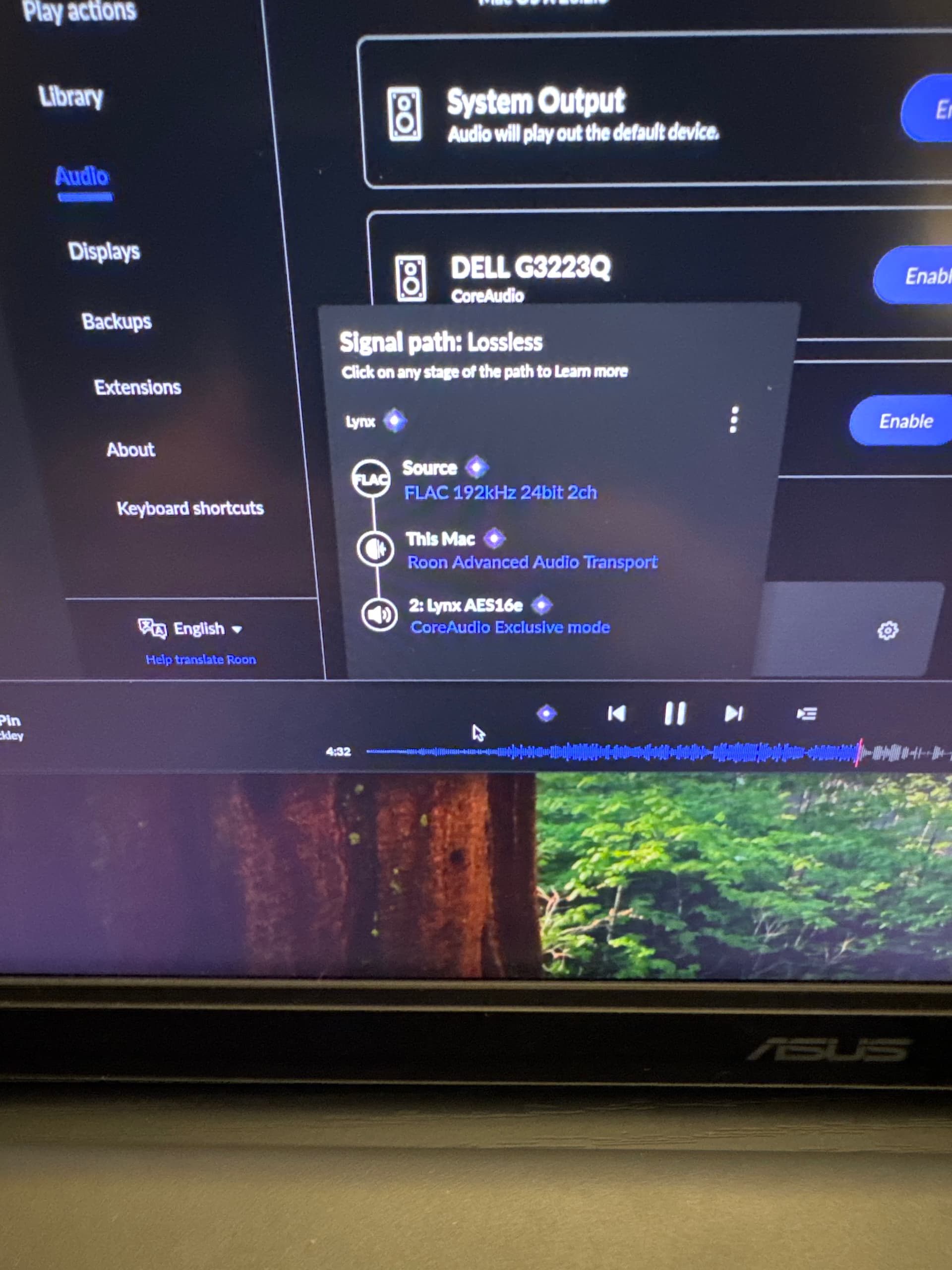
Can you please share a screenshot of your Signal Path within Roon as well?

Thank you! We’ll watch for your reply.

I closed the mixer app and set max buffer size. The Mac Mini is connected to the card via Thunderbolt in an external bay and the card is connected to the DAC via AES. The popping is still present. I have attached a photo.

Just a quick update. I downloaded a trial version of Audirvāna and after tweaking a few settings, playback is flawless. I can’t really compare sound quality to Roon since Roon isn’t working properly. Audirvāna uses significantly more resources on my Mac Mini than Roon is using. There is nothing else running on the Mac Mini, but is there a way to give Roon the ability to use more resources? Ram or CPU?

Thanks,
John

Thanks for the update @John_Collins - could you please reproduce the issue, share the track name, and then can you please use the directions found here and send over a set of logs to our File Uploader? Once logs have been uploaded, please let us know so that we can check the server for your files, thanks!

I have uploaded the log files. I was listening to the album Grace by Jeff Buckley in 24/192 via my FLAC library. The tracks were Mojo Pin through Hallelujah.

Hi @John_Collins,

What is the bit-depth and sample rate you have configured for the USB/AES interface in your Audio Midi Setup utility? Can you share a screenshot?

Thanks for sending those over @John_Collins!

From the logs, we can see you are getting buffer underruns caused by disk I/O latency, not CPU or network issues.

Specifically, your external 8TB SSD + Thunderbolt PCIe expansion + AES16e combo is occasionally starving Roon’s RAAT buffer, which causes audible pops.

This is confirmed by this line:

Trace: [prebuffer] short read: 0 / 38400 fill=1894400

Roon asked macOS for audio data. macOS didn’t deliver it fast enough.

The RAAT buffer drained, result = crack / pop.

I believe your hardware topology is as follows (correct me if I am wrong here):

Mac Mini
 ├─ Thunderbolt → PCIe expansion
 │ └─ AES16e (real-time audio)
 └─ Thunderbolt/USB → 8TB external SSD (music library)

This means:

  • Audio and disk I/O are competing for system interrupts
  • Thunderbolt bridges introduce latency spikes
  • macOS occasionally deprioritizes external storage under load
That’s exactly when Roon stumbles. As a next step in troubleshooting:

Let’s test out increasing Roon’s Buffering:

In Roon → Device Setup → Lynx AES16e:

  • Resync Delay: Increase from 0.5s to 1.0s or 1.5s
  • Buffer Size: Enable Max Buffer Size
Another test: Copy a single 24/192 album to the internal SSD on your Mac and play it. Do you run into the same issues?

Thank you!

I also have a display connected so that is probably causing a number of issues as well. I’ll do some additional testing and get back to you and also send the screenshot that Connor requested.

Thanks,
John

I am still getting crackles and pops after disconnecting the monitor, attaching the external drive to a USB port instead of thunderbolt port and copying the album to my internal drive. I just don’t think this Intel Mac Mini is up to the task. The mini is very warm during music playback. Do you think I should try a newer Apple Silicon Mac Mini?

Thanks,
John

Hi @John_Collins,

Thanks for the update!

It’s less likely an issue with the Mac, and more so an issue with the AES - Roon wasn’t designed for use with recording interfaces, unfortunately.

If you remove this device from your chain, how do things sound?

I bought a M4 Mac Mini yesterday and got it hooked up yesterday evening. I applied the settings you recommended previously and so far so good. I tested multiple tracks on albums of various resolutions and everything was good and sounded clear. I’ll keep you posted on if anything changes. When it works, the Lynx card sounds amazing so I’d like to keep it if I can.
Thanks,
John

1 Like

Ah, that is excellent news to hear @John_Collins! I’m glad the new Mac ended up being the right call.

We’ll keep the thread open so you have some more time to test - we’ll be monitoring for your reply! :raising_hands:

This topic was automatically closed 7 days after the last reply. New replies are no longer allowed.