No, neither Arlen nor I. Roon support does not work on weekends. And Roon staff members have a Roon logo as their forum icon.
1 Like
Thanks Suedkiez,
I know nothing about Roon, and find it far to complicated to stay on top of things. While I appreciate your advise and recommendations, I am not equipped with your level of technical expertise. It certainly isn’t a fault of yours, but the more information I receive, the more confused i get.
Thanks for youyr input
To be honest, Roon requires a modicum of computer literacy. If you struggle with creating and finding a folder on your Mac, my honest advice is that Roon is most likely not for you. And that’s OK, not every software is for everyone.
Yes however, much more than modicum. A person must be willing to sacrifice a signifiant amount of personal time to solving Roon’s never ending technical glitches and difficulties. I just want to turn on my music and listen to it. I do appreciate your input, thanks.
Moreover, there is also the issue of the money I have invested which keeps me hanging on.
I think most (not all, mind) of these glitches occur when people don’t know what they are doing. I turned on my Roon server 5 years ago and have never had a significant problem. (Yes, bugs, some of them annoying, or missing features. But nothing that kept me from listening to music or using Roon more or less normally, ever).
At least, setting up a backup folder shouldn’t pose a problem, and that’s not a Roon glitch.
Agreed, the back up folder is me, not Roon.
I will contact Roon Staff tomorrow and try to get things solved.
This whole problem originated when I changed servers a number of months ago and I abandoned the task of fixing things. I might update you and Arien at a later date just to let you two know how things went. Thanks again!
1 Like
I’ll be watching here anyway. And support staff will show up after the weekend. Arlen and I just thought we could get you going today 
Good luck!
You don’t have to contact them explicitly - these posts are in an open Support request, so it is being monitored by the Support team. They will respond here.
Thank you Geoff!
You and Arlen did in fact provide a good start, thanks again!
2 Likes
Hey @Tim_deCocq,
Thanks for all the updates and for your patience so far!
Before anything else, I agree - let’s get you set up with a reliable and safe backup. Here is some easily disgestiable knowledge base articles that I think will help get you up to speed quickly and pain free:
And this article in particular is a great place to start:
This would be the easiest next step for you - click the ‘New Folder’ button after clicking ‘Deobrah’ to remove all the additional subfolders (which is why you’re getting the warning, it is not safe to store backups in the same folder as your music) and you should be all set to go!
Thanks Tim, we’ll be monitoring for your reply. 
Okay thanks, I backed up in "deborah’ but I am still getting Duplicate Albums (1 triplicate) eg. The triplicate Bob Dylan has one album with all the songs I originally added years ago, and the other two albums contain less songs which are all duplicates. Am I able to delete these 2 duplicate albums? There are a few more Albums which have all the music and, the other containing duplicate songs.
I should also mention that I have always backed up my server to an orange color “Lacie” hard drive.
Hi, I provided a reply a few days ago and, I was wondering if anyone was able to review my comments. It’s the coming weekend so, if someone was able to help, I would be most grateful.
Did you do the library cleanup, like I mentioned earlier? And did you disable one of the two music locations before the cleanup?
Also, it might be possible that you have several copies of the same album in the remaining location.
I did not perform a library cleanup as you had earlier suggested. Try as I might I was unable to find the 2 music locations in order to disable one of them. Once I do clean up the library, can you lead me through deleting duplicate albums, or is this even possible without deleting all the albums?
When I located my backup folders in
‘scheduled backups’ it did not give me an option to disable it.
Deleting the watched location can be done via the screen you posted before.
Select either of the two (it doesn’t matter which one), click the three dots and select disable.
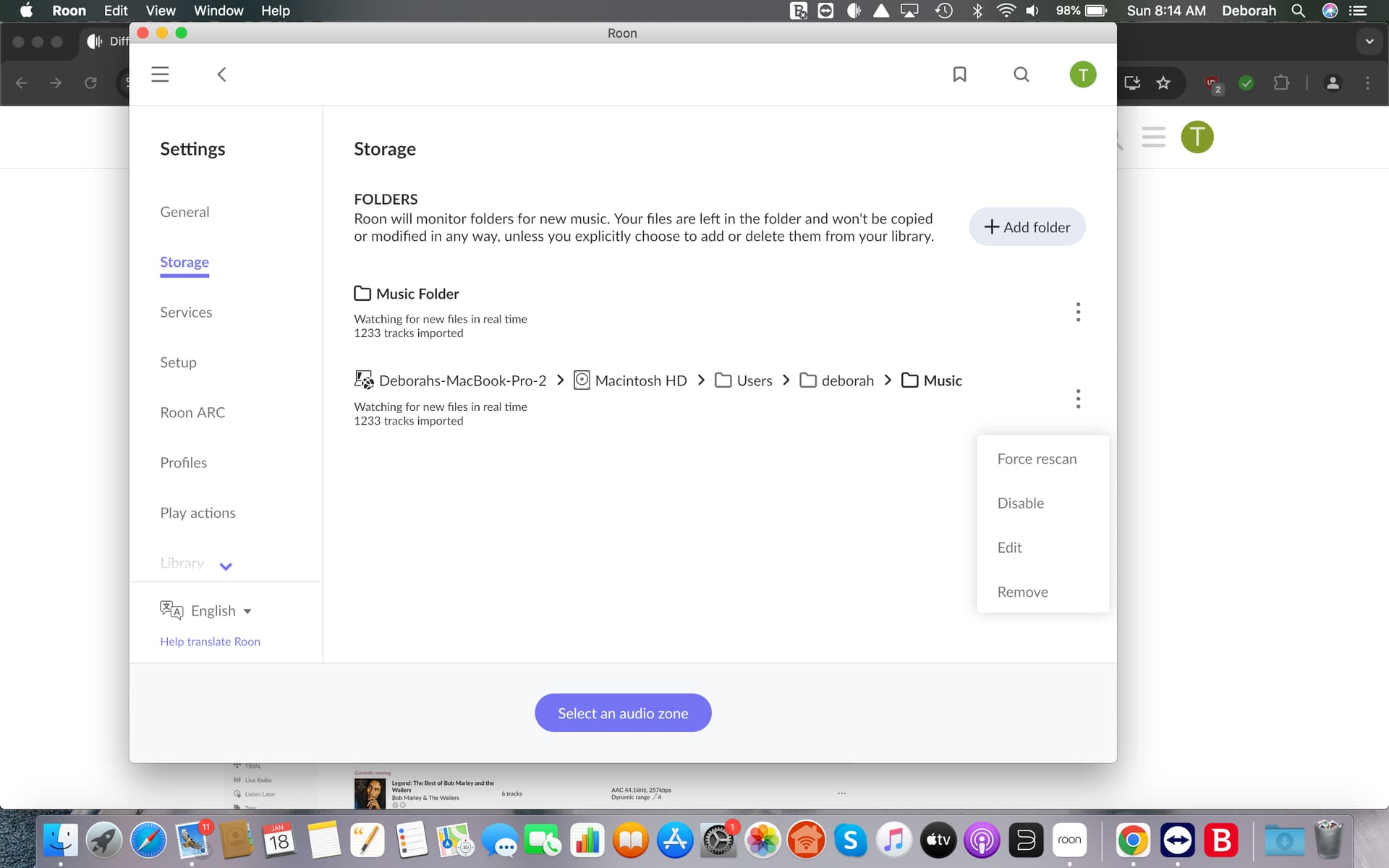
After that, do the library cleanup.
That is correct. Your backup location doesn’t have anything to do with the location where your music is stored. The backup contains all information about your music collection (play times, metadata, your own edits etc.), but not the music itself. Your music is stored in a folder that Roon watches but not touches. That’s the location in the image here. Of course, you should have a good backup of that too, but you cannot do that in Roon.
@Arlen - he has already removed the second Watched folder and now just has the default Music Folder left as the only Watched Folder.