Hello @Todd_Reitz
I have enabled diagnostics on your account so our technical staff can get some more insight into what’s going on here.
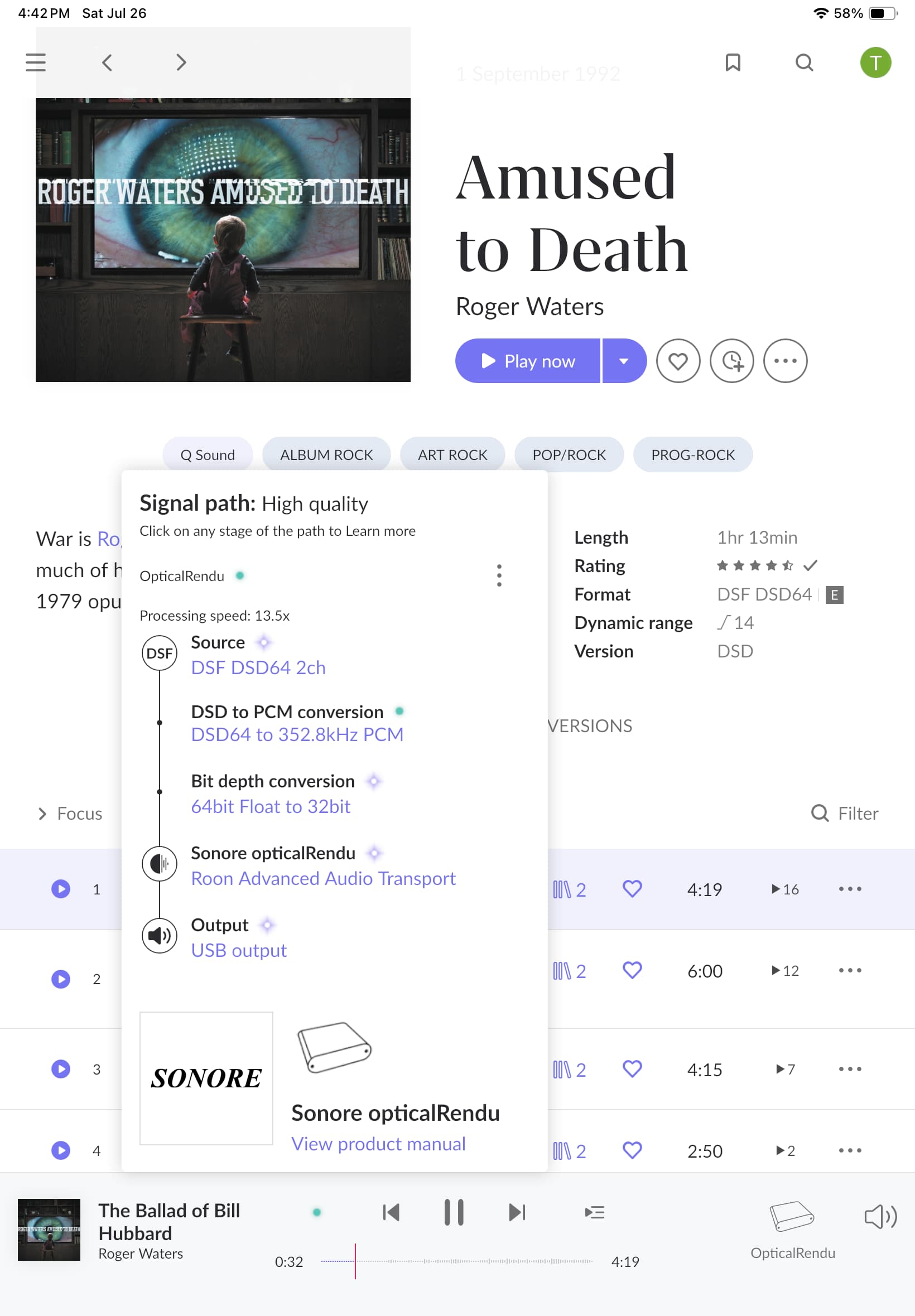
After reviewing the RAAT logs and device capabilities, we’ve identified the reason why your PS Audio DAC is not receiving native DSD and is instead triggering a DSD-to-PCM conversion in Roon.
Summary of Findings:
1. PS Audio Stellar Gold DAC does not advertise native DSD support over USB in Linux
From the RAAT logs for the PS Audio DAC:
07/26 13:49:56 Trace: [Sonore opticalRendu @ 192.168.10.77:40569] [raatclient] GOT [2] {"flags":{"has_write_chmap":true},"output":{"supported_formats":"96000/16/1|2,384000/24/1|2,352800/32/1|2,48000/24/1|2,192000/24/1|2,88200/32/1|2,48000/16/1|2,176400/16/1|2,192000/16/1|2,44100/24/1|2,96000/24/1|2,384000/32/1|2,48000/32/1|2,384000/16/1|2,96000/32/1|2,352800/24/1|2,352800/16/1|2,192000/32/1|2,44100/16/1|2,88200/16/1|2,44100/32/1|2,176400/32/1|2,88200/24/1|2,176400/24/1|2","info":{"alsa_device":{"name":"PS Audio High Resolution USB","mixername":"USB Mixer","components":"USB","usbid":"2616:0203","id":"USB","longname":"PS Audio PS Audio High Resolution USB at usb-ci_hdrc.1-1.1, high speed","driver":"USB-Audio"},"config":{"dsd_mode":"native","device":"hw:0,0","buffer_duration":0.05,"signal_path":[{"quality":"lossless","method":"usb","type":"output"}],"type":"alsa"}}},"volume":{"is_supported":true,"info":{"config":{"optional":true,"type":"null"}}},"platform":{"uname":{"version":"#1 SMP Wed Jan 25 17:44:48 EST 2023","nodename":"orendu0286B1","machine":"armv7l","sysname":"Linux","release":"6.0.18-200.sgc.fc36.armv7hl"},"os":"linux"},"source_selection":{"is_supported":false,"info":[]},"transport":{"is_supported":false,"info":[]},"info":{"unique_id":"2ae0a0a7-d9aa-4948-8749-2d53a1310851"},"status":"Success"}
This list includes only PCM formats. There are no entries in the form of xxxxxxx/1/1|2, which represent native DSD sample rates (e.g., 2822400 for DSD64, 5644800 for DSD128, etc.).
As a result, Roon cannot send DSD to this DAC directly. Instead, it converts the DSD content to high-resolution PCM (in your case, 352.8kHz / 32-bit) before sending it via USB.
2. Lampizator Amber 3 DAC correctly advertises native DSD support
From the logs when using the Lampizator DAC:
{"request":"set_client_type","client_type":"Roon"}
07/26 16:56:19 Trace: [Sonore opticalRendu @ 192.168.10.77:39779] [raatclient] GOT [2] {"info":{"unique_id":"2ae0a0a7-d9aa-4948-8749-2d53a1310851"},"platform":{"os":"linux","uname":{"release":"6.0.18-203.sgc.fc36.armv7hl","version":"#1 SMP Wed Jan 29 17:18:33 EST 2025","machine":"armv7l","nodename":"orendu0286B1","sysname":"Linux"}},"flags":{"has_write_chmap":true},"output":{"info":{"config":{"type":"alsa","device":"hw:0,0","signal_path":[{"type":"output","quality":"lossless","method":"usb"}],"buffer_duration":0.05,"dsd_mode":"native"},"alsa_device":{"name":"Lampizator","mixername":"USB Mixer","driver":"USB-Audio","longname":"JLsounds Lampizator at usb-ci_hdrc.1-1.1, high speed","usbid":"20b1:2023","components":"Lampizator","id":"Lampizator"}},"supported_formats":"705600/16/1|2,44100/24/1|2,384000/32/1|2,96000/16/1|2,2822400/1/1|2,96000/32/1|2,44100/32/1|2,192000/16/1|2,88200/16/1|2,48000/32/1|2,176400/24/1|2,11289600/1/1|2,176400/16/1|2,384000/16/1|2,705600/32/1|2,705600/24/1|2,88200/24/1|2,88200/32/1|2,768000/32/1|2,768000/24/1|2,176400/32/1|2,192000/32/1|2,384000/24/1|2,768000/16/1|2,22579200/1/1|2,48000/16/1|2,192000/24/1|2,48000/24/1|2,352800/16/1|2,352800/32/1|2,352800/24/1|2,5644800/1/1|2,96000/24/1|2,44100/16/1|2"},"volume":{"is_supported":true,"info":{"config":{"type":"null","optional":true}}},"transport":{"info":[],"is_supported":false},"status":"Success","source_selection":{"is_supported":false,"info":[]}}
These are native DSD sample rates, indicating that this DAC fully supports native DSD input over USB when used with Linux devices like the opticalRendu.
Because this DAC reports its capabilities correctly, Roon is able to send native DSD audio without conversion.
Why This Matters
Roon relies on the DAC and the streaming endpoint to declare supported formats. If native DSD is not advertised, Roon will not attempt to stream DSD directly and will instead convert the signal to PCM.
This behavior is expected and by design to prevent playback errors.
Possible Solutions
Option 1: Try enabling DSD over PCM (DoP) mode in Roon
- Go to
Roon → Settings → Audio → Device Setup for the PS Audio DAC.
- Under the “Advanced” section, set DSD Playback Strategy to “DSD over PCM (DoP)”.
- This method wraps DSD in a PCM stream, which may be accepted by DACs that don’t support native DSD but still support DSD via DoP.
Option 2: Check DAC USB compatibility and firmware
We recommend contacting PS Audio support to confirm:
- Whether the DAC supports native DSD or DoP over USB under Linux.
- Whether a firmware update or USB setting is available to enable full DSD support in Linux environments (such as opticalRendu).
Some DACs are designed primarily for Windows environments and may require custom drivers to handle DSD formats properly.