· Hi - I recently purchased a FiiO M21 DAP. I set up both the Roon Remote and the Roon ARC apps successfully. When using the device set up for the FiiO with the Roon Remote app (I used the Roon Ready option), I do not have a DSD strategy option for the device. Everything works well in the app, except when I play DSF files, which results in static.
In Roon Arc, I am able to set the DSD strategy and the DSF files play fine. Is there a way I can get the Roon Remote app to do the same?
Tell us about your home network
· I have the latest XFinity modem with a 2 gigabyte plan. The ethernet for the Titan is connected directly into the modem and I have a switch for other ethernet devices. I don’t have any range extenders.
Based on the diagnostic logs we have, the FiiO device is correctly identified by Roon and is advertising full DSD capabilities (including native DSD rates). From Roon’s perspective, the endpoint itself is behaving as expected at the RAAT level.
This makes one part important to clarify first:
In Roon, the DSD Strategy setting is only shown when multiple viable DSD transport strategies are available for a given endpoint (for example: Native vs DoP vs PCM conversion).
If the device advertises only a single supported DSD path in its RAAT capabilities, Roon will not expose a DSD Strategy selector in Device Setup — because there is nothing to choose between. In that case, the strategy is implicitly fixed by the endpoint.
This would explain why:
DSD Strategy is visible in ARC
but not visible in Roon Remote for the same device
ARC and Remote do not always expose identical device-level controls, especially when the endpoint advertises a constrained or fixed capability set.
To better understand the static you’re hearing with DSF playback in Roon Remote, could you please clarify:
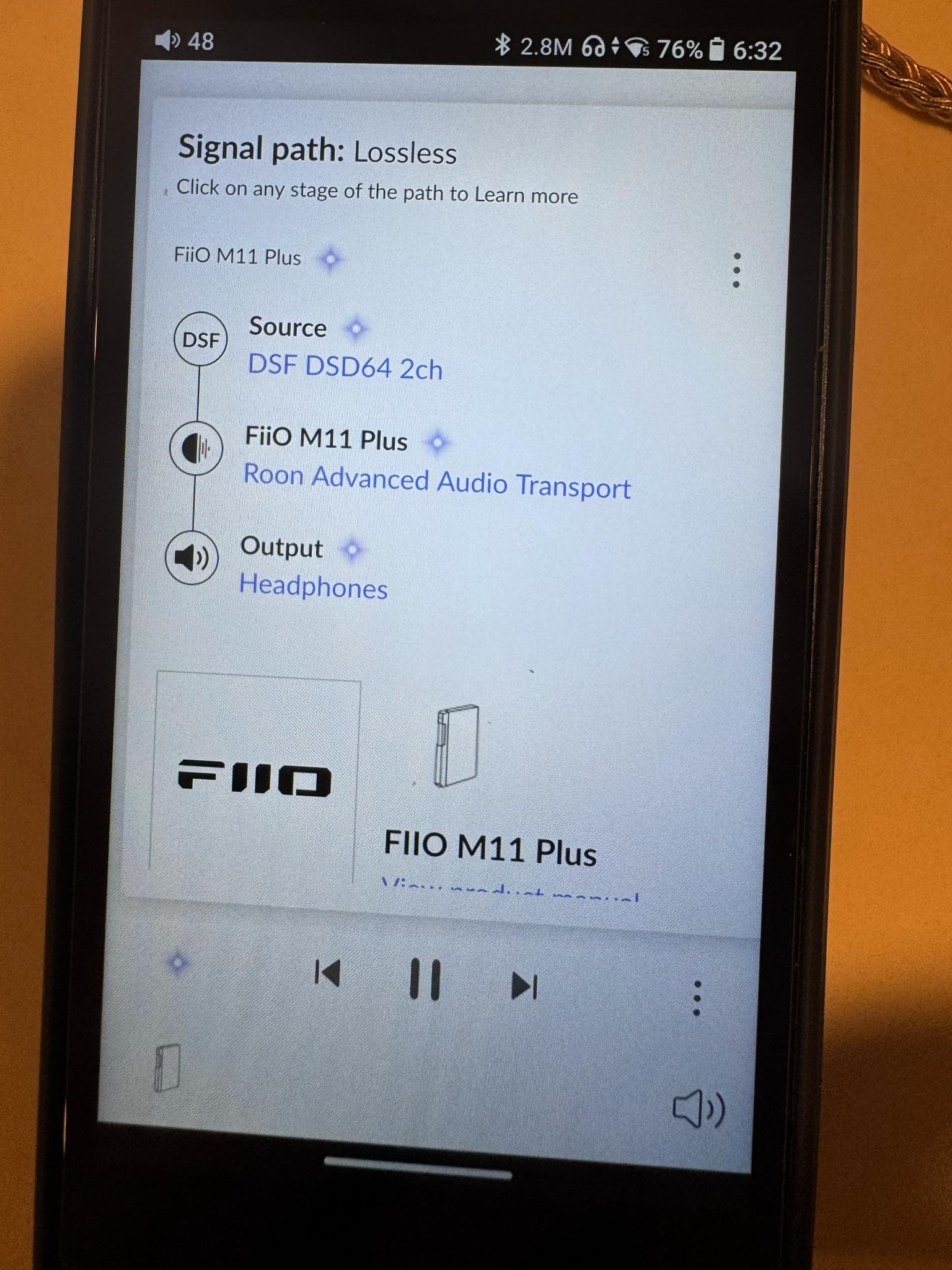
What does the Signal Path show when playing a DSF file via Roon Remote?
(A screenshot would be very helpful.)
Does the static occur:
only with DSF files, and
only when using Roon Remote (not ARC)?
Are you using the same physical output on the FiiO in both cases (same jack / same mode)?
Since the endpoint advertises native DSD support correctly, the static is more likely related to how the device handles that stream in its current mode, rather than a discovery or capability issue.
Once we have the Signal Path and confirmation of the above, we can advise on the best workaround (for example, forcing DSD → PCM at the DSP level if needed).
The end of my response appears to have been cut off:
Based on your question, I tried listening to DSF files using Roon Remote with wired headphones and they played without issue. When I listen to DSF files with the AirPod Pro 2 headphones in Roon Remote via Bluetooth, I encounter static.
DSF files play without issues using the AirPod Pro 2 headphones while using Roon ARC
Thank you for the screenshots — they make the situation very clear.
From the Signal Path you shared, Roon is always playing to “Headphones” on the FiiO M11 Plus via RAAT, regardless of whether you are actually listening through wired headphones or Bluetooth (AirPods).
From Roon’s perspective:
The RAAT endpoint is the FiiO M11 Plus itself
The active output is reported as Headphones
The device advertises native DSD support
Roon therefore sends native DSD (DSF / DSD64) to the FiiO
This is exactly what we see in the Signal Path:
So far, everything is correct at the RAAT level.
When you switch to Bluetooth headphones (AirPods Pro 2):
RAAT still sends native DSD to the FiiO
However, Bluetooth audio on Android cannot carry DSD
The FiiO OS then:
takes an incoming DSD stream
converts it internally
sends it over Bluetooth using AAC
This mismatch is the key issue:
Roon believes it is outputting DSD → wired headphones
The FiiO OS silently reroutes that stream to Bluetooth (AAC)
The DSD stream is not properly converted for Bluetooth, resulting in static
This is why:
DSF works fine:
with wired headphones in Roon Remote
with Bluetooth when using Roon ARC
DSF produces static:
only in Roon Remote
only when using Bluetooth headphones
ARC handles this differently by converting DSD to PCM before playback, which makes it compatible with Bluetooth audio paths.
Roon does not expose a DSD Strategy selector here because:
The FiiO advertises only one valid DSD path at the RAAT level
Roon has no visibility into the Bluetooth routing happening inside the FiiO OS
From Roon’s point of view, there is nothing to choose between
So the absence of the DSD Strategy option is expected behavior.
When using Bluetooth headphones on the FiiO with Roon Remote:
Avoid native DSD playback
Use one of the following:
Play PCM versions of the same content
Use Roon ARC, which already performs the necessary conversion
When using wired headphones, native DSD playback via Roon Remote is working correctly and as designed.
This is not a fault with your device or setup — it’s a limitation caused by:
RAAT seeing only the wired headphone output
Bluetooth routing happening after RAAT, inside the FiiO OS
Bluetooth codecs (AAC) being incompatible with native DSD
Thanks again for the excellent screenshots — they were key to identifying this behavior precisely.