Network Setup
· I use my ISP's router alongside a personal router.
ARC Status
· ARC is *Ready*
Describe the issue
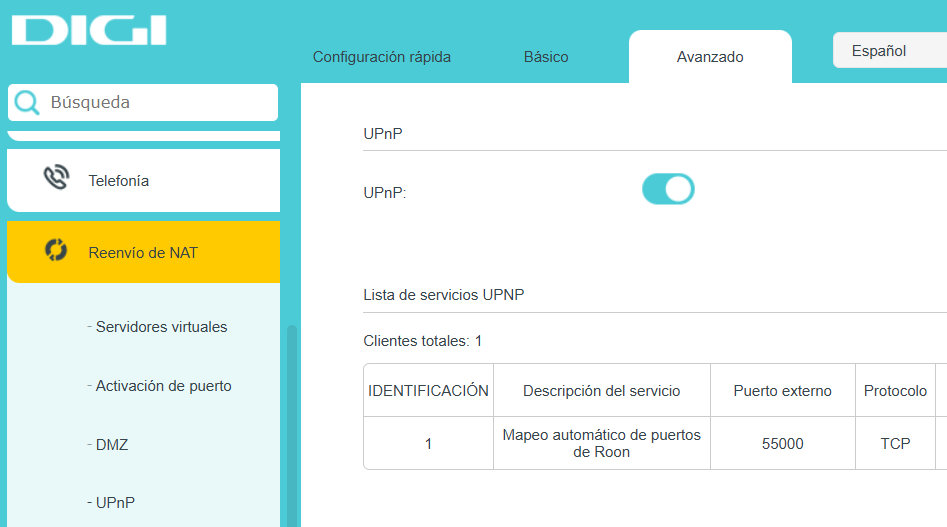
Hola, he habilitado Upnp en mi router pero ARC me da error 504
Describe your network setup
no entiendo
· I use my ISP's router alongside a personal router.
· ARC is *Ready*
Hola, he habilitado Upnp en mi router pero ARC me da error 504
no entiendo
Please share a screenshot of the diagnostic message found under Roon Settings → Roon ARC.
The 504 message may be caused by a number of issues, and this will help diagnose the problem.
However, the fact that you are using two routers is the likely cause as this is causing an additional layer of network translation.
Ideally, you should put the ISP modem/router into bridge mode as this removes the double-NAT.
If this isn’t possible, set up a port forwarding rule in your ISP router that uses the same port for Roon ARC, and point this to the IP address of your modem.
{
"ipv4_connectivity": {"status":"NetworkError","status_code":504,"error":"error code: 504"},
"external_ip": {"actual_external_ip":"79.aaa.bbb.ccc","actual_external_ipv6":"null","router_external_ip":"null"},
"natpmp_autoconfig": {"status":"NotFound"},
"upnp_autoconfig": {"status":"NotFound"},
"multinat_autoconfig": {"status":"Failed","error":"No uPnP Routers found on LAN"}
}
Gracias, pero solo tengo un router y he habilitado la funcion Upon
Thanks, but I only have one router and I have enabled the UPnP function.
To be clears you said…
Therefore, please describe your network, including how your Roon server connects to the Internet.
Also, turn off UPnP if the only rule is for Roon, and confirm the port number displayed under Settings → Roon ARC.
Hello @martfdez,
Thank you for sharing that diagnostic text.
You mentioned you only have one router, but since your initial ticket indicated you were using an ‘ISP’s router alongside a personal router’, we need to clarify how this affects Roon ARC.
Here is what is likely happening depending on your exact setup:
Scenario A: You have TWO routers (e.g., an ISP modem/router + a personal Wi-Fi router) If you have two routing devices connected together, enabling UPnP on just your personal router is not enough. The connection from the outside world is hitting your ISP router first and getting blocked. This is called a “Double NAT”. To fix this, you must do one of the following:
Scenario B: You truly have ONLY ONE router If there is absolutely only one routing device in your home, its UPnP implementation is likely failing to communicate with Roon. You will need to bypass UPnP entirely:
Note: If you set up manual port forwarding correctly and it still fails, your internet service provider might be using a technology called CG-NAT. If they are, standard port forwarding will not work, and you will need to ask them for a dedicated public IP address.
To help us give you exact instructions, could you please reply with the brand and model of the device(s) that provide your internet and Wi-Fi?
Disculpa el error pero solo tengo 1 router y he activado la upnp pero sigue sin funcionar, me sale este mensaje
{
“ipv4_connectivity”: {“status”:“NetworkError”,“status_code”:504,“error”:“error code: 504”},
“external_ip”: {“actual_external_ip”:“79.aaa.bbb.ccc”,“actual_external_ipv6”:“null”,“router_external_ip”:“100.ddd.eee.fff”},
“status”: “status”: MultipleNatFound
,
“natpmp_autoconfig”: {“status”:“NotFound”},
“upnp_autoconfig”: {“status”:“NotFound”},
“multinat_autoconfig”: {“status”:“Success”,“error”:“No Error”,“routers”:4,“routers_mapped”:1}
}
Me puedes decir como configurar el puerto? gracias
Hi @martfdez,
Digi commonly implements CG-NAT (carrier-grade network address translation), which will block port forwarding upstream of your account. This can cause the multipleNAT diagnostic you see in Roon.
It’s worth reaching out to your ISP (Digi) directly to inquire if they can offer a dedicated IP address. Sometimes, they’ll charge a small fee, but it will allow port forwarding to work out-of-the-box with a single ISP router.
We’ll watch for your reply.
Hi @martfdez,
Were you able to ask Digi whether they can provide a dedicated IP address, or confirm if your connection is behind CG-NAT? That would line up with the multipleNAT warning we mentioned. The other possible option is to use a 3rd party app called Tailscale:
Hello @martfdez ,
We have not heard back from you, so we will go ahead and close this thread due to inactivity. If you need further assistance, please submit a new support request and specify that the issue be reopened. Thank you.