"Failed to Initialize" when Switching Sample Rates on MacOS Tahoe [Ticket in]

What’s happening?

· I'm having trouble connecting to Roon

What type of connection issue?

· Something else

How can we help?

· None of the above

Other options

· Other

Describe the issue

When using Roon to play music, I encounter playback problems when switching between tracks with different sample rates. For example, if the current track is 48 kHz / 24-bit and the next track is 44.1 kHz / 16-bit, playback will freeze and Roon shows the error message: “Failed to initialize the audio device.” After this happens, the audio device temporarily disappears from Roon and then reappears. This issue occurs most frequently when the sample rates are different between consecutive tracks.

My configuration is Mac Mini with MacOs Tahoe and Bricasti M1 as DAC. The issue started when I installed the MacOs Tahoe. Before I was able to play perfectly activating the Exclusive mode Toggle. Now I am unable to play DSD files and The Bricasti display does not change in case of sample rate change.

Describe your network setup

I access the the Wan via a vodafone fibre connection. I har wired the router to a switch and to Mac Mini. The connection with the Bricasti dac is via USB

1 Like

Good day @Paolo_Talenti !

Sorry to see you have this problem.

Can you please share with us a timestamp of when did the issue happen so we could analyze it more precisely in diagnostics data reported to us ?

Thanks!

Looking forward to your reply.

Regards.

I am having the same problem. I have a Mac mini with MacOS26. Topping E50 DAC. Continually “failed to initialise the audio device” it’s a nightmare. Then the Zone / DAC disappears from Roon. Then reappears.
I have completely erased Roon and downloaded new and started again. Didn’t help. Tried to find the offending LOG item but can’t. Please help.

1 Like

Hello, It happened immediately after the installation of OS26 on September the 17th.

Many thanks.

3 Likes

Hello @Paolo_Talenti / @Katherine_Dennis ,

Thanks for letting us know what your experience has been like. Can you please let us know the exact local time + date + track when you next experience this issue? We can then enable logging for your device to see if we can gather more clues. Thank you.

On a MacBook Pro running Tahoe as a Roon endpoint connected to a hugo2 dac I notice exactly the same thing in exclusive mode. If I play a single album it handles track switches without issue, however when playing a “Daily List” the minute the bit rate changes on a track it loses the dac with the following ocurring:

  1. “Roon lost control of the audio device”
  2. The icon for the dac disappears and reappears
  3. Any attempt to play a track and “Failed to initialize the audio device”
  4. Disconnecting and reconnecting the dac and it reconnects
  5. Turn off exclusive mode and it works correctly.

Clearly something has changed in the core audio code for exclusive mode access.

2 Likes

I am having the same problem.

This issue occurs most frequently when the sample rates are different between consecutive tracks. For example, if the current track is 48 kHz / 24-bit and the next track is 44.1 kHz / 16-bit, playback will freeze and Roon shows the error message: “Failed to initialize the audio device.” However, if the tracks only differ in bit depth (e.g., both at 44.1 kHz but one is 16-bit and the other is AAC 257kbps), playback does not freeze.

following is my system information.

  • Computer: MacBook Pro with M1 Pro
  • OS: macOS Tahoe 26.0
  • Audio Device: Chord Hugo 2
4 Likes

I am using a M4 MacMini. The exact same phenomenon occurs to me. I hope the problem-solved version will come out soon.

2 Likes

maybe this issue is related to the following information in macOS Tahoe 26 release note

" Music

Resolved Issues

  • Fixed: You might experience audio issues when using the Music app and changing the underlying audio device sample rate. (152465491)"
2 Likes

good catch.
Additional data point — I tried turning on upscaling in muse on the hope that normalizing the bit-rate upstream might resolve the issue. No luck.

1 Like

I loaded the last update from Roon. No change. For your reference I tried to listen today at 14:13 (local time) with Hotel California by Eagles in version 44, 192 (from Roon) and DSD. No luck. Thanks.

1 Like

Hi @Paolo_Talenti !

I hope you’re doing well today.

I would like to let you know that our R&D team is already actively working on the eliminating issues related to macOS Tahoe update.

However, as of now we can recommend you to try to Run the software in Rosetta Compatibility Mode.

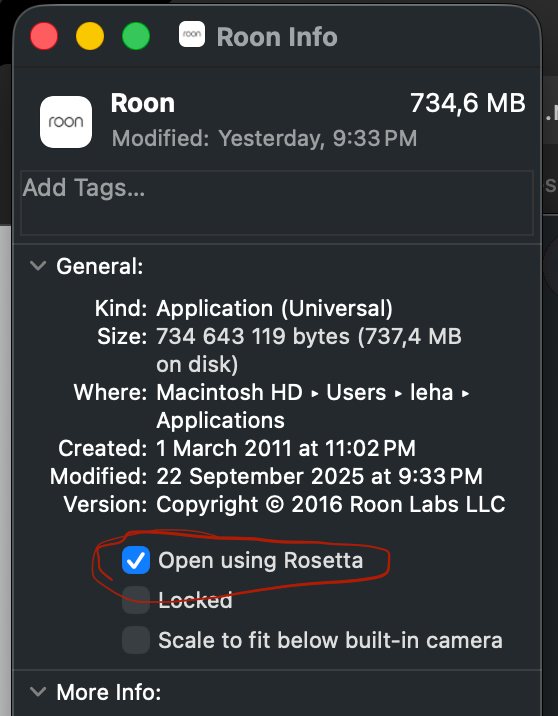
In order to enable it please find the Roon App in the Applications folder and when you do a right click on it please press “Get Info” and enable checkbox “open using Rosetta”. This option now eliminates some problems caused by an update.

Please try it and let us know whether it is helpful to you.

Regards.

Hi, I followed your instructions and I launched Roon with Rosetta. No luck. Thanks for your help.

1 Like

Hi @Paolo_Talenti,

Thanks for giving that a try! To confirm, did you also reboot your Mac before launching Roon after making the above adjustment?

Let me know if this changes any behavior for you. Thank you! :folded_hands:

Hi, I followed your instructions but nothing changed. Many thanks.

1 Like

What best describes your playback issue?

· Music stops playing unexpectedly

What type of Zone is affected by this problem?

· *Directly-connected Zones* are affected.

Does the issue affect all file formats?

· The issue affects *multiple/all* file formats.

Does the issue happen with local library music, streaming service music, or both?

· *Both streaming and local* *library* music are affected.

Do you encounter any playback errors with the "System Output" Zone?

· I don't have a System Output available, but I'd like to keep troubleshooting

How is the affected Zone connected to your RoonServer machine?

· Cable (USB, HDMI, SPDIF, etc.)

Is your device connected directly to the Roon Server via cable or over the network, or is it chained through another device (such as a streamer, Roon Bridge, or Roon Remote)?

· Connected directly to my RoonServer machine

Does the device show up at all in Roon Settings -> Audio?

· Yes, it shows up there, but it isn't Enabled

Does the "Enable" button unlock the Zone?

· I can Enable the Zone, but the Zone disappears

Does the device play audio from another source when using the same connection?

· The device has no problems with another audio source

Have you checked that Roon is whitelisted in any firewalls?

· I've checked the firewall and the issue remains

If the device has multiple output options, do the other options work as expected?

· Only one output type is affected while the other output type works as expected

Is the device using the latest firmware as per the manufacturer?

· Firmware is up-to-date but the issue remains

Do you have an approximate timestamp of when the issue last occurred?

· 23 SEP 2025 @ ~22:00 CDT

What are the make and model of the affected audio device(s) and the connection type?

· Apple MacBook Air M4, Jeff Rowland Aeris DAC.

Describe the issue

Hello… I’m suddenly having the “Failed to Initialize Audio Device” or “Lost Control of the Audio Device” issue for the first time ever, after updating my MacBook Air M4 Roon Server to Mac OS 26.0 (Tahoe) & Roon Server version update 2.55 (Build 1559).

No hardware changes have been made, I’ve re-booted everything, unplugged/replugged USB cable both ends, swapped to a second DAC input port, added 100ms to Re-Sync Delay – yet the problem continues intermittently, apparently when stream bit rates/sample rates change between tracks, whether streaming from Qobuz or locally stored tracks.

In order to clear it, I must not only restart Roon, but also the MacBook. Only the local system connected to the MacBook has the problem, as I can play music on other Roon-Ready devices and Remotes, even when the error occurs on the directly connected system.

Actually, as I think about it… the Roon Server update v2.55 may have caused the issue; I believe I had played music after the Tahoe OS update on your previous version without any issues.

Attempted launching with Rosetta – no help.

Describe your network setup

Roon Server is 2025 Apple MacBook Air M4, wired via ethernet to 1GB AT&T Fiber Internet. Output is connected via 1.5M Cardas USB cable to Jeff Rowland Aeris DAC (Exclusive and non-Private Zone).
1 Like

Not sure why the Rosetta “fix” continues to get proffered to new support requests. As noted by multiple users across multiple threads, the Rosetta approach doesn’t solve the problem.

1 Like

Hi @GSpot,

Thank you for the report. The team is investigating this precise symptom with Tahoe. Please, at your convenience, upload a set of RoonServer logs for our team to review (automatic logging so far hasn’t uploaded). Also ensure that Roon still has local network access toggled on in Privacy & Security → Local Network.

You can use the directions found here and this secure File Uploader.

Thank you for your patience. We’ll respond as soon as we know more or have a potential workaround.

Thank you… I have uploaded both the Roon and Roon Server Log folders. They both showed recent activity, so I wasn’t sure which one to send, so you have everything!

Hello @GSpot,

Thank you for your valuable feedback.

Our R&D team is aware of this issue and is actively working on a fix, which, if all goes well, will be included in the next release. In the meantime, we’ve been suggesting the Rosetta workaround since it has helped some users temporarily resolve the problem until the permanent fix is deployed to production.

Please let me know if you have any additional questions or concerns.

1 Like