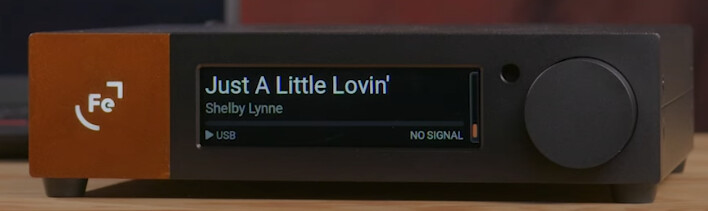
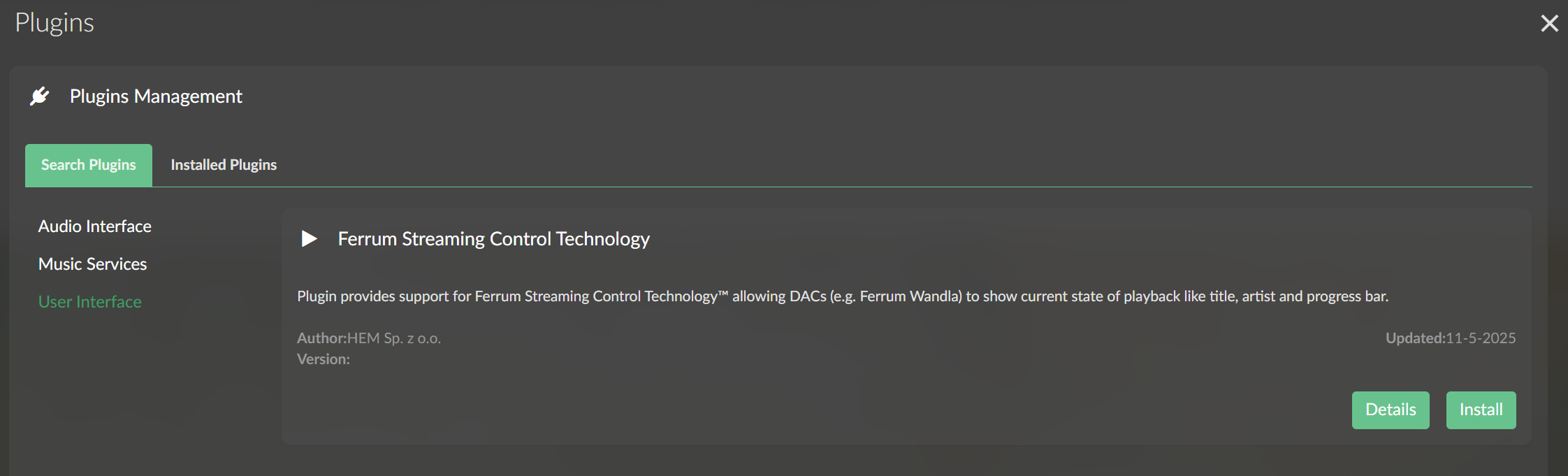
It made me wonder about what this new control tech could mean for interfacing with the Roon endpoints, in my case Roon Bridge on RPi4. I don’t expect much, like actually control, but you never know (display tracks?) until you try it, which I will after release.
There is a Ferrum streamer in the works, which this may be related to; this also suggests more possibilities for Roon integrations.
Being a fellow WANDLA owner, I’m looking forward to this as well!
There is a video link in the press release on the ferry website which demonstrates the functionality using roon on a laptop. The link doesn’t seem to work anymore, but I could watch it the day the announcement was released.
Demonstrated functions in the video were (IIRC):
Artist/title information on the WANDLA display
track time information (progress bar) on the WANDLA display
track skipping forwards/backwards in the queue by swiping on the WANDLA display
play/pause and track skipping using the WANDLA remote
From what I have seen and read I assume the FSCT doesn’t directly integrate into roon itself but interfaces with the playback control functions of the operating system which is interfacing with the roon remote app on the PC/Mac connected to WANDLA.
While this two step approach seems complicated in the first place, I think it’s a pretty smart approach because it makes FSCT independent from a specific playback software. Consequentially every playback software which is controllable through the operating systems playback control features should work with FSCT.
So let’s wait for Munich High End and the release of Firmware 2.0.0 afterwards.
The update is out.
Apparantly, basic controls (play/pause, track skip, volume) even work without the specific FSCT driver installed.
The FSCT driver is needed to display metadata (song/album title, artist, progressbar) on the WANDLA display.
I will try it out by the end of the week and report my findings.
I’ve been watching people’s experiences with it and I’ll try it over the weekend myself.
The required driver makes sense and explains away some of the magic I felt when I couldn’t work out how it “just worked” according to the press releases.
Roon Bridge on a RPi4 is what I use so without a driver this is likely to have limited functionality for me. I am interested in their upcoming streamer so overall progress is a good thing.
Got to it earlier than anticipated and got mixed results with firmware 2.0.0.:
The good:
I like the new dual Home Screen option with small / large fonts for desktop and speakers setups!
I like the new feature to assign toggling Upsampling filters with the Fn-Key of the remote
MacBook connected to WANDLA via USB
Playback controls (Play/Pause, skipping back-/forwards) work when running the Roon Remote App even without FSCT driver
Displaying metadata works with the FSCT driver installed.
USB Volume Control through roon works as well
The Bad:
Direct USB connection to Roon Sever (ROCK)
USB transport controls don’t work (USB volume control works though)
Displaying metadata doesn’t work either, but wasn’t expected to do, because there’s no driver for linux yet.
USB connection to a Pi4-based streamer running VolumioOS and RoonBridge
Same as with a direct connection although the FSCT plugin was installed. This is surprising as this supposedly was the setup Ferrum demonstrated the new feature at Munich HighEnd.
This is a big disappointment since the direct connection to the RoonServer is my favored setup and I was very much looking forward to use the Wanda remote for playback control.
It was promoted by Ferrum to work with VolumioOS in the press release. Apparently not with roon or not in this configurations.
In general it would be nice, if Ferrum would add some advice on known working and non-working configurations in the FAQ-section on their website.
The Ugly:
New VolumeScaling Option is too radical IMHO, I was in the range 60-70 before in PRO mode, now I’m in 20-30 range in RED mode. It would be nice to either revert this or offer an option to toggle between old/new scaling in the menu in a future firmware update
Edit: ESS LinPhase Filter works again after power cycling Wandla.
So at the moment I would like an option to roll back to 1.6.1…
Some further feedback on working / non working configurations:
non working:
RasPi running Ropieee with RoonBridge. I assume any other configuration with Roonbridge (e.g. DietPi with Roonbridge) won’t work either.
Headless RoonServer on MacMini with direct USB connection to WANLDA and only RoonServer running
DSD via DoP doesn’t work anymore, so stay away from FW 2.0.0 if you need this!
ESS LinPh Upsampling filter not working It only works once after power up. If you cycle through all inputs and back to USB for example, it seizes to work.
partially working:
iPad connectec via USB and runnig RoonApp playing to WANDLA (playback controls, Volume, no metadata)
VolumioOS accessed by Roon via AirPlay (Shareport): Metadata works if FSCT plugin is installed but nor playback control
working:
Headless RoonServer on MacMini with Roon app (not only Roon server) set to autostart on boot (playback controls, Volume, metadata with FSCT driver installed). This way, playback information is shared with the OS through the Roon App even if a different device (iPad) is used to control playback.
However it’s a (small) waste of resources to have the Roon App running “blind” in the background just for this purpose.
More thoughts regarding VolumioOS with RoonBridge:
Ferrum demonstrated FSCT using a volumio streamer (riva?) with Roon on Munich High End. The streamer is Roon Ready certified, most likely incorporating the RoonStream as Input in the Volumio Software and making it possible to use transport controls and metadata information via FSCT plugin.
This obviously makes a difference compared to VolumioOS running on a Pi4 just hosting RoonBridge and not passing the stream through the Volumio Software but instead just routing it directly to the DAC.
When music plays through RoonBridge there’s no information on the “now playing” screen of VolumioOS, thus no information can be passed to WANDLA.
If a friend hadn’t informed me, I wouldn’t have known that the Ferrum Wandla Firmware 2.0 update introduced the following issues (since I normally use I2S):
(1) Mac directly connected to Wandla via USB
• Before the update: PCM up to 768kHz, DSD up to DSD256
• After the update: PCM remains normal, but DSD drops to DSD64
(2) Mac → Streamer (e.g., SOtM / Sonore) → Wandla (via USB)
• Before the update: PCM up to 768kHz, DSD up to DSD256
• After the update: PCM drops to 192kHz, DSD drops to DSD64
It’s unclear whether this is caused by Firmware 2.0 or the FCST driver.
I observed the same issues (see above), regardless of source (Mac, ROCK, streamer). It has nothing to do with the FSCT driver, which is not available for Linux based systems.
Native DSD instead of DoP however works fine with higher DSD rates, so maybe you should try to configure your streamer to Native instead of DoP in the audio device setup, if it is supported.
I opened tickets with Ferrum support regarding the DoP-Bug, the ESS LinearPhase Bug and the radical Volume scaling issues, which IMHO wasn’t a smart change.
Also requested an option to roll back to 1.6.1.
Let’s see, what happens on Monday when Ferrum staff is back in office…
Quick Udpate regarding Feedback I received from Ferrum Support today:
DoP and ESS LinPase Bugs are being worked on.
Digital input trim and Dac Output Mode PRO/RED are done in the analog domain, so there’s no harm to sound quality in adjusting these accordingly to better suit the new volume scale. So in essence, if the output signal is the same volume as before, you’re applying the same negative (analog) gain as before, it’s jut a different number on the volume scale.
Applying max. digital input trim and setting output mode to RED, I’m back in the 50-60 range on the new volume scale where increments are 0.5 dB, allowing for very fine adjustment. So I’m fine with this.
I was given the opportunity to roll back to 1.6.1, so I took the opportunity to try and compare the sound quality of Firmware 1.6.1 vs. 2.0.0. Of course there was no quick A/B comparison possible as the process involves flashing the firmware inbetween listening sessions, so what I did was
fixing the volume on a certain level, noting the level using white noise
listen to a few well known tracks with firmware 1.6.1
flash the firmware to 2.0.0, load factory default values
adjusting the level using white noise to match the noted level (thanks to the new volume scaling, this was possible within 0.5 dB)
listen to the same well known tracks again
Both listening sessions were done with the default HP Apod filter and using the RoonServer connected directly to the USB input.
And dare I say it - Firmware 2.0.0 does not only give a decent upgrade in functionality, it even sounds better! Most noticeable were a more relaxed treble and a bigger spatial presentation both in width an depth. What a pleasant surprise!
Update 2.0.1 is out. This fixes bugs regarding high rate PCM and DSD not playing as well as the issues with ESS linear phase filter.
Update:
As it seems, Firmware 2.0.1 introduced a new bug while fixing the above issues.
Apparantly PCM 32 bit signals are truncated to 24 bit via USB Input. Diisplay shows only 24 bit.
It works fine on the I2S input, showing 32 bit.
Ticket with Ferrum support has been opened.
As a temporary fix i recommend setting the maximum bit depth to 24 bit instead of 32 bit in audio device setup in roon. This way the input signal shouldn’t be truncated on Wandla and you benefit from proper dithering when applying DSP (EQ, convolution, upsampling) in Roon.
1 Like
Torben_Rick
(Torben - A Dane living in Hamburg - Roon Lifer)
15
Does this showup when using Roon and Roon Ready streamer?
No, to make playback information visible on the WANDLA display, a special driver is needed to fetch this information from the playback device and send it to WANDLA.
Currently the following options work with Roon:
Roon Remote App running on Windows PC, directly connected to WANDLA via USB an FSCT driver installed
dto. with a MAC
Roon Ready Volumio Streamer with the FSCT plugin installed
Note: When playing from a PC or MAC via USB to WANDLA, FSCT works with any playback software that passes information to the OS’es “now playing” function. FSCT grab’s the information from there and not directly from a specific playback software.
The same goes for playback Control (play/pause, track skip) via the WANDLA remote using USB HID commands. Those work like the playback control keys on a keyboard (Mac: F7, F8, F9-Key) on the OS’es “now playing” function and this way control the playback software. This works without an additional driver because it’s standard USB functionality already supported by Windows and MacOS.
Maybe Ferrum will come up with a RoonExtension to integrate FSCT and playback control directly into Roon one day.
1 Like
Torben_Rick
(Torben - A Dane living in Hamburg - Roon Lifer)
17
WANDLA HP should be a nice addition to your headphone setup from what user/reviewers report about it.
I’ve got the original WANDLA (without HP), so I can’t give any first hand impressions on headphone performance of WANDLA HP.
I haven’t gone for the GoldenSound plugin for my WANDLA for the same reason. Too pricey for a handful of DSP toys IMHO which to some extend could also be reproduced by DSP in Roon as well, And since there’s no “try before buy” option, I stayed away.
Money is IMHO better spent on the HYPSOS power supply, which gives WANDLA an extra bit of sound quality. I would imagine, that WANDLA HP which needs to power the internal headphone amp as well might benefit even more from HYPSOS than the regular WANDLA, which draws a mostly constant 13 Watts from HYPSOS all the time.
1 Like
Torben_Rick
(Torben - A Dane living in Hamburg - Roon Lifer)
19
The only thing that I find interesting is “spatial enhancement”. But again 599 EURO for that is spicy.
The total list price would than be 4.500 EURO. Also spicy
But so far I have not found another good alternative.