Try using Flatseal to disable socket=fallback-x11. Although I understood that this was resolved out-of-the-box with Wine 10, so could be a Flatpak packaging issue.
Interesting! I’m learning about the diff between x11 and Wayland and xWayland, etc. - but I’ll say font rendering and scaling looks quite crisp on my main setup. I know I recently ran a ton of Wine updates last week, so maybe I have the “fix” MJW refers to here.
Think there’s potential for better rendering by forcing Wayland? Or maybe I am already rendering through Wayland?
Setup where rendering looks just fine to me:
- Fedora 41 using Gnome (and thus Wayland?)
- Flatpak Bottles 51.17
- 150% scaling on 4k monitor
- 150% scaling on laptop monitor (2492x1664)
I also have the same Bottles setup on an old Surface Go 1 (quite low res screen) running Ubuntu 2410, and I’ll admit fonts there look cloudy/blurrier than this Fedora machine. But not sure if it’s just the device itself.
Finally found some time to try that but the issue persists even on Wine10rc6.
1 Like
For people struggling to scale the resolution on wayland, here is what I ended up doing:
- Install the
roon-on-wineprefixe. winecfg: emulate a 4k screen (3840x2160) at 96 DPI in theGraphicstab.winetricks: force a x11 graphics (inChange settings).- Set your regular scaling factor in the
winecommand:env WINEPREFIX=/home/USER/my_roon_instance WINEDEBUG=fixme-all WINEDLLOVERRIDES="windows.media.mediacontrol=" wine /home/USER/my_roon_instance/dosdevices/c:/users/USER/AppData/Local/Roon/Application/Roon.exe -scalefactor=2
Then the tedious part:
- Given that you already use
shikaneto scale your display, restore a scale factor of 1.0 through a new profile before spawning Roon. Run the whole thing through a script. Being onqtilethis looks like this:
#!/bin/bash
qtile cmd-obj -o cmd -f to_screen -a 0 &
shikanectl switch bureau_roon0 &&
env WINEPREFIX=/home/USER/my_roon_instance WINEDEBUG=fixme-all WINEDLLOVERRIDES=“windows.media.mediacontrol=” wine /home/USER/my_roon_instance/dosdevices/c:/users/USER/AppData/Local/Roon/Application/Roon.exe -scalefactor=2
This will give you a proper 4k window if your compositor doesn’t handle scaling through Xwayland.
As I’ve got a dual display setup, I mostly spawn Roon on the secondary monitor - thus adapting the scale factor only on display 2. This may require additional tuning. For instance, in my case, I had to toggle fullscreen within the script.
Not the easiest (and hopefully temporary) workaround but once it’s set, you manage the window as any other window.
Following the instructions above, on OpenSUSE Kalpa (which I highly recommend as an immutable OS that is very stable, despite being alpha), I was unable to run Roon in wine in flatpak, bottles or distrobox - always crashing when the audio zone was selected, irrespective of having the mediacontrol override in place, and always with the following error:
Process terminated due to error in .NET Runtime...
What ultimately worked for me was using dotnetdesktop7 instead of dotnetdesktop6 as well as the mediacontrol override. Please note that Kalpa uses wine 10, KDE 6 and Wayland.
This works inside a distrobox - but as the error was consistent across flatpak, bottles and distrobox - I’m confident that this using dotnetdesktop7 would work in all environments. That aside, from within the distrobox (called Wine) with wine installed, I followed the usual steps to install:
WINEPREFIX=/home/alan/WinRoon WINEARCH=win64 wine wineboot
WINEPREFIX=/home/alan/WinRoon winetricks -q dotnetdesktop7
WINEPREFIX=/home/alan/WinRoon winetricks -q win10
WINEPREFIX=/home/alan/WinRoon wine /home/alan/Downloads/RoonInstaller64.exe
It crashes when a zone is selected, but that’s fixed with the mediacontrol override, so to run Roon
WINEPREFIX=/home/alan/WinRoon WINEDEBUG=fixme-all WINEDLLOVERRIDES="windows.media.mediacontrol=" wine /home/alan/WinRoon/drive_c/users/alan/AppData/Local/Roon/Application/Roon.exe
I created a script to launch this (thank you @spockfish borrowed from Roon on Wine), and start it from a launcher created in KDE Menu Edit - but it’s this .desktop
[Desktop Entry]
Actions=Remove;
Comment=Roon running in a distrobox
Exec=/usr/bin/distrobox enter Wine -- bin/startroon.sh
GenericName=Roon
Icon=8630_RoonServer.0
Keywords=distrobox;
Name=Roon
NoDisplay=false
Path=
StartupNotify=true
Terminal=false
TerminalOptions=
TryExec=/usr/bin/distrobox
Type=Application
X-KDE-SubstituteUID=false
X-KDE-Username=
Hopefully this helps someone who is having similar issues to my experience.
Mundane question: how long does it take to install dotnet7. It’s been running for 45 minutes on Arch and an i7 CPU.
It should only take a couple of minutes to install Roon with the dependencies, so something has gone awry. Have you checked the process?
I finally got Roon working in a Bottle. It appears that the WINEDLLOVERRIDES="windows.media.mediacontrol=" isn’t always accepted when entered through the settings menu.
If you are still getting the same .NET Runtime error, you can add it to the launch options instead.
After installing Roon, enter the bottle, you should be presented with a section “Programs” that lists Roon and RoonServer. On the Roon line, click the three vertical dots and choose “Change Launch Options”. The first option is Command Arguments, enter
WINEDLLOVERRIDES="windows.media.mediacontrol=" %command% -scalefactor=1
Where the scalefactor should be a value that works for your needs.
This worked for me - the runner didn’t matter, the dotnetcoredesktop version didn’t matter (6 or higher). I found the solution on the Bottles Github page, it appears to be (or was) a known, but intermittent bug.
5 Likes
I run Roon Server via Distrobox & Roon Client via Bottles which works very well. The only trouble I get is, when Roon gets an update. Roon Server updates automatically, but to update Roon Client I always have to download Roon manually & create a new bottle. I can copy the Bottle config so thats not the Problem, but it’s annoying that I have to change the settings for Roon client every time. Is there a way to update Roon Client in place, like under Windows?
I can’t say I’ve experienced this using Bottles or Wine. Roon downloads the new version (I don’t have automatic updates enabled), and after a restart, is updated.
Interesting. For me, Roon Client just doesn’t download, no matter how often I restart it or the Server.
Sorry for replying to an old post. As the new proud owner of a nicely loaded System76 Mega Custom, I am back to running Roon Remote on Linux. However, I was forced to use Wayland because its fractional scaling handles multiple HDPI monitors with slightly different resolutions and aspect ratios better than Xorg.
That said, as usual with many apps, Roon on Wine is blurry on Wayland. Wine stable 10.0 has wayland support - unset $DISPLAY and you should be in Wayland… err… land. So I unset the DISPLAY variable and I got a crash dialog:
“Cannot activate the second GL rendering context”
Set DISPLAY back, it runs, however it is HORRIBLY BLURRY.
So I want to ask first the poster: You said it runs well under wayland, so checking if that means it runs under fractional scaling, thinking it obviously runs under Xwayland. Maybe in not trying to adress wayland, 9.X handles it better when it comes to Wine. Because I have been banging my head against the problem and cannot find a solution, so willing to consider downgrading to Wine 9.X.
That said, want to check if the conditions are the same. Fractional scaling is notoriously difficult sometimes, and well, monitors are working well, so not willing to start changing configs or switch sessions (to an Xorg one) just to run Roon.
I know that Roon won’t support roon on wine, so asking the community if you have encountered this, if you solved it. If you did, and it is trivially simple, pls let me apologize for my dumbness…
(Native Linux client, please)
This thread describe what I run to get Roon on Wine running. I’ve not experienced any blurring, but I’m running 1X scaling on 1080p. For an LTS, e.g., there’s no i386 architecture, so those steps can be removed.
What you may need to do, in addition, is use winecfg to adjust the scaling to match what you’ve done for Roon. You’ll need to increase the DPI.
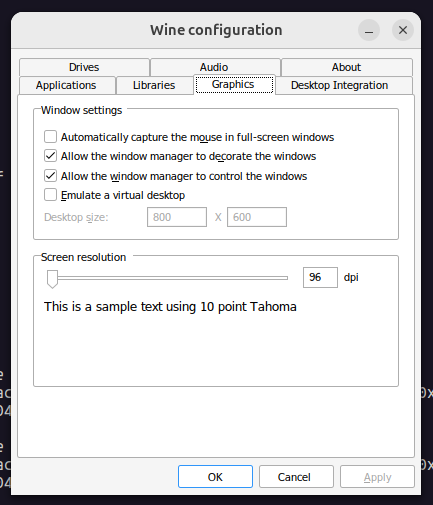
Edit: Run winecfg under the Roon-on-Wine prefix.
1 Like
Ah - that makes sense, give that increasing the font size indeed helps - I concentrated my problem solving efforts around Wayland mode and that message, quite frankly did not occur to me to try to improve X (or Xwayland mode, to be accurate)
Thanks for the tip.
1 Like
I have Roon installed on two computers, one not using scaling and another at 150% scaling.
Both computers are running Fedora 41 with KDE Plasma and Wayland.
However, I don’t experience any blurring at all.
Both installations look great…
Yeah from what I understand, plasma does it right. That said, have to ask, Wine 10.0? unset DISPLAY? Thanks!
Curious - so used to gnome that moving to KDE is improbable, but would love to know
thnx!
I’m simply using Bottles to set up Roon.
So not using Wine 10, but I have tested many of the runners available in Bottles, like Soda 9.0.1, which is based on Wine 9, and even various versions of Wine-GE.
All have worked fine for me, so I think it is likely that this is more due to Gnome’s rather poor implementation of Wayland.
1 Like
For me, automatic updates work just like under Windows.
And I’m running through Bottles.
I have been running Roon in Linux through Bottles for a couple of years on more than one computer, and only once did I have to create a new bottle for an update of Roon.
No idea if this will work, but it should prioritize Wayland. Once again, this needs to be done in the Roon prefix. I may take a look later.
[HKEY_CURRENT_USER\Software\Wine\Drivers]
"Graphics"="wayland,x11"
It will only work with Wine 9.x onward.
Tried to reinstall on arch / xfce. Cannot load the exe file since the file browser shows nothing, also selecting “all files”. Works in gnome with the same flatpak version 51.18.