Thank you for your input. Unfortunately it’s the way i first tried, with the same crash when selecting a zone. I will carry on testing combos.
Try this: when Roon first opens, resize the window so it’s not maximized. Also, don’t enable any zones on the hist machine, and then try playing on a remote zone.
Does this help?
I always end up with
Failed to find library for L"Windows.Storage.Streams.RandomAccessStreamReference"
Edit:
And the likes:
wine: Call from 000000007B013AD7 to unimplemented function shcore.dll.CreateRandomAccessStreamOverStream, aborting
Bloody hell, I got it to work with dll substitution:
Set windows.media.mediacontrol to Disabled
2 Likes
It’s not the first time this has broken Roon. Good to have visibility here, too.
When I try run Roon on Bottles I get a Fatal Error: “Unable to load DLL ‘roon_dxgi’ or one of its dependencies: Modul nicht gefunden. (0x8007007E)”
Any Ideas?
The Installation did run without Errors.
Window-System: X11
Runner: wine-ge-proton8-26
DXVK: disabled
VKD3D: disabled
DXVK-NVAPI v. 0.7.1
Installed dependencies: dotnetcoredesktop6
1 Like
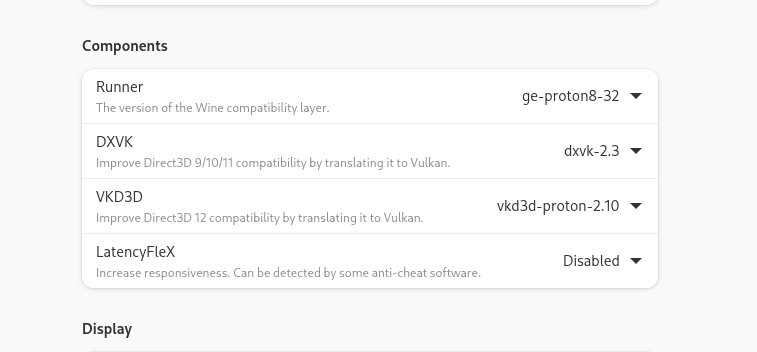
Sadly, those Settings don’t work for me. What did work was Soda 9.0-1 but only for a Minute, when I started the Music, it crashed. And now, i just get the same Error as above.
Maybe try installing from scratch. You can always use community remote.
xx@fedora:~$ find . -name roon_dxgi\*
./.var/app/com.usebottles.bottles/data/bottles/bottles/roon/drive_c/users/steamuser/AppData/Local/RoonServer/Application/200001480/roon_dxgi.dll
./.var/app/com.usebottles.bottles/data/bottles/bottles/roon/drive_c/users/steamuser/AppData/Local/RoonServer/Application/200001483/roon_dxgi.dll
./.var/app/com.usebottles.bottles/data/bottles/bottles/roon/drive_c/users/steamuser/AppData/Local/Roon/Application/200001483/roon_dxgi.dll
1 Like
I’m already using that, but thanks anyway. I’ve investigated a bit further & what seems to work is sys-wine-9.0, but only when no Music is playing or added to the Queue on the Zone which is selected. If so, it will crash, if not, it will start normal again.
Which bottle did you install? I first had the rpm from fedora, that did not work, flatpak has been working fine for over a year.
Bottles com.usebottles.bottles 51.15 stable system
I did install the flatpak.
I was able to solve my problem: When I got the error message, I set the runner back to Soda 9.0-1 and reinstalled Roon. Then I had to set the mediacontroll dll substitution from earlier in this Thread. Now it works flawless.
I have Roon working on my ubuntu 24.04 but I have still one issue: When I try to play music on zones that are part of my laptop several songs are automatically skipped and then it says it stopped playing due to too many retries. Strange thing is that on my PC it does work fine to play music on the Zone part of the PC itself. Any suggestions how I can fix this?
Solved, forgot to install Roon Bridge Linux. I was confused as I did see local devices in the setup-audio but they don’t work. Only when I install native RoonBridge on ubuntu devices work.
Yes, it worked for me. Thanks!
Hi! Wanted to say thanks for this screenshot; it’s been the ONLY config I have gotten Roon to work reliably now. (Even the Roon on Wine script from Ropieee dev didn’t work for me).
I wanted to double down on this config detail, in case it helps others. **These settings have worked on both Fedora 41 and Ubuntu 2410 releases! **
- Install Bottles directly from Flatpak
- In a new bottle, install the dotnetcoredesktop6 dependency
- In the bottle’s Settings>DLL Overrides window, enter (include the " "): WINEDLLOVERRIDES=“windows.media.mediacontrol=”
- Install the specific Runner, DXVK, VKD3D versions listed below (might run with newer versions, but these are CONFIRMED to work)
Bottles supports backup yaml files, so you can also copy/paste this text below into a new file, save as “backup_Roon.yml” and import in Bottles (click the hamburger menu on the Bottles main window, then IMPORT).
Hope this helps those struggling with Roon on Linux!
Arch: win64
CompatData: ''
Creation_Date: '2025-01-10 21:35:38.405730'
Custom_Path: false
DLL_Overrides:
    WINEDLLOVERRIDES="windows.media.mediacontrol=": n,b
DXVK: dxvk-2.3
Environment: Custom
Environment_Variables: {}
External_Programs: {}
Installed_Dependencies:
- dotnetcoredesktop6
Language: sys
LatencyFleX: latencyflex-v0.1.1
NVAPI: dxvk-nvapi-v0.8.0
Name: Roon
Parameters:
    custom_dpi: 96
    decorated: true
    discrete_gpu: false
    dxvk: true
    dxvk_nvapi: false
    fixme_logs: false
    fsr: false
    fsr_quality_mode: none
    fsr_sharpening_strength: 2
    fullscreen_capture: false
    gamemode: false
    gamescope: false
    gamescope_borderless: false
    gamescope_fps: 0
    gamescope_fps_no_focus: 0
    gamescope_fullscreen: true
    gamescope_game_height: 0
    gamescope_game_width: 0
    gamescope_scaling: false
    gamescope_window_height: 0
    gamescope_window_width: 0
    latencyflex: false
    mangohud: false
    mangohud_display_on_game_start: true
    mouse_warp: true
    obsvkc: false
    pulseaudio_latency: false
    renderer: gl
    sandbox: false
    sync: wine
    take_focus: false
    use_be_runtime: true
    use_eac_runtime: true
    use_runtime: false
    use_steam_runtime: false
    versioning_automatic: false
    versioning_compression: false
    versioning_exclusion_patterns: false
    virtual_desktop: false
    virtual_desktop_res: 1280x720
    vkbasalt: false
    vkd3d: true
    vmtouch: false
    vmtouch_cache_cwd: false
Path: Roon
Runner: ge-proton8-31
RunnerPath: ''
Sandbox:
    share_net: false
    share_sound: false
State: 0
Uninstallers: {}
Update_Date: '2025-01-10 21:44:35.818730'
VKD3D: vkd3d-proton-2.10
Versioning: false
Versioning_Exclusion_Patterns: []
Windows: win10
WorkingDir: ''
data: {}
run_in_terminal: false
session_arguments: ''
1 Like
Has anyone managed to bypass xwayland with the DISPLAY= environment variable? I get:
Can not activate the second GL rendering context.
I haven’t tried. But curious why it would be needed? Both Fedora and Ubuntu are using Wayland, and Bottles is able to run and render Roon just fine without needing to work around xwayland from what I can tell.
Bottles is able to run and render Roon just fine without needing to work around xwayland from what I can tell.
Bottles just encapsulates wine. Wine wayland is currently quite experimental but some apps work. Try extra-maus and you’ll likely see a red cursor (=xwayland) on the Roon window if you haven’t specified the registry key to run wayland.
The problem here is HiDPI resolution. Users of KDE or Hyprland (and maybe other DEs) won’t complain about running Roon within xwayland as they’ve implemented a way to deal with resolution scaling on 4k displays. For the rest of us, we’re right in this niche where xwayland renders blurry characters. Passing Roon through native wayland would solve this.