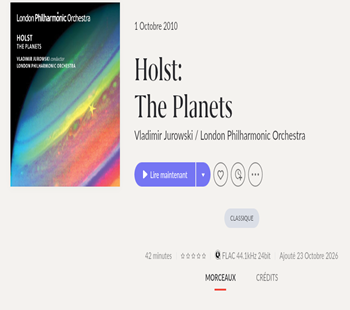
· System in use: Streamer INNUOS Zenith MK3 (up to 32 bits/384 KHz) used as Roon core Qobuz sublime (up to 24/192) 1) With Accustic Arts Tube-DAC II (up to 24/192) : 16/44 and 24/44 recordings play well. 24/96 and 24/192 do not play. 2) With North Star Design DAC Model 192 (24/192) : Recordings 16/44, 24/44, 24/96 play well. Recordings 24/192 don’t play. Some recordings appear as 24/96 in Qobuz but are 24/192, don’t play 3) On Smartphone, every recordings Qobuz work well.
That pattern points us toward a format or signal-path limitation somewhere between Qobuz and the two DACs.
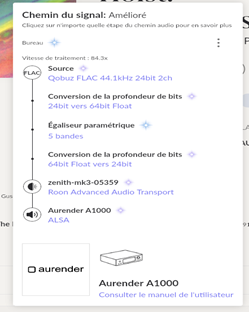
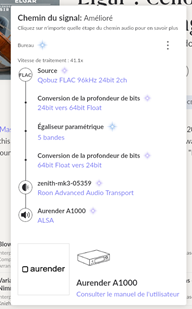
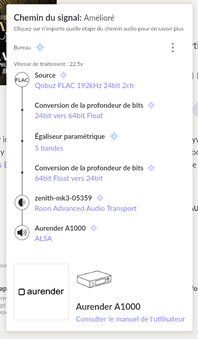
First, could you open one of the failing 24/96 or 24/192 tracks in Roon and check the Signal Path? We want to see whether Roon is trying to downsample, whether any DSP is enabled, or whether the zone is reporting a format it cannot accept. If you can share Screenshots of that screen, it will help us confirm what Roon is sending. Please try this when playing to your Smartphone as well, as it would allow us to compare the two.
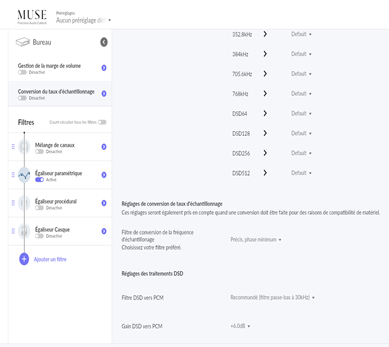
Next, please try the same track with DSP disabled for that zone, especially sample rate conversion, volume leveling, and any convolution or headroom settings. If those settings are already off, that is useful to know as well.
We’ll also enable diagnostics for your account. If you can share the exact local time + date + track when you perform the above tests, we can look over the logging to see if there are any clues. Thank you.
Thank you for the detailed tests and screenshots, they were very helpful.
The diagnostics from your Zenith show that Roon is sending 24/96 and 24/192 to your Aurender UC100 correctly and without errors: the UC100 accepts both formats and playback starts normally. So the signal is reaching the converter, but it gets lost on the S/PDIF connection between the UC100 and the DACs, or at the DAC’s input. The fact that one DAC stops at 96 kHz and the other at 192 kHz also points to that connection rather than to Roon or Qobuz.
A few things to check:
Which output of the UC100 are you using: coaxial, optical (Toslink), or AES? Optical connections are often unreliable above 96 kHz. If you’re using optical, please try a coaxial or AES cable instead.
If you have another digital cable, please try it, ideally one rated for 75 ohm digital audio.
Please check the DAC manuals for the maximum sample rate on the specific input you’re using. Some DACs support 192 kHz on one input but less on another.
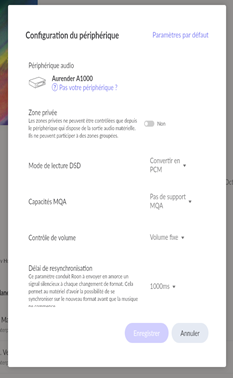
In the meantime, you can let Roon convert anything above what works. Go to Settings > Audio, click the gear icon next to AUR-UC100C > Device Setup, and under Advanced set Max Sample Rate (PCM) to 96 kHz. Then click Save. Roon will play 24/192 tracks at 96 kHz, which your North Star DAC handles fine. If you also use the Accustic Arts DAC, you may need a lower setting (for example 48 kHz) until the connection issue is found.
Yes indeed, it is a problem with the maximal input that is possible in the DAC. I have changed the maximal sample rate in the streamer and it works. Thank you.
Great to hear that sorted it out. Setting the streamer’s max sample rate to match what the DAC can take was the right fix here, and it explains why playback is now stable. Enjoy the music, and we’ll go ahead and mark this one for closure.