hello … I have Roon server running on an i5 sonic transporter, and it is working fine playing FLAC files on two audio devices - Surface compute and iphone. Also connected sonic transporter to Audiolab Omnia (PC USB Input) but am not able to see Omina as an audio device in Roon. Any advice on how to get Roon to play on Audiolab Omnia? Thanks for your help.
@F_J according to Audiolab, the USB B port on the Omnia is capabile of connecting to a computer and the USB A is for a hard drive. What USB port do you have connected on the Omnia to the i5?
It also has a Roon Tested DAC, so most likely, as @Robert_F says, the wrong connection is used.
1 Like
My Audiolab 9000A also had problems using the usb connection to a Linux based source (rpi). What Os does the sonic transporter run on?
Your Omnia is not Roon Ready, so it seems. But there might be a way to stream to it over ethernet, since you have a SonicTransporter.
To do this:
- install this app on your SonicTransporter: SonoreUPnP Bridge
- in Roon, goto settings → setup, and activate Squeezebox support
- now open the settings page of your SonicTransporter and click on Sonore UPnP settings. Under ‘available renderers’, you should see your Omnia.
- in Roon, pick squeezebox as the zone to play music to, and you probably will hear music
It’s Linux as well. Your best off with windows for the pc side with Audiolab or get a streamer and connect it up to its digital ins or analogue ins.
Good idea, used UPnP bridge in LMS and it works well to my Marantz and use RHEOs for last 18months for Roon which also uses the same LMS bridge.
I have it running of my mac mini server directly. Works fine this way. I did get it to work running of a pi but sometimes the audiolab would not show up in roon. So didn’t bother further.
If the Omnia is roon tested I suggest @F_J to try running it using a pc or mac to see if it works that way
thanks for the replies.
@Robert_F … I have connected to the USB-B port on the Omnia. See image below. Should I change and connect to the USB-A port? thx
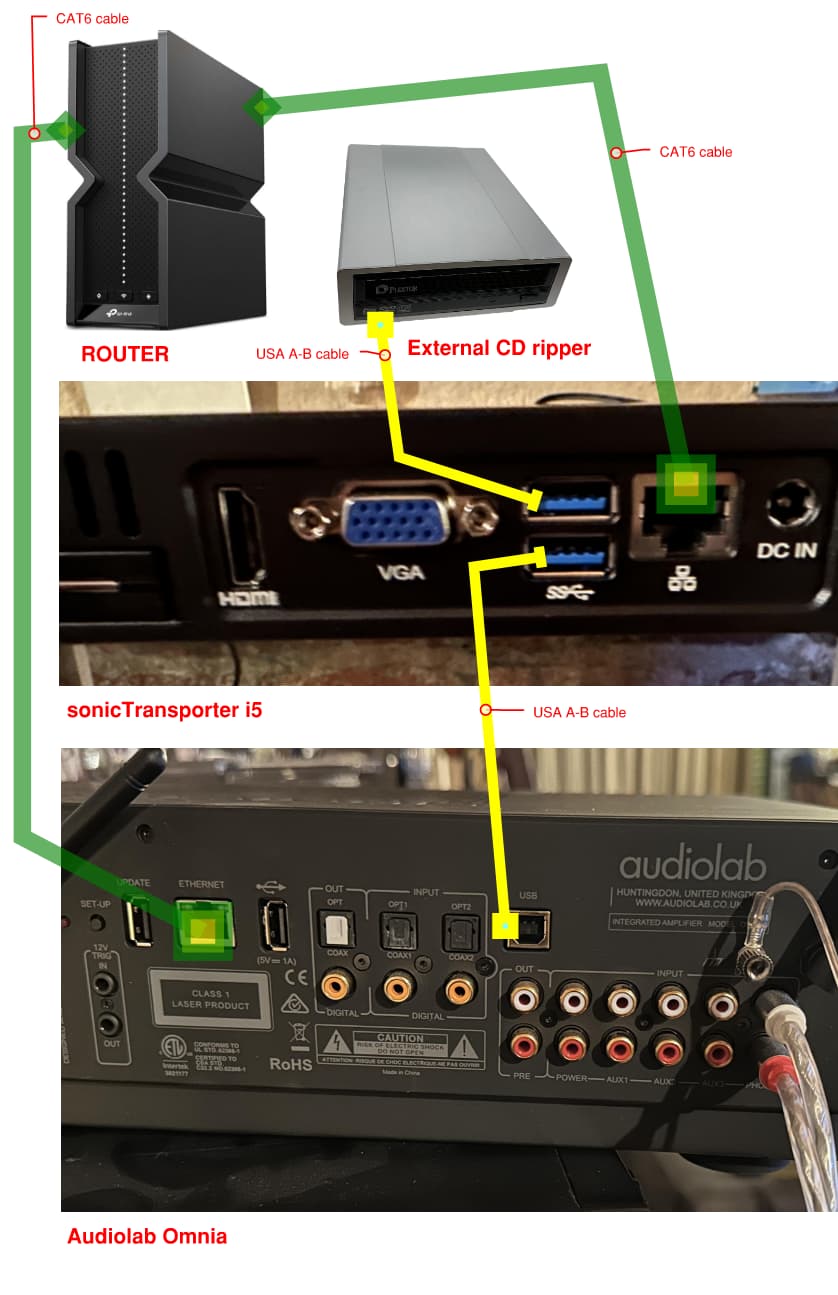
It’s not being used as a streamer, but a DAC via USB input, which is Roon Tested.
For clarity:
- Roon Ready refers to network streamers, smart speakers, players, and streaming amps etc., i.e, connected via Ethernet or Wi-Fi.
- Roon Tested refers to DACs only.
I know. My suggestion is to make it more versatile.
Try it in the USB B port (the square(ish) USB port to the right of the Opt2 port). Not sure the Omnia will be recognized if the other side of the connection is not a PC or Mac