
But more seriously… the article seems viable. I haven’t tested it of course, but it’s definitely a more “correct” way of solving this sorta of problem. You should try it out and report back!
1 Like
If you do decide to try it, it’s:
5 parts Vodka
3 parts cream
2 parts Kahlua

Back in the day, it was always missing from Blockbuster… and for good reason
Article is from a few years ago, figured you would have seen it?
I haven’t. Doesn’t mean anything other than help illustrate what a small percentage of articles on the internet I’ve actually read.
Oh man I’m on the edge of my seat… someone else going in to try to make site-to-site work!!! Good luck, Godspeed!
1 Like
Step 1 Wireguard
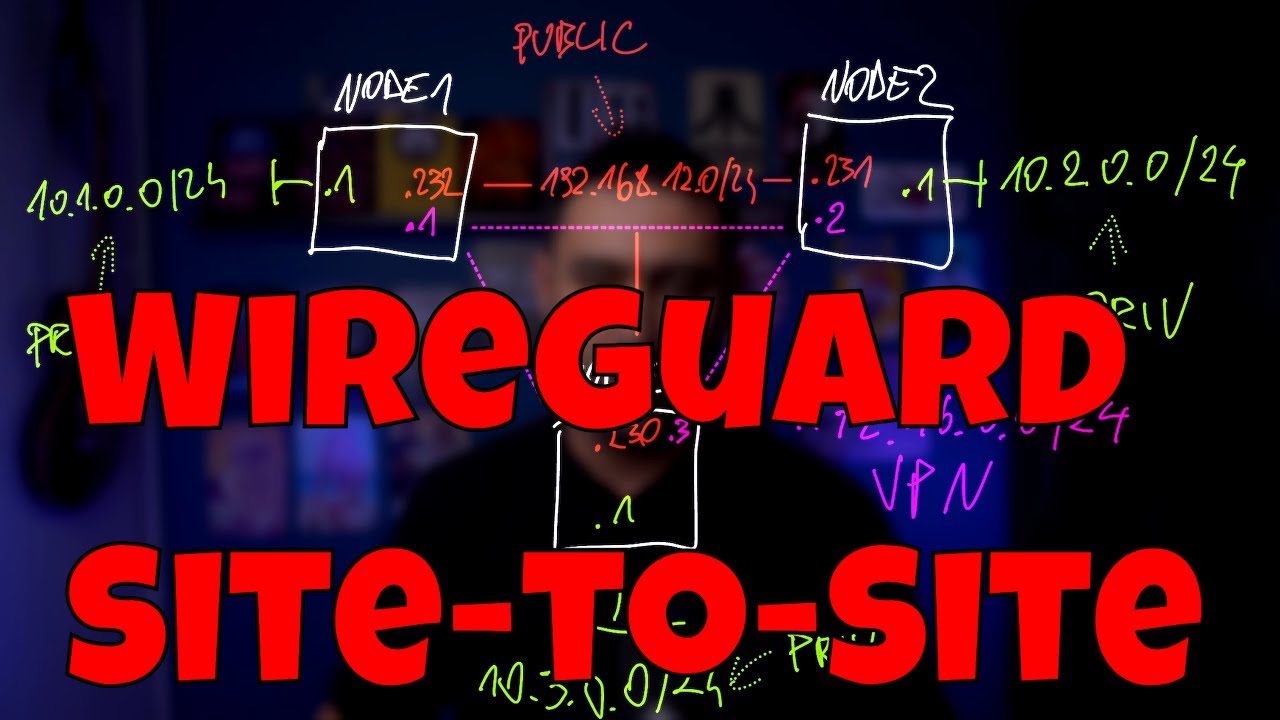
Just finished setting up wireguard between my 3 sites. my config is a little different since I already have wireguard setup at the firewall between my 3 sites. (I don’t want to fuss with my 3 PFSense as business is involved) I now have 3 Ubuntu VMs running in each LAN with wireguard connecting the 3… done and tested.
Step 2
Next up, I’ll use udp-proxy-2020 … have already identified my interfaces… backed up the VMs in case I need to roll back.
installing on Ubuntu running on x86? Not sure where to start…
wget https://github.com/synfinatic/udp-proxy-2020/releases/download/v0.0.11/udp-proxy-2020-0.0.11-1.x86_64.deb
save to?
then… any help, appreciated. thank you
It doesn’t really matter where you download the package. A simple set of steps is:
cd ~/Downloads
wget https://github.com/synfinatic/udp-proxy-2020/releases/download/v0.0.11/udp-proxy-2020_0.0.11-1_amd64.deb
sudo dpkg -i udp-proxy-2020_0.0.11-1_amd64.deb
That should install the package. Read the output from that command - it will tell you the location of the conf file you need to edit and how to restart the proxy once you’ve done that.
I run it in Docker and haven’t done this myself but I think it should work. That’s about the extent of the support I’m going to be able to provide - getting this working was tricky for me and my setup is quite a bit simpler than yours. Good luck!
1 Like
That’s all I needed, it’s installed.
My output for ifconfig:
root@bkk-wireguard:~# ifconfig
enp6s18: flags=4163<UP,BROADCAST,RUNNING,MULTICAST> mtu 1500
inet 10.0.3.219 netmask 255.255.255.0 broadcast 10.0.3.255
inet6 fe80::be24:11ff:fecf:63be prefixlen 64 scopeid 0x20
inet6 fd95:bee2:51f:394a:be24:11ff:fecf:63be prefixlen 64 scopeid 0x0
ether bc:24:11:cf:63:be txqueuelen 1000 (Ethernet)
RX packets 2073167 bytes 639222247 (639.2 MB)
RX errors 0 dropped 44005 overruns 0 frame 0
TX packets 16640 bytes 1401962 (1.4 MB)
TX errors 0 dropped 0 overruns 0 carrier 0 collisions 0
lo: flags=73<UP,LOOPBACK,RUNNING> mtu 65536
inet 127.0.0.1 netmask 255.0.0.0
inet6 ::1 prefixlen 128 scopeid 0x10
loop txqueuelen 1000 (Local Loopback)
RX packets 202 bytes 20185 (20.1 KB)
RX errors 0 dropped 0 overruns 0 frame 0
TX packets 202 bytes 20185 (20.1 KB)
TX errors 0 dropped 0 overruns 0 carrier 0 collisions 0
wg0: flags=209<UP,POINTOPOINT,RUNNING,NOARP> mtu 1420
inet 172.16.0.2 netmask 255.255.255.0 destination 172.16.0.2
unspec 00-00-00-00-00-00-00-00-00-00-00-00-00-00-00-00 txqueuelen 1000 (UNSPEC)
RX packets 0 bytes 0 (0.0 B)
RX errors 0 dropped 0 overruns 0 frame 0
TX packets 0 bytes 0 (0.0 B)
TX errors 0 dropped 0 overruns 0 carrier 0 collisions 0
My config file:
ARGS=–interface enp6s18 --interface wg0 --port 9003 --level warn \
Status:
root@bkk-wireguard:~# systemctl status udp-proxy-2020
× udp-proxy-2020.service - UDP Proxy 20202
Loaded: loaded (/etc/systemd/system/udp-proxy-2020.service; enabled; vendor preset: enabled)
Active: failed (Result: exit-code) since Thu 2023-12-14 18:47:42 UTC; 4s ago
Docs: GitHub - synfinatic/udp-proxy-2020: A crappy UDP router for the year 2020 and beyond
Process: 16891 ExecStart=/usr/bin/udp-proxy-2020 $ARGS (code=exited, status=1/FAILURE)
Main PID: 16891 (code=exited, status=1/FAILURE)
CPU: 7ms
Dec 14 18:47:42 bkk-wireguard systemd[1]: udp-proxy-2020.service: Scheduled restart job, restart counter is at 5.
Dec 14 18:47:42 bkk-wireguard systemd[1]: Stopped UDP Proxy 20202.
Dec 14 18:47:42 bkk-wireguard systemd[1]: udp-proxy-2020.service: Start request repeated too quickly.
Dec 14 18:47:42 bkk-wireguard systemd[1]: udp-proxy-2020.service: Failed with result ‘exit-code’.
Dec 14 18:47:42 bkk-wireguard systemd[1]: Failed to start UDP Proxy 20202.
is there something wrong with my arguments?
Yes, the trailing \ is breaking things
btw, journalctl -u udp-proxy-2020 is how to get logs from systemd.
btw… great “how to” on the 3 way wireguard here
Thank you Aaron, that fixed the startup.
root@den-wireguard:~# systemctl status udp-proxy-2020
● udp-proxy-2020.service - UDP Proxy 20202
Loaded: loaded (/etc/systemd/system/udp-proxy-2020.service; enabled; vendor preset: enabled)
Active: active (running) since Thu 2023-12-14 19:07:43 UTC; 2min 36s ago
Docs: GitHub - synfinatic/udp-proxy-2020: A crappy UDP router for the year 2020 and beyond
Main PID: 1140 (udp-proxy-2020)
Tasks: 8 (limit: 4513)
Memory: 9.0M
CPU: 559ms
CGroup: /system.slice/udp-proxy-2020.service
└─1140 /usr/bin/udp-proxy-2020 --interface enp6s18 --interface wg0 --port 9003 --level warn
Dec 14 19:07:43 den-wireguard systemd[1]: Started UDP Proxy 20202.
Doesn’t seem to make a difference out of the box. Opened Roon on my iPhone and Mac Desktop, not finding the Roon Server. I don’t want to ask too much help, in the end if this doesn’t work I might go ahead and put it onto my Netgate 6100’s if it’s compatible. Is there any troubleshooting I can do with my current setup?
You’re running site to site right? so you’re running udp proxy 2020 at every site?
That’s minimally required. Beyond that, need to look at logs or tcpdump traces to figure out what might be wrong. As I’ve said numerous times, I don’t have a “how to” for site-to-site and I don’t really support it, because it’s too painful to debug remotely with people… just way way too many variables to consider as the config becomes more complex.
I do have it running at each site, Totally get it, you were kind enough to make this with your time and do your best to help us. I suspect if I install this on my 6100, you will be able to give me better support… as it sounds like it’s something more similar to what you have?
I want to give this a try… is there anything you could look at that I can dump here? I have no expectation of any support… Thank you either way
Have you tried running the proxy with “–level trace” instead of “–level warn” and looking at the log?
Allan, I don’t support site-to-site on any device. Full stop.
It’s because there are far too many variables (device type is actually pretty low on the list of concerns) and because fundamentally, I have never gotten it working that way- because I haven’t really tried/don’t have a site-to-site network. Then people want Docker support, etc. I gotta draw the line somewhere, and that is where it is at. People have even offered me $$$ privately to get it to work for them and I say no.
In theory, it should work. In practice… well that’s different. One of these days someone with a good networking brain will look at it and get it working and then become super popular. 
For those looking into debugging this further on their own, I will point out that recent versions of Wireshark support decoding the Roon Discovery protocol on udp/9003.
1 Like
I’m glad you didn’t run out of gas before doing the Docker work. This thing works really well on my multi-homed Synology NAS with multiple Docker macvlans. I’m writing this on a Mac that’s on a different subnet than my core and I’m playing Roon on the Mac at the same time. That doesn’t work without your proxy - so thank you!
I’ve written plenty of networking code and spent more than my fair share of time in front of capture tools/protocol analyzers but I don’t know if I’ve ever been more amused by networking code than I am by this proxy. It started with “He wrote this in Go?” and proceeded to “Wow…this code is so clever!” and finally to “Man…this guy supports a ton of flags, platforms, and even Docker”.
I just wanted to say that - even if your proxy hadn’t helped me, I would have had fun looking at the project.
2 Likes
I’m 100% on your side here… and agree with all your points. On my end, 2 young kids got in my way of troubleshooting this too much.
As you said, my setup only does one part… without the routing I don’t think it’s going to work without a lot of “tinkering”. At the same time, I discovered that allowed IPs cannot be the same subnet as the endpoint, so while the routing is being handled by my firewalls, and the routing is working, something is missing. I’m thinking I can create some static routes in each endpoint… could even bring in some heavy hitters I know to look at it. Maybe at some point, but during the holidays is tough.
I am going to rethink this. You have mentioned that this won’t work point to point? SO I’ll just be wasting my time installing this on my 3 Netgate 6100 and trying to make it work point to point.
Maybe it’s time to try to get Roon Arc working on my M2/M1 Macs.
Sorry, I don’t know what you mean by “point to point”. Let me explain it this way:
The use case that udp-proxy-2020 was designed for is basically “I have a Roon Core/Server at home and want to listen to Roon while traveling on my phone or laptop using the Roon client.” I personally was visiting family for an extended period of time in another state and so udp-proxy-2020 was born.
In this case, you have a Roon Core on some random box on your (home) LAN. You then setup a VPN on your firewall/gateway and get your phone/laptop able to connect to that while traveling and to talk to devices on your home network. At this point everyone knows Roon doesn’t work properly, but other services do.
Then you install/configure udp-proxy-2020 on the firewall.
At that point, the Roon client should work fine on your phone/laptop when connected to VPN. People have had success with both OpenVPN and Wireguard.
Of course, now with Arc, I recommend people use that when available since the protocols are optimized for working over 4G/5G cellular WAN connections while traditional Roon networking is designed around high-speed LAN networks.
As for your 3 Netgate 6100’s… are you wasting your time? I honestly don’t know. How L2/L3 networking savvy are you? Are you comfortable with tcpdump to debug packets over a WAN? Can you figure out if issues are routing vs. security policy vs. “something else”. The vast majority of software engineers would answer “no” to those kinds of questions because networking is a black box and they just understand network protocols like HTTP and REST API’s. This is a big reason why nobody has AFAIK gotten it to work.
FWIW, if someone could clearly articulate a feature request/bug report to me for udp-proxy-2020 that would make this work I would happily do it if it was feasible with a moderate amount of effort. But so far nobody has been able to explain to me what is the actual underlying problem is.
That said, I believe that it is doable. It will likely be easier with OpenVPN than Wireguard.
1 Like
I am a humble wishful end-user who pokes stuff around. I actually did just pick up a second UDM-Pro on Black Friday sale so I can give it one more try. I had gotten close with my UDM-Pro in one house running udp-proxy-2020 on docker and my USG-3 in the other, but I don’t think I fully got it running on the USG-3, so it’s not bidirectional. But I’m gonna give it one more shot in January. And despite the fact that I’m terrible at this, I’ll try to document and give you guys some feedback / traces. I’m just psyched I get to listen to you all, cause I learn a little something every time.
1 Like
When I say Point to Point, I’m referring to LAN A in City A, LAN B in City B, connected by Wireguard VPN (in my case). Usually when it’s LAN A in City A, and roaming client anywhere that’s more of a road warrior situation, not Point to Point. I’m trying to configure City A. City B, and Office C.
I currently have Netgate 6100 with PFSense at each of the 3 locations with Wireguard, have had this setup for a few years and it’s great.
I understand what you are describing, like on the road at your folks place. I want to assign Roon End Points in City B (Node X) using the installed Roon Server at City A. I don’t have to describe all the limits built into the software… you guys already know.
Arc would certainly make life easier… again, cut off at the knees that we cannot install it on Mac Desktops. I was then hoping Bridge would help me, but no…
I am a networking guy but I have not practiced in over a decade, however my old colleagues are still at it. I might be able to get one of them involved to figure this out. I’m going to reach out to him. If we can find something specific… I will certainly bring that to you.
If I want to install on my 6100, which of your binaries is the correct one? Agree, over Open VPN which is L2 would be easier than L3 Wireguard… Again, big thank you for your time Aaron.
ps- if I do get this working, ill make a big write up for the community
I don’t know off the top of my head what a “6100” is. Generally speaking you want to pick the binary for the operating system and hardware architecture. pfSense is freebsd. You can always try them and see what works… it’s pretty obvious when it doesn’t.