True, sounds awkward, but NAA is a pretty powerful for bit perfect over IP, could be used for more, not only as HQPlayer endpoint. Like in my pervious post, for peer-to-peer audio over IP, when you don’t need something as complex as Ravenna or Dante.
Oh! And afaik NAA is the only protocol that supports native DSD512+ over IP
Yes, NAA works as input/output to HQPlayer, which is the DSP processor (and player).
But chaining multiple HQPlayer instances is quite obscure use case.
Input ? where can i read about that ?
i was wondering why you were using Ravenna driver without any Ravenna hardware?
i have an entire dedicated thread which you’ve posted in?
my daily HQP use is feeding Apple Music Hires through HQP for digital filtering, DSP XO and room correction - not much Roon use.
For headphones also the 1-bit SDM modulator of course!
As I mentioned before, my setup is splitted over four locations.
- MacStudio with DJ Controller.
- Digital mixer with 20 analog inputs for mics, guitars inputs etc, but no Dante or ADAT, aes, spdif…. Only USB with 24 channels in and out. So I would just use an SBC with the mixer to interface it with other devices. A good mixer with Dante, is kind of expensive.
- The HQplayer itself.
- NAA obviously.
So far audio over IP is best for connecting these devices into one system. Another option would be a long USB cable from the mixer, but it could be not so reliable.
If there is another technology for realtime audio over IP, I would consider testing it out also…
I don’t have a Ravenna hardware, but a licensed VAD, acts like one… like Jussi said, crown device.
So far im happy with the first outcomes, HQPlayer, with proper hardware and settings, can be considered for live performance. Realtime DSP is achievable.
I would also like to keep the signal in digital form from the source to the HQPlayer, without unnecessary DAC<>ADC conversions.
Happy holydays to everyone!
I have an issue that is boggling me for a week. The hardware fingerprint is changing on itself, without any hardware/software/bios modifications  Asked already twice Aapo to update the key, now i am too ashamed to do it again. A solution would be an usb key stick but they are out of stock. Any idead how could this happen ? The motherboard is an ASUS Pro WS w790 sage.
Which OS / HQPlayer build are you using?
We will have more dongles in about three months. Getting the dongle batches is rather expensive and somewhat lengthy process.
On the first run, my new Xeon DAW was running Dietpi, unwilling to wait a day for an updated key, i just bought a new license. A couple of weeks it was all ok, but i decided to switch to ubuntu for various reasons, it is officially supported by HQPlayer and can be used with jl+ or realtime kernels. I then asked Aapo to update the key and by the time i received it, the fingerprint changed. Now, i am not sure if I’ve done any BIOS modifications but no hardware/software changes for sure. So i asked Aapo for an update again. This time it was ok for few days… and im sure not a single change was made. The DAW is running 24/7, but at that day there was an undervoltage in the powergrid so my Powergrip did emergency shutdown. When i powered up everything HQPlayer receive a different IP from DHCP for some reason… usually the IP is the same(The router is powered by UPS) … and a new fingerprint.
Last time when that did happen, the DAW was running Ubuntu 24.04.3 LTS with jl+ kernel 6.12.49 with latest HQPlayer Embedded.
Ок, I’ve got to the bottom of this. Hardware fingerprint changes after clearing the bios cmos. Did this three times, no settings changed, just saving defaults. Every time new fingerprint…
One more question on topic. I have a new switch, that is ptpv2 enabled and has special profiles for each Ethernet port. For Dante/aes67 devices there is a special Dante profile. Will HQPlayer/NAA benefit from applying that profile or it doesn’t matter.
Different MAC address?
That is really weird, it shouldn’t really change anything, but with this particular motherboard it seems to do something strange.
Without knowing what exactly that does, it is better not to apply such. It could lead to unexpected results. For NAA, just check that 802.3x Flow Control (aka Pause Frames) is enabled, and I also recommend to enable 802.3az. In addition 802.1p CoS and/or IP DiffServ should be enabled (former is typically supported by unmanaged switches, latter needs higher level of operation from the switch and is typically only on more advanced managed switches).
If you’re using a Netgear M4250 series switch, this profile simply sets some ACL criteria and adjusts the relevant DSCP values. The reason is that Dante and AES67 use different DSCP values for PTP and audio streams: Dante’s audio is assigned DSCP 46, which is the same as AES67’s PTPv2. Without reassigning these values, AES67’s PTPv2 traffic would be constantly interrupted by Dante’s audio streams. The built-in M4250 profile is designed to place them at the same priority level.
HQPlayer and NAA traffic use DSCP values that fall outside this scope, so applying the profile makes no difference.
1 Like
Nope, I’m using Ubiquiti hardware for many years. The switch for realtime AoIP I bought usw-pro-8-poe. The Dante profile has also some IGMP settings
Ok thanks for the info. Good switch for pro audio.
I built a new machine for a roon server on Windows 11.
Playing music from roon works, but I am having trouble connecting to external inputs using Network audioid 515.
What is the likely cause?
HQPe log states:
2026/01/02 21:31:17 NAA input discovery from ::
& 2026/01/02 21:31:17 NAA input discovered network audio: name=‘naa-0f3a5899’ version=‘Signalyst Network Audio Daemon 5.1.8’ protocol=‘5’ trigger=‘1’ @[fe80::da3a:ddff:fee8:3a1a%enp7s0]:43210
& 2026/01/02 21:31:17 NAA input discovered network audio: name=‘naa-0f3a5899’ version=‘Signalyst Network Audio Daemon 5.1.8’ protocol=‘5’ trigger=‘1’ @[2408:10:938a:7800:da3a:ddff:fee8:3a1a]:43210
2026/01/02 21:31:18 NAA input discovered 1 Network Audio Adapters
2026/01/02 21:31:18 NAA input endpoint ‘PONTA-COMPUTER’ : ‘ASIO Hammerfall DSP’
? 2026/01/02 21:31:18 NAA input adapter ‘PONTA-COMPUTER’ not found
The Network audioid window looks as follows:
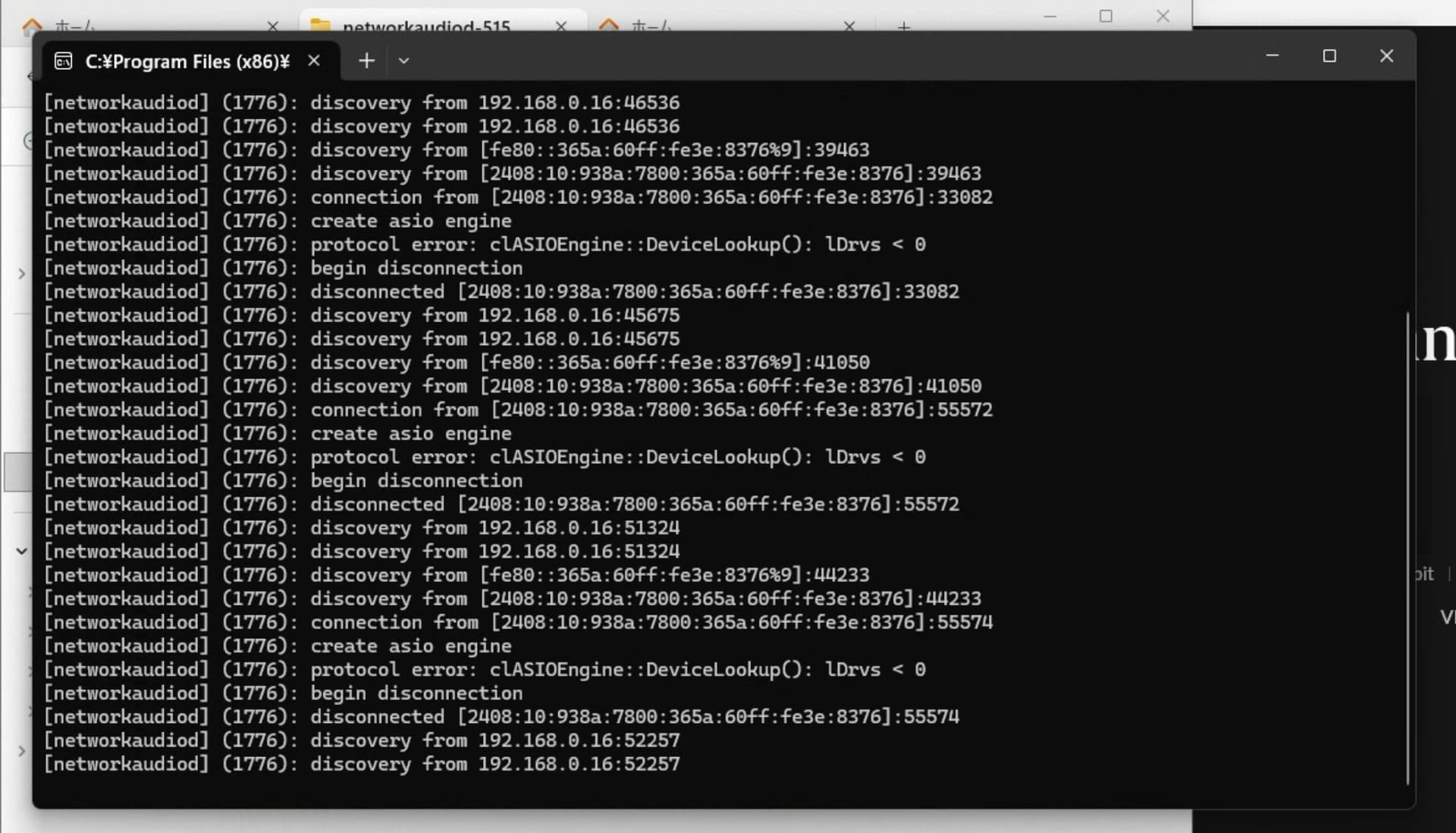
There are no ASIO drivers available. Perhaps you have forgotten to disable the driver you want to use under Roon Settings / Audio?
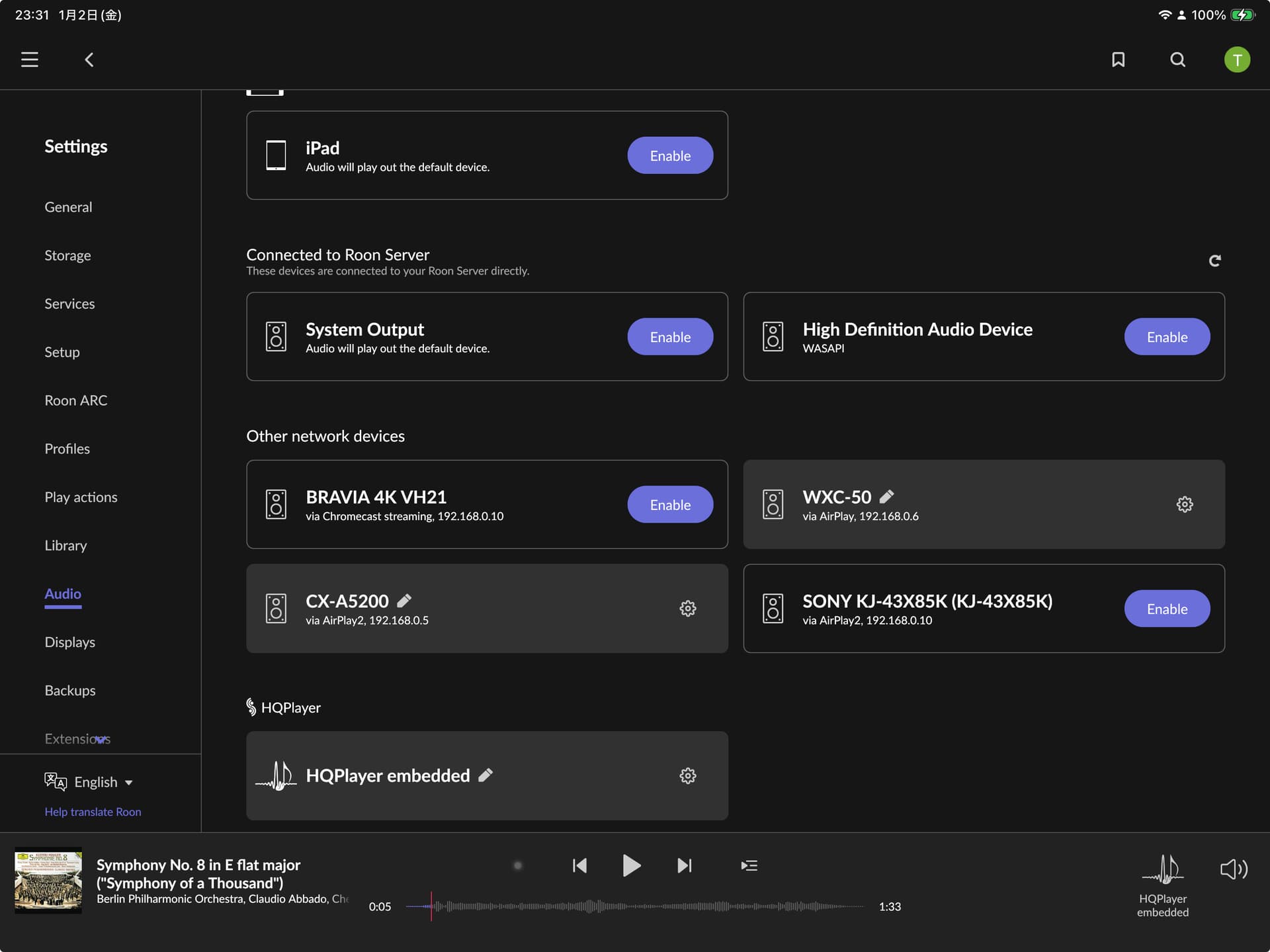
OK, if neither Roon, HQPlayer and networkaudiod don’t see the ASIO driver, then there’s a driver issue, device is not connected, or some of the Windows services are not functioning.

Downloading 5.16.1, got a header timestamp warning. Just in case, I’m not installing it, thought I I would ask first.
$ wget https://www.signalyst.eu/bins/hqplayerd/noble/hqplayerd_5.16.1-45intel_amd64.deb
--2026-01-02 17:09:48--  https://www.signalyst.eu/bins/hqplayerd/noble/hqplayerd_5.16.1-45intel_amd64.deb
Resolving www.signalyst.eu (www.signalyst.eu)... 91.150.61.42
Connecting to www.signalyst.eu (www.signalyst.eu)|91.150.61.42|:443... connected.
HTTP request sent, awaiting response... 200 OK
Length: 203732266 (194M) [application/octet-stream]
Saving to: ‘hqplayerd_5.16.1-45intel_amd64.deb’

hqplayerd_5.16.1-45intel_amd64.deb     100%[===========================================================================>] 194.29M  10.2MB/s    in 24s

Last-modified header invalid -- time-stamp ignored.
2026-01-02 17:10:13 (8.15 MB/s) - ‘hqplayerd_5.16.1-45intel_amd64.deb’ saved [203732266/203732266]