Thank you very much! :))
So boards have memtest opinions available in the bios, but all you need is a usb stick and burn the image to it and boot from it.
1 Like
Would you say it’s okay to test all four RAMs at once as long as they are the same model?
I would definitely test them all at once if you intend on using them all together. I’ve had chips that could pass tests individually but not all together.
If you’re using all four in the system, test all together in the system.
1 Like
I actually have one motherboard that is functional with DDR5 RAMs, so that’s why I thought of testing them all at once.
I do have a spare motherboard (the one I bought when I got desperate to get the CUDA offload work), but no CPU yet. 
So, I don’t plan to use them together. But thanks!
1 Like
It is important to test the final configuration. Not just the memory modules, but the final assembled system as whole in the form it is supposed to be used, and then run the test.
2 Likes
I see.
However, I am short of money due to the unexpected expense, so all I can do now is to at least check the RAMs aren’t completely defective.
I mean, I can request a replacement within a month after delivery, but I’m afraid I’ll get the CPU after that time frame. 
But thanks for reminding me of the way the test is supposed to be done. 
Anybody having issus trying to update Nvidia drivers 590 in Ubuntu?
> E: Unable to locate package nvidia-driver-590-open
hq512@hq512-desktop:~$ sudo apt update
[sudo] password for hq512:
Hit:1 https://dl.google.com/linux/chrome/deb stable InRelease
Hit:2 Index of /ubuntu noble InRelease
Hit:3 Index of /ubuntu noble-updates InRelease
Hit:4 Index of /ubuntu noble-security InRelease
Hit:5 Index of /apps/ubuntu/ noble-apps-updates InRelease
Hit:6 Index of /graphics-drivers/ppa/ubuntu noble InRelease
Hit:7 Index of /apps/ubuntu/ noble-apps-security InRelease
Hit:8 Index of /infra/ubuntu/ noble-infra-updates InRelease
Hit:9 Index of /infra/ubuntu/ noble-infra-security InRelease
Reading package lists… Done
Building dependency tree… Done
Reading state information… Done
57 packages can be upgraded. Run ‘apt list --upgradable’ to see them.
N: Skipping acquire of configured file ‘main/binary-i386/Packages’ as repository ‘https://dl.google.com/linux/chrome/deb stable InRelease’ doesn’t support architecture ‘i386’
hq512@hq512-desktop:~$ sudo apt install nvidia-driver-590-open
Reading package lists… Done
Building dependency tree… Done
Reading state information… Done
E: Unable to locate package nvidia-driver-590-open
hq512@hq512-desktop:~$ ls
I don’t think there’s a version specific driver package at least yet. From Nvidia’s package repo, installing “nvidia-open” pulls in 590 series driver, but it is not good option for headless, since it has the desktop graphics things too which will pull a lot of desktop components in as dependencies.
But since your system is with graphical desktop (?), it is not an issue.
For headless installs, 580 series driver works too, so one can stick to it until there’s an update.
2 Likes
Yes! No issue with me! The only thing seems 590 still on beta not able to install the automatic way.
Edit:Running nvidia-open command I get same issue.
Will wait update as now using 580
No it is not beta. But given above you are pulling drivers from somewhere else than Nvidia’s official repository?
The Ubuntu ppa stuff is all “beta” / unofficial.
I recently, like 2 days ago, upgraded to Trixie (Debian 13). While that process was fairly smooth it was a lot more steps than I was expecting… but follow the manual and all will be well.
However, I was disappointed to find out the Trixie repository is using older Nvidia drivers so… It was back to following the Nvidia documentation and using their repository. All extra steps. Not impossible, not difficult, just following the documentation until you find doc errors and then finding the new name for things to keep going.
After a bit of focus I’m on Trixie with the latest Nvidia drivers all to load the latest HQPlayer. Yeah me.
Anyway, I only tell my story because using the Nvidia repository seems to be a requirement with most distros. That’s an extra step I don’t think is super clear anywhere. Ignore your disto’s Nvidia install process and just use Nvidia’s so you have the latest drivers.
hq512@hq512-desktop:~$ wget https://developer.download.nvidia.com/compute/cuda/repos/ubuntu2404/x86_64/cuda-keyring_1.1-1_all.deb
–2025-12-19 18:08:05-- https://developer.download.nvidia.com/compute/cuda/repos/ubuntu2404/x86_64/cuda-keyring_1.1-1_all.deb
Resolving developer.download.nvidia.com (developer.download.nvidia.com)… 203.80.97.241, 203.80.97.82, 203.80.97.195
Connecting to developer.download.nvidia.com (developer.download.nvidia.com)|203.80.97.241|:443… connected.
HTTP request sent, awaiting response… 200 OK
Length: 4328 (4.2K) [application/x-deb]
Saving to: ‘cuda-keyring_1.1-1_all.deb.1’cuda-keyring_1.1-1_all.deb.1 100%[=============================================================>] 4.23K --.-KB/s in 0s
2025-12-19 18:08:07 (880 MB/s) - ‘cuda-keyring_1.1-1_all.deb.1’ saved [4328/4328]
hq512@hq512-desktop:~$ sudo dpkg -i cuda-keyring_1.1-1_all.deb
[sudo] password for hq512:
(Reading database … 364769 files and directories currently installed.)
Preparing to unpack cuda-keyring_1.1-1_all.deb …
Unpacking cuda-keyring (1.1-1) over (1.1-1) …
Setting up cuda-keyring (1.1-1) …
hq512@hq512-desktop:~$ sudo apt update
Hit:1 https://dl.google.com/linux/chrome/deb stable InRelease
Hit:2 Index of /ubuntu noble InRelease
Hit:3 Index of /ubuntu noble-updates InRelease
Hit:4 Index of /ubuntu noble-security InRelease
Hit:5 Index of /apps/ubuntu/ noble-apps-updates InRelease
Hit:6 Index of /apps/ubuntu/ noble-apps-security InRelease
Hit:7 Index of /graphics-drivers/ppa/ubuntu noble InRelease
Hit:8 Index of /infra/ubuntu/ noble-infra-updates InRelease
Hit:9 Index of /infra/ubuntu/ noble-infra-security InRelease
Reading package lists… Done
Building dependency tree… Done
Reading state information… Done
18 packages can be upgraded. Run ‘apt list --upgradable’ to see them.
N: Skipping acquire of configured file ‘main/binary-i386/Packages’ as repository ‘https://dl.google.com/linux/chrome/deb stable InRelease’ doesn’t support architecture ‘i386’
hq512@hq512-desktop:~$ sudo apt install nvidia-open
Reading package lists… Done
Building dependency tree… Done
Reading state information… Done
E: Unable to locate package nvidia-open
I used the tips u showed me last time.
Do I need to uninstall it and then run the command?
sudo apt remove nvidia-open-580 ← current version last part on command
apt autoremove --purge
sudo apt install nvidia-open <-new version last part on command
I also ran this command:
hq512@hq512-desktop:~$ ubuntu-drivers devices
udevadm hwdb is deprecated. Use systemd-hwdb instead.
udevadm hwdb is deprecated. Use systemd-hwdb instead.
udevadm hwdb is deprecated. Use systemd-hwdb instead.
udevadm hwdb is deprecated. Use systemd-hwdb instead.
udevadm hwdb is deprecated. Use systemd-hwdb instead.
udevadm hwdb is deprecated. Use systemd-hwdb instead.
udevadm hwdb is deprecated. Use systemd-hwdb instead.
udevadm hwdb is deprecated. Use systemd-hwdb instead.
udevadm hwdb is deprecated. Use systemd-hwdb instead.
udevadm hwdb is deprecated. Use systemd-hwdb instead.
udevadm hwdb is deprecated. Use systemd-hwdb instead.
udevadm hwdb is deprecated. Use systemd-hwdb instead.
== /sys/devices/pci0000:00/0000:00:01.0/0000:01:00.0 ==
modalias : pci:v000010DEd00002783sv00001462sd00005138bc03sc00i00
vendor : NVIDIA Corporation
driver : nvidia-driver-570-server - distro non-free
driver : nvidia-driver-580-open - distro non-free recommended
driver : nvidia-driver-570-server-open - distro non-free
driver : nvidia-driver-565 - third-party non-free
driver : nvidia-driver-565-server-open - distro non-free
driver : nvidia-driver-580-server - distro non-free
driver : nvidia-driver-580 - distro non-free
driver : nvidia-driver-565-server - distro non-free
driver : nvidia-driver-570 - third-party non-free
driver : nvidia-driver-570-open - third-party non-free
driver : nvidia-driver-565-open - third-party non-free
driver : nvidia-driver-580-server-open - distro non-free
driver : xserver-xorg-video-nouveau - distro free builtin
I’m lost don’t know how to proceed
I saw also this option but want to check first with you if is trustable:
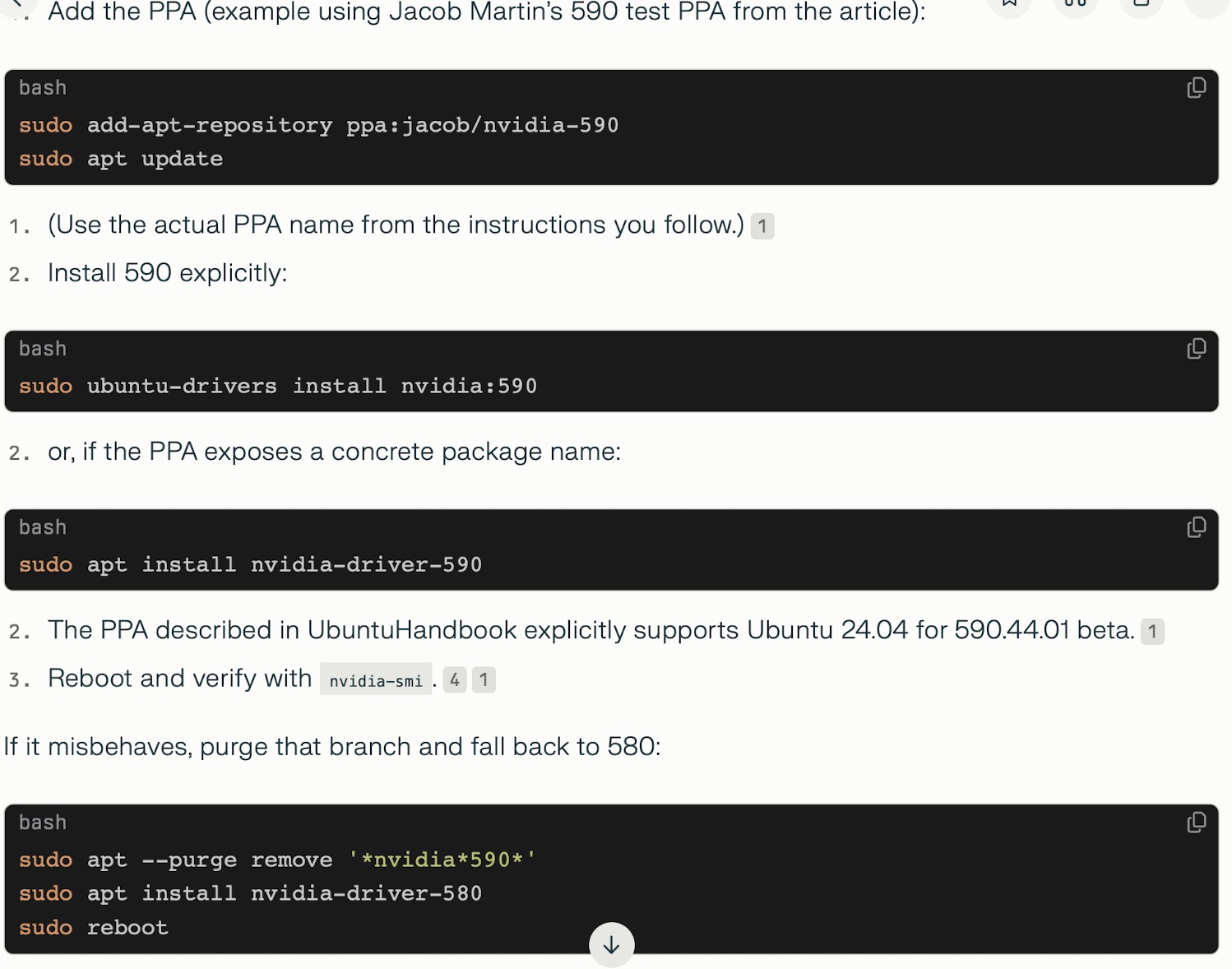
For some reason you have the nvidia repository disabled. If “apt update” is not fetching package metadata from the Nvidia repository.
apt update should list fetching metadata from the nvidia repo:
root@linuxwks:~# apt update
Hit:1 http://fi.archive.ubuntu.com/ubuntu noble InRelease
Hit:2 https://updates.signal.org/desktop/apt xenial InRelease
Get:3 http://fi.archive.ubuntu.com/ubuntu noble-updates InRelease [126 kB]
Hit:4 https://developer.download.nvidia.com/compute/cuda/repos/ubuntu2404/x86_64  InRelease
Get:5 http://fi.archive.ubuntu.com/ubuntu noble-backports InRelease [126 kB]
Hit:6 https://deb.opera.com/opera-stable stable InRelease
Get:7 http://security.ubuntu.com/ubuntu noble-security InRelease [126 kB]
For me “apt install nvidia-open” certainly works and it is what Nvidia’s documentation says. So I recommend checking your /etc/apt/sources.list.d directory contents what repositories you have enabled.
I really don’t know… I wouldn’t use some unknown ppa repo.
Fixed!
Purge Delete all nvidia drivers
sudo apt-get remove --purge ‘^nvidia-.*’
sudo apt-get remove --purge ‘^libnvidia-.*’
sudo apt-get remove --purge ‘^cuda-.*’
sudo apt install build-essential
then
Installing from repository on Ubuntu Desktop
sudo dpkg -i cuda-keyring_1.1-1_all.deb
sudo apt update && sudo apt upgrade -y
sudo apt install nvidia-open
(Still booting with secure mode off, but I guess no issue right ? Also the custom kernel can’t boot if not using secure boot off. I guess is safe right? Or any command to reenroll them, I saw something, but I don’t want to mess things up anymore)
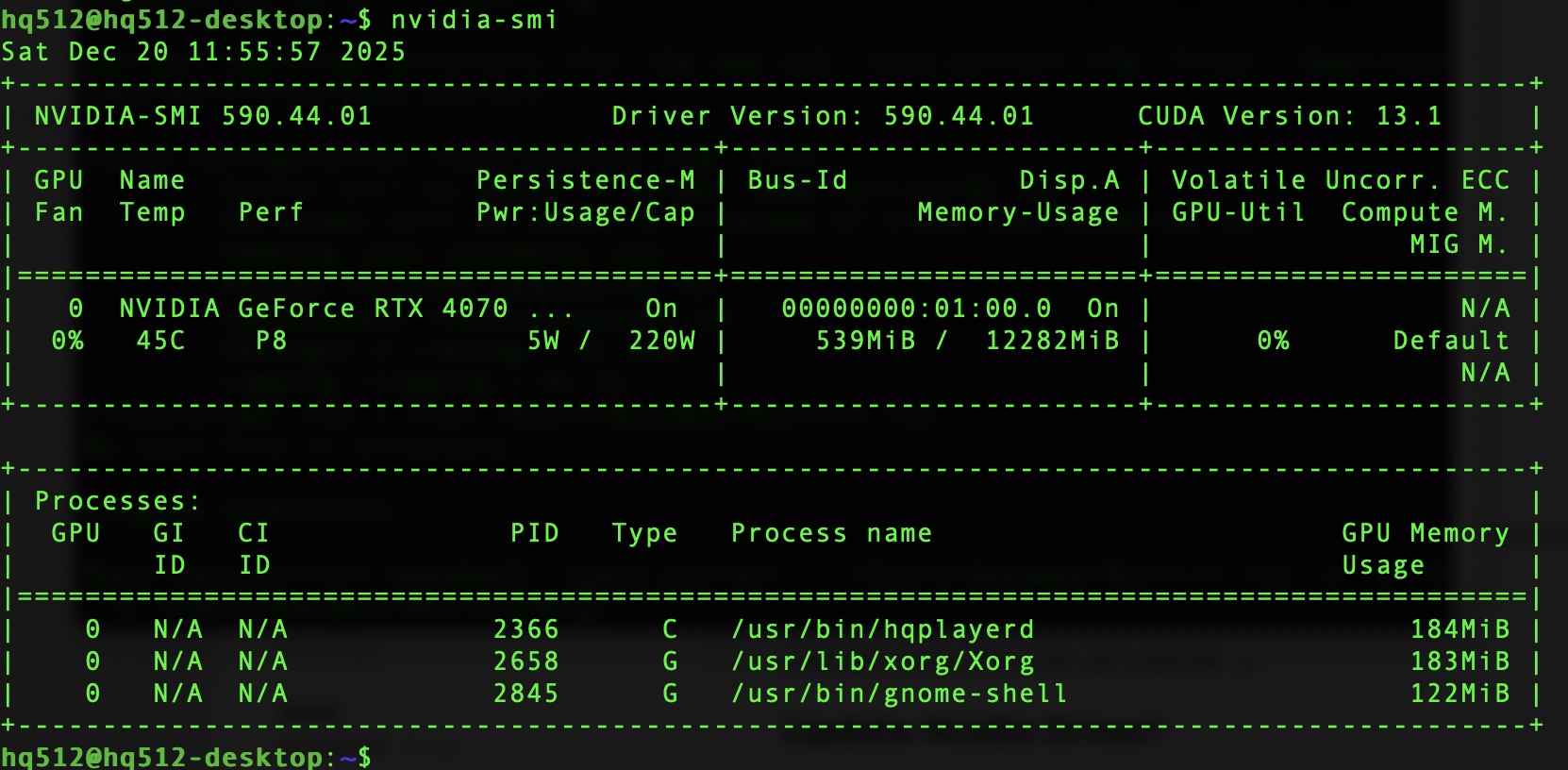
And had to be manually installed
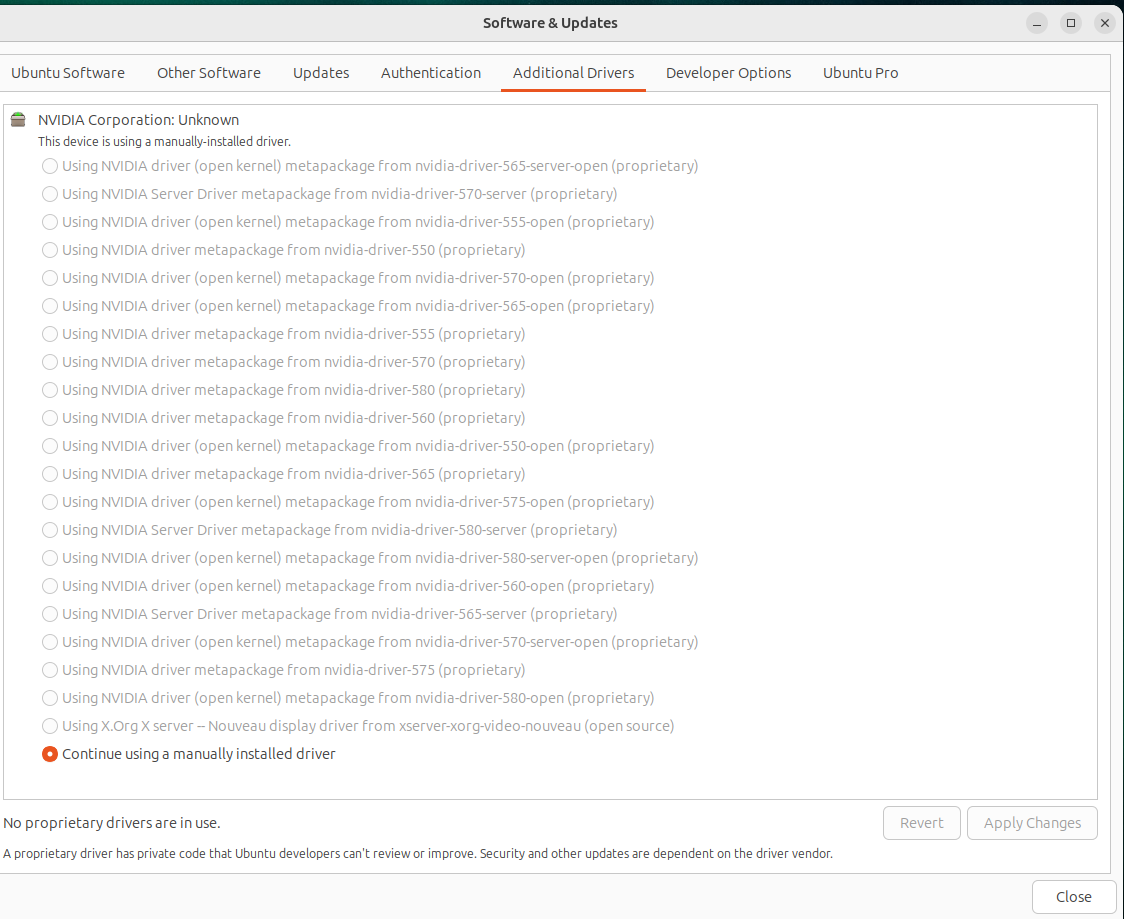
2 Likes
Do HQPlayer and NAA use ptp automatically if there is a grandmaster on the network? Or I have to config that in their xml files ?
It is not relevant for NAA, since NAA doesn’t distribute/carry any audio clocks. NAA is totally different from Ravenna and such.
1 Like
Ok, so am I right to assume, that there is not difference between using pi5 or up board for NAA OS. There would be no benefit to the latency regardless of the more advanced NIC pi5 carry.
 If i have multiple HQPlayer licenses, wouldn’t it be better to use NAA instead of Ravenna ? I could stream from MacStudio to the NAA running on main HQPlayer Box. If it is not possible for HQPlayer Embedded to expose an input interface NAA could stream to, it is always possible with snd-aloop. I am not planning to build big network with lots of devices i would want to interconnect. The setup is pretty simple… MacStudio as the main source for audio content, because DJ Controllers work best with MacOS. This feed must stream into the digital mixer with USB input, and then the mixed master out to the HQPlayer for upsampling/room correction. I guess a Desktop License and two embedded licenses should do it.
tbh i find it wierd that upnp devices discover HQPlayer on the network, and can stream and override the current input. Roon also does so… but an HQPlayer can’t offer another HQPlayer as an output device 
The overall hardware design on UP is better. Pi5 cuts more corners on the hardware design.
Why would anyone want to do something like that?