HQPlayer Embedded Discussion

@jussi_laako I’m having a big issue here, and I need some help please: I added a new NIC to my box and the HQPlayer fingerprint changed.

Any way to fix this, please? I mean I get why you want to make sure the hardware/license bond is verifiable, but this is extreme.

If it helps, the whole setup is still working on the initial network card, nothing changed, the new one is not yet connected in the network.

Also, while we are here, out of curiosity: my box has a 3 disks setup, 2 in RAID1 with 1 spare, it can boot from any of them in case one disk fails. What happens then HQPlayer wise? It will again change the fingerprint?

What else it’s a fingerprint change event?

Even more, if I order the USB now, how will that work since I do not have a license for the new fingerprint?

You will need an updated license key file. If you like to frequently modify your hardware, there’s the option to get a USB key dongle that replaces the computed hardware fingerprint with a physical USB device.

RAM, SSD/HDD and GPU are not included in the hardware fingerprint.

If you order the dongle, we just replace the original license key with a one bound to the USB dongle. From there on, the computed hardware fingerprint doesn’t count and is not shown either as long as you have the USB dongle plugged in.

1 Like

Ok, thank you!

Last weekend I was restoring my friends’ fanless NUC 8th Gen - the CPU is i7-8665U, for some reason it was collecting dust for almost a year. It was HQplayer Embedded 5 machine, so this is what I restored with latest updates. Ubuntu Server + HQPe 5 - simple.

@jussi_laako Jussi, couple of questions - HQP 5 latest version continues with libgmpris dependency - and the link to this is nowhere to be found on downloads page, obviously same for the kernels. Is sonarnerd Index of /src/ still relevant?

I had some difficulties in finding this link, or maybe I was looking in wrong places.

PS: NUC 8i7 - can do SDM1024 with AHM7EC8B! I was using hqplayerd_5.17.2-48intel_amd64.deb

Yes it is

https://audiophilestyle.com/forums/topic/19715-hq-player/page/1583/#findComment-1349313

Yes, the link is still relevant for that case. And for the custom kernels. For v6, libgmpris depedency was dropped since it has been practically unused for ages. Only thing it recently enabled was that running HQPlayer Embedded on a desktop environment under user session would show the player information (metadata etc) and playback controls in the desktop toolbar. Since I guess nobody even noticed this feature, I didn’t want to drag the dependency along any longer.

I will put the link back somewhere, since the kernels are sort of relevant for the v6 as well.

To those who use a Holo Audio DAC,

I’ve been using a Holo Audio May DAC for two years, and somehow I noticed it has a certain amount of “noise” – some sort of hum – recently.

I am not sure whether this was present and I simply did not notice before, or whether it started recently. The amount of noise is not large, but it is audible at high volume (above -12dB) and in the absence of any sound signal.

So, I wonder how other users of Holo Audio DACs are with theirs, as I understand many of you here use one. Please let me know so I can determine whether my DAC is normal or not.

FYI, my pre-amp and power amp are Accuphase C-2800 and P-7000, which have extremely low noise. Turning the volume to max with maximum gain (+24dB) makes little hiss, and that’s all.

Thank you in advance!

Sounds like a ground loop/noise issue.

Are you using XLR from May to the C-2800? Are you using USB for input to the May? Any other connections to the May?

I’m using Intona USB isolator to avoid similar issues… Could be worth trying out.

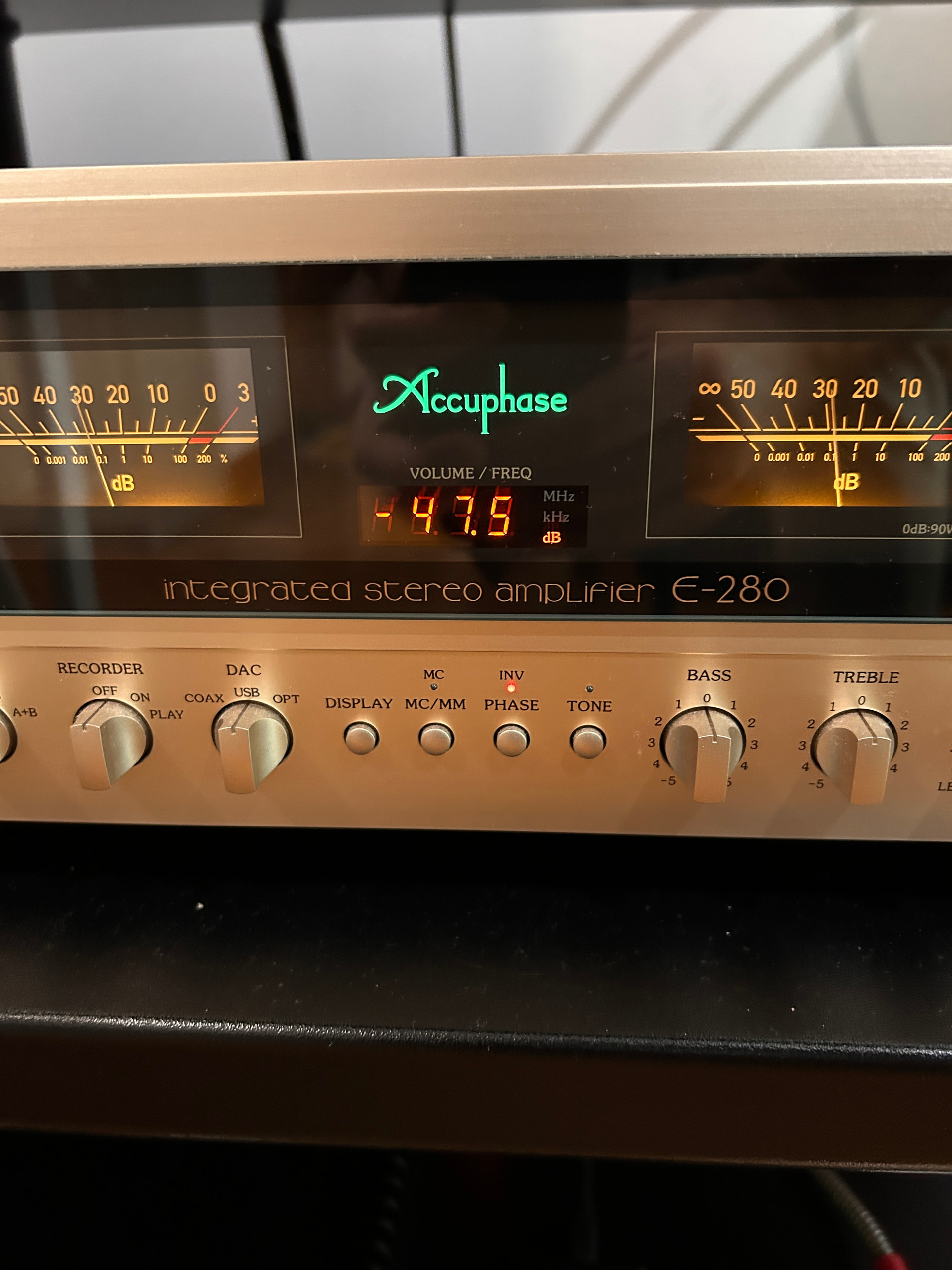
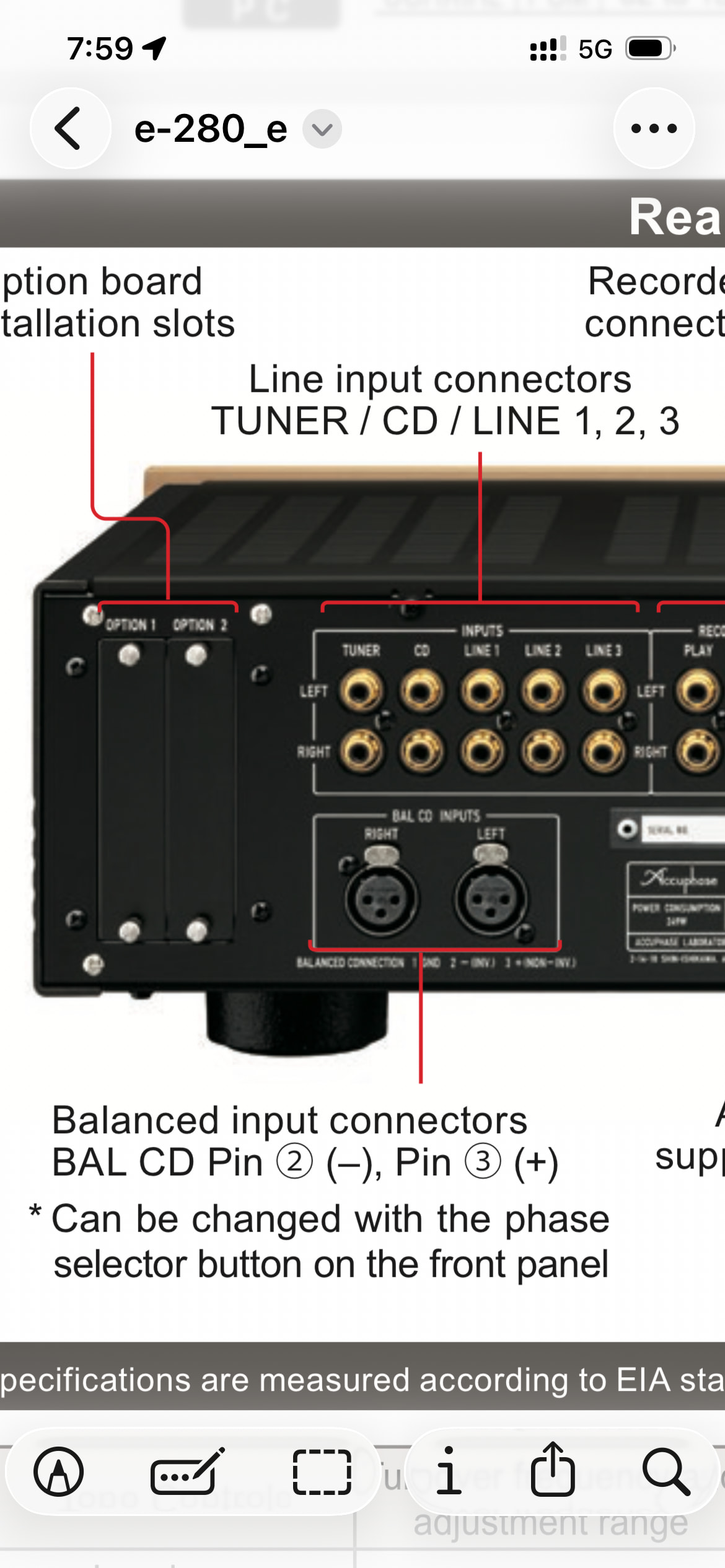
P.S. Worth noting, in case you didn’t already, that Accuphase uses Japanese XLR layout, while Holo Audio uses the layout used by most of the world. This results in inverted phase, which you can correct in HQPlayer, either with the “invert” option, or using the matrix processor. Or with a custom XLR cable that swaps the +/- pins.

I use a pair of unbalanced cables (RCA) from May to C-2800.
Only USB and hdmi (I2S) are connected from RED to May, but disconnecting the hdmi cable didn’t help…

Turning the RED off didn’t help either, so the May should be causing the noise.

Is it still worth when using the Holo RED?
I thought LAN connections guarantee galvanic isolation.

So, anyway, I pulled out an isolation power transformer and applied it to the May, but this didn’t help, either.
Changed the application to the C-2800 and still the same.

I wonder what else I can do. :confused:

PS. I recalled I use a “directional cable,” and the direction seemed wrong. When I renovated the floor, I disconnected everything (and moved all components to another room) and put it back later. I think I got the direction in reverse during this process.
Correcting the direction reduced the noise quite a bit, and now it’s audible over 0dB, which is realistically not an issue. So, I think I’m good.

Completely isolate the May, no inputs and only the output into amplification (and of course power) connected. Also is yours a KTE as they run different transformers. I have a none KTE Spring 3 and don’t have the issues you do.

1 Like

This is naturally more sensitive to interferences…

I would recommend using balanced XLR. Just note that pins 2 and 3 are swapped.

Gain selector in back panel should be set to lowest value = 12 dB.

While Holo DACs have isolation for USB input, there’s no isolation for I2S. S/PDIF and AES/EBU are to some extent isolated (optical S/PDIF is naturally isolated through optical, AES/EBU goes through transformer, etc).

Depends on the Red and connection method. LAN guarantee galvanic isolation as long as you use correct type of cable - U/UTP. Recommendation being CAT6A U/UTP. Any shielded cable (metal connector body instead of full plastic) generally destroys this isolation.

But it may still be worth trying, just hard to estimate with this information… Just note that with Holo Red, likely the USB3 models like 7055-C are not compatible. The USB2 models should be, at least if they are most recent generation from Intona. When in doubt, ask Intona first. The 7054-line should work.

1 Like

Omg! I’ve been living on a different reality :joy:!

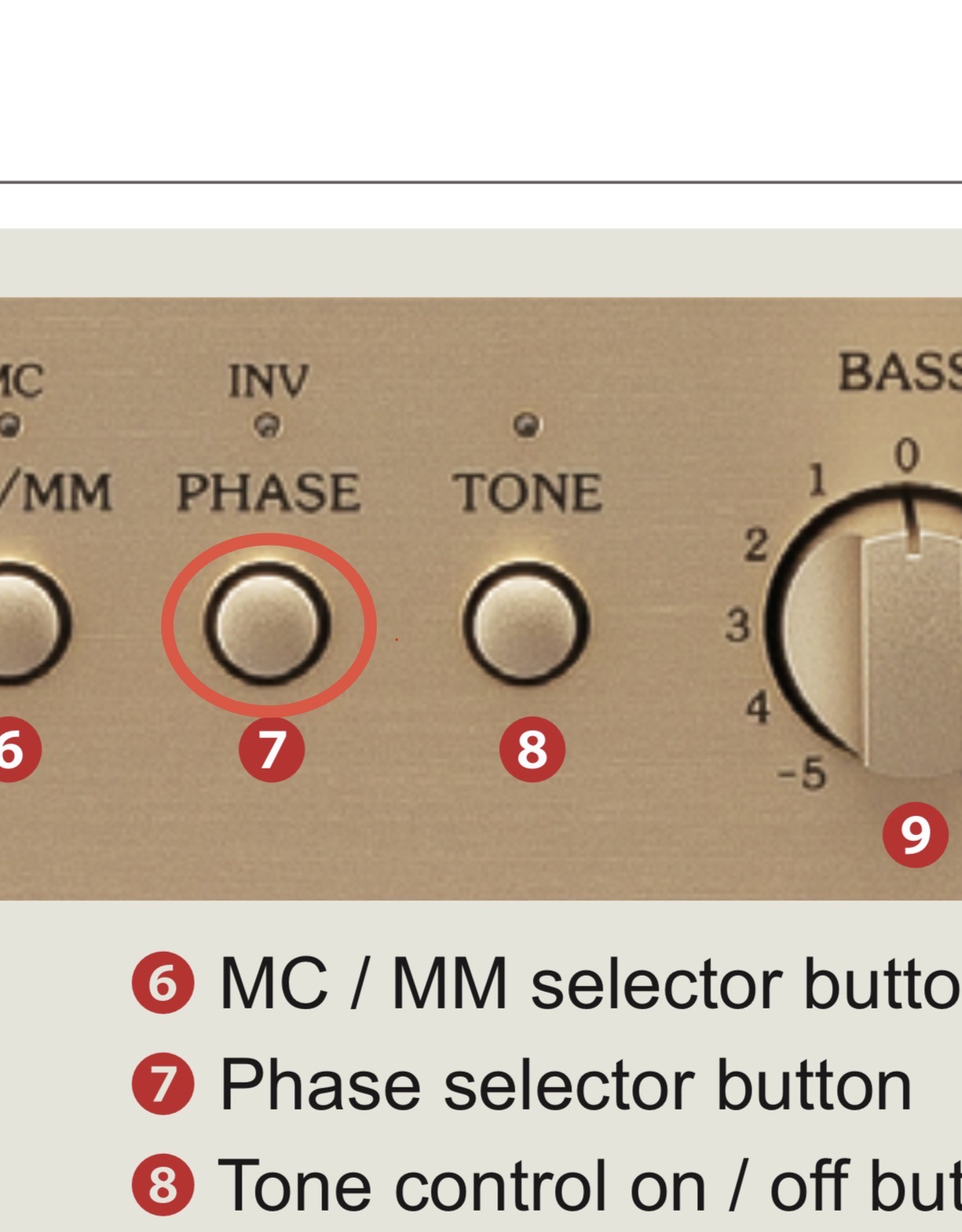
I just switched the INV Phase Accuphase bottom and I can feel the difference, grater details, how could I overlooked that. Thanks Jussi

Now 3 options:

Reverse polarity using HQplayer

Reverse polarity using Accuphase

Reverse polarity using Holo Spring

Which one :index_pointing_up:t3: should be more accurate and consistent? @jussi_laako

Much appreciated for your help :folded_hands:t3:

Thanks for your suggestions. I appreciate them!

Mine is May KTE. I think I’ve isolated the DAC enough when investigating the cause, but I’ll do it more thoroughly. :wink:

I kinda have a preference for using unbalanced connection due to a suggestion from a late, acclaimed critic in Japan. Tetsuo Nagaoka was an Accuphase user, but he didn’t use balanced connection.
Well, that’s quite in the past, so perhaps I should start using some more.

Also, C-2800 is an unbalanced-circuit preamplifier, so aside from addressing the noise issue, SQ will not improve with balanced connection.

If you’re curious, use Google Translate to see who he was.

Well, for some reason, the gain changes the sound profile, so that’s a trade-off.

I played with later models at an audio shop and kept the overall gain the same (e.g., setting the preamp at +24 and the power amp at +12, then reversing the gain values on both amps).
Somehow, the sound profile changed so much that I don’t trust the quality of the gain control function on Accuphase amplifiers. In fact, they seem to be controlled with small resistors, one for each gain value.

I’m aware of that. I keep the I2S in case I want to use two outputs from the RED (i.e. I2S and SPDIF coaxial that goes to an AV preamp) to play the same music source simultaneously. When I use the USB input, the other outputs from RED don’t work for some reason. (Perhaps due to UAC 2 Gen 2.1) But anyway, I rarely use I2S these days.

Good to know this. I somehow use a flat-looking cable (simply because it looks nice), and I doubt it has twisted-pair conductors. I’ll change it to a better one.

Accuphase didn’t have the function to preserve polarity, including the C-2800 I use. Some newer models do. So, it would be inconvenient if you use multiple sources – you’ll have to change the polarity every time you switch sources.

-–

Although it seems “okay” for now, I’ll see what I can do to reduce more of the hum.

Thanks again, everyone! :wink:

1 Like

I guess I’ll use the option on the Holo Spring KTE to change it. No other input is used there.

Thank for sharing

1 Like

Either HQPlayer or Spring. I didn’t know Spring had such function… :sweat_smile: Although I never looked for such either since I didn’t have a need. Easiest and most convenient would be of course to use a swapped interconnect. (perhaps a bit of soldering to modify the currently used cabling)

If you use the INV button, then it inverts all inputs, including the RCA inputs which would be otherwise correct. I don’t want to remember switch the INV for example when I switch from T+A DAC 200 (XLR connected) to Marantz SA-12SE (RCA connected). So I rather do it at the source side.

It is very straightforward to do at HQPlayer side and it certainly doesn’t have any quality implications.

When it is done at the DAC side, it depends on how it is implemented. It could have quality implications, unless it is just relay switches swapping two signals.

2 Likes

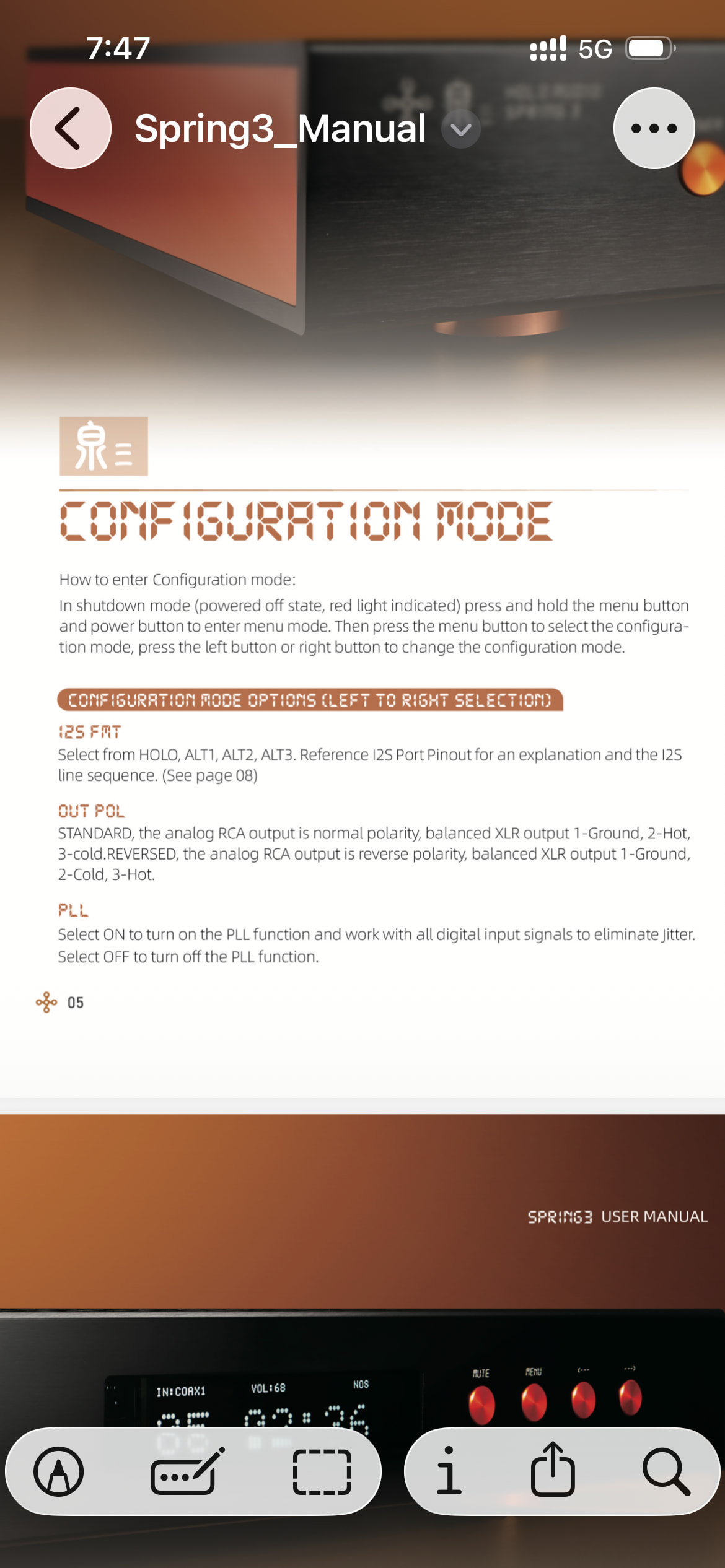
May and Spring 3 seem to have the same config settings. This is taken from the Holo manual…

Configuration Mode

How to enter Configuration mode: In shutdown mode (powered off state, red light indicated), press and hold the MENU button and the POWER button to enter menu mode. Then, press the MENU button to select the configuration mode. Use the left (←) or right (→) button to change the configuration mode.

Configuration Mode Options (Left to Right Selection)

  • I2S FMT: Select from HOLO, ALT1, ALT2, ALT3. Refer to the I2S Port Pinout section for pinout explanations and I2S line sequences.
  • OUT POL:
    • STANDARD: Analog RCA output is normal polarity. Balanced XLR output is 1-Ground, 2-Hot, 3-Cold.
    • REVERSED: Analog RCA output is reverse polarity. Balanced XLR output is 1-Ground, 2-Cold, 3-Hot.
  • PLL: Select ON to enable the PLL function, which works with all digital input signals to eliminate jitter. Select OFF to disable the PLL function.
1 Like

Done :white_check_mark: working great :+1:t2:

1 Like

Yes, I remember that PLL setting since I measured I2S input jitter with and without it in the past. But those things are something I so rarely look at that I don’t even remember what config options it has… :sweat_smile:

What happens if you turn the PLL off?
I mean, I don’t understand the turn-off function’s purpose…

The clock coming in from S/PDIF (coaxial or optical), AES/EBU or I2S is used as-is. This results in pretty huge increase in jitter components in the analog output, due to all the difficulty in transferring clock accurately over long distances (more than 2-5 mm on a well designed circuit board).

It is not applicable to USB, since USB is clocked by the DAC, no clock to recover.

It is a bit like you can turn off some things, like dither, in HQPlayer. It will certainly have an adverse effect, but you are still given the option to do it.

1 Like