I like it! And I think I might like the HQP Desktop UI better than the Embedded UI.
Hello Jussi, one quick question.
I am running HQP to upsample my PCM files (44.1 to 192 kHz, 16 and 24 bits) to DSD 256 (44.1 kHz x 256, the Merging Hapi accepted format). I use the Matrix to convert stereo to 6 voices using filters designed by Acourate.
What is the ideal filter frequency to upload in Matrix?
Currently, I upload the 352.8 kHz version to stick to a 44.1 multiple but I have no file at that rate. Should I use 176.4 or 192 kHz filtres instead?
Thanks in advance.
I was thinking a newer M2 Mac mini as well. Is there a web based interface with HQP desktop? So that I can control it similar to now where I use the sonicOrbiter OS from my MacBook while listening to music.
Fernando and musicjunkie, since the newer Macs use ARM CPUs, it sounds like what Jussi said is not a problem?
I’ve not noticed a startup difference relative to my other setup with HQPlayer Embedded on a Linux box. But then I tend to listen to whole albums, no rate changes between tracks, and my DACs (Holo) accept both 44.1 and 48kHz multiples.
Curious, what’s the sampling rate when you record the log sweep in Acourate?
No harm in using 352.8 kHz
HQPlayer will convolve at the source music rate anyway
Uli suggest to build the crossover and record at 48 kHz. Since my mic is limited at 23 kHz, it is fine to me.
If you record the log sweep at 48KHz, just make 48KHz FIR filter. HQP will resample it to match the source sampling rate.
I think it is better to still make PCM353kHz filter for HQPlayer but lets check with @jussi_laako ?
If you make 48kHz filter and play 192kHz music what happens?
Filter will be upsampled to match 192.
But however although ALXO or Acourate can resample the original log sweep file to higher sampling rate but I personally think that there’s no reason to do sampling rate change twice for FIR filter (once in FIR filter creation software, once in DSP pipe). I’d like to keep one side unchanged, for example, maintain original 48Khz log sweep’s sampling rate and producing FIR and let DSP pipe do the FIR filter upsampling to match music source sampling rate. Or choose higher sampling rate like 192 or 352.8 when doing log sweep and produce FIR filter then let DSP pipe down sampling it to match source music sample rate.
It won’t if “HF Extend” option is not enabled. I haven’t seen mention of the ‘HF Extend’ option mentioned.
Even then Jussi has said it is best if Acourate/Audiolense create the 353k files.
This is also what I had in mind, but I wanted a confirmation from Jussi: building a 352.8 kHz is better than 48 kHz, event if it is built on a 48 kHz recorded filter.
HF-Extended is on.
(edit to make sure I was clear)
Yes, that’s the generally best option.
Without HF Expand option, it’s response will end at 24 kHz, meaning that your output won’t pass anything higher either. With HF Expand, HQPlayer extends the filter’s frequency response flat from the last point where it’s response ended due to the filter Nyquist.
If you generate filter for 352.8k, the filter creation tool should make a filter that covers 176.4 kHz worth of bandwidth, which should be sufficient for most source content. And HF Expand is not particularly relevant anymore. Of course, scaling the convolution filter down is much simpler than the other way (because we can just throw away the excess frequencies). This is quite different from rate conversion of music content.
If you use parametric EQ instead, then it is not tied to any sampling rate, it is just filter parameters. This allows HQPlayer to create the actual filter straight to the needed rate, what ever that would be.
1 Like
You don’t need to turn this on if you use Acourate/Audiolense 353kHz output files
It would need to be on if you created 48kHz files
Yes, you are right. I wrote this because I was still using filters at 48 kHz. I rebuilt a 352 kHz filter yesterday evening and then unchecked the option.
1 Like
I’ve verified the HQPd’s log and confirmed the FIR filters (48KHz) will be resampled to match the source sample rate (192KHz) even without enabling HF Extend.
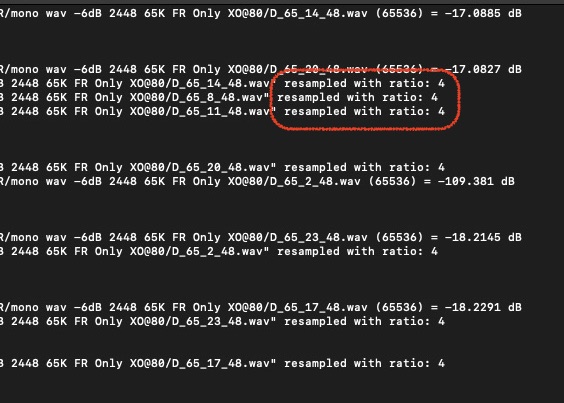
Yes it does. The difference is that without, the response ends at 24 kHz, so your output won’t go beyond 24 kHz, even though the source is 192k. With it enabled, the response gets extended to 96 kHz and all frequencies from the source content pass through.
HF Extend extends actual high frequencies
Upsampling does not extend actual high frequencies
Proper verification would be to look at frequency response, not just the reported sample rate
That’s two different topics: 1. will filter be upsampled to match source frequency what I answered and 2. once upsampled, do you need audio band pass beyond 24KHz or not.
2 is an option (not mandatory) especially you’ve already designed an LP filter @ HF region in ALXO like this:
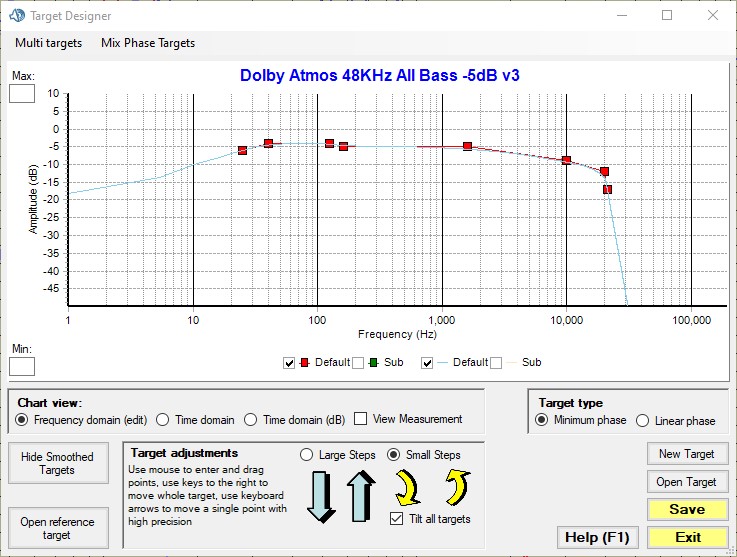
HF Extent has nothing to do with it. The audio will still be cut @ the designed HF frequency. You can make one and verify the frequency response.
