Probably 4x4 also works if you set output channels to 4. But that will of course double the CPU loads as well, since HQPlayer will need to output four channels instead of just two.
The beta of 5.4.2 fixed the problems
I had to select 2x2 audio and output channels to 4 on HQ Player. Sounds strange but it works
1 Like
Does linux-image-6.6.15-jl+_6.6.15-00011-g06f68f5359ba7_amd64.deb, the custom kernel, support NVIDIA?
When I installed it, NVIDIA did not work.
@jussi_laako
As Tidal phases out, MQA and returns to High-res PCM, are you considering adding Tidal to HQPlayer client?
2 Likes
I’m not sure if Nvidia driver DKMS is already up to date enough to compile for that kernel version. It just recently got updated for 6.5… Did you remember to also install the header package?
The header package also installed.
I re-installed the nvidia driver to try, but the installation failed.
I think you will have to wait for Nvidia to update their driver to get compatible with 6.6+ kernel versions. Or if someone wants, can try to fix their driver shim…
Thank you very much.
I will wait until the nvidia driver updates.
Before I leave v4 behind and buy v5….
Will I need to delete v4 image on sd cards in my Rpi4’s, and do newest v5 versions?
Will all my HQP filter settings be automatically kept, or should I save them?
Anything I need to remember to do before hand?
You should update the Pi’s because v5 NAA brings some great new features that only work with HQP v5.
HQP Desktop? You can install v5 alongside v4. You just shouldn’t run both at the same time.
After you install check all your HQP v5 settings look the same, which they should be anyway.
1 Like
… if you have some existing microSD cards for RPi4, you can keep those and get new cards for the new versions. It is good idea to keep two cards per device and cycle these, so you can always go back to previous one if you encounter issues with a new one.
2 Likes
Hi all,
has someone already tried to use ZLUDA with HQPlayer ? ZLUDA allows CUDA optimized software to run on AMD GPU’s. I tried it but without success. That would be a nice option as many notebooks or mini PC’s have AMD GPU’s.
Your first issue will be that AMD doesn’t support ROCm on such GPUs. Only on the most powerful GPUs.
On Linux:
AMD Instinct™ MI250X
AMD Instinct™ MI250
AMD Instinct™ MI210
AMD Instinct™ MI100
AMD Instinct™ MI50
AMD Radeon™ Pro W6800
AMD Radeon™ Pro V620
AMD Radeon™ Pro VII
AMD Radeon™ VII
On Windows:
AMD Radeon Pro™ W7900
AMD Radeon Pro™ W7800
AMD Radeon Pro™ W6800
AMD Radeon™ RX 7900 XTX
AMD Radeon™ RX 7900 XT
AMD Radeon™ RX 7600
AMD Radeon™ RX 6950 XT
AMD Radeon™ RX 6900 XT
AMD Radeon™ RX 6800 XT
AMD Radeon™ RX 6800
So most likely your notebook or mini PC doesn’t have one of these…
I have the native support in my codebase, but I removed it from Embedded quite a while ago because practically nobody was using it, and the dependencies were affecting everyone.
My 14900KS arrived yesterday. I won’t have time to install it before the beginning of the week… Unfortunately, the power is already too much, but at least I’m ready if @jussi_laako comes up with something or I update Cyan’s big brother sometime… 
1 Like
I’ve been using HQP embedded on a sonicTransporter i7 since 2019. I can send it back to Small Green Computer where Andrew can upgrade the sonicOrbiter OS to 2.9 for $100, then I can buy HQP 5 embedded from Jussi and install it.
I might want to go a different route though with a new Mac computer instead. My computer is a 2015 MacBook Air so pretty old. I just replaced my Pontus II DAC with a Cyan 2, so DSD256 is reportedly the highest rate needed, and I want to use the DAC correction feature. Would one of the new MacBook Pros be able to run HQP 5 Desktop?
I found the answer is yes by reading back a few pages. However would a purpose built music server perform better for HQP than a MacBook Pro that I would frequently be using for other things while listening to music?
And I’m assuming I could continue to use the sonicT as my Roon core if I have HQP on a MacBook Pro. Or would it be fine or even advisable to have the Roon core on the MacBook Pro as well?
Obviously the least expensive choice is to just get HQP 5 on my sonicT. But I could use a new MacBook.
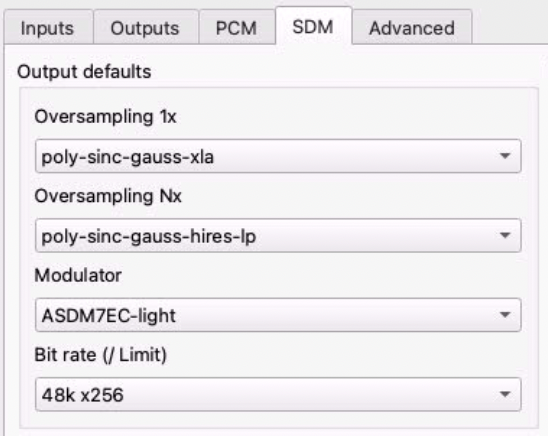
For a Spring 2 KTE (NAA, not direct USB), I use a headless Mini M1 with HQP Desktop, filter+modulator configuration below, DAC corrections. Works reliably. If I use both corrections and heavier modulators like the -super family, I start getting occasional stutters.
1 Like
I like that option, is HQP the only task your Mini handles? Is your Roon core on that machine?
Just HQP, I have my Roon server on an Ubuntu Server box that I had before which is enough for Roon but not for HQP DSD256.
I do the same thing as Fernando and run the same settings. I run an M1 Mac mini with 16GB of RAM and I have both Roon and HQPlayer Desktop 5 running on it. I love the setup. It is easy to update and has run perfectly. I’ve had two sonicTransporters previously and would NEVER go back to them!!
I would recommend getting a newer M2 Mac mini with 16GB of RAM.