@jussi_laako Do you suggest every device in the playback chain have tx and rx flow control enabled? This setting can be enabled on each network port. I have started by enabling tx and rx flow control only on the port connected to my Holo Red. This alone did not work.
I found my Roon Core logs which indicates Roon is losing its endpoint so it shuts down. But what endpoint is it? Is Roon losing its endpoint, HQPlayer? Or is HQPlayer losing its endpoint, Holo Red? I suppose by reading the log Roon is stopping playback because it loses HQPlayer. So must the flow control issue exist on my Windows Desktop host which is running HQPlayer? It may seem the issue is RAAT, not NAA.
07/16 21:23:49 Trace: [zoneplayer/hqplayer] Lost endpoint (1)
07/16 21:23:49 Warn: [zone hqplayer-pc] Track Stopped Due to LostEndpoint
07/16 21:23:49 Info: [zone hqplayer-pc] OnPlayFeedback StoppedLostEndpoint
07/16 21:23:49 Trace: [zone hqplayer-pc] Suspend
07/16 21:23:49 Info: [zone hqplayer-pc] OnPlayFeedback Stopped
07/16 21:23:49 Info: [zone hqplayer-pc] Canceling Pending Sleep
07/16 21:23:49 Trace: [hqplayer-pc] [Enhanced, 24/96 FLAC => 24/96] [100% buf] [PLAYING @ 0:14/4:45] Everything Is Sound - Jason Mraz
07/16 21:23:49 Trace: [hqplayer-pc] [Enhanced, 24/96 FLAC => 24/96] [100% buf] [PAUSED @ 0:14/4:45] Everything Is Sound - Jason Mraz
07/16 21:23:49 Trace: [hqplayer-pc] [IP] Disconnected
07/16 21:23:49 Trace: [zone] hqplayer-pc received transport control from endpoint integration: deselected
07/16 21:23:49 Trace: [zone hqplayer-pc] Suspend
07/16 21:23:49 Info: [zone hqplayer-pc] Canceling Pending Sleep
07/16 21:23:49 Info: [audio/env] [zoneplayer -> stream] All streams were disposed
07/16 21:23:49 Trace: [zoneplayer/hqplayer] State transition Playing => Disconnected
07/16 21:23:49 Trace: [zoneplayer/hqplayer] State transition Playing => Stopped
07/16 21:23:49 Info: [audio/env] [zoneplayer] All streams were disposed
07/16 21:23:55 Info: [stats] 11070mb Virtual, 3837mb Physical, 1629mb Managed, 369 Handles, 74 Threads
Yes it needs to be enabled for all involved ports, otherwise it just moves packet loss to the switch.
I personally keep it enabled for all ports on all switches. On Cisco it can be adjusted per port, on HPE/Aruba it is global for all ports.
Yes, for example if you close HQPlayer, or enter any of the HQPlayer server dialogs (since this essentially triggers server restart). For example if you want to switch filters, I recommend switching active filter from HQPlayer Client (no restart). Not like some do by changing the startup defaults from HQPlayer Settings dialog (full restart)…
You could compare those timestamps with the corresponding ones in HQPlayer’s log file.
Usually it gets enabled on all regular hosts if the switch indicates capability for it. IOW, most driver’s have it set to “auto”, meaning that it becomes enabled if network infrastructure supports it. Almost all unmanaged switches support it, but managed switches have configuration option for it and the default setting varies.
I implemented flow control on all ports but unfortunately my issue still exists. Playback is stopping almost exactly at 28 minutes of continuous play.
Edit I see there is a new release 5.7.3 for HQPlayer. I have upgraded to that (as I always do!) and so far I have 60 minutes of continuous playback with no disruptions. It seems there may be a minor revision here that has corrected my issue?
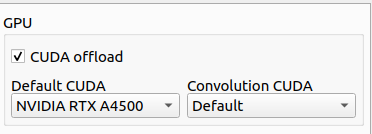
Is this only if you have two GPUs in a single PC case or is it to push either convolution or DSP to the CPU whilst the GPU takes the entirety of the other? If the latter, is it just trial and error or is there an anticipated advantage, for example, to pushing all convolution to the GPU? And what is Default CUDA actually infer? JCR
I tried to set matrix pipelines to 2 to minimize startup time, but I play would not start with poly-sinc-gauss-hires-lp, ASDM7EC-light, Spring 2 corrections. Setting pipelines back to 8 fixed the issue. Is there documentation of the pipeline requirements for different filter/modulator/correction configurations? Thanks!
Hello
As for my last question regarding (“Experimental support for GPU selection / multi-GPU.”), I’m not sure if we’re talking about the same things.
I have HQPlayer embedded auf Ubuntu Server 22.04 lts and sometimes I cannot find the settings you are talking about, I quote “On Desktop advanced tab you can select GPU for general purpose DSP and convolution / big items separately”.
I have been using HQPlayer embedded for about two years and from time to time I learn things related to HQPe on various forums, because so far I have not found any detailed description on www.signalyst.
I think that HQP was created for listening to music, but the content of many forums indicates a very “scientific” approach to the topic…
If it is possible or maybe in the future it will be possible to use two or more Graphics Cards (GPU) with HQPlayer embedded on Ubuntu 22.04 lts.
Generally, I would like to spend more time listening to music and not constantly searching various forums.
DO YOU REALLY NEED TO BE AN ACOUSTIC ENGINEER TO FULLY USE HQPe?
The best thing to be with respect to HQP is “open-minded.” Generally speaking, the more time you put into it the more you get out of it, but you certainly don’t need to an engineer or acoustic engineer to get the most of it. That being said, a lot of consumers are perfectly happy having the acoustic engineer at any number of DAC manufacturers make their sonic choices for them. If you find such a DAC that you love, enjoy it!
Many of us have discovered, however, that our ears aren’t exactly the same as those who designed the DAC of our choice, or that we can benefit by more powerful software that requires hardware beyond the capabilities of our DAC. That is where HQP comes in. If you have a powerful enough CPU/GPU and the patience to test various settings until you find one that best suits you, then there are many of us who feels as though it gives us the cleanest digital reconstruction and the filtering that best suits our ears (which settings might also vary based on what type of music you are listening to). That is what Jussi enables and he does so without telling us what settings he thinks are best for us – that is the only skill required, the patience to figure that out for yourself.
HQPe and Roon are so far (for me and I am not the youngest) the two best solutions when it comes to music.
I have a ronn Lifetime License and I will continue to buy HQPe.
I am mainly concerned about the very sparse “user manuals” that I found on the “Signalyst” website.
I use Roon to manage music on my server and for Tidal.
I understand that Jussi Laako is rather alone and despite this he always answers correspondence quickly.
However, sometimes the language and formulations used on forums make “normal people” afraid and terrified “what are they talking about?”
A more extensive and understandable for “normal people” description and user manual.
That is all I would wish for.
How to explain it to someone and understand it yourself
quote “poly-sinc-mp Minimum phase polyphase sinc filter, otherwise similar to poly-sinc. Modified phase response, but no pre-echo”.
This scares some people.
The way I always explain to the folks in layman terms - “ Hqplayer is the best sounding software in the world and robust network audio solution.
You don’t need to know about anything else, just click and play!!!”
I mean if people don’t ask question about foobar or roon or whatever app and go about reading the manual, why do they want to spend the time to understand even more technical matters in hqplayer ? (Most of the time they don’t care they just want the best sound and hqplayer will give them that)
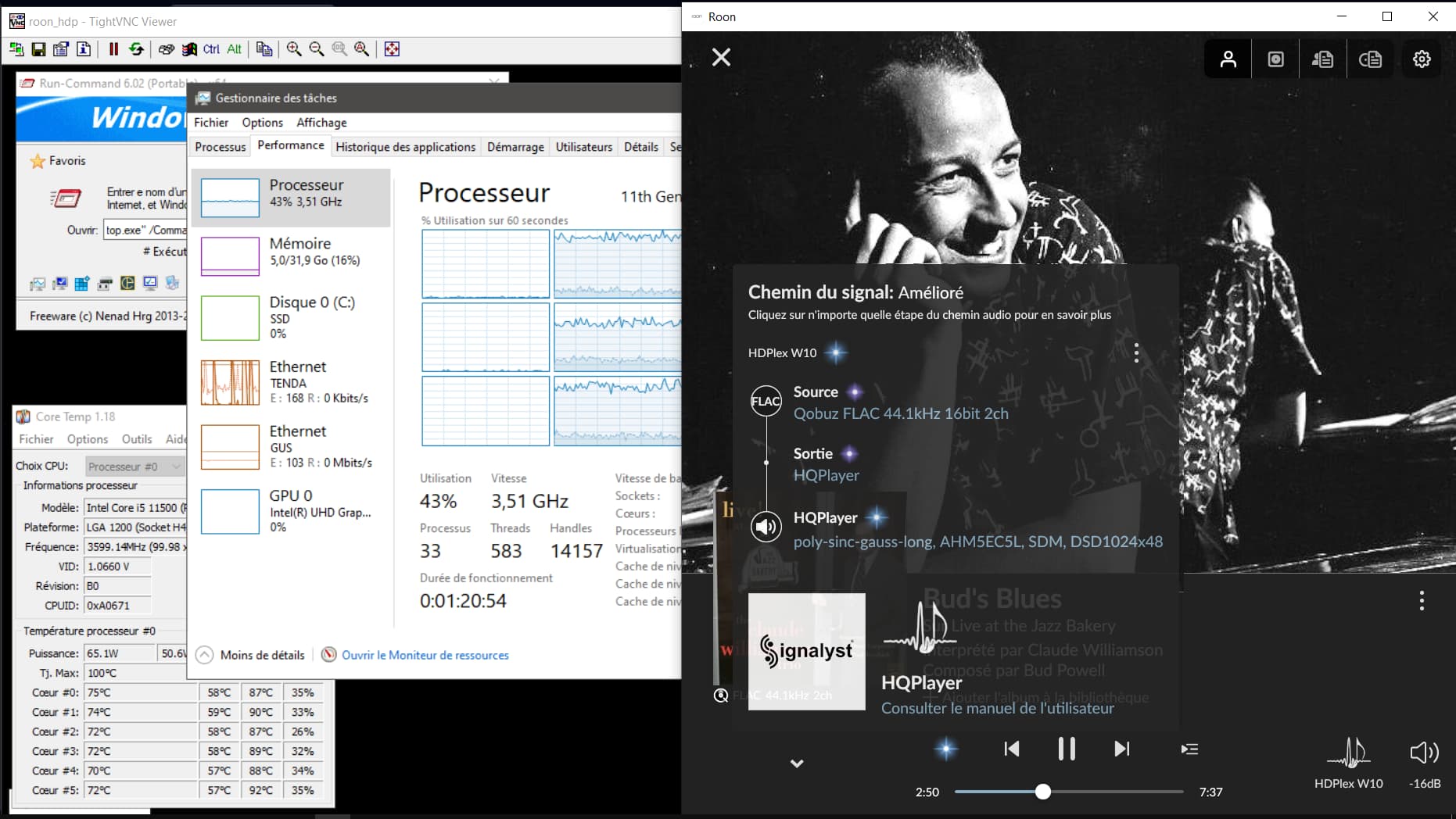
I sometimes have a blank… very rarely but which was simply impossible a year ago… works with an I5-11500 in fanless version (without exceeding 80°). with 4 corrections HAF pipelines.
To see if the 1024… justifies a few blanks or if we have to go back to 256.
Perhaps HQPlayer is having some internet access problems? Or some other network issues.
Since Embedded is designed for “streamer firmware”, hardware related settings are in hqplayerd.xml to be manually edited. This is something hardware manufacturer adjusts and is not generally accessible over the web interface. When you buy a streamer from some vendor, you are not assumed to adjust hardware specific details inside the device. Those should be correctly preconfigured by the manufacturer…
HQPlayer Desktop is for running on ordinary desktop OS, such as Windows or macOS with graphical interface where you can access all the details. This is not for something you buy as part of a ready-made device.
That is part of HQPlayer Desktop, it comes with a PDF manual. On HQPlayer Embedded, the web interface documentation is offered as help pages under each respective page. And rest (non-end user) is included in the readme.txt
I use HQP desktop and volume control with it, without using the preamp’s volume knob. HQP is installed on a Mac mini M2, and I turn it off when I’m done listening to music and restart it for a new listening session. HQP retains the last volume setting, which means the volume may be inappropriate depending on the previous listening session. Indeed, I have several headphones that don’t have the same sensitivity, as do my speakers, and the music tracks also have their own recording levels.
So I have to remember to reset the HQP volume to an average volume to avoid unpleasant surprises the next time I start it up. Ideally, this would be possible to configure in HQP: for example (reset volume at startup → Y or N and if Y, level xx dB). I would be the happiest person in the world with this feature added to a future version of HQP.
I always keep my computers on, might switch off if traveling long trip. But when you turn your Mac on, you will need to login to have HQplayer running on background right? HQplayer app also can adjust volume
I removed the login feature at startup.
So every time I restart my Mac, it automatically restarts HQP without any intervention on my part.
And so HQP restarts with the last volume setting it had at the previous shutdown.
Of course, the volume is adjustable afterward, but sometimes (often…) I forget, because I start the music via Roon and so HQP follows behind