HQPweb: a simple phone-friendly controller for HQPlayer (Desktop & Embedded)

Hi all,

Update: docker builds available now in beta3, lots more features like guided set up if you keep reading

-–

I’ve been working on something I’ve wanted for a long time: hqpweb, a simple web controller for HQPlayer that works nicely on a phone (or tablet, or computer, but it does work great on a phone).

Why? HQPlayer is one of the most cherished parts of my audio chain. It does magic. But the interface leaves something to be desired, and I’m not an audio engineer, I’m a guy who likes usability. So I put a layer on top. If it makes HQPlayer easier and gets a few more people into actively playing with filters, which I found that I wasn’t really doing as much as I once did, that’s all I’m hoping for.

What it does:

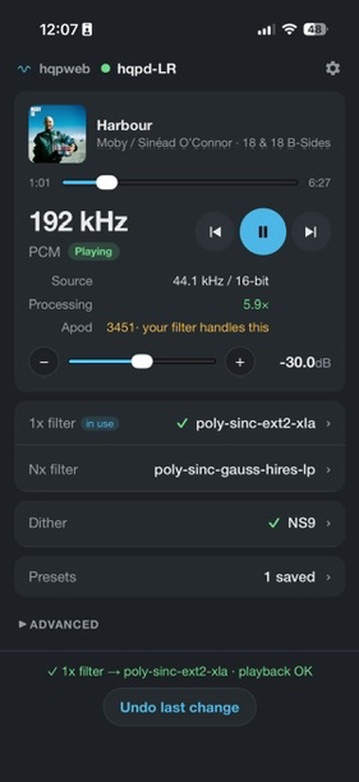
  • The stuff you actually change, up front: 1x and Nx filters, dither/modulator, volume and presets, all reachable without scrolling on a phone.

  • Checks every change. It reads HQPlayer’s settings back instead of trusting “OK”. If a change stops playback or HQPlayer can’t keep up, it rolls back automatically, remembers the combination, and warns you next time. One-tap undo too.

  • Shows whether HQPlayer is keeping up with your choice of filters/modulators/rate: “Real-time ✓”, “Straining” or “Falling behind”, measured from playback itself, so it works without access to the machine.

  • Presets: save your current settings with a name, then use them on any instance. It tells you before you tap whether a preset is a quick change or a mode/rate change.

  • Advanced section for mode, output rate, convolution on/off, matrix profiles and the toggles. Mostly stuff that will stop playback.

  • Volume safety: never jumps up more than 6 dB at a time, and undo/rollback never raise it.

  • Optional Roon integration: track, artist, cover art, a seek slider, and working play/pause/skip for the zone that feeds each HQPlayer. Off by default; everything else works without Roon.

  • Works with HQPlayer Desktop (tested on 5.17.2, macOS and Linux). Embedded should work, since it’s the same control protocol, but I haven’t tested it yet. v6 should work too, but I haven’t tested it because I don’t have it. Reports very welcome.

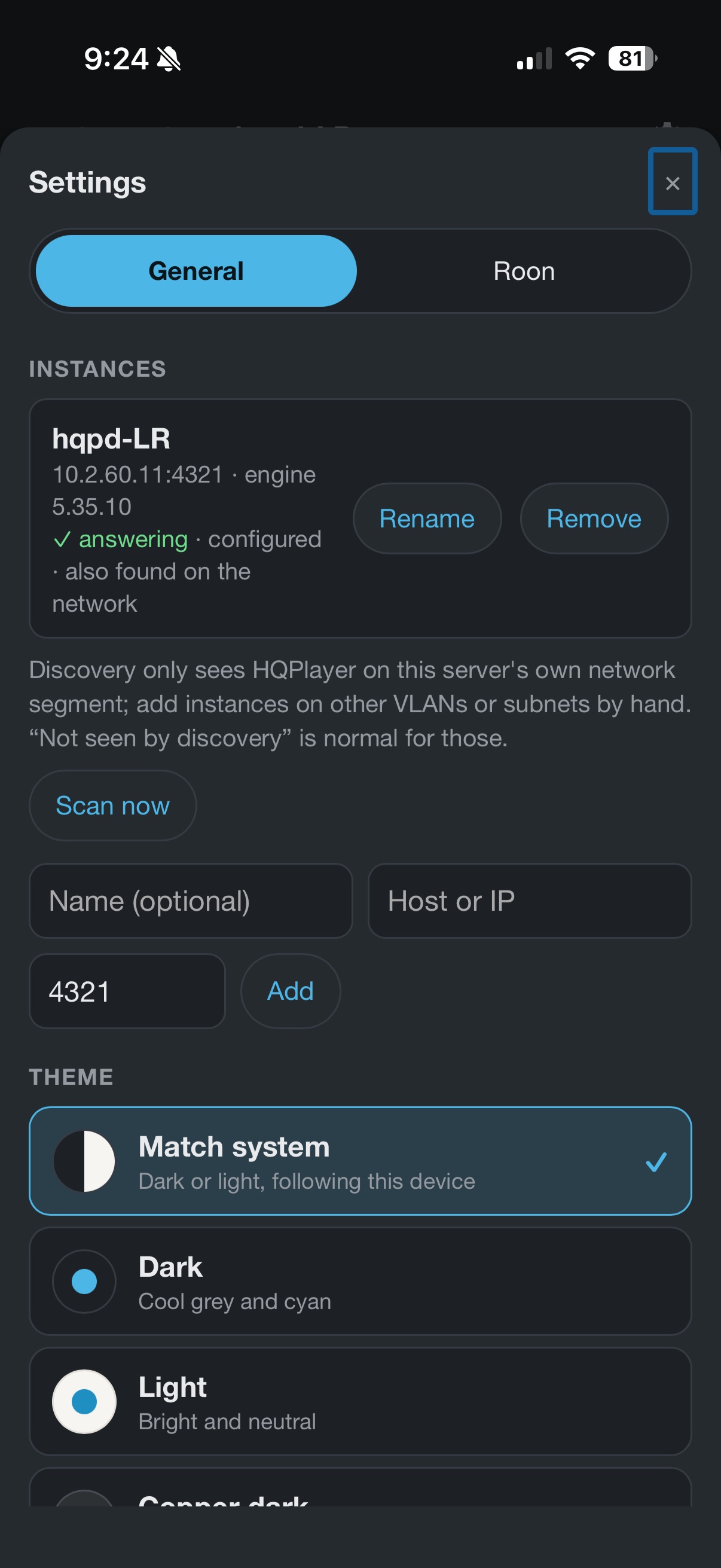
  • Ships in Docker: three commands, then add your HQPlayer by address (or discovery - tbd how well this works in the wild!).

What it isn’t:

  • Not a music player or library browser. That’s Roon’s job (or HQPlayer’s own Client).

  • Not a configuration tool like HQPTuner, which does a lovely job on Embedded’s deeper settings. hqpweb is the everyday remote.

  • It can’t switch profiles or outputs/NAAs. HQPlayer’s control protocol doesn’t allow it (loading a saved configuration is reserved for Signalyst’s own Client). If that changes, I’ll add it!

  • I haven’t yet integrated the manual content into tooltips for filters. Coming soon I hope - flipping to the manual is something I find myself doing all the time!

How it was made: honestly, with a lot of help from an AI coding assistant. I couldn’t have built it alone. I tried hard to make it solid:

  • HQPlayer’s behaviour was measured on real instances and written up;

  • every change is verified and can be rolled back;

  • it has automated tests and has had security reviews.

It’s an alpha, so it’ll have rough edges. I’d really love feedback, especially from Embedded, HQPlayer 6 or Windows users, since those are the setups I can’t test. There’s a short testing guide in the repo, or just reply here. For instance, when switching songs it sometimes says “HQPlayer isn’t keeping up” when it is keeping up just fine, so I need to tune that.

Notes/thanks: Not affiliated with Signalyst or Roon Labs. Big thanks to @jussi_laako for HQPlayer and for publishing the control SDK that makes this possible. Also to @MusicD and @ohwowgorillas for the inspiration to believe I could build something like this.


Pretty pictures! (from a WPA saved to home page on the iPhone - it has a pretty app icon and all if you decide to do that!); note that here I’m playing PCM to a cherished older DAC, it works just fine in DSD too obviously!

4 Likes

hqpweb 0.1.0-alpha.2: a filter guide, compatible filters, and some safety checks

like it says on the tin, hqpweb is a small self-hosted web controller for HQPlayer. You can change filters, modulator or dither, volume, mode and rate from a phone. Every change is read back from HQPlayer, and rolled back if playback stops. Roon now-playing/simple controls are optional. It’s free and MIT-licensed: GitHub - statelycurmudgeon/hqpweb: Modern web controller for Signalyst HQPlayer · GitHub

New since the first alpha:

A filter guide

  • A bunch of hqpd v6 stuff, including:
    • Tested with hqpd v6 finally (ok, a day later), and embedded
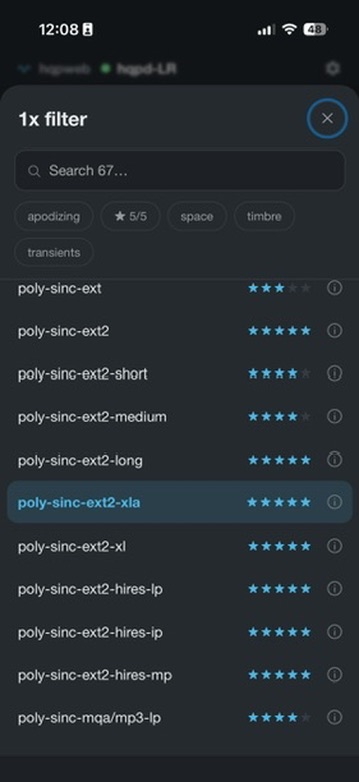
    • Filter lists show star ratings, what each filter favours (transients, timbre, space), and which conversion ratios it can do. HQPlayer 6 supplies this itself; for HQPlayer 5 the app borrows HQPlayer 6’s ratings by name.
  • Chips narrow the list: 5/5, a focus, apodizing, compatible. Modulators show their generation (Gen1–8).

Compatible filters first

  • With a fixed output rate, filters that can’t do the current conversion are hidden by default. Pick one anyway and the app offers output rates that fit, or Auto.
  • If the next track can’t start with your settings (HQPlayer just ignores Play when that happens), the app says why and offers a fix.

Safety checks

  • If HQPlayer’s volume jumps without you (a restart brings it back at its startup level, −3 dB on v6), the app flags it, with one tap back to where it was.
  • If Play doesn’t start and the settings don’t explain it, the app says so and points at the output: an NAA held by another HQPlayer, or a DAC that’s off.
  • HQPlayer’s Apod and Clips counters appear once they’re above zero. If Apod passes 10 in a track and your filter isn’t apodizing, the app says so and offers the apodizing filters.

Also

  • “Processing” shows HQPlayer’s own processing speed (e.g. 3.4×) on 5.17 and 6.x.
  • Seek within files HQPlayer plays itself.
  • If you use it as an installed app, it now offers a reload when hqpweb has been updated.

Tested with: HQPlayer Desktop 5.17.2 (macOS and Linux) and HQPlayer 6 Embedded 6.2.3 (macOS and Linux), playing to a DAC over NAA. Desktop 6 and Windows are untested; reports welcome.

Update: git pull && docker compose up -d --build. New install: see the README.

It’s an early alpha built around my own system, so expect rough edges. Bug reports and ideas are welcome here or as GitHub issues.

hqpweb is still not affiliated with Signalyst or Roon Labs, nor do we ever expect to be, but man oh man do we love their stuff.

Pretty pics of revised now page and filter chips / picker:

2 Likes

And… (this all happens so fast)

hqpweb 0.1.0-beta.1: it’s a ready-made image now

We’ve gone to beta, and there’s no build step any more. hqpweb is now a published Docker image, for both regular x86 machines and ARM ones like a Raspberry Pi or an ARM NAS.

  • New install: paste the short compose file from the README and run docker compose up -d. There’s also a one-line docker run for Synology, Unraid or Portainer.
  • Updating from now on: docker compose pull && docker compose up -d.
  • Installed it from a git clone? Run git pull && docker compose pull && docker compose up -d once. Your instances and presets carry over.

Also, “Scan now” tries harder to find HQPlayer on the first go.

Details in the README: GitHub - statelycurmudgeon/hqpweb: Modern web controller for Signalyst HQPlayer · GitHub

1 Like

Nice work. It’s working very nicely Johnny and updated to the beta version now :+1:

1 Like

Thanks Michael!

It’s been fun building this - and it solves a real pain point for me with a product I otherwise love. Learning a lot as I go!

1 Like

Thanks Johnny, It’s been great for me for the last couple of days of testing, and I have been happily flipping between DSD 256 & DSD 512 and changing filters using my phone, and with so much more ease than opening my MacBook and doing Screen Sharing.

I look forward to see what you do with this next

Thanks Michael!

Well, what’s coming is (a) I refactored the whole thing, unexciting for you, but exciting because vibe-coding requires serious discipline for things not to get messy, and more importantly, (b) I’m building a process for picking modulators and ditherers.

I went back through manuals and forum posts, and realize, despite how much time I’ve invested over the years, I didn’t really know how to pick the right modulator / dither for my three VERY different DACs. So a guided picker, which incorporates wisdom from the manual, from Signalyst’s forum posts, from DAC spec sheets, etc. was very helpful to me. And the number of times I see Jussi having to answer basic questions he’s already answered… I figured it could be easier! It’s in mockups now, iterating, but this is fun. Sent you a sneak peek!

1 Like

Phew, a big one! v0.1.0-beta.3 is out. The version number says “small step”, but we did a lot.

The headline: a guide for the modulator and dither (beta).
Tap the Modulator (or Dither) row and you get two tabs:

  • List: HQPlayer’s whole list, grouped by family, with search. The older series are folded away (you can expand them), but the one you’re using always shows.

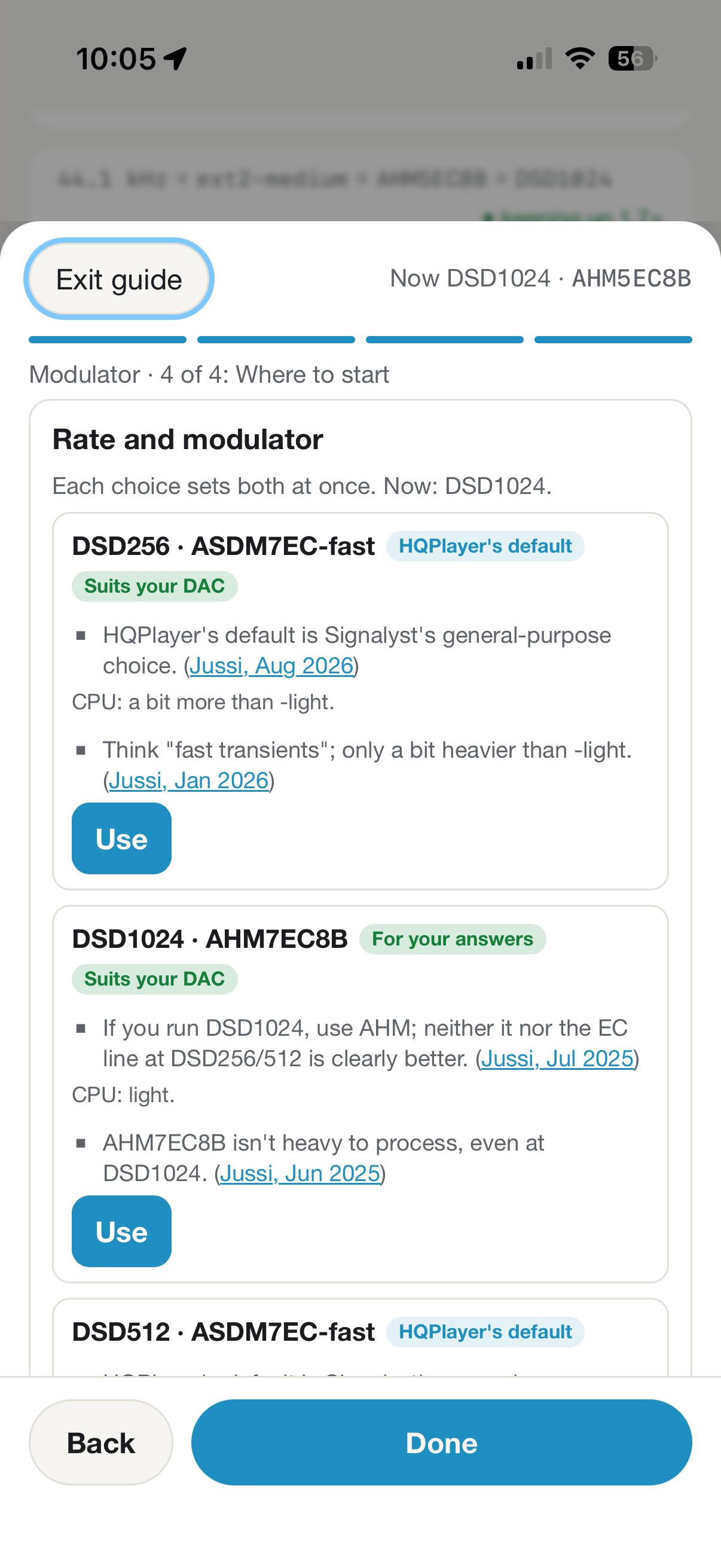
  • Guide: a few plain questions about your DAC, your amp, how you set the volume, and how the DAC connects. Then a place to start.

In DSD, the guide suggests a rate and modulator together, e.g. DSD256 with ASDM7EC-fast, or DSD1024 with AHM. Each is one tap, and hqpweb changes both in the right order. Every suggestion links the post it comes from, with its date, because this advice moves as HQPlayer does. It’s a starting point, not the last word: your ears decide.

Also new:

  • Your setup in Settings, with Find your DAC, a table of chips and common models to help answer the DAC question.

  • What each modulator is like: CPU load and character for the -ul/-light/-fast/-super variants and AHM, with sources.

  • A safety net for rate and modulator. Pick a rate your modulator can’t play at, or AHM below DSD1024, and hqpweb offers the other half of a pair that works. That’s the only thing it ever refuses.

  • Failure history. “Failed here 3×” for combinations your machine couldn’t keep up with. Clear it in Settings if you know why.

  • Gentler rollback. After a rate change, hqpweb now waits for HQPlayer to settle before judging, so a slow start isn’t mistaken for an overload. If it does roll back, it says so in plain words, where you can see it.

  • If HQPlayer stops answering, hqpweb says how to restart it (Desktop or Embedded), and dims what it last showed so it isn’t mistaken for live.

  • Volume: the guide suggests gain optimisation (HQPlayer at −3 dB, amp at the loudest you’d ever want, then turn down in HQPlayer or Roon).

Update: docker compose pull && docker compose up -d. Settings are kept. Release notes: https://github.com/statelycurmudgeon/hqpweb/blob/main/CHANGELOG.md

What I’m thinking about next:

  • A guided path for the whole setup. The guide now covers DAC, amp, volume, rate, modulator and dither, so it’s outgrown the modulator sheet. I’d like to think through where it lives, and how filters fit (“your ears decide”, with Signalyst’s defaults). We all learn this eventually, but I was surprised how much I learned by going back through manuals and the forum really carefully

  • A/B comparisons done properly, to switch between two settings while listening. I took a first version out of this release because it wasn’t clear enough.

  • Smaller things: forgetting one failure at a time, and more reliable network discovery.

Feedback always welcome, on what’s here and what’s coming! And if any of the advice is out of date, an issue on GitHub (or a reply here) gets it fixed quickly; the rules are kept as data on purpose.

2 Likes

Big news: hqpweb now runs inside Rouen, @MusicD’s web controller for Roon

If you’ve been following the controller app that @MusicD has been building, you know Rouen is an excellent controller for Roon. It fixes a lot of what I’ve found frustrating about playing music in Roon. He has now built hqpweb into it, so most of hqpweb sits in Rouen’s sidebar. You can control Roon and HQPlayer in one place, without switching apps. Yeah, you gotta use docker and have it somewhere running on your network, but same thing for hqpweb so now one container instead of two.

What’s in the Rouen sidebar

  • Filters, modulators and output rate for your HQPlayer, with the same notes on CPU load and character that hqpweb shows.

  • The Guide: answer a few questions about your DAC and it suggests a starting point.

  • Presets, so you can save a combination you like and return to it in one tap.

  • Safety net: if a change makes HQPlayer stutter, hqpweb tries to roll it back and remembers that combination didn’t work on your system.

hqpweb still runs on its own too if you want It separately alongside (which I do). Rouen is an extra way to use it, not a replacement - but for me this is going to be my default way of controlling Roon I think - Rouen with hqpweb in the sidebar! Also available if you’re using a Wall Display as a “screen saver”.

If you want the absolute latest and fullest featureset, keep up with the hqpweb project, and if you want pure one-stop convenience use Rouen with hqpweb (cooked with duck sauce), and if you want to give feedback on hqpweb features in either setting, send 'em my way.

See Rouen at: https://meltface-80.github.io/MusicD-Remote

Forum thread: MusicD Remote - a companion client for Roon

Thanks for listening, and thanks to @MusicD for doing the integration work and building a great product!


2 Likes

:partying_face:

:duck:

1 Like

Great to see you guys working together.

Johnny I like the questions in the latest version, feels that is leading to giving some good advice on filter choice. Updated but not had a chance to play to HQP yet

1 Like

Thanks Michael-
I never would have had the guts to start on something as ambitious as Rouen… but with a more defined surface area I can make progress, and the two things work together really well. I’ve been wanting an HQP control surface a “single click away” for a long time. Fact that they both work well on phone is ridiculous to me. Hope you enjoy!

2 Likes

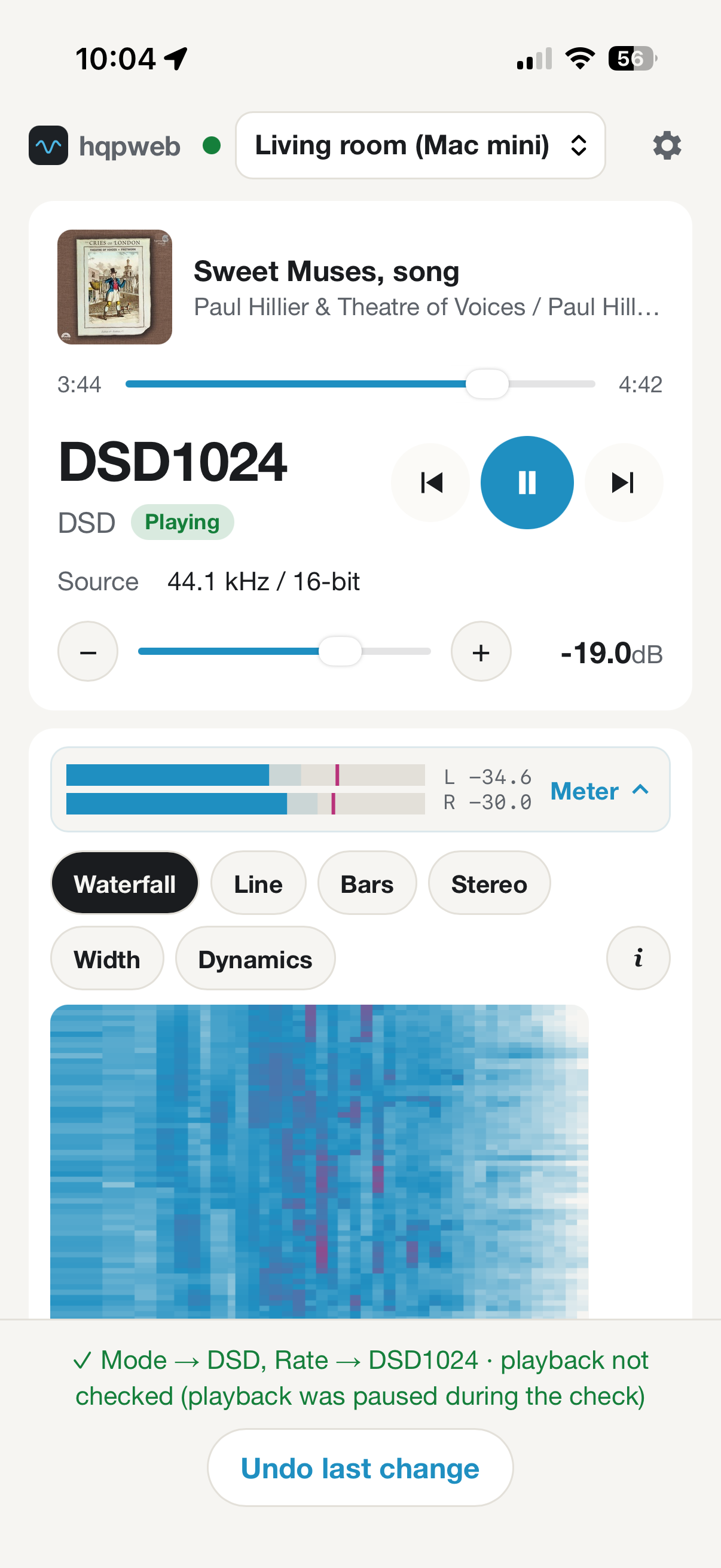
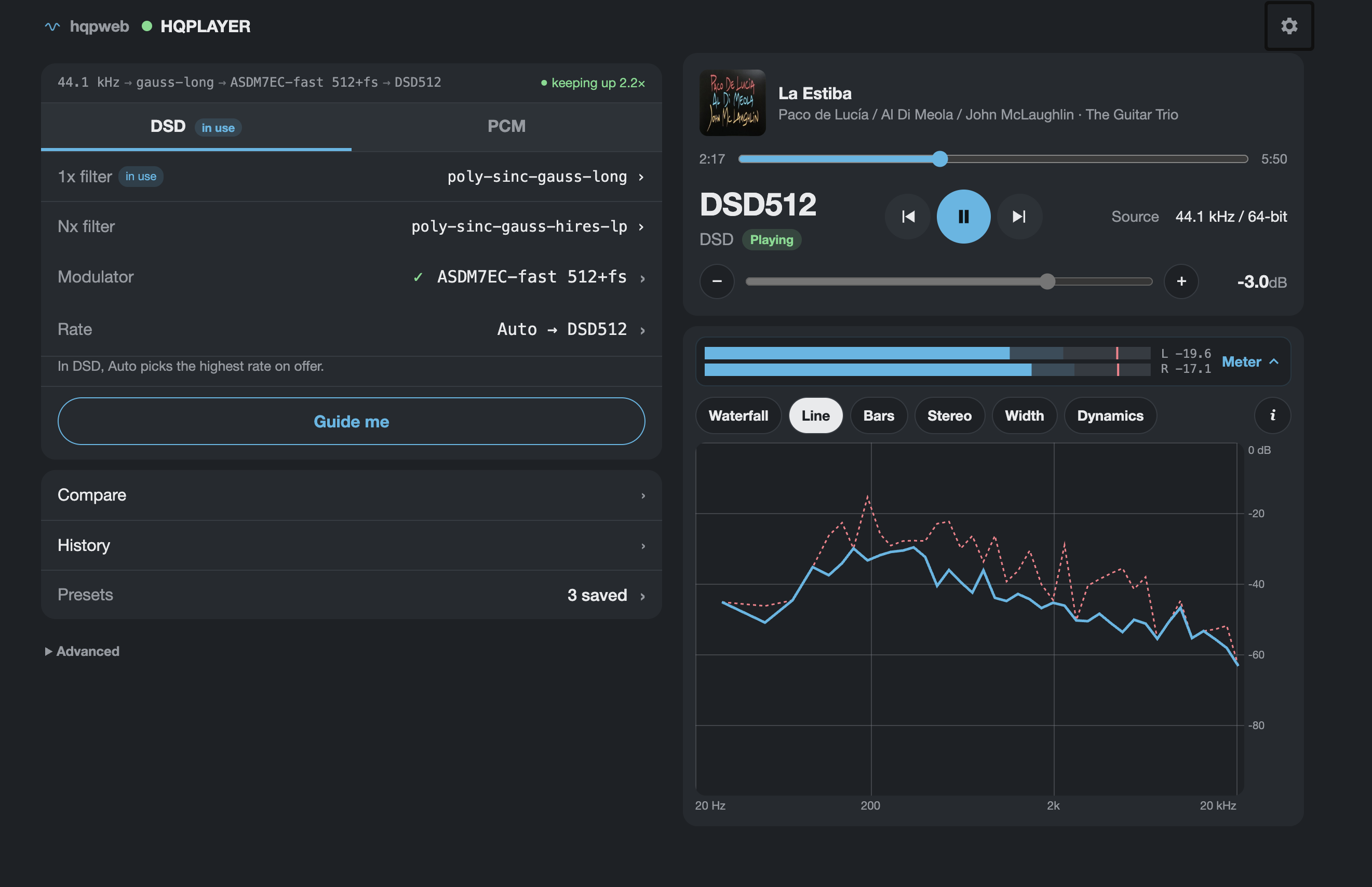
Big release tonight! Decided I needed to move the guide into center stage and add a bunch of visualizations. It’s way more fun and still pretty simple and phone friendly, but now works on desktop too…

hqpweb 0.1.0-beta.5

The headline is that it’s a whole new layout. It’s a preview for now, so flip it on in Settings → Try the new layout (per device; flip it off anytime, nothing else changes).

What’s new:

  • Guide me, front and center. One big button, then one question at a time: your DAC, your amp, your volume habits, and then where to start. Back and Next like a grown-up wizard. Same advice as before, just way less homework on one screen.

  • A meter! Six of them, actually. Tap the strip under now-playing and it opens into Waterfall, Line, Bars, Stereo (left and right racing away from each other), Width (how mono or wide each band is; red means something’s out of phase) and Dynamics (30 s of loud vs. peak, with a crest-factor number so you can finally prove that remaster is squashed).

  • The meter waits for your ears. HQPlayer buffers output, so meters run ahead of the sound. hqpweb now waits however long HQPlayer says its buffer is, and there’s an Earlier/Later nudge in (i) for your DAC and network.

  • Compare (A/B). Two full settings cards side by side: A is what was playing, B is whatever you dream up, including DSD vs PCM. Tap A, tap B, squint, repeat. It tells you what each switch costs and reads back from HQPlayer which one you’re actually hearing. Keep the winner or save it as a preset.

  • One card for the whole signal path. A line across the top says what the music goes through right now (44.1 kHz → gauss-xla → ASDM7EC-fast → DSD256 · keeping up 2.1×). DSD and PCM are tabs; the other mode shows what it had last time you were there.

  • Chips that explain and filter. Filters and modulators wear little chips like ✓ kept up here (1.8×), ✗ fell behind here, minimum phase, apodizing. Tap one to filter the list. “Kept up here” is your machine’s real track record, not a guess.

  • History. Every change, who made it (hqpweb, a preset, or someone poking HQPlayer directly), and how playback took it.

  • Desktop finally gets the room. Two columns on wide screens, meter on the right. Phones get a slim mini bar with play/pause and volume when you scroll away.

  • Colour! Every theme picked up a second accent, so Brass and Copper are no longer 50 shades of brown.

  • Safer mode switching. hqpweb brings back the rate you last used in that mode, and won’t trip over one your setup no longer allows.

  • Plus a big tidy: one way of writing rates everywhere (DSD256, 1536 kHz), volume taps stop throwing toasts at you, and the favicon should finally show up. (If Safari still sulks, clear its cache.)

Updating: docker compose pull && docker compose up -d. Settings and presets carry over. For the meter, hqpweb needs to reach HQPlayer’s meter port, which is the control port + 1 (usually 4322).

Full changelog and the image: on the GitHub releases page. GitHub - statelycurmudgeon/hqpweb: Modern web controller for Signalyst HQPlayer · GitHub

Phew! Hope you enjoy. Send bugs and nits this way!

1 Like

@Michael_Harris coming your way soon (next day or so)… matrix profiles so you can switch DAC correction, loudness, etc on and off. I think you asked for this a while ago, but maybe I’m confusing it with NAA picking…

Hard thing I’m trying to figure out is whether I should keep your history separate for every single matrix pipeline profile so you can see for yourself every single combination of rate/filter/modulator/profile how your setup performed or if I should simplify. The complex thing is that you can’t turn pipeline on/off in the api, just pick a profile (one of which can have no pipeline elements enabled) but we can’t easily know through the profile what you’ve named the “nothing enabled” profile.

1 Like

My R30 doesn’t have DAC correction, but I will look to test everything else and thanks @Johnny_Ooooops for keeping the changes coming quickly

I have been working my way through recommended settings which fit pretty close to what I already use. Mostly worked well, but I have had the odd issue where playback doesn’t restart or just stops, but I need to work through the scenarios when that happens

I have to say the guide is an interesting one. As anyone who follows the HQP forums here knows, there is a nearly infinite set of subtleties and permutations. I’ve tried to make it good for those getting started, and maybe instructive on the “why” - pointing back to forum posts etc. However, it’s complicated - if I was the one writing this software I’d want people to get to know the reasons why… so it’s a trade-off between information density and references and trying to create enough simplicity. LMK if you think I’m getting balance right…

Having lurked in the HQP threads for quite a while and read the PDF manual several times before ever purchasing I felt I was in a fairly good place when I started using it as paid for software.

Your beginners guide is great and deciphers a lot of what is in the manual that most people never read.

When I read your initial questions I was assuming you were going off in this direction and I think it is really helpful for beginners and intermediate level users as well.

Hey @Johnny_Ooooops the additions you have made this into a really nice, yet simple package

So nice of you to say! I’ve been working hard, though it’s been quiet for a few days learning new stuff. Turns out that it might be possible to get profile loads (not creation, just list and load) into a native app - iOS or Android. I just can’t do it in open source. I know that profiles was something that was interesting to you… I’ve figured out how to get a native app done, at least for iOS. Are you interested in testing?

1 Like

Great news, I will be happy to test when you are ready. I have been enjoying using the preset feature you have built though, I have crashed HQP a number of times, but that has happened using the HQP tools as well :grin: