So, if I understand you correct then you hear the difference with your ears, right? Which one did you test - the standard or the industrial version of Intona?
Well that’s a bit more curious! That’s how I would have started a project like this:
(1) build a prototype based on hunch about some DACs being impacted by upstream processing noise
(2) enjoy subjective experience
(3) ask big why questions and whether it is only my DAC that is being impacted
(4) test objectively and marvel at lack of clear results
(5) develop new measurement methodologies to try to understand why I have (2)
(6) explain how this works as part of the product offering
Everybody wins and YMMV is no longer the answer!
1 Like
You quoted the model of the unit I use and ask what model I’m using.
And yes, I use my ears to hear things.
Please go ahead, do some science for use Mark and let us all learn something new. To me, what I hear is plenty enough evicence.
1 Like
But you’re missing the big picture! You have enough evidence but we don’t know whether it can work for others…it’s just YMMV still. The project/product developers should have done the groundwork for all of their adopters/customers.
1 Like
Hi everyone,
I am posting this to perform a hard reset on this thread.
The theoretical debates about why this project shouldn’t work are actively burying the support requests and build reports of the people actually building it.
To respect the time of the members who are here to build, listen, test, and tune this ~$300 project, I need your help to enforce a strict separation of topics effective immediately.
The Two Lanes of Discussion:
Lane 1: The Build Lane (THIS THREAD)
- Purpose: Installation support, configuration questions, hardware choices, and sharing subjective listening impressions.
- Goal: To help Roon users build a fun, affordable endpoint that delivers a listening experience competitive with streaming transports costing an order of magnitude more.
- Rule: If you haven’t built the kit, or if your post is solely to demand measurements or debate the validity of human perception, do not post it here.
Lane 2: The Measurement & Theory Lane (MARIAN’S THREAD)
- Purpose: Analyzing detailed measurements, debating the audibility of jitter/noise, and conducting null tests.
- Goal: To scientifically validate or debunk the underlying protocol.
- Action: If you want to discuss SINAD, voltage rails, or placebo effects, please take that conversation to the Diretta Measurements and Listening Tests thread. That is the appropriate venue for rigorous scrutiny.
Moving Forward: I will no longer respond to theoretical challenges or measurement demands in this thread. I am asking those who have built the kit to do the same. If someone posts a theoretical challenge, please do not debate them. Simply link them to the Measurement thread and move on.
Let’s clear the airwaves for the builders.
To get us back on track: Has anyone experimented with removing Roon Bridge from the core isolation group on the Diretta Host? Since making this change in my own builds, I’ve observed reduced timing variations between L2 frames. Does this translate to better sound quality? That’s for you to decide. Let’s discuss.
8 Likes
Understood! In terms of hardware choices, configuration questions, and installation support, can you please add to your agenda developing a guide/overview for the specific DAC architectures and connectivity patterns that are known to benefit from the Diretta protocol?
So you actually tried that in your system and it was bad?
1 Like
I suggest David’s request be honored by both sides. I’m certainly a skeptic but the message has been delivered…continued interference here could be viewed as suppression not just debate. David asked nicely.
So yeah Marian’s excellent thread is where the debate may continue. Let the tech talk happen here.
6 Likes
David
I have started the instllations . I got theRbP 4 with diretta host But now I am block when trying to get license for Diretta target. Un audiolinux menú after installation of Diretta target I go to optî’ of License and a very long web address appears that after do not allow me to open
Is there other way of incorporating the license
1 Like
For AudioLinux, there’s no other way to purchase the Diretta Target license. I just tested the link, and it works for me:
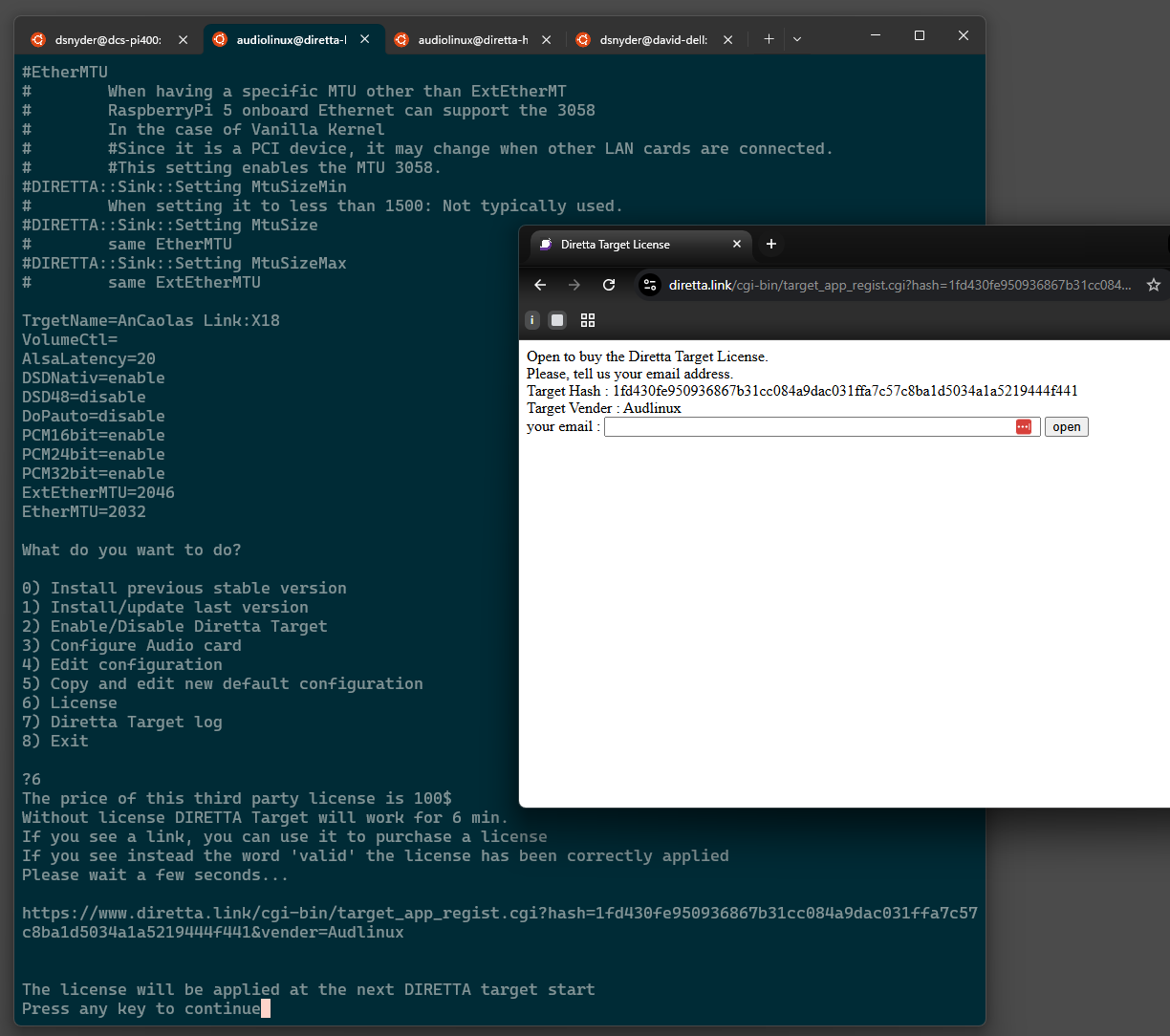
If you are accessing the Diretta Target computer via SSH (login to the Host first, then type ssh target), you should be able to copy the long URL from your terminal window and paste it into a browser. You can also try using Piero’s browser interface to get the long URL. For example:
http://172.16.8.154:5101/index.html#/0.7.1%20DIRETTA%20Target%20installation%2Fconfiguration
You’ll have to replace 172.16.8.154 with the IP address of your Diretta Host computer. As in the example above and below, pick option “6) License” and you’ll have the address that you can click on:

From which computer are you trying to access the link? Make sure you don’t have any firewall or other security settings that would prevent you from reaching this site. Also make sure that the clock on your computer is accurate.
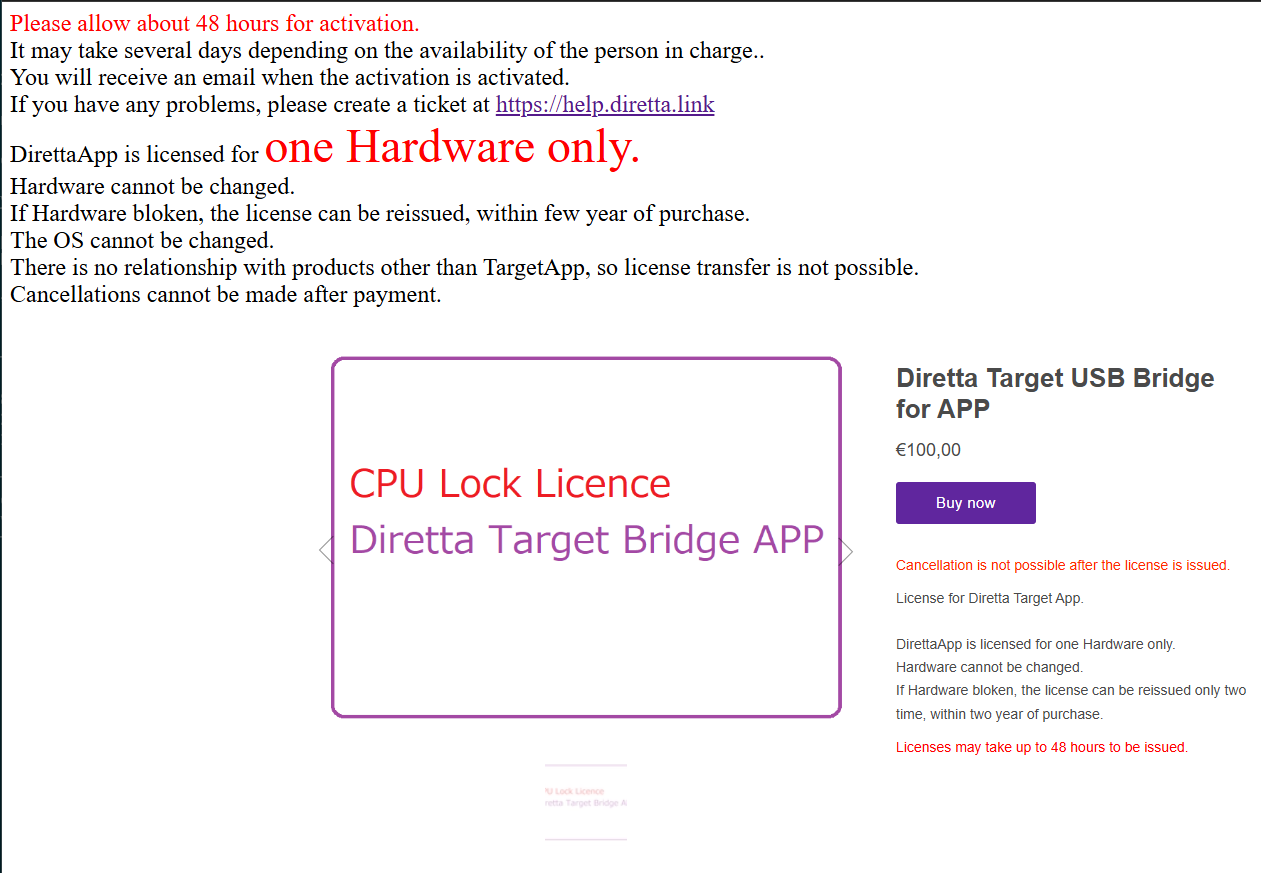
The next two screens in the purchase flow are working as well. Although I did not complete the purchase this time, it appears that the Diretta checkout system is operational.
I’ve also verified that the license servers are up by renaming my license file (it’s under “/opt/diretta-alsa-target” on the target) and manually running this command:
$ sudo /opt/diretta-alsa-target/diretta_app_activate
After a second, my RPi had re-downloaded the license file from Japan.
Although it’s true that the Diretta servers and purchase flow have been offline for maintenance a few times in the past 3-4 months, they are up now. Perhaps give it another try. Good luck!
1 Like
Thanks for the measurements… 
1 Like
Unfortunately, there will ALWAYS be trolls looking for attention…and everyone keeps giving him what he wants so STOP. The best way to silence the nonsense, is stop responding.
1 Like
BOOM! 
Yesterday i’ve got 3T Diretta running back again (now i can see that for RPi5 target i’m using RPi5 image from Diretta (with no ssh access and therefore no tuning possibilities).
Unfortunately I was too keen to recompile diretta alsa_bridge module for latest kernel and forgot that vagrant destroy is not the same as virsh destroy ;( So i’m now rebuilding my dev env - at least i can verify if my instructions for build env are fine.. 
@David_Snyder , please on the Target RPi5 (as i’m not using AudioLinux) , what the Diretta Target Installation do exactly?
I have alsa_sync module loaded in kernel, also running the diretta_ssync_host - which i don’t think is correct as my Diretta Host (Rpi4) do not see the Target. In tcpdump i can see both are sending discovery packet to ff02::1.19642: UDP but nothing happens. I suspect, there must be another process/service runing on Target than the diretta_ssync ?
EDIT: hmm it looks on Target i need to have MemoryPlayHost_ daemon running, which i now have but host still can’t see it, i guess i might have version mismatch (148 on Target and 147 on Host)- is that possible reason, or it should work too?)
EDIT2: got it running, had to upgrade Host with alsa_sync v148 , yay
EDIT3 - i’m actually running alsa_sync driver directly in kernel (no LKM needed)
EDIT4 - actually MemoryPlayHost seems to be for different purpose - it ignores USB DAC and rather creates “Recorder” device presented to Host. So im at dead end for now until i can grok what should be running on Target
1 Like
While you are waiting, perhaps buy AudioLinux. Just $79 in total for both computers (if they are both Raspberry Pi) will get you started. 
I am waiting, myself, until there is some kind of definitive guide concerning how the system and various configurations interacts with all of the different DAC architectures (R2R, FPGA, ESS, Burr Brown, etc.) and interconnect options (USB, SPDIF, Toslink, I2S)! Why buy when everything is so uncertain?
1 Like
I have been thinking buying AL and Diretta, but considering that I just need free version of Diretta to test (e.g. compare to my isolating switches before i invest in buying additional diretta-dedicated hw) as I invested lot of effort to current setup i’m hesitant buying what i actually do not really needed for the test.
If the situation is that the Diretta Target actually must be bough (or AL or GentoPlayer) to get it running on custom endpoint then fine, but it should be probably clearly stated somewhere so people do not burn time and end up frustrated it’s not working
..and by “groking” the Target i meant to finally understand what have to run on Target , not specifically waiting , rather i hope someone with working setup will have a look and share it here
I can only share my experience - although it was just some older Diretta version without any serious tweaks in the Diretta config or CPU pinning etc. This was back in August 2025.
Setup:
DAC: FPGA based PS Audio DirectStream MK2 (have galvanic isolation)
DDC: Matrix SPDIF I2S mk2 (USB in , I2S out)
USB cable: AQ Diamond [RPi5 to DDC]
HDMI cable: Wire4World Silver Sphere [for I2S DDC to DAC]
Ethernet cable: AQ Vodka and Pangea Premier SE [AQ going to streamer “last-mile” ; Pangea all remaining ethernet interconnects near audio]
Full Ethernet connection chain without Diretta:
NUC (USB network adapter) → OpticalModule Deluxe (with selected Finisar SFP+) → EtherRegen → PaulPang Quad switch → RPi5.
My intention was (and still is) to replace ethernet stack (OM+ER+PPQ) with plain Diretta connection like:
NUC (USB network adapted) → RPi-Host → RPi-Target
Result of the test (not ideal Diretta setup) yielded sound quality comparable to optical isolation (OM+ER+SPF+) which is already nice (that setup including LPSes , sans cables costs over 2k) .
I still prefer PaulPang-Quad switch over the mentioned Diretta basic setup, so now i want to squeeze maximum from Diretta to see how far i can get.
1 Like
I’m not following your objection. The project I’ve documented does not require anyone to purchase a Diretta license to evaluate the sound quality in their system. When a license key is not present, the “free” Diretta Target software operates in “limited” mode. It will play 44.1/48 kHz audio indefinitely but any formats with higher sampling rates will stop playing after six minutes.
There’s an enormous amount of fine audio content out there at 44.1 or 48 kHz that can be used to conduct a through evaluation of the sound quality before committing €100 to an unlimited Diretta Target license.
As I’ve said earlier in this thread, the only “sunk cost” is the AudioLinux license. But if one does not find Diretta to their liking, they can always repurpose AudioLinux as one might use RoPieee or DietPi. Do a clean install, add Roon Bridge, connect a USB DAC, and enjoy.
i’ve finally got Diretta playback running, so for us, folks who want to test Diretta without AudioLinux and Gentooplayer, there is a way 
Host:
- alsa_bride LKM
- RoonBridge
Target:
- alsa_bridge LKM
- diretta-alsa-target application (the version i got requires new glibc, so does not work on debian12 based system, needs debian13)
The “diretta-alsa-target” was the piece i was missing and the only place i actually i found it available is the AudioLinux website (not easy to find if one does not work with AL). I’m not sure if this is intention or I was just not searching correctly.
Now I can finally play with tuning part and ordering 2nd Pi5 as current Host RPi4 built-in ethernet does not support MTU higher that 1500 (at least to my knowledge) as I would like to try the non-IP mode.