I used to think the DAC was 90% of the sound. This sub-$300 DIY project proved me wrong

@David_Snyder

Hi David.

Been playing around with the setup and so far seems better than other sources.

That said, was wondering what, if any, maintenance needed to be done periodically.

Going thru the host and/or target menus, observed both Update kernel and Update system options, with kernel cautioning to do system first. Did both updates on host and target in suggested order and now Roon is not seeing the device(s).

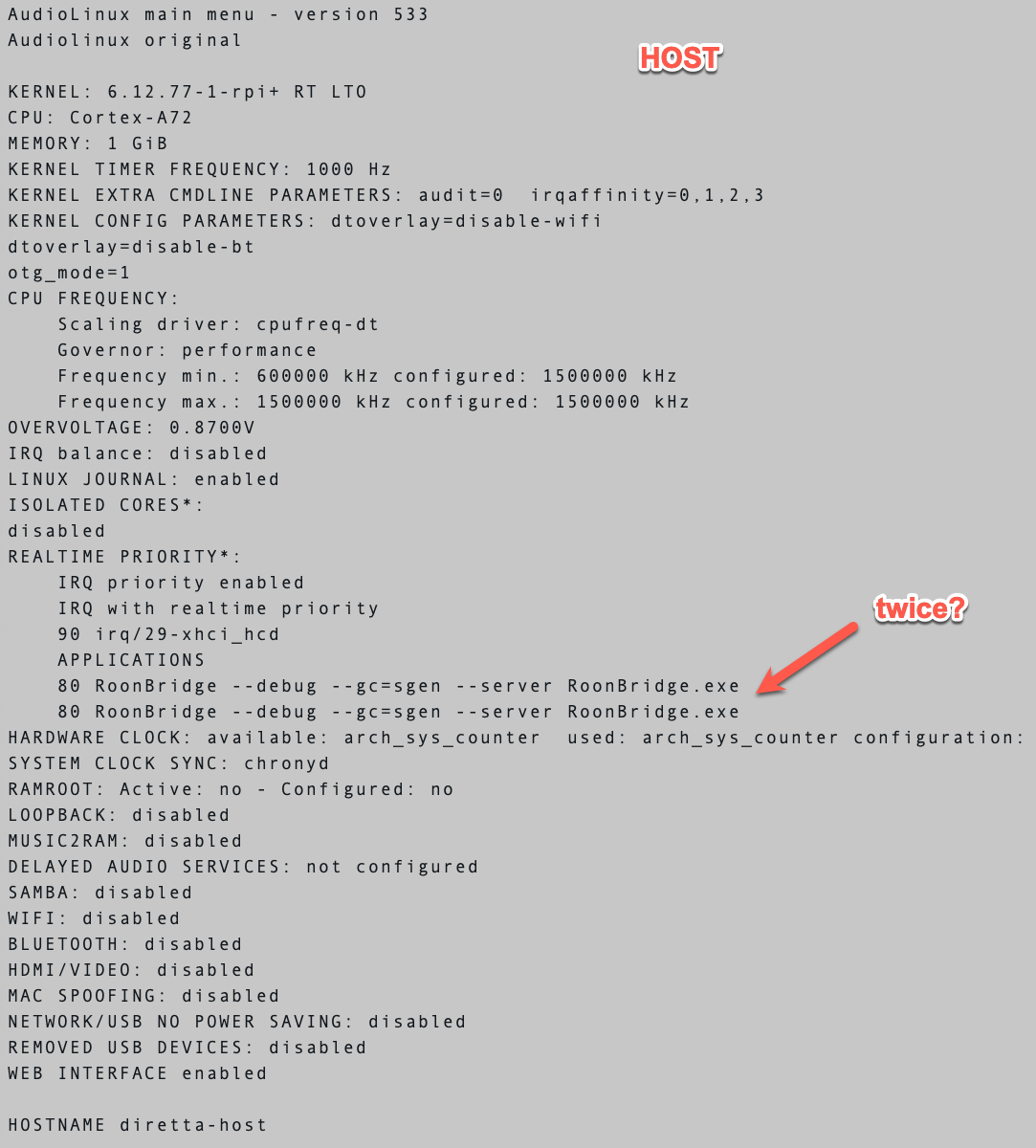
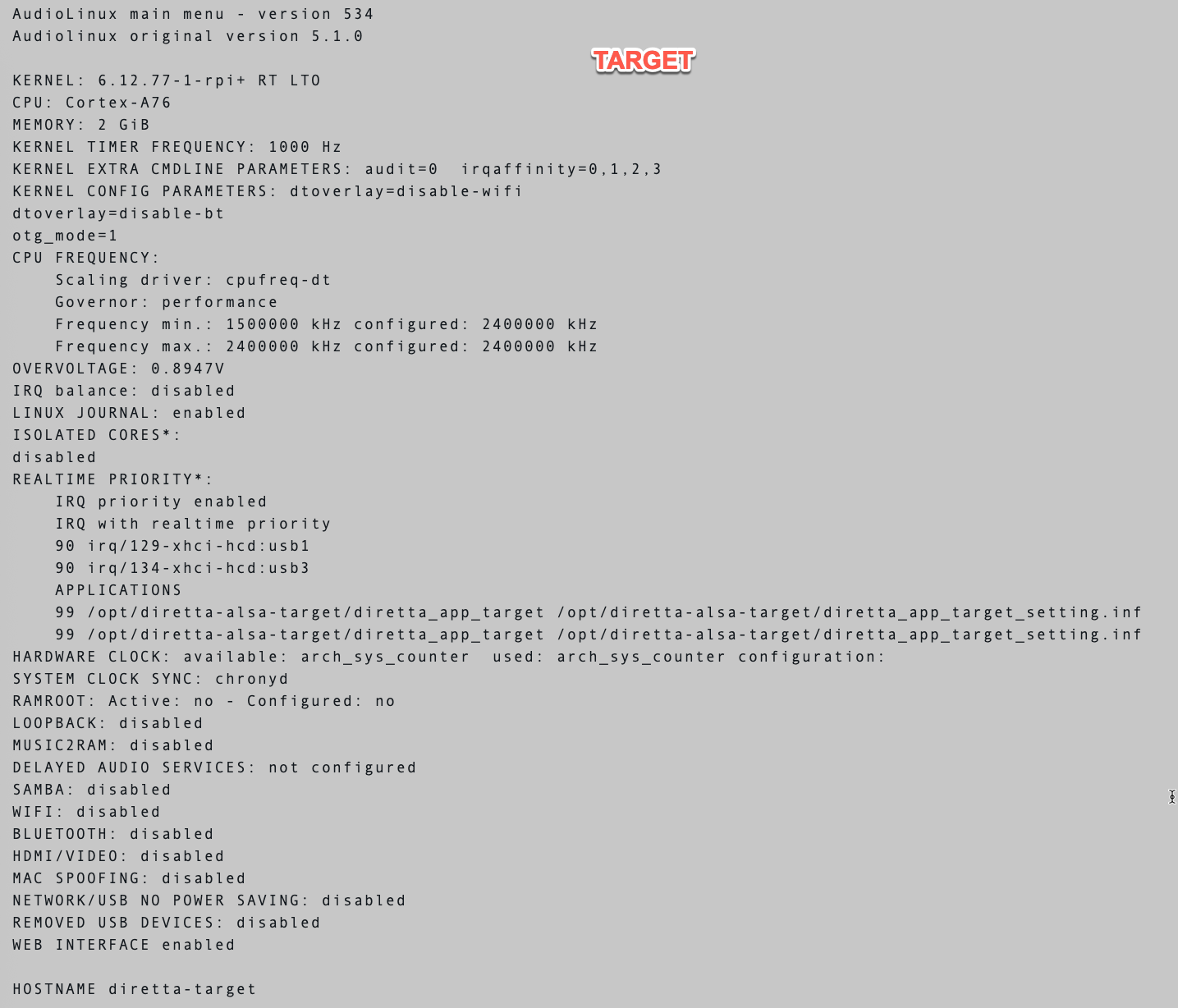
Sorry to be a pain but I’m stumped. Figured providing “Show configurations” would be good first troubleshooting step. Pasting below.

Thanks for any help!

############ START OF PASTE ####################

│ AudioLinux main menu - version 533 │

│ Audiolinux original version 5.1.0 │

│ │

│ KERNEL: 6.12.77-1-rpi+ RT LTO │

│ CPU: Cortex-A72 │

│ MEMORY: 1 GiB │

│ KERNEL TIMER FREQUENCY: 1000 Hz │

│ KERNEL EXTRA CMDLINE PARAMETERS: audit=0 irqaffinity=0,1,2,3 │

│ KERNEL CONFIG PARAMETERS: dtoverlay=disable-wifi │

│ dtoverlay=disable-bt │

│ otg_mode=1 │

│ CPU FREQUENCY: │

│ Scaling driver: cpufreq-dt │

│ Governor: performance │

│ Frequency min.: 600000 kHz configured: 1500000 kHz │

│ Frequency max.: 1500000 kHz configured: 1500000 kHz │

│ OVERVOLTAGE: 0.8700V │

│ IRQ balance: disabled │

│ LINUX JOURNAL: enabled │

│ ISOLATED CORES*: │

│ disabled │

│ REALTIME PRIORITY*: │

│ IRQ priority enabled │

│ IRQ with realtime priority │

│ 90 irq/29-xhci_hcd │

│ APPLICATIONS │

│ 80 RoonBridge --debug --gc=sgen --server RoonBridge.exe │

│ 80 RoonBridge --debug --gc=sgen --server RoonBridge.exe │

│ HARDWARE CLOCK: available: arch_sys_counter used: arch_sys_counter configuration: │

│ SYSTEM CLOCK SYNC: chronyd │

│ RAMROOT: Active: no - Configured: no │

│ LOOPBACK: disabled │

│ MUSIC2RAM: disabled │

│ DELAYED AUDIO SERVICES: not configured │

│ SAMBA: disabled │

│ WIFI: disabled │

│ BLUETOOTH: disabled │

│ HDMI/VIDEO: disabled │

│ MAC SPOOFING: disabled │

│ NETWORK/USB NO POWER SAVING: disabled │

│ REMOVED USB DEVICES: disabled │

│ WEB INTERFACE enabled │

│ │

│ HOSTNAME diretta-host │

################################################

│ AudioLinux main menu - version 527 │

│ Audiolinux original version 5.1.0 │

│ │

│ KERNEL: 6.12.77-1-rpi+ RT LTO │

│ CPU: Cortex-A76 │

│ MEMORY: 2 GiB │

│ KERNEL TIMER FREQUENCY: 1000 Hz │

│ KERNEL EXTRA CMDLINE PARAMETERS: audit=0 irqaffinity=0,1,2,3 │

│ KERNEL CONFIG PARAMETERS: dtoverlay=disable-wifi │

│ dtoverlay=disable-bt │

│ otg_mode=1 │

│ CPU FREQUENCY: │

│ Scaling driver: cpufreq-dt │

│ Governor: performance │

│ Frequency min.: 1500000 kHz configured: 2400000 kHz │

│ Frequency max.: 2400000 kHz configured: 2400000 kHz │

│ OVERVOLTAGE: 0.8924V │

│ IRQ balance: disabled │

│ LINUX JOURNAL: enabled │

│ ISOLATED CORES*: │

│ disabled │

│ REALTIME PRIORITY*: │

│ IRQ priority enabled │

│ IRQ with realtime priority │

│ 90 irq/129-xhci-hcd:usb1 │

│ 90 irq/134-xhci-hcd:usb3 │

│ APPLICATIONS │

│ 80 /opt/diretta-alsa-target/diretta_app_target /opt/diretta-alsa-target/diretta_app_target_setting.inf │

│ 80 /opt/diretta-alsa-target/diretta_app_target /opt/diretta-alsa-target/diretta_app_target_setting.inf │

│ HARDWARE CLOCK: available: arch_sys_counter used: arch_sys_counter configuration: │

│ SYSTEM CLOCK SYNC: chronyd │

│ RAMROOT: Active: no - Configured: no │

│ LOOPBACK: disabled │

│ MUSIC2RAM: disabled │

│ DELAYED AUDIO SERVICES: not configured │

│ SAMBA: disabled │

│ WIFI: disabled │

│ BLUETOOTH: disabled │

│ HDMI/VIDEO: disabled │

│ MAC SPOOFING: disabled │

│ NETWORK/USB NO POWER SAVING: disabled │

│ REMOVED USB DEVICES: disabled │

│ WEB INTERFACE enabled

############ END OF PASTE ######################

BTW: Could NOT figure out how to capture output without including “menu’s framing”. Sorry…
My recommendation for most folks is to avoid making updates. Just listen and enjoy.

Due to popular demand, I added an Appendix 10 to my doc describing some optional updates, but that’s for advanced tinkers who enjoy breaking things just so they can figure out how to fix them. If that’s not you, steer clear!

I’ve been working furiously over the past week on major changes to Appendices 3, 4, and 8. I hope to announce something here and in other groups soon.

1 Like

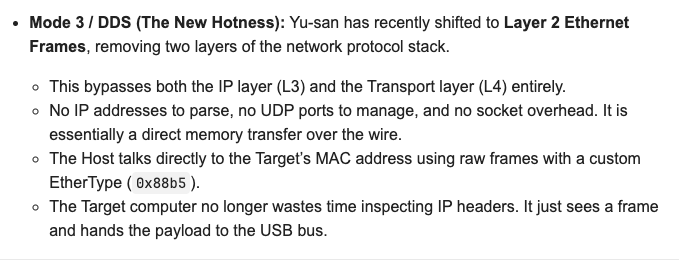
@David_Snyder Some great work here on audio-based networking protocols with lower overheads. I started your thread last year, but didn’t stay up-to-date - just revisited and what has me interested, is with Diretta now bypassing some of the layers in the network protocol stack “Mode 3 / DDS”


This has the potential to significantly change how a audio stream is processed.

However, I am not sure where or how I can implement a Diretta ‘bridge’ as my Naim network player (network-enabled DAC) doesn’t offer a USB input.

Presently, I use a SonoreUPnP bridge with Roon (a Squeezelite implementation using Roon’s Squeeze support) and the NDS is force fed a UPnP stream from the Roon Server (via Port ‘B’ on an EtherREGEN. The Roon Server, along with NAS units are 2 switches upstream from this).

I see there is a Slim/Diretta bridge, but is there a way of getting a UPnP stream out of Diretta, and would this be back via Ethernet frames and would this negate the Diretta optimization within the protocol stack in the target unit?

I do have a USB->S/PDIF converter (Sonore UltraDigitial) where I can take a USB output from the UltraRendu, which runs SonoreUPnP Bridge, but again, converting to S/PDIF seems to go against the work the Diretta protocol has undertaken.

1 Like

Hi Simon,

Thanks for checking back in on the project. It has been an exciting year watching the protocol evolve from IPv6 UDP packets to Layer 2 Ethernet frames. It is a much more efficient way to handle data, and I think we are just starting to see what that architecture is capable of.

To answer your question about the UPnP stream: that is not how the Diretta protocol is designed to function. The inherent problem that Diretta was created to solve is the bursty, high-latency data transmission used by protocols like UPnP, DLNA, SlimProto, and RAAT. It is designed to replace those protocols entirely, operating strictly as an Ethernet-in to digital-audio-out bridge.

If you would like to see this integrated with your Naim, I highly encourage you to contact them and request Diretta firmware support. Manufacturers generally move when there is clear customer demand, and the more users who ask for it, the more likely we are to see broader industry adoption.

In the meantime, regarding your signal chain, you are correct that using a USB-to-S/PDIF converter adds a step. However, using a high-quality DDC like your Sonore ultraDigital is a very effective way to implement this if your DAC lacks a native USB input, or if that input happens to be the weak link in the chain. I have evaluated many DACs that performed better over S/PDIF than through their own onboard USB implementation. A good DDC is often the best way to bridge that gap without compromising the integrity of the data stream.

From an engineering perspective, this project is in its purest form when paired with a “dumb” DAC that has no internal streaming capability. Most streaming DACs have a small, secondary computer integrated into the chassis to handle the network functions. Even when idle, that computer is often powered up and can share ground planes or power supply noise with the delicate audio circuitry. While I assume Naim has implemented high levels of electrical isolation, the benefit of an external transport is that it allows you to minimize the number of active, noise-generating components in the signal path.

Even if there’s no way to completely disable the streaming function in your Naim, there’s a good chance you will find that adding a Diretta transport improves your system’s performance by simply shifting the processing load of network streams to an external device. A good DDC should act as a transparent pass-through of Diretta goodness. PM me if I can help you get up and running.

1 Like

Ok, thanks for that.

It is unlikely Naim will implement Diretta natively on their network players. They are trying to move to the “just plug it in & play” mass market.

However, I could ask Sonore would they implement Diretta on the SonicOrbiterOS, so the UltraRendu could operate as the Diretta Target. It has a good USB implementation that is already known to less noisy, as well.

Or your fully DIY option.

I wonder if anyone is thinking about offering a prebuilt dual-RPi5 configuration or even ready-to-go image files for RPi5s

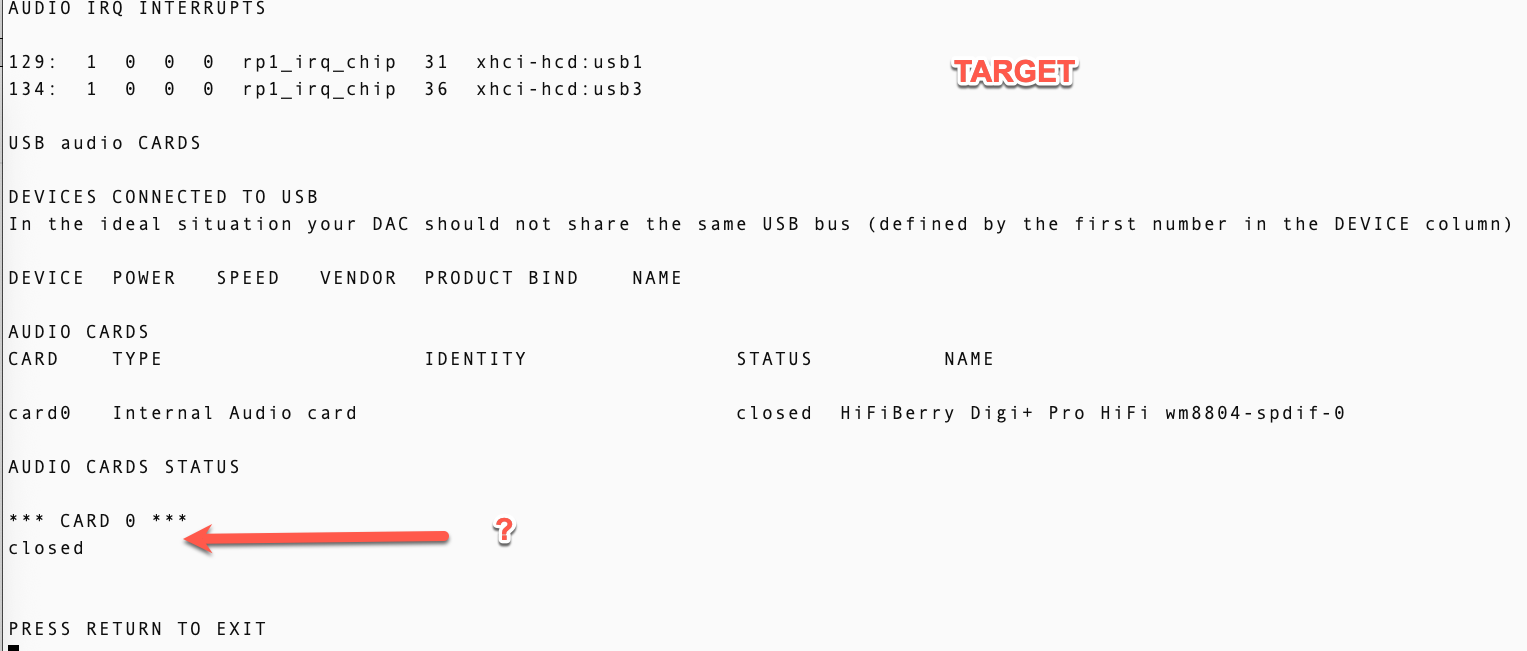
OK - I’ve learned my lesson. That said, I was hoping for a suggestion or two how to recover – short of rebuilding from scratch.

I’ve been navigating/investigating for the last couple hours as best I know how being a newbie. From what I can discern, all seems configured correctly – but still no endpoint visible in Roon.

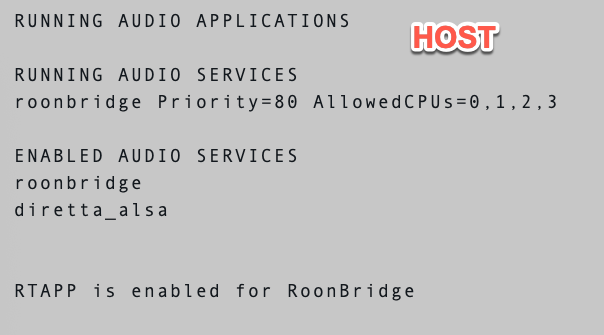
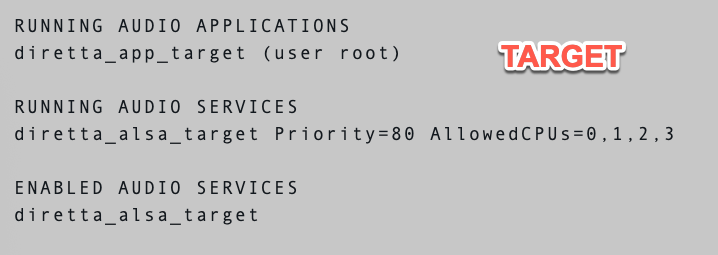
Below is what I can summarize from my exploration. I’ve tried to highlight what I might guess are anomalies with the red arrows. I hope I am missing something simple/obvious. Any ideas/suggestions greatly appreciated.

PM sent. Let’s get you back up and running.

That’s more difficult than it sounds because of licensing issues, unfortunately. I’ve helped dozens of folks get up and running over screen sharing calls and in person meetups. Not the most scalable solution…unless people I’ve helped start doing the same for others. :blush:

But from what I read the solution is pretty crippled without the licenses, so the user would have to obtain them to actually get playback.

I would pay for 2 bootable images, configured ready to go.
The host is either going to be a DHCP address or a pre-assigned address on someone’s home network. Roon should then discover it, as an Endpoint. And the outlet is USB.

Without ongoing support, it works out of the box, if you mess with it and break it, your fault. :laughing:

1 Like

Well, sort-of. Diretta still sounds great even when limited to 44.1/48 kHz.

The problem is that there’s currently no opensource operating system with a real-time Linux kernel and the impressive optimizations that Piero has put into AudioLinux. I suppose it’s possible for someone to eventually create their own operating system image with similar features (especially as AI coding tools continue to improve), but, as far as I’m aware, this has not happened yet. Plus, when I get stuck, Piero is just email away.

So I started scanning this thread but, being so long, thought I would ask - maybe those than have been on this thread for a long time can point me to the posts:

WHAT is the hypothesis that the device(s) delivering the ONEs and ZEROs to the input to the DAC change what the DAC processes? It literally is stating everything we know about the digital domain is wrong, right? I mean, is it only in the audio space? If delivering 1’s and 0’s “differently” by hardware can impact what the receiver sees, wouldn’t that manifest in all delivery of data, even the web server hosting this discussion? Or a payroll direct deposit sometimes having an extra penny? If its only in conversion of digital to analog where it happens then what is the theory?

I am not trying to be an arse, just really trying to understand the premise posted here. I only see three outcomes of delivery (successful delivery of the 1 as a 1 and 0 as a 0, the conversion of a 1 to a 0 or visa versa, or the bad delivery, retry) and a fourth issue of rate of delivery for proper end point processing. I clearly could be missing something, and would like to hear thoughts on it…

Has the hypothesis been presented or just resulting data without a theory been accepted?

thanks

5 Likes

There have been some “hypotheses” presented (the tongue in cheek one about quantum entanglement being the most sensible) but really this is just a playground for people who want to fiddle with stuff and pretend that it makes a difference. The idea of Diretta having any audible effect (which, as you’ve noted, it can’t have) hs been debunked quite thoroughly.

3 Likes

Finally, some recognition! Thx Boris! When ORCH-OR theory is finally proven, you will be on the right side of history.

2 Likes

My pleasure. I am not quite sure what exactly does it tell us about the state of the industry (or the world in general) that it is the only theory presented so fr that does not outright contradict all known laws of physics, but it must be something quite profound.

2 Likes

Hi everyone,

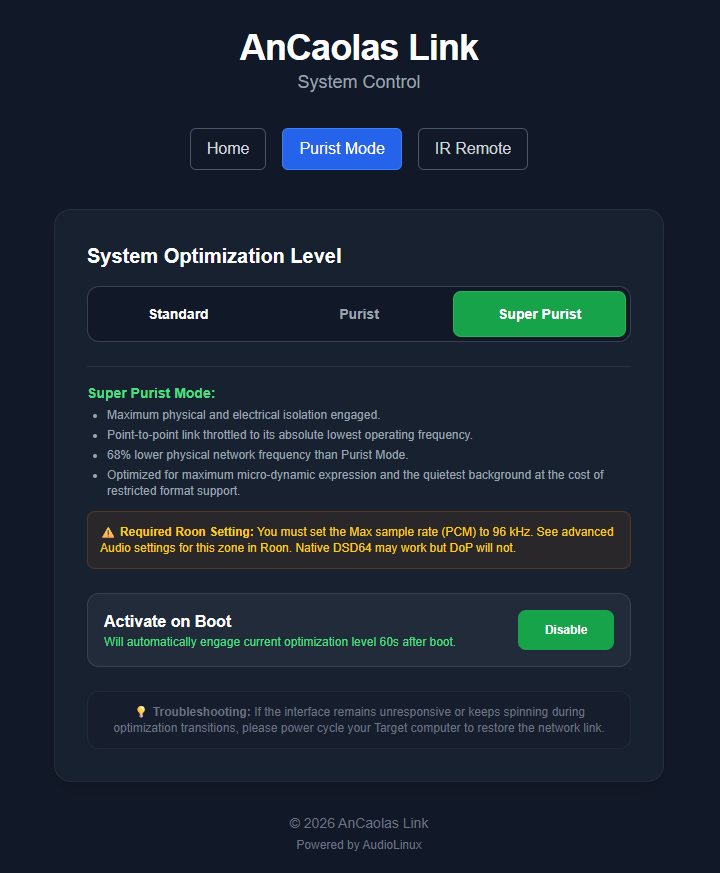
I’ve been deep in the development trenches over the last couple of weeks, and I’m excited to share a major evolution of my little open-source Diretta DIY endpoint project. What started as an experimental concept has turned into a hefty code update—over 1,500 lines of new logic, updated target check scripts, documentation, and an overhauled web UI—to bring a brand-new feature to life: Super Purist Mode.

What is Super Purist Mode?

To a traditional network engineer, Super Purist mode sounds like a completely nonsensical combination. It forces the dedicated point-to-point link between your Diretta Host and Target down to the absolute minimum speed of 10 Mbps, while simultaneously retaining Jumbo Frames (2032 bytes for RPi4 hardware, or a full 9000 bytes MTU when running an RPi5 on both ends).

Dropping to 10 Mbps lowers the physical network carrier frequency from 31.25 MHz to just 10 MHz. Combined with a simpler Manchester encoding scheme on the physical link, it alters the localized radio frequency (RFI) emissions inside the chassis compared to high-frequency Gigabit signaling.

But the core architectural goal isn’t just the lower wire frequency; it’s enforcing a highly predictable, minimized processing cadence on the Target transport feeding the DAC.

The High-Res Dilemma (And Why It’s a Scam)

My hot take on this: consumer playback of ultra-high-res formats (DSD256, DXD, and higher) presents a severe case of diminishing returns outside of a professional mastering studio. They can actually work against the calm electrical environment we are trying to preserve with this Diretta Host + Target architecture.

Streaming an ultra-high-res file increases network transmissions volume by roughly an order of magnitude compared to a standard Redbook file. That increased data introduces processing cycles that run counter to the flat, homogenous electrical baseline we are trying to establish for the Target.

Furthermore, few of us have more than 60 dB of usable dynamic range in our actual listening rooms. And realistically, given the limits of human hearing in the top octave, maximizing the system’s performance within the core audible band matters far more than chasing empty ultrasonic bandwidth.

In this design, pushing the transport to accommodate those ultra-high bitrates forces a terrible trade-off: you expand the system’s format support, but you add workload to the Transport without adding value.

Enter the 10 Mbps Limit

By locking the link to 10 Mbps, Super Purist mode mandates a strict, low-overhead speed limit.

  • PCM is capped at 32-bit/96 kHz.

  • DSD is limited to Native DSD64 (which requires the exact same bandwidth as 32-bit/88.2 kHz, provided your DAC and the Linux kernel support native DSD, not DoP).

Enable the high-quality sample rate conversion tools built directly into Roon or HQPlayer to automatically downsample any content in your library with rates above 96 kHz. The Diretta Target transport is then left to do what it does best: process a lightweight, perfectly steady stream of data with a low interrupt rate.

Deceptively Simple, Audibly Stunning

I’m not the first person to experiment with using a 10 Mbps link. Initially, I wrote this idea off as too extreme. Like many of you, I’ve paid good money for DACs that boast DSD512 and 768 kHz PCM support, and darn-it, I wanted to use those features! But after extended listening tests across multiple systems, the sonic results are undeniable. I can’t go back.

My updated Web UI makes toggling this optimization level much easier than running manual Linux commands. It manages the complex underlying host/target link handshakes automatically on boot. The process takes less than 20 seconds.

If you’ve been sitting on the fence, waiting for the right time to dive into this DIY Diretta project, this is your sign to grab a couple of Raspberry Pis and get tinkering. The water has never been warmer, and the sound has never been better.

I’d love to hear from those who give Super Purist mode a spin!

Happy building.

-- David

Reference: rpi-for-roon/Diretta.md at main · dsnyder0pc/rpi-for-roon · GitHub

4 Likes

hey David, although i currently do not have chance to test it , i’m still curious if the 10mbps is Full Duplex, or half-duplex?

1 Like

It’s 10 Mbps full-duplex.

1 Like

But yet, so many sweat about alleged interference by ground plane noises, that are even below any current state of the art measurement systems’s capabilities at about as low as -160 dB … it’s simply inaudible, but imagination seems just too strong.

3 Likes

from my (not Diretta related) experience i can say using EtherRegen 100mbps port vs 1G port to streamer was quite a difference. 100mbps being more laid-back, while 1G was more forward sounding (think of enhanced detail in sacrifice for more refined treble - one can guess why) .
I haven’t tried 10mbps in my current stack yet, but i’m encouraged by David’s post enough to try it on non-resampled material (eg <=192kHz and <=DSD64) - it shouldn’t really take much time ..

1 Like

You keep updating and upgrading this project with more credible, and dare I say empirical evidence. This is a very good thing! I haven’t started this project yet, but since you keep offering more ‘audible carrots’ for those of who haven’t yet, I may have to sooner rather than later. :slightly_smiling_face: Now where did I put those extra RPis…

1 Like