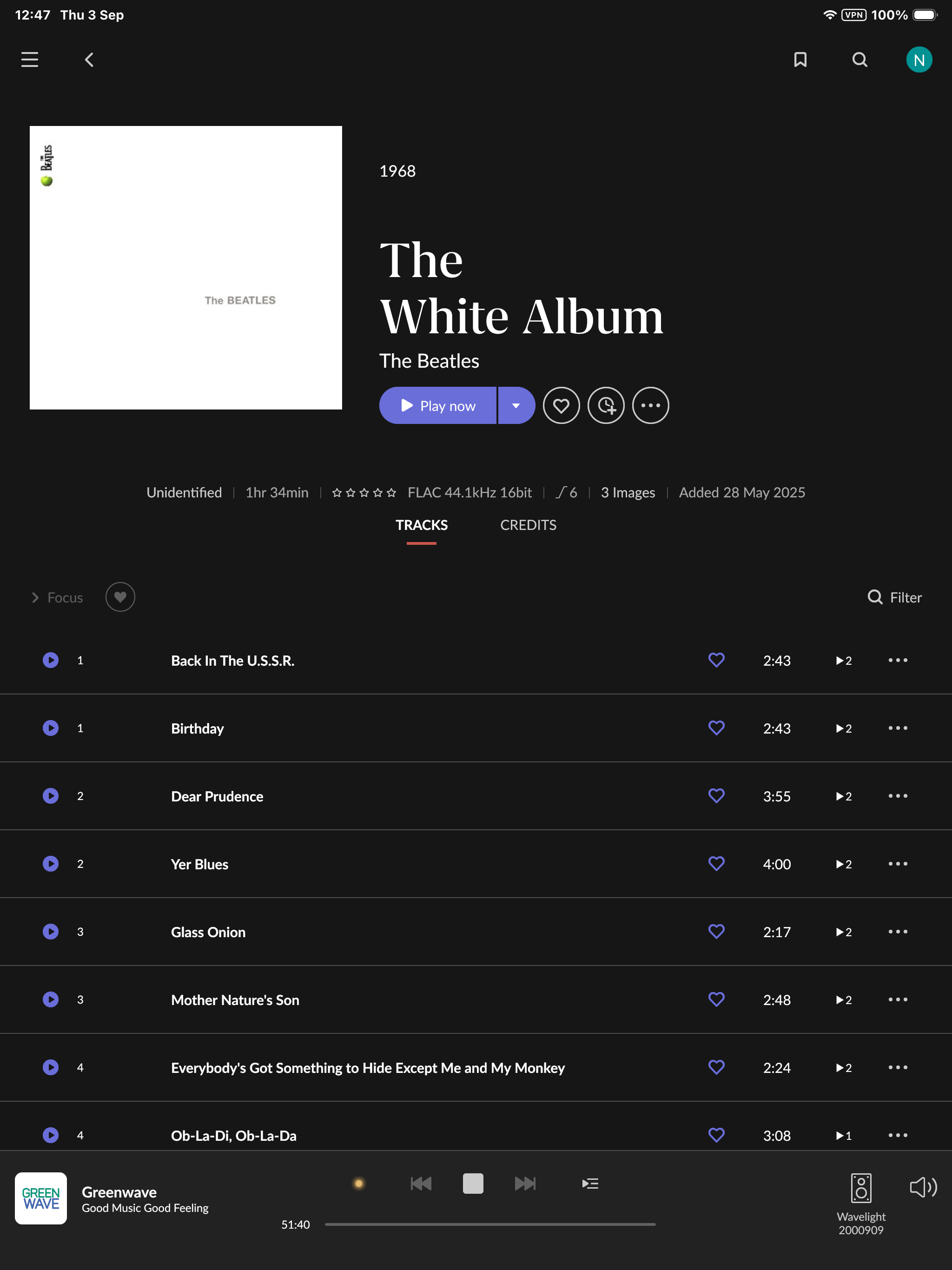
Hi @Neil_MacInnes,
Thanks for uploading the files, that gave us exactly what we needed, and we can now explain both problems. They’re the same problem, and it’s in the tags rather than in Roon.
What we found
Every track in your The White Album (CD1) folder is tagged like this:
Album = The White Album (CD1)
Track = 1–17 of 17
Disc number = 1 of 1
The CD2 folder is tagged the same way, disc 1 of 1. When these were ripped, each disc was written out as its own standalone single-disc album, and the only thing distinguishing them is the “(CD1)” / “(CD2)” text in the album title. The disc number fields were never set to 1-of-2 and 2-of-2.
Roon correctly recognizes the two folders as one two-disc set and combines them into a single 30-track album. But once combined, both halves claim to be disc 1, so there’s nothing to sort them by except track number, which produces exactly what you’re seeing: CD1 track 1, CD2 track 1, CD1 track 2, CD2 track 2, and so on. Your Roon Server logs show it plainly:
Playing: .../The White Album (CD1)/01 ... Back In The U.S.S.R..flac
Queueing: .../The White Album (CD2)/01 ... Birthday.flac
Queueing: .../The White Album (CD1)/02 ... Dear Prudence.flac
Queueing: .../The White Album (CD2)/02 ... Yer Blues.flac
The failed identification follows from the same cause. Because the album presents itself as a single disc with 30 tracks, it doesn’t match any real release, so identification can’t succeed. We can see this directly in your logs from 2 September: while you were experimenting with folder names, Roon briefly saw the 17 tracks on their own and identified them within two seconds. The moment it was back to 30 tracks, identification failed again.
April by Sun Kil Moon has the identical issue, April CD1 (11 tracks) plus April CD2 (4 alternate versions), both tagged disc 1 of 1, combining into a 15-track album that can’t be identified. That also explains why the sequence seemed to change partway through listening: playback started in the main album and then crossed into the CD2 files.
For contrast, your Delicate Sound of Thunder and Sgt. Pepper’s sets use the same folder layout and play in the correct order, because their disc numbers were tagged properly.
Why the settings changes didn’t help
Switching an album between “Prefer File” and “Prefer Roon” won’t change anything here. Those settings choose between Roon’s metadata and your file tags, but an unidentified album has no Roon metadata to choose, so the file tags are used either way.
Two ways to fix it
The quickest fix, with no re-tagging, is inside Roon:
- Select the album, click the three-dot menu, and choose Edit
- Choose Fix Track Grouping
- Assign the CD1 files to disc 1 and the CD2 files to disc 2, in track order
- Then use Identify Album to match it
The more durable fix is to correct the tags themselves, using something like Mp3tag or dBpoweramp’s tag editor:
- CD1 files: disc number
1, total discs 2, track total 17
- CD2 files: disc number
2, total discs 2, track total 13
- Both: set the album title to the same value on every track — remove the “(CD1)” and “(CD2)” suffixes
Then rescan the folder. Roon will combine, order and identify the set correctly.
We’d suggest applying the same fix to April, and it’s worth checking any other multi-disc sets you ripped in that same era, the “(CDn)-in-the-album-title” pattern tends to repeat across a rip session, so there may be a few more waiting to surface.
One unrelated thing we noticed while reading the logs: your iPad is refusing audio connections quite persistently. If you use it as a playback zone, the VPN running on it is the most likely cause. Happy to look at that separately if it’s giving you trouble.
Let us know how the above goes.