Increasing playback gaps and app slowdown on Roon Server (ref#0NRVNK)

What app are you having the slowness issue with?

· Roon

What kind of performance/speed issue are you experiencing?

· Tracks take a long time to play

Please try to reboot your Roon Server

· Yes, rebooting helps, but the issue returns after some time

Please try to reboot your networking gear (Router/Switches/etc.)

· No, the issue is still the same even after a reboot

Is there any change in behavior if you try to navigate to Roon Settings -> Library and set both Background and On-Demand Audio Analysis to Throttled or Off?

· No, the issue is still the same

Does the issue happen on multiple Roon Remotes (controllers) or just one?

· I only have one Roon remote to test with

Please try to restart your Roon Remote (controller) app

· No, the issue is still the same even after a restart

What is the operating system of your Roon Remote (controller)?

· iOS

Reinstall Mobile Roon Remote App

· No, I am still having the issue even after reinstalling

Router Domain Name System (DNS) change

· I don't know how to do this

What is the operating system of your Roon Server host machine?

· Prebuilt Branded Roon Server (SonicTransporter, Innous, Merging...)

Timestamp of issue occurrences

· It’s occurring each time I’m using it really, this morning the gap between tracks was up to about 10 seconds, between 11 am and 1 pm, eighth of April 2026

Describe the issue

When first starting the server, Roon Functions quickly, going between Pages in the app is instant, and tracks change in playlist With no gap. But Each day from first switching on the server, or restarting it, the gap between tracks in a playlist increases more each day, until the gap gets so big the playlist will just pause at the end of one track, Depending which end point I’m streaming to. Today in my main system the gap between tracks is up to 10 seconds. Yesterday it was a little less, the day before less so, and so on… Also changing between pages in the app remote on the iPad occasionally gets stuck for a long time, and happens more frequently, the longer the server has been on.
Of the following the instructions before filling out this form, I deleted the app, restarted it, but now it’s stuck after typing login.
I’ve had this problem on three different servers, and now onto different externally connected SSD’s, Since first experiencing.

Describe your network setup

I have Sky fibre broadband, with the Wi-Fi turned off. An ethernet cable from The Sky router connected to an EERO Pro 6E router, which is then connected by Ethernet to a HIFI Rose RS130. I have another two EERO Pro 6E‘s in the property, one of which is connected by ethernet to a silent angel Z1C sever (which is the Roon Core). I also play music to a Marantz stereo receiver And very rarely an Amazon cube if testing something briefly. I have experienced this problem with the Roon core on two other devices, also, Sonic transporter and A nucleus one. I have also tried two different SSD’s

I should probably add, that I don’t stream from streaming Services, I only play from downloaded music or ripped CDs, which are all on an SSD, consisting of about 1.6 TB

Thanks for letting us know, can you please let us know a more precise timestamp, including the time + date + track when this issue next occurs? This behavior sounds like it could be related to increasing RAM usage, since the reboot temporarily sorts the issue out, we have our upcoming Roon release which should improve behavior if this is indeed the cause.

Hi noris,

Thank you for your reply, and sorry for my late reply, been having some issues.

Unfortunately,something has come up and I have been very busy, so I haven’t got time to test at the moment, is it okay if I get back to you in a few days. But although I can’t give you any times from the last three or four days, before that I was usually listening in 2 hour playlists, every day between 11 am and 1 pm GMT. It happens between most tracks, with the gap between increasing a little bit more, with each day after I last restarted the server.

Do you know when the update is being released?

Hi @Quark,

Sounds good, we’ll be monitoring for your reply in the meantime, thank you! :folded_hands:

Hi @Quark,

The next Roon update is scheduled for April 27. We’ll watch for your response once you’ve had a chance to test this and provide a timestamp. From there, our team can pinpoint the event in diagnostic logging and let you know what’s wrong, along with a menu of suggestions.

nnor,

Thank you so much. I have been unable to have any of my usual listening sessions for a couple of weeks. I don’t want to burden you with my personal problems, so to be short, I am paralysed and my usual PA has been on her break for two weeks, in which time I’ve had someone new to work with, leaving me with a lot less time during the day. But everything is back to normal from this weekend, so as you suggest I will see how it goes after the update.

thanks again

Hi,

Just a quick update.

I know the update is scheduled for today, I haven’t received it yet.

But I have been listening for the last three days, each time between 11 am and 1 pm. And each day the gap between tracks in my playlist has been a little bit longer than the day before. Probably should add that, before the first listening day I restarted the server and added the storage location again for a fresh start also.

On day one Saturday 25th April between 11 am and 1 pm, it was changing track almost immediately in the playlist, just the occasional short gap.

On day two Sunday 26th April between 11 am and 1 pm, the gap between tracks was around four to five seconds.

Day three Monday 27th April now, I started at 11 am and my playlist will finish at 1 pm, so far the gap between tracks is up to nine seconds.

In previous experiences, and the coming days the gap will become so long playback will pause between tracks.

Also, if I tried to play for my Mirantz stereo receiver in another room, it uses airplay, it will often take so long to load a track when tapping on the play icon, I have to press play again several times before it starts the track. that kept happening last night Sunday 26th April between roughly 10 pm and 11 pm

Thank you,

Hi @Quark,

It looks like your Roon Server was able to update to the latest version of Roon, which includes some memory optimizations. I wanted to check in and see if things have improved for you, or if you’re still suffering from performance issues.

We’ll be monitoring for your reply and results, thank you! :folded_hands:

Hi Benjamin,

Thank you for your message, it is greatly appreciated.

Yeah, I have been using Roon for the last few days since the update and so far it’s been behaving. however, I’ve also restarted the server every day since as well, because I have three SSD’s and two of them I’m suspicious of for context I won’t leave here now, and tried the third and final SSD this morning. But as I said before, everything would be okay the first day after restarting the server, so I’m not going to restart it again now for awhile, so in the next few days I should know if the gaps between the tracks start appearing.

I will reply here again in a few days and reveal if the update has fixed my problem or not.

Thanks again

Okay, so it’s the third day of listening since the update and restarting the server.

Over the last three days, I have been listening to different 2 hour playlists at the same time every morning as usual, between 11 am and 1 pm. give or take a few minutes either side.

The first two days there was minimal gap between tracks, if anything. However today, I had been getting gaps of 4 to 5 seconds between each track in the playlist. Although usually on the third day after restarting the server, the gap would’ve been up to nearly 10 seconds between tracks in a playlist. So at the moment the gap is about half the time between tracks, for a third day after resetting server, then it has been in the recent past.

I will be listening again tomorrow morning, between 11 am and 1 pm, to see if the gap increases more on the fourth day since restarting my server.

Maybe I mentioned before, but just in case, I don’t stream through the Internet, I just play my locally stored music because to me that sounds far better.

Thanks

Hi @Quark,

Thank you for the additional information! From a fresh Roon Server diagnostic report, we can see that the HIFI Rose RS130 has a Severe Clock Drift, which is likely the primary cause of growing gaps.

The Rose RS130’s internal clock is progressively drifting further and further behind the Roon Server’s clock.

Why does this get worse each day? Because the Rose RS130’s clock is drifting without correction. A fresh restart resets the synchronisation state, which is exactly why you report gaps are minimal on day 1 and grow each day.

Why did you see it on three different Roon Servers and two SSDs? Because the fault is on the Rose RS130, not the server. It doesn’t matter which server you use, the RS130 keeps drifting.

Some recommended next steps to try in light of this:

1. Update the Rose RS130 firmware. The clock drift behaviour and the wildly unstable offsets on 5/04 strongly suggest a firmware bug in the RS130’s RAAT clock synchronisation. Check HIFI Rose’s website for the latest firmware and apply it.

2. Check the Rose RS130’s NTP/time settings. Log into the RS130’s settings and verify NTP is enabled and pointing to a reachable time server. A misconfigured or unreachable NTP server could cause exactly this type of progressive clock drift.

As a temporary test, try switching playback to the Marantz receiver zone (if it’s a RAAT endpoint) and see whether gaps occur there too. If the Marantz plays without gaps, it confirms the issue is RS130-specific.

Thank you! :+1:

Hi Benjamin,

Thanks for getting back to me, I was seeing how it was going and tried something myself last night before I saw your reply.

Anyway, I checked everything you asked and it is all as it should be, but I am getting similar struggles to stream on other devices also. The Marantz stereo receiver for example, only worked with AirPlay even though it has Qobuz connect so I’m not sure why it can’t stream Roon directly also. But I digress, when streaming via AirPlay to the Marantz, after typing the play icon next to a track Roon app would take so long to play it would eventually revert to paused status, then if I tap play at the bottom and after another little struggle it would eventually start playing. I know this is AirPlay, so the server is doing a little conversion, but normally it has always played immediately after initiating playback.

So my experiment last night, which may help figuring this out. I logged out and reset the server, then logged back in and imported my local music folder, but didn’t restore my backup. It took about 10 minutes to scan all my music, but then took a couple hours at least to analyse all the tracks in the library section of Roon settings. After which the response time in the Roon app was lightning fast, immediately responding to playback on the Marantz, each time I tapped play next to several different tracks, exactly how it used to be. Then this morning I have restored my back up in Roon app settings, and so far it’s been okay, but it is the first day since restarting so we shall see. Another thing I noticed after restoring the backup, some of the artwork of my albums has changed. I don’t know if that sheds any light on my problem also.

I will see if anything starts to slow down again over the next 24 hours and come back with my findings.

Just to add, I don’t want to restart Roon going forward without my backup unless I have to, I spent a very long time liking tracks and use history to go through tracks and albums. I haven’t listened to for awhile. So all my settings are important to me.

Hey @Quark,

Thanks for the update! If you could bring your server back online, we’ll investigate another diagnostic report for deeper insight.

Thank you!

Hi Benjamin,

Thank you for your reply.

Although I have turned on my server now, I got so fed up with the music I’ve been busy tidying my music folder and the Roon app to try and fix myself.

I’ve been using Roon for a very long time, I can’t remember when I started, but it has to be at least 2018 Ish. So maybe my database has got a bit convoluted or corrupted in someway I was thinking.I didn’t mention this before, because.I wasn’t 100% sure. But apart from the increasing delays in playback, also not often but sometimes when I play music it feels like part of the song is missing, like layers of the track. Then when I stream directly from Qobuz, the sound will be fuller again.I don’t know if that makes any sense.

So, over the years I have merged a lot of artists and a few albums, sometimes in the Roon app and sometimes directly on my computer with Yate. What I’ve done so far is unmerge all the merged albums and the two albums I had manually merged together, back into their normal configuration. However when I was trying to unmerge all the artists, two of them wouldn’t unmerge no matter how many times I tried. So then I turned off the server, as you noticed, plugged my SSD into my computer and deleted all the music that I never listen to, especially one of the albums of the artist which wouldn’t unmerge. Now I have plugged it back in and switched the server back on, and now waiting for all the files to scan. Once the files have scanned, I’m going to try reinstalling my back up on top of that, then checking merged artists to see if the offending one has disappeared, then probably delete all my old backups and do a fresh back up, then see how that goes. But obviously, by the time I’ve done all that it will be later this afternoon UK time, and as I previously said somewhere at the beginning of this page, Roon is always lightning quick on the first day or two after a restart, so it might take a couple of days to find out.

Quick update.

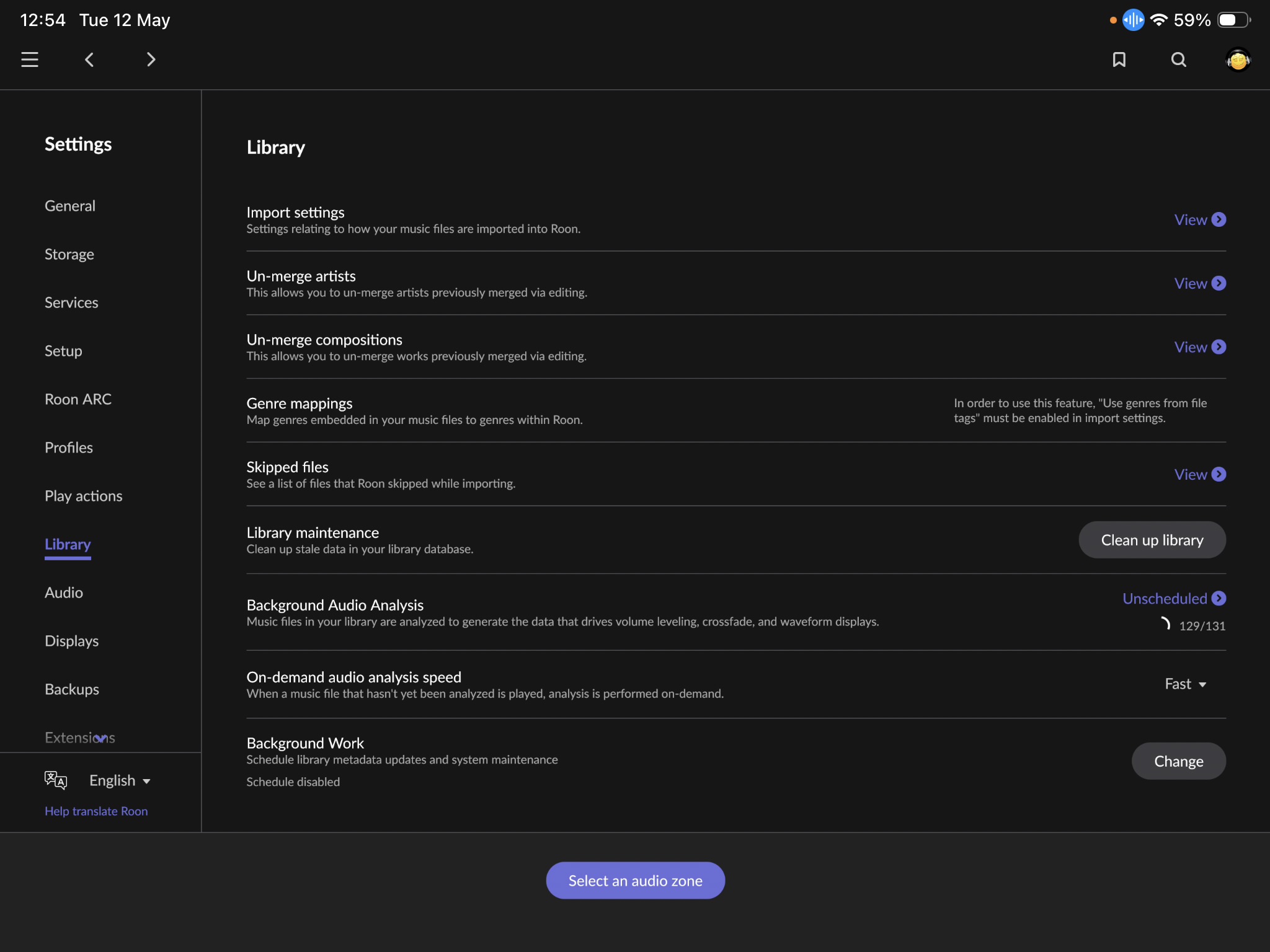
After doing the fresh install I played a track and it sounded great, better than I can remember. But after reinstalling my backup, then doing the clean up library setting and then clearing cashe. There is still one merged artist which will not unmerge, no matter how many times I tried to tap the unmerge icon in Roon settings. Also under the library settings, background audio analysis is stuck on 129/131, which I’ve never seen before.

I’ll enclose a couple screenshots of the Two problems two problems. Try not to laugh at the cheesy artist which I’m trying to unmerge

So I’m wondering if anyone official from Roon can I have a look at my server somehow, because it is still stuck for the last two hours or so, doing a background audio analysis on 129/131.

Is there any way of finding out what album or tracks it is stuck analysing please, so maybe I can delete them?

Okay back again, because I’m desperate to get my music back back I’ve tried something else. I switched off the server unplugged the SSD, plugged it into my computer and deleted both artists that I suspected were causing a problem, plugged the SSD back into the server and switched it on. Now it has stopped analysing, so perhaps my previous edit on those artists albums were the problem, I don’t know because I can’t see the code or understand it even if I could see it. I have also done the cleanup library option in settings to remove the track information. However even though the artist doesn’t even exist in my library anymore, there is still one merged artist the Almighty, which I cannot unmerge for some reason, remaining in the merged artist section of Settings. So before I put the deleted albums back, can someone from Roon please have a look and see how I can unmerge the artist and remove it completely from the merged artist list.

Hi @Quark,

Thanks for the update, and patience so far! Unfortunately, a fresh Roon Server diagnostic report isn’t showing any trace surrounding ‘the almighty’.

Since a few days have passed, I wanted to check in and see how things are performing for you.

We’ll be monitoring for your reply, thank you! :folded_hands:

Hello Benjamin,

Thanks for your reply.

Yeah so I got fed up waiting and reset my Roon core and App to factory settings and re-imported my music library fresh. The gaps between tracks we’re getting so long, it was ruining any enjoyment. Also the music has been so temperamental, like parts of the tracks missing… So when you had a look and couldn’t find the problem, it was because I reset the core three days ago. But, I’m not that annoyed to be honest, because the music is back sounding fantastic again and the software is very responsive once again. The problem wasn’t the hifi rose, the Roon core was the issue somehow.

I have been using Roon since 2018, so must’ve corrupted my back up somewhere along the line. But maybe it would be beneficial to have not just a backup of the database, but a playlist and history export tool also. So people can start a fresh but still keep some playlist…

Anyway, may as well close this, cheers