Roon lost connection to denon ceol sometimes. At fist time all was fine, but sometimes Roon doesn’t see denon ceol at tab Audio at settings. Roon running at Mac mini at same network where ceol. I set fix ip. And I can’t add manually Ceol to Roon(
This helps our team gather all the necessary information to solve your issue as quickly as possible. Thank you!
AceRimmer
(Smoke me a kipper, I'll be back for breakfast!)
2
Hi
This thread indicates you might require assistance from Roon technical support.
To equip the Roon Technical Support team to assist you directly, please follow this link to provide the details of your case to Technical Support: Technical Support Request
Respond to the prompts there to ensure that you’ve performed basic troubleshooting and to ensure Technical Support has the full details necessary to expedite Technical Support’s investigation into the case.
Your responses will auto-generate a Community thread in the appropriate section.
Because this Community thread will be in a public forum, please do not include any personal information, such as your email address, postal address or telephone number in your submission. Thank you.
· A connected audio device is not appearing in Roon
What type of Zone is affected by this problem?
· *Network Zones* are affected.
How is the affected Zone connected to your RoonServer machine?
· Network - Ethernet
Which network audio protocol is the Zone using with Roon?
· RoonReady
Does the device show up at all in Roon Settings -> Audio?
· No, it does not show up there
Does the device play audio from another source when using the same connection?
· The device has no problems with another audio source
Have you checked that Roon is whitelisted in any firewalls?
· I've checked the firewall and the issue remains
Since you are using a network connection to the device, please ensure that your RoonServer is on the same subnet as the device
· My devices are on a single subnet but is not visible to Roon
Do you have a complex network setup?
· I have a *mesh network* with devices connected to multiples points
Your local network might need some re-arranging to support Roon.
· None of the suggestions have helped me. I'd like to submit a support request.
Do you have an approximate timestamp of when the issue last occurred?
· no
What are the make and model of the affected audio device(s) and the connection type?
· Denon Ceol n10 wired connected to Buddy 6, Roon at Mac Mini using Wi-fi.
Describe the issue
Roon lost connection to denon ceol sometimes. At fist time all was fine, but sometimes Roon doesn’t see denon ceol at tab Audio at settings. Roon running at Mac mini at same network where ceol. I set fix ip. And I can’t add manually Ceol to Roon( I use Keenetic Giga + Keenetic Buddy 6
Describe your network setup
My network based at Keenetic Giga with 2 reppiter Keenetic Buddy. Whey have same subnet without firewall ot etc
As a first step in troubleshooting, could you please temporarily connect your Denon directly to your primary router via ethernet, and see if the same issues occur?
With that, what OS are you currently running on your mac running Roon Server?
macOS Sequoia (version 15), has tighter (and more obfuscated) network security settings than preceding MacOS versions.
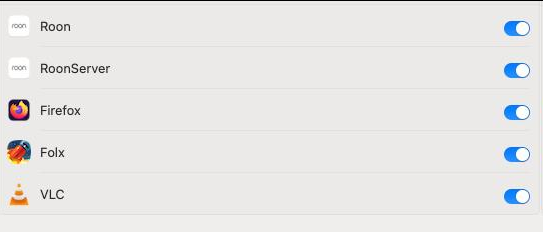
Can you please navigate to macOS System Settings > Privacy & Security > Local Network, and make sure Roon and Roon Server are allowed.
If it is already enabled, toggle it off and on again. Then reboot your Mac, and see if the same issue persists.
Let me know if either of the above help - thank you!
I’m turn off all buddy and connect Ceol through Wi-Fi to core router, also check at Mac network permission settings, but still not see Ceol at Roon. Unfortunately last connection was menu times ago.
At least one of your Roon Remotes is running an outdated version of Roon - please update to the latest available build on all Roon devices in your ecosystem.
What is the specific pathway between the Denon and Roon? Do you have any access points, managed switches, mesh nodes, etc in between?
Please ensure that multicast forwarding is enabled in your router settings. It sounds like you’re relying on a WiFi connection for the Ceol; try restricting the WiFi network to a single band (2.4GHz) or turning of band steering, if that setting is available.
About
Roon Remote
恩
This Mac O
Roon version 2.56 (build 1582) production - Read change log
You have the latest version installed.
Roon Server
This Mac O
Roon Server version 2.56 (build 1582) production -
Read change log
You have the latest version installed.
Thx for all, now all works fine.
To solve this issue, as a recommended, im connect Denon Ceol direct to router through wire and Roon detect Denon Ceol. Now all work at Wi-Fi correct.
Sorry for our delayed response here. We’re glad to hear the issue is resolved and grateful that you’ve taken the time to share your solution here for the community.
 Get Help With Roon