· I have a problem with my Meridian 218 dropping out. I am running the latest Roon software 2.71 (build 1683) and the latest firmware on my Meridian 218 version 1.1, build 271, hardware version 0.8. My Roon core is an Apple MacBook Pro with the latest OS, Tahoe 26.5.2. All connections from MacBook to router and router to 218 by ethernet cable. I also have an Apple TV device on the network, connected to the router by wi-fi and that never drops out. Any advice appreciated.
Tell us about your home network
· Gigaclear router with two additional nodes. Network speed above 500 mb/s for upload and download.
We’ve pulled diagnostic logging from the affected server instance.
The Meridian is reporting repeated timeouts with delivery of metadata during playback of live radio stations. This isn’t fatal to playback, but out of curiosity, are you seeing metadata (track titles, album artwork, etc) fail to display as it should in any Meridian control interfaces?
The actual playback stoppage we see occurs when RAATServer appears to switch to a different network interface than that which it had been using to communicate with the Meridian previously. They rediscovery one another, but it forces playback to stop and it only restarts after manual intervention. This sounds like what you’re describing.
Do you have the WiFi still active on this laptop while the ethernet is plugged in? Roon will scan for the fastest available network connection; if it’s switching between WiFi and ethernet because they’re both still active, it might occasionally lose sight of endpoints and remotes.
Do you have a recent timestamp of a dropout or the name of a track that was playing when you experienced it?
Thanks Connor, that’s interesting. The drop outs are when listening to radio and sometimes when I change radio stations. I do get the occasional radio metadata error as well. I have also noticed a message appearing on my iPhone Roon App saying ‘trying to connect with Roon server’ while music continues to play. I haven’t noticed any recent drop outs when listening to music downloaded to the MacBook and no metadata errors there either, although I will monitor this more closely over the next few days.
When the drop out occurs the 218 is still on the network - lights flashing on the network connection port - and it also appears as a connected device on the Linksys App, which monitors the Gigaclear network. The Gigaclear signal strength is strong throughout the house, helped by two additional nodes linked to the main modem. I don’t have wi-fi running on the MacBook, all connections just by ethernet cable.
Restarting the MacBook sometimes helps to re-establish a connection and on the odd occasion I have re-booted the modem and both additional nodes. Do you have any suggestions, perhaps changing network settings, that might help improve stability?
A further update . . . I just tried to play music stored on my MacBook. When I opened the Roon App the 218 appeared as an audio source but when I hit the play button it disappeared, replaced by the usual message ‘select audio source’. The 218 does not appear as a selectable audio source. I tried rebooting the MacBook and the 218 appeared, but when I hit the play button it immediately disappeared again. So now, nothing works, no radio, no stored music. Any suggestions?
Just tried for the fourth (or is it the 5th) time rebooting the MacBook and restarting Roon. Same result: 218 appears as an audio source but disappears immediately when I click play. Note: this is not to play a radio station, but rather to play an album stored on my MacBook. This is getting extremely frustrating. Please help.
Final update today . . . rebooted the router and this has re-established the connection. Playing music stored on the MacBook, not the radio, but I shouldn’t have to reboot the router every time I want to play music!
Now just had a drop out while playing music stored on the MacBook. Started with a message appearing on my iPhone Roon App “Trying to connect to Roon server”, but the music continued to play. Then another message “Uh oh something’s not right”, then the audio zone disappeared and the music stopped. Then about 10 seconds later it reconnected.
Since you’re running macOS, the behavior you’re seeing is consistent with the newer, stricter Local Network permission controls in the recent macOS releases.
Please try the following steps:
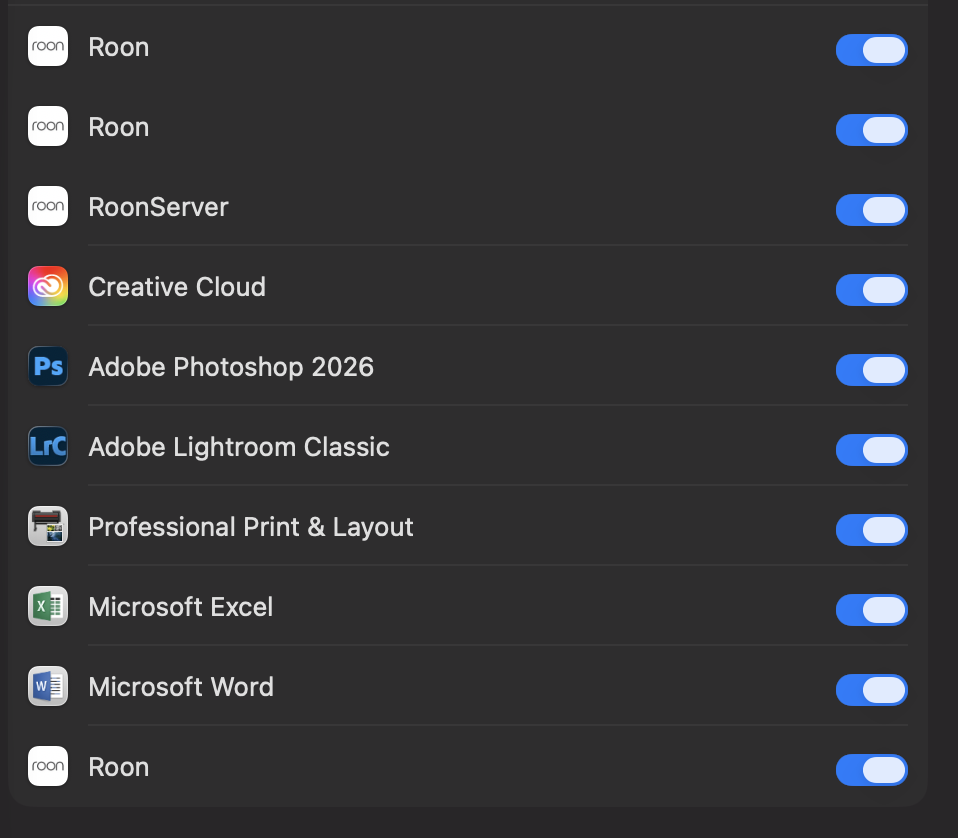
Open macOS System Settings → Privacy & Security → Local Network
Make sure Roon and Roon Server are both enabled
Even if they are already enabled, please toggle them off and back on
Fully quit Roon Server from the macOS menu bar / task bar
Reboot your Mac
After reboot, launch Roon again and check if the devices is avaliable again.
Once these permissions are refreshed and the system restarted, your audio devices should reappear.
Please let us know if the issue persists after these steps, and we’ll continue from there.
Thanks Benjamin, but this did not work. First I quit the Roon App, then followed your instructions System Settings > Privacy & Security > Network both Roon and Roon Server were enabled. I toggled off, then on again and rebooted the Mac. The 218 did not appear as an audio source. I also noticed there were three Roon items - see screen shot attached. Is this normal? Should there just be one? If so, could this be part of the problem and how do I delete the other two?
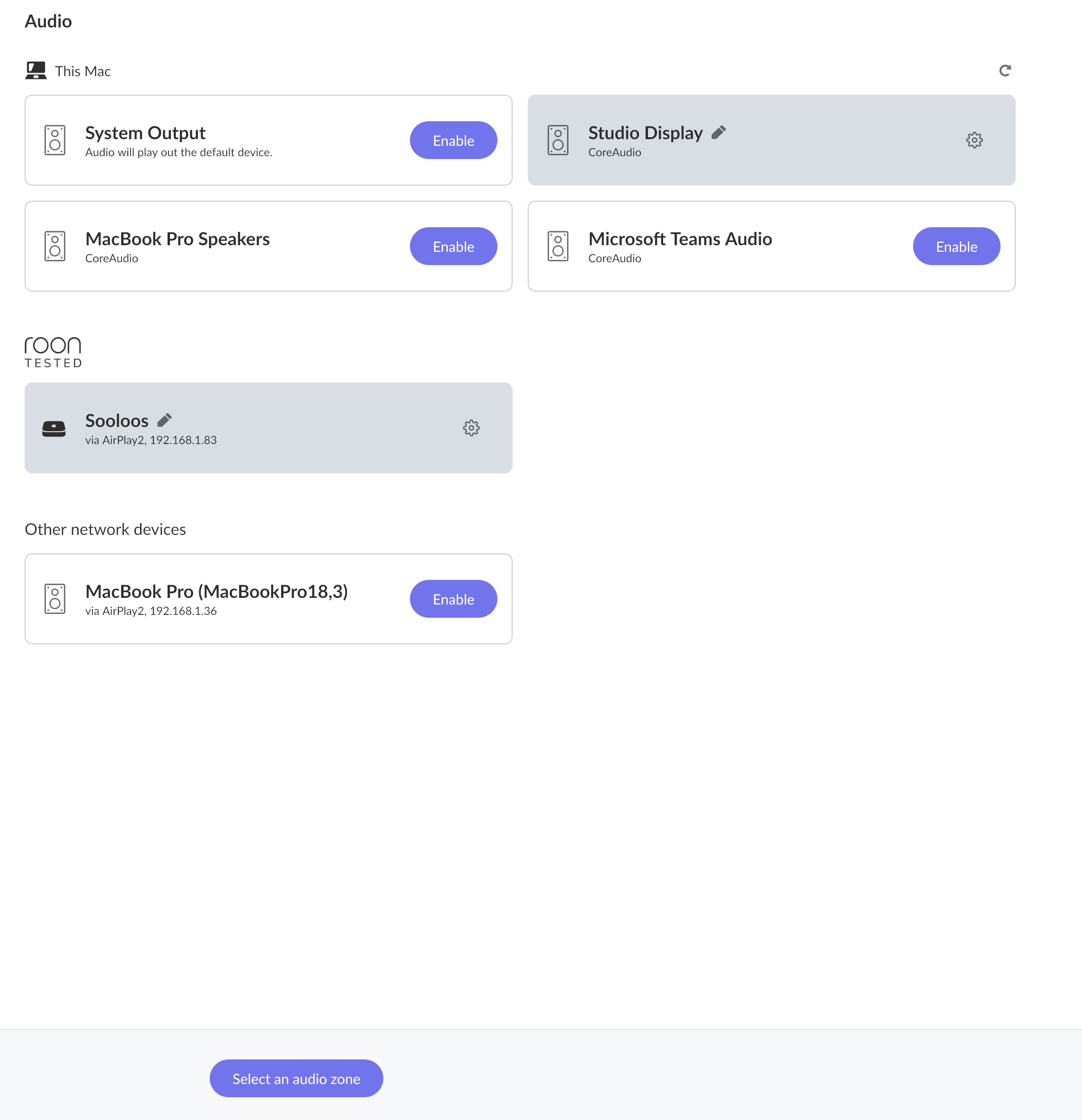
Have also attached another screen shot of the audio page which shows one item named Sooloos enabled (that’s the name I have given to Apple TV) but nothing for the 218. What should I do next?
I’ve tried some different tests, which may help isolate the problem. I have two additional Nodes linked to my main router. Both the MacBook and the 218 are normally connected to Node 1 with the following IP Addresses:
Mac: 192.168.11.36
218: 192.168.1.237
Roon: 192.168.1.83
I bypassed Node 1 and connected both Mac and 218 direct to the router. Everything worked fine, but this cannot be a permanent solution, with long cables running across the carpet! Then left the 218 connected direct and the Mac to Node 1. The 218 remained connected, but dropped out after about 30 seconds, but then reconnected again after another 30 seconds. Have now gone back to original settings, Mac and 218 connected to Node 1 and all working fine, but could drop out at anytime.
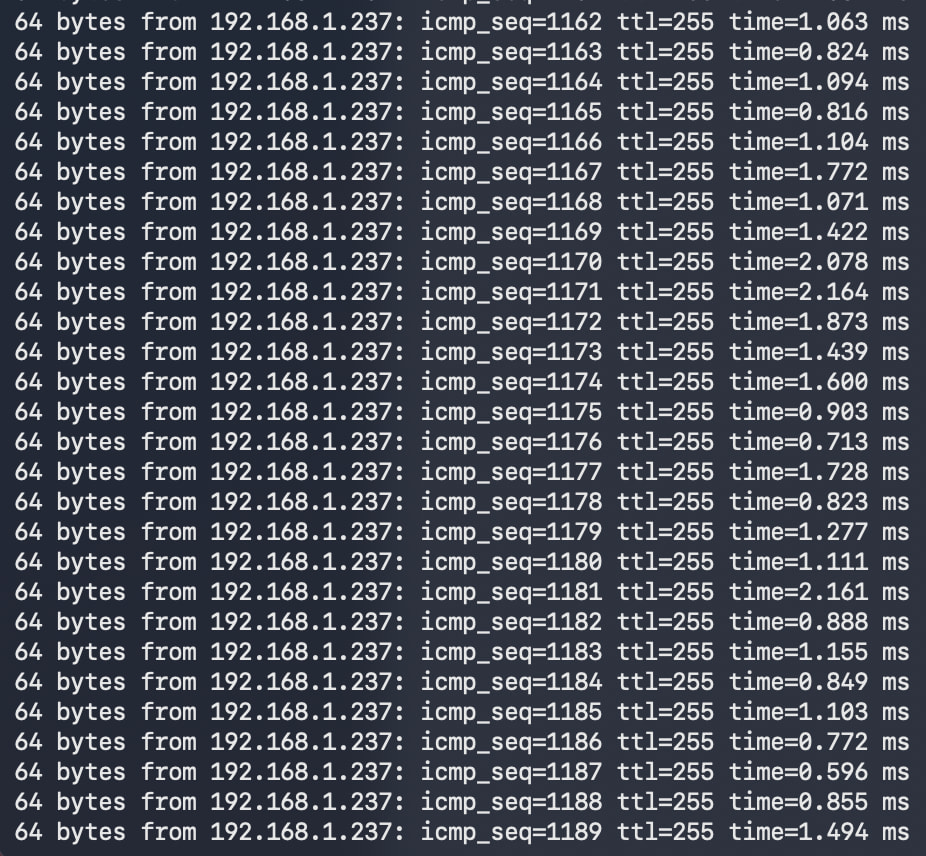
I am also running a Ping test on the Terminal using the 218 IP Address. This has been running for about 15 minutes with no issues - see screen shot below. Does any of this help track the problem? Please advise.
Thank you for those tests, they are the most useful thing in this thread. The addresses you posted explain everything, and the answer is not in Roon.
Look at what you sent us:
Mac: 192.168.11.36
218: 192.168.1.237
Your Mac and your Meridian 218 are on two different networks. Anything in 192.168.11.x and anything in 192.168.1.x cannot see each other directly, even though both are plugged in and both are online.
That is why your own tests came out the way they did. Plug both into the router and they share one network, and everything works. Put the Mac behind Node 1 and they are separated again, and the 218 vanishes the moment you press play.
Your ping test is not a contradiction, and it is worth understanding why. A ping is sent to one specific address and a router will happily pass it between networks. Finding audio devices works differently: Roon announces itself to the whole local network at once, and that kind of announcement is not passed between networks by design. So the 218 answers a ping while remaining invisible as a zone. That is exactly the symptom you described.
What this means is that Node 1 is handing out its own separate network rather than passing your router’s network through. Most mesh nodes can do either, and yours needs to be doing the latter.
Please look in the Linksys app for a setting on Node 1 along the lines of Bridge Mode, Access Point Mode, or an option to disable DHCP or router mode on that node. The wording varies. Once Node 1 stops issuing its own addresses, every device behind it will receive an address in 192.168.1.x like your 218, and this problem disappears without any long cables across the carpet.
Thanks Vadim . . . unfortunately, I mis-typed the IP address and both MacBook and 218 are on the same network; however, I think I’ve found the answer. I also had an Apple TV box enabled as an audio device connecting by AirPlay. I disabled the Apple TV box and the 218 immediately reappeared as an audio source. It looks like there was some conflict between the Apple TV and the 218. I never used the Apple TV as an audio source anyway.
Apologies for the misleading info but I have learned a lot from these exchanges and I really appreciate all the help and advice given.
Glad to hear you found the answer. It does not look like the IP addresses were overlapping after all, but there may have been some other type of conflict in play.
In any case, it sounds like the issue is sorted now. Enjoy your music, and we will go ahead and close this one out.
 and both MacBook and 218 are on the same network; however, I think I’ve found the answer. I also had an Apple TV box enabled as an audio device connecting by AirPlay. I disabled the Apple TV box and the 218 immediately reappeared as an audio source. It looks like there was some conflict between the Apple TV and the 218. I never used the Apple TV as an audio source anyway.