I have a problem that I have seen many people having but i have yet to see a solution.
I run a Roon an Intel NUC i3 with Tidal HiRes feeding Roon and also a local Netgear ReadyNas where my ripped CDs reside.
I mostly listen to Roon with a Windows laptop as client and in some cases my iPhone. Music is played to a NAD M33 streaming amplifier that is Roon ready.
Initially for a number of years, this worked flawlessly but suddenly Roon can no longer find the network volume on my NAS. Nothing has changed. I can still reach the music folder on my NAS from Windows with the same IP address.
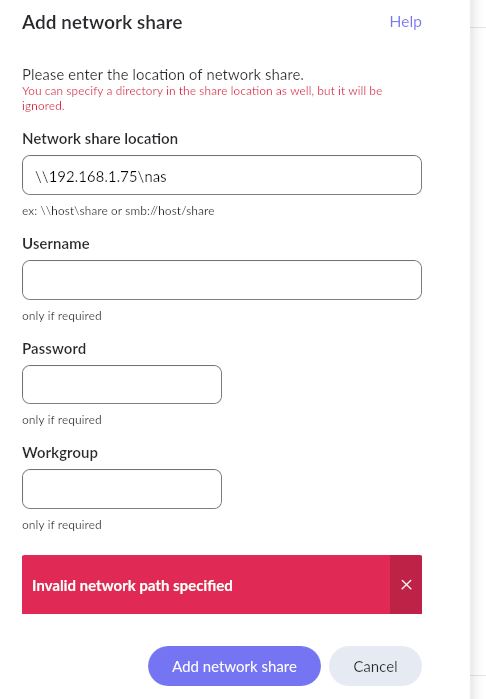
When I try to connect my NAS volume, usually nothing is happening or in some cases, I get the error message “Invalid path”.
My Roon core and clients are always updated whenever the prompt appears to do so, so I assume I am on the latest version.
If there is a solution to this problem that someone knows of, please let me know, so I don’t have to read through post after post in tons of forum threads.
How are you specifying the connection to your NAS in Roon? It’s best to specify it via IP address and set up an IP address reservation for your NAS in your router, so that it’s fixed.
In Roon → Settings → Storage, I have specified \192.168.1.75\nas , expecting it to present my actual data folders to choose which is the one for music.
With this IP address I can reach my NAS from Windows, so I know the IP is correct.
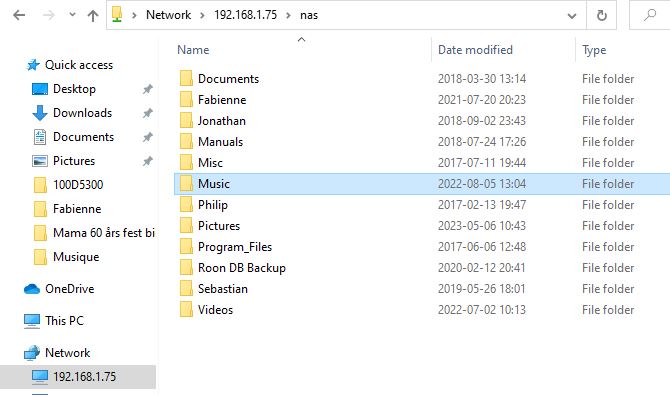
The highest level in my NAS has three volumes, one called nas which is the actual NAS-storage and two other that are USB connected disk drives used for local back-up of the NAS. In the volume nas I have my folders with actual data, e.g. Music, Video, Pictures, etc.
This is the way it has been set up since the very beginning and has never been a problem until recently.
Yesterday, I made a complete reset of the Roon Core in my NUC, both OS and Roon server. I also uninstalled the Roon client on my laptop and re-installed it from scratch,
I still have exactly the same problem.
It appears that the Roon server no longer recognizes the network path I give to my NAS, and I don’t seem to be alone having this problem.
Hej Dan,
skulle du kunna visa några skärmbilder på:
Dina Lagrings-inställningar i Roon
En utforskarvy från Windows där du visar mapparna på NAS’en
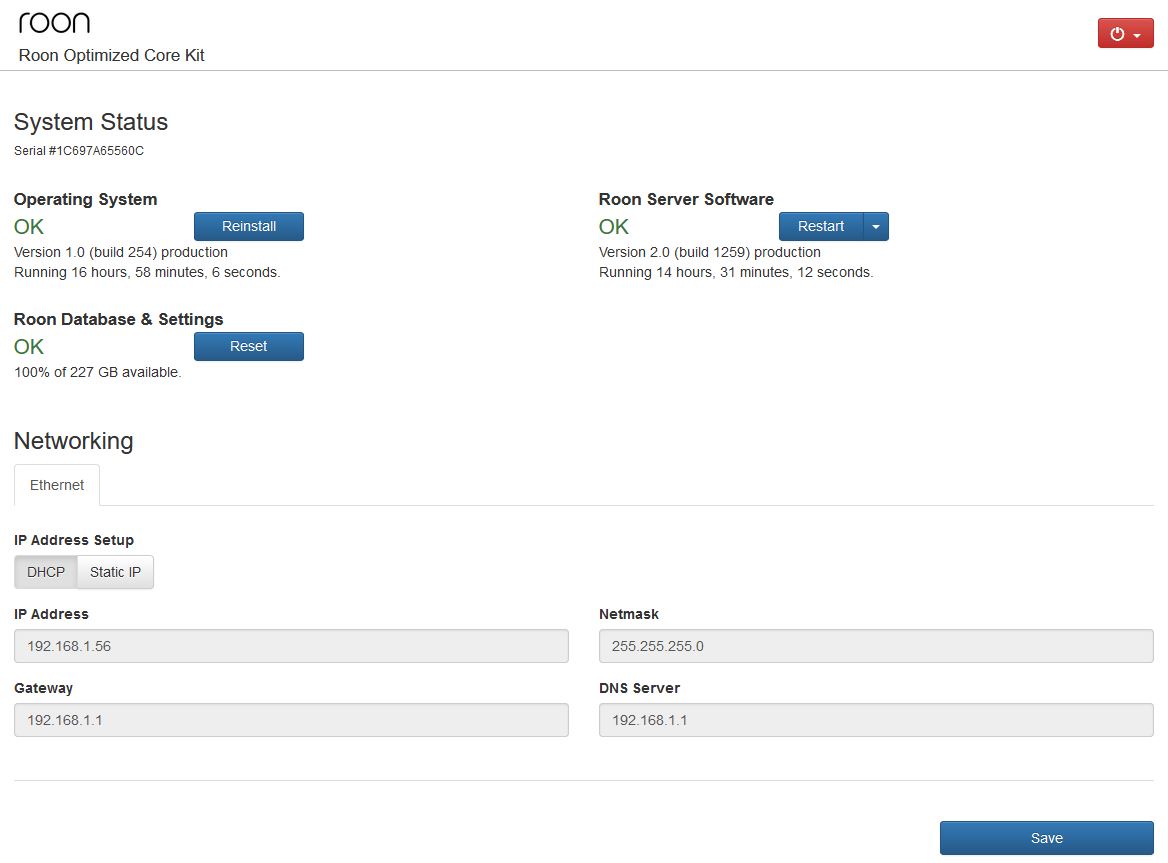
En skärmbild från din ROCK, alltså webb-interfacet.
Sorry for the swedish guys, i’ll get back to english immediately.
Asking for some screenshots, ROCK GUI, Windows Explorer (showing NAS) and Storge settings in Roon.
I assume from the screenshot of Windows File Explorer that Music is your shared folder for your music. Therefore I would suggest that your network address would be \\192.168.1.75\Music
And you’ll need to enter the relevant username and password for access to the shared folder as well.
I have tried \192.168.1.75\Music but it does not work either. Also \192.168.1.75 gives the same error message.
As you can see in the screen shot and as I tried to explain in my first post, in my NAS, at the top level, I have one data volume named nas and two USB connected back-up disks, so in order to reach my Music folder, I need to use the path \192.168.1.75\nas\Music otherwise it won’t work at all, neither from Windows.
I don’t have my volumes in my NAS protected, so I have never used username/password to access them.
Only log on to the NAS admin account requires username/password but that has nothing to do with the data volumes.
Well, I’m not a NAS user, but your method of network addressing does not seem right to me. What make and model is your NAS?
I can only say that when I use a Windows PC as a NAS, then the data volumes are not part of the network address and I am required to use a username and password (not the admin credentials) for access to a shared folder.
So, while the filepath to the shared folder on my server (Degas) is E:/Music, the network address is \\Degas\Music
This is a common way to adress a network share, nothing strange about it.
IP adress/network name and then the share name (in Dan’s case “192.168.1.75” and “nas”).
I think, not sure, that the netgear is a pretty ancient NAS and they are not very up to date anymore. My QNAP publish the main shares separately like \\192.168.1.11\Music and \\192.168.1.11\Video but it seems the Netgear doesn’t…
Yeah, I have tried it but to no avail.
I might even be that Samba (which I assume smb is an abbreviation for) is not enabled in my NAS.
I don’t remember 100%.
I have also tried to mount the Music volume to my laptop as the Z drive and then give Z:\Music as storage path in Roon but I still get the the same error.
You mention in you later post that Netgear (ReadyNas NV+) which I have is ancient, and yes that is true. For example, I cannot use any modern version of Chrome/Edge/Firefox to log on to the NAS and administrate it, as the SSL protocol used in the NAS no longer is supported by modern browsers and there are no new firmware revisions coming anymore from Netgear for this old model. I think I bought it in 2009 or so.
What irritates me though, is that it used to work, it seems pretty basic, and that it seems that many other people have the same or similar problems not only with Netgear but also QNAP and others.
Yeah, but if he uses just the \\192.168.1.75\nas as he says he has, then all the folders underneath would get added as watched folders - which looks like a recipe for disaster to me.
You might be on to something there, but to clarify, Samba is a linux based software/protocol which is compatible with the Server Message Block protocol, implemented in Windows since the last century.
I do get the frustration, but to be quite honest, you’d be better off hanging one of those USB-drives on your ROCK rather. The local storage makes the Roon experience a better one with internal or USB based storage. And, secondly, a non updated NAS on the network is exposing you to security issues.
Several contributors to this thread have recently been on other threads in which Samba-based connectivity to NAS devices appears to have stopped working for some people.
@Dan_Michaeli had a working setup that stopped working. That’s true in at least one other thread in which the NAS device was a Synology. Both of these people appear to be using anonymous logins. I don’t have the time to experiment at the moment but I wonder if it’s worth exploring the potential that anonymous logins to SMB servers broke.
Sure, that is a possibility. But if that is the cause, which change brought it?
The NAS hasn’t been updated for ages, and the ROCK is on 1.0 b254 which i believe is the latest, and hasn’t been uppdated lately?
That’s the ROCK build but Roon has released numerous core releases since Rock b254 shipped in November. I believe Roon uses CIFS for SMB - in the case of a ROCK, I’m not sure if CIFS updates only with ROCK updates or also potentially with Roon updates.
I’m not claiming, though, to have a theory about root cause. Something broke for @Mikael_Ollars. Here’s an example of another case where connectivity to a NAS (Synology in this case) also recently broke:
In both cases, the broken case involves anonymous logon. In the case of the Synology user, we recommended he try putting access control on his music folder and updating his Roon settings. We haven’t heard back.
I could be wrong but there are worse strategies than triangulation when debugging…
Hi all and thanks for all your input to try to help me out.
What conclusions should I come to?
As I see it, based on your input, is that there could be two causes:
My NAS is too old, and something is no longer compatible with Roon
Roon has a bug
I am thinking of getting a new NAS (or something like that) to replace my old faithful.
Maybe a QNAP. I believe that QNAP is especially recommended by Roon. Please confirm or reject my assumption. Also, if you could recommend a special model. I am thinking of a 4-bay with SSD disks.
If I want to try to keep my old one, what should my next step be? Log an official incident to Roon or…?
Have you tried setting up a username and password for the Roon share? The latest updates seem to have disabled anonymous access on most NAS devices. Presumably to address security vulnerabilities.