High, when I am streaming from Tidal, I can only choose low quality (320kbps and 96kbps). Selecting “high” and “max” will introduce pause and usually skipping to the next track. I know lowering the streaming quality will solve the problem, but is there any way to increase the streaming the network buffer like in Youtube? I simply can’t find the option, and I wonder why there isn’t one.
There is a buffer size setting in the individual device settings under advanced.
I doubt that it will fix your problem. Sounds more like a network/internet performance issue
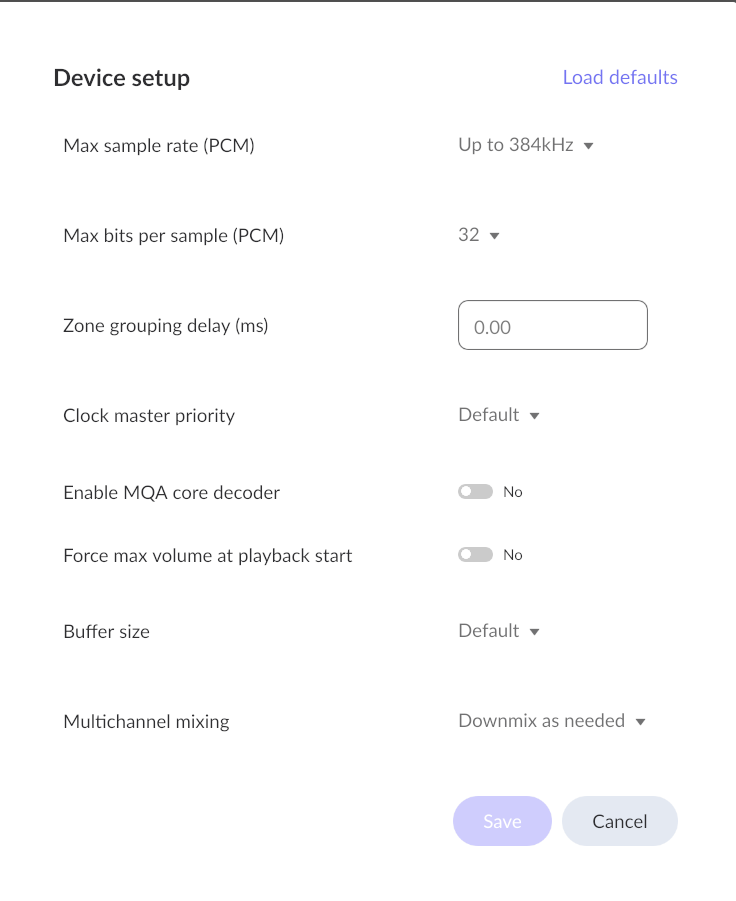
Whether this exists or does anything depends on the device
Thank you for the advice. I am quite sure my problem is not related to audio hardware buffer, but caused by slow internet connection. So what I am looking for is some kind of preloading as seen in Youtube.
Thank you for showing the way. Just as I said in my last reply, this is not related to the audio hardware buffer but caused by slow internet connection.
I don’t know why it is slow, as I have a 2000 Mbps fiber connection which is otherwise blazing fast.
1 Like
Is the slowness only happening with Roon? What happens when you stream directly from Tidal? Do you still get things like dropouts? 2000 mbit fiber is completely overkill for streaming music. 10% of that is already more than enough.
1 Like
10% of 2000mbit enough?
my streamers still work on 100 mbit, so that’s even a miserable 5% of that 2000mbit 
Yes, it’s only happening with Roon. When streaming directly from Tida, it’s very smooth at the highest quality. When choosing high and max quality in Roon, it will pause or skip to the next track, showing “Tidal loading slowly. This may indicate a network connectivity problem”.
Are you using WiFi, Ethernet or a combination in your location? The Roon Server should be Ethernet to the router at the very least, and Ethernet for end-points is best to avoid WiFi issues.
1 Like
I am only using Ethernet. I use windows PC as both Roon sever and player, and a Roon certified DAC as Roon endpoint.
Hi @yan_laoge,
I suspect… that access is inconsistent due to the Great Firewall.
Often users in this situation need a VPN to log in or stream reliably.
Have you tried using a VPN?
1 Like
I guessed that too. There was a time I have to use VPN to get access to Tidal and Roon. Now I can use Roon and Tidal without VPN, but it’s still slow. I have a fast VPN, and I use that too, but it’s still slow. What is strange is that I can play directly from Tidal very smoothly at the highest quality. Why Tidal becomes slow when accessed as a service embedded in Roon?
Open a Support request, and let Roon determine what is actually happening. Only then can a solution be proposed.
1 Like
Couple questions:
Does your DAC have a windows driver (like an ASIO driver)? Are you using that in Roon and Qobuz? Often these ASIO drivers will have their own buffers (in number of samples) you can configure. I’m wonderingif its an issue with the driver.
A larger buffer only helps so much… if it’s draining the buffer it will just eventually drain on a long enough track. It can fix extreme network jitter (not to be confused with audio clock jitter) but it is weird that you’re good with Qobuz app but not Roon. This leads me to believe you’ve selected two different drivers / audio endpoints in Windows and that’s the source of the difference.
This gets into a more complicated investigation but make sure Roon and Qobuz are pulling files / streams from the same region. You’d probably have to look at the actual transfer sources to confirm though.
Thank you for the explanation. I am using Roon with Tidal. My DAC has a windows ASIO driver and I have set its buffer to the max. The problem remains. I am now inclined to think that my problem is caused by some form of internet blockade. When I use VPN there are less delay and interrupt, but it can still stop playing and skip to the next track.
What about roon DSP/MUSE or resampling settings, do you have some enabled? Did you check your signal signal path while experiencing dropouts? In doubt please share a screenshot of the signal path.
I haven’t enabled any of the DSP/MUSE settings. The signal path is straight to the DAC. I am quite sure it’s the VPN that is causing the problem. I just don’t know why the VPN is causing the problem only to Roon. All the other Windows apps which also require high bandwidth of internet connections work flawlessly.