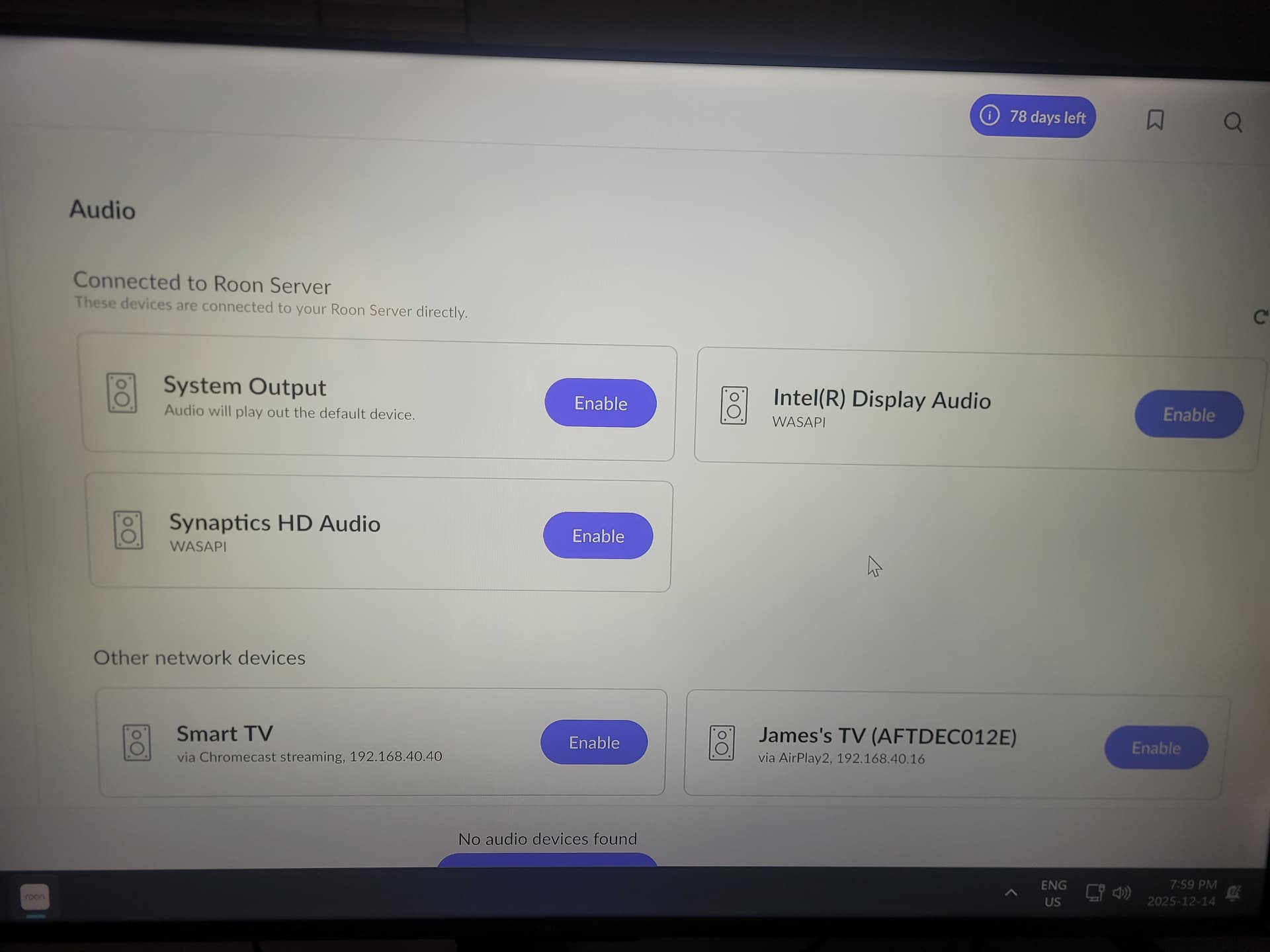
· I have a PC (windows 11) running Roon 2.57 (build 1598) in my living that i use as the core and one in my basement that I just want to use to play music. Both PC’s are the same model. In my basement when I select Intel(R) Display Audio it only connects to my Livingroom PC.
When you install Roon on a computer, Roon installs both Roon server and Roon client. So, you have two Roon servers and two Roon clients. I suggest you shut down the Roon server software on the basement PC and just use it as a Roon client and/or Roon end-point. In that case, the Roon client in the basement should connect to the Roon server upstairs and you should see everything on the PC screen downstairs.
Go to Roon - Settings - General on the basement PC and make sure it says you are connected to the Roon server upstairs.
If you want to also use the downstairs PC as a Roon end-point to play music, Go to the lower right corner of the Roon screen and choose the basement PC end-point as audio output.
EDIT: On the basement PC, go to Roon - Settings - General and make sure you are connected to your Roon server upstairs. Then, go to Roon - Settings - Audio and find your PC downstairs as an audio device and enable it. I think it will be called This PC at the top of the screen since that’s the PC you are using at the moment.
Those are the only options it gives me in the basement. The top three all connect to my pc in my living room. Bottom left is tv in living room and bottom right is tv in basement.
Just to clarify one important point first — have you installed the Roon application on the basement PC itself, or are you only controlling Roon there remotely?
For the basement PC to appear as a playable audio device, Roon must be installed and running on that machine so it can expose its local audio outputs (for example, Intel Display Audio) as an endpoint.
Once confirmed, we can look at why the basement PC isn’t showing up as a separate audio endpoint and why playback is being routed to the living room instead.
Thank you for your message. Can you please use the directions found here and send over a set of logs to our File Uploader? Once logs have been uploaded, please let us know so that we can check the server for your files, thanks!
Have you tried going to your PC upstairs and going to Roon - Settings - Audio and seeing if the basement PC shows up there? If it does, enable it and try playing to the basement PC.
Nope nothing shows up for basement. Two Intel(R) Options are there. One is for my livingroom receiver and the other is for my living room TV. There is no option for basement audio at all.
Apologies for not considering this earlier - but from a fresh Roon Server diagnostic report, there could be multiple active subnets within your local network that might be causing some issues here.
Could you temporarily disable all but a single subnet, and confirm all your Roon devices are on the same local subnet? Then, see if your local PC outputs become available.
This solved it thank you so much! I had no idea what a subnet was and I had no idea that having my pc in the basement connected to a router extender would change the IP and now I know thank you.