Issue with Roon backup on Ugreen DXP4800PLUS (ref#C9H9EE)

@vadim suggested I ask Support -


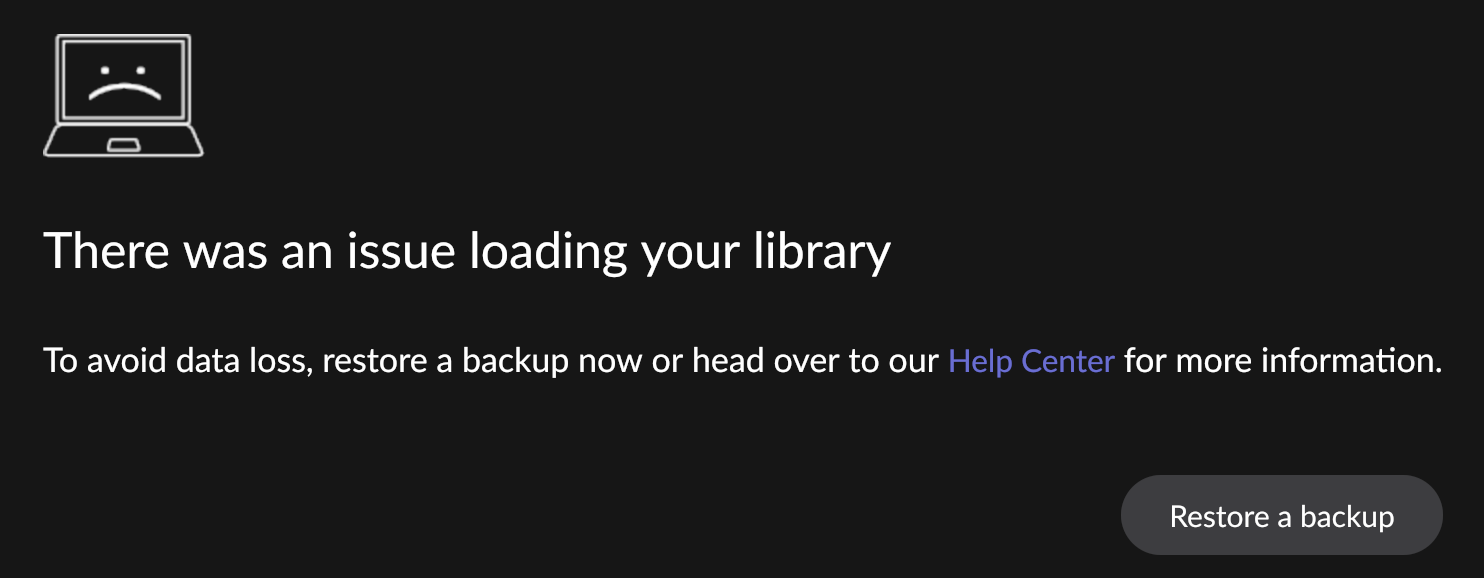
Running it on Ugreen DXP4800PLUS with 64GB RAM. Everything seems to work but backup. It is mapped but when it runs or I tried to run it manually, I always get this:

There was an issue loading your library

I can restore and old backup from the same location, but backing up to it does not work!
To get ROON running again without a useless restore, all I have to do is to go to Docker on Ugreen and restart Roon project or container.
Backup is mapped in docker compose as - /volume1/docker/RoonBackups:/RoonBackups

I have tried to restore the database, restart and tried to backup right away - still got the same error.

I do have a rather large library, all local, with:
133536 tracks
10445 albums
5436 artist
lots of multiple languages in metadata.
May be this is the problem. Last backup that worked is dated Jan 24, 2026.

Tell us about your home network

· Ubiquity Router and AP, Gigabit internet all around, Roon on NAS, Roon endpoint on WIIM Pro
Hi @tudupka,

Thanks for the details and screenshot.

Since you can restore an older backup from the same location, this does point us toward a permissions issue rather than a problem with the backup path itself.

Please run the command inside the Docker container and share the output with us, along with a screenshot showing the backup location selected when you try to run the backup. That will give us a clearer read on what the container can actually do at /RoonBackups.

id; whoami; pwd; echo '=== mount target ==='; ls -ld /RoonBackups; stat /RoonBackups 2>/dev/null || true; echo '=== write test ==='; touch /RoonBackups/testfile && echo 'touch OK' || echo 'touch FAILED'; echo '=== mkdir test ==='; mkdir /RoonBackups/testdir && echo 'mkdir OK' || echo 'mkdir FAILED'; echo '=== rename test ==='; mv /RoonBackups/testfile /RoonBackups/testfile2 && echo 'mv OK' || echo 'mv FAILED'; echo '=== delete test ==='; rm -f /RoonBackups/testfile2 && echo 'rm file OK' || echo 'rm file FAILED'; rmdir /RoonBackups/testdir && echo 'rmdir OK' || echo 'rmdir FAILED'; echo '=== create bigger file ==='; dd if=/dev/zero of=/RoonBackups/write_test.bin ■■=1M count=100 conv=fsync && echo 'dd write OK' || echo 'dd write FAILED'; echo '=== rename bigger file ==='; mv /RoonBackups/write_test.bin /RoonBackups/write_test_renamed.bin && echo 'big mv OK' || echo 'big mv FAILED'; echo '=== cleanup bigger file ==='; rm -f /RoonBackups/write_test_renamed.bin && echo 'big rm OK' || echo 'big rm FAILED'; echo '=== filesystem info ==='; df -h /RoonBackups; mount | grep RoonBackups || cat /proc/mounts | grep RoonBackups || true

Thanks.

Hi @alex_h ,

I had to fix your command ■■=1M, this mardown does not like “b s” letters together.
Here is the output of this command from inside my Roon docker container:
root@DXP4800PLUS:/# ./rn.sh

uid=0(root) gid=0(root) groups=0(root)root/
=== mount target ===
drwxrwx— 1 1000 uucp 198 Apr 22 10:55 /RoonBackups
  File: /RoonBackups
  Size: 198             Blocks: 0          IO Block: 4096   directory
Device: 0,79    Inode: 847125      Links: 1
Access: (0770/drwxrwx—)  Uid: ( 1000/ UNKNOWN)   Gid: (   10/    uucp)
Access: 2026-04-22 10:55:56.470919220 -0400
Modify: 2026-04-22 10:55:56.434918734 -0400
Change: 2026-04-22 10:55:56.434918734 -0400
 Birth: 2026-04-18 09:27:49.210343006 -0400
=== write test ===
touch OK
=== mkdir test ===
mkdir OK
=== rename test ===
mv OK
=== delete test ===
rm file OK
rmdir OK
=== create bigger file ===
100+0 records in
100+0 records out
104857600 bytes (105 MB, 100 MiB) copied, 0.648588 s, 162 MB/s
dd write OK
=== rename bigger file ===
big mv OK
=== cleanup bigger file ===
big rm OK
=== filesystem info ===
Filesystem                                      Size  Used Avail Use%
 Mounted on/dev/mapper/ug_3FB740_1752183412_pool1-volume1   17T  8.9T  7.6T  54% /RoonBackups
/dev/mapper/ug_3FB740_1752183412_pool1-volume1 on /RoonBackups type btrfs (rw,relatime,space_cache=v2,subvolid=262,subvol=/docker)

@tudupka ,

Thanks for performing this test.

The results from your previous mount test are very helpful — they show that /RoonBackups is mounted correctly, writable, and has sufficient free space. Basic file creation, directory creation, renaming, deletion, and a larger write test all completed successfully, so this does not appear to be a simple read/write permissions issue or a problem with the mapped backup path itself.

From the backup logs we reviewed, we can also see that the backup process is able to start normally and successfully prepare the /RoonBackups destination. The failure appears to happen later, during Roon’s internal backup/database validation phase rather than at the point where it tries to access the backup folder.

To help us determine whether anything at the Docker host or container level is interfering with Roon during the backup attempt, please reproduce the issue once more and capture the following diagnostics.

On the NAS OS, please run these in separate terminal windows/tabs right before reproducing the backup:

dmesg -w

Inside Roon Container please run these:

while true; do date; ps aux | grep -i '[R]oonServer'; cat /sys/fs/cgroup/memory.current 2>/dev/null; cat /sys/fs/cgroup/memory.max 2>/dev/null; echo '-----'; sleep 2; done

Then, while those are running, please manually trigger the backup again and let it fail.

When you send the results back, please also include the approximate local timestamp of when you started the backup and when the failure appeared on screen. That will help us line up the host-level output with the Roon logs.

Once we have that, we’ll be able to check whether:

  • the process is being terminated by the host,
  • the container is restarting,
  • a memory limit is being enforced,
  • or Roon is failing internally while the host/container remain stable.

    Thanks.

Before getting to it, I noticed there was an update to the new version of Roon docker image. I updated it.
Did run dmesg -w and have an output of that, but couldn’t run inside the container command, as Roon Container does not have ps, and it appears to be useless without it.
I went on triggering a manual backup, which to my surprise completed successfully.
I scheduled an automatic one and will see if runs successfully shortly.

Could it be that one of the improvements in the latest v. 1.0.6 image fixed something?
Regardless, I have my first successful backup in 3 month!!!

  • Automatic backup completed successfully.
  • I have tried a few manual ones.
  • Played a few songs.
  • Synched music directory from external(my Music ssd drive) to NAS roon mapped /music folder.
  • Run another manual, everything was ok.

At this point, I decided to reload the Roon container and run manual again:

At this point, I have it running again and we can close this issue.
:crossed_fingers:t3: it will continue to work.
If it starts hiccuping again, I’ll reopen it or create a new one.

Thank you for your help