· I hear distortion or noise when I'm playing music
What type of Zone is affected by this problem?
· *All of my Zones* are affected.
Does the issue affect all file formats?
· The issue *only affects one file *format.
Which format is giving you trouble?
· Other
Is your device connected directly to the Roon Server via cable or over the network, or is it chained through another device (such as a streamer, Roon Bridge, or Roon Remote)?
· It is connected through a different device (e.g Rasberry Pi)
Does the device play audio from another source when using the same connection?
· The device has no problems with another audio source
Have you checked that Roon is whitelisted in any firewalls?
· I've checked the firewall and the issue remains
If the device has multiple output options, do the other options work as expected?
· Multiple output types are affected
Is the device using the latest firmware as per the manufacturer?
· Firmware is up-to-date but the issue remains
Do you have an approximate timestamp of when the issue last occurred?
· Yesterday
What are the make and model of the affected audio device(s) and the connection type?
I should have noted that in your subject & description. I am sorry and probably should wait to post until after I’ve been awake for a bit. There are 32-bit DXD files as well and they can cause problems in some playback chains.
Should we assume that you are using USB input to your MPD-6? I cleared the sleep from my eyes before posting this time
As an experiment, try playing DSD256 using DoP. If it doesn’t play, this may indicate that you can’t stream higher PCM rates. If it does play okay, then something else is at play with DXD.
From reading this - Playback Designs MPD-6 | HFA - HiFi-Advice - and understanding that you use both the MPD-6 and the MPS-X, I suggest you reach out to Playback Designs for some support as well, if you haven’t already.
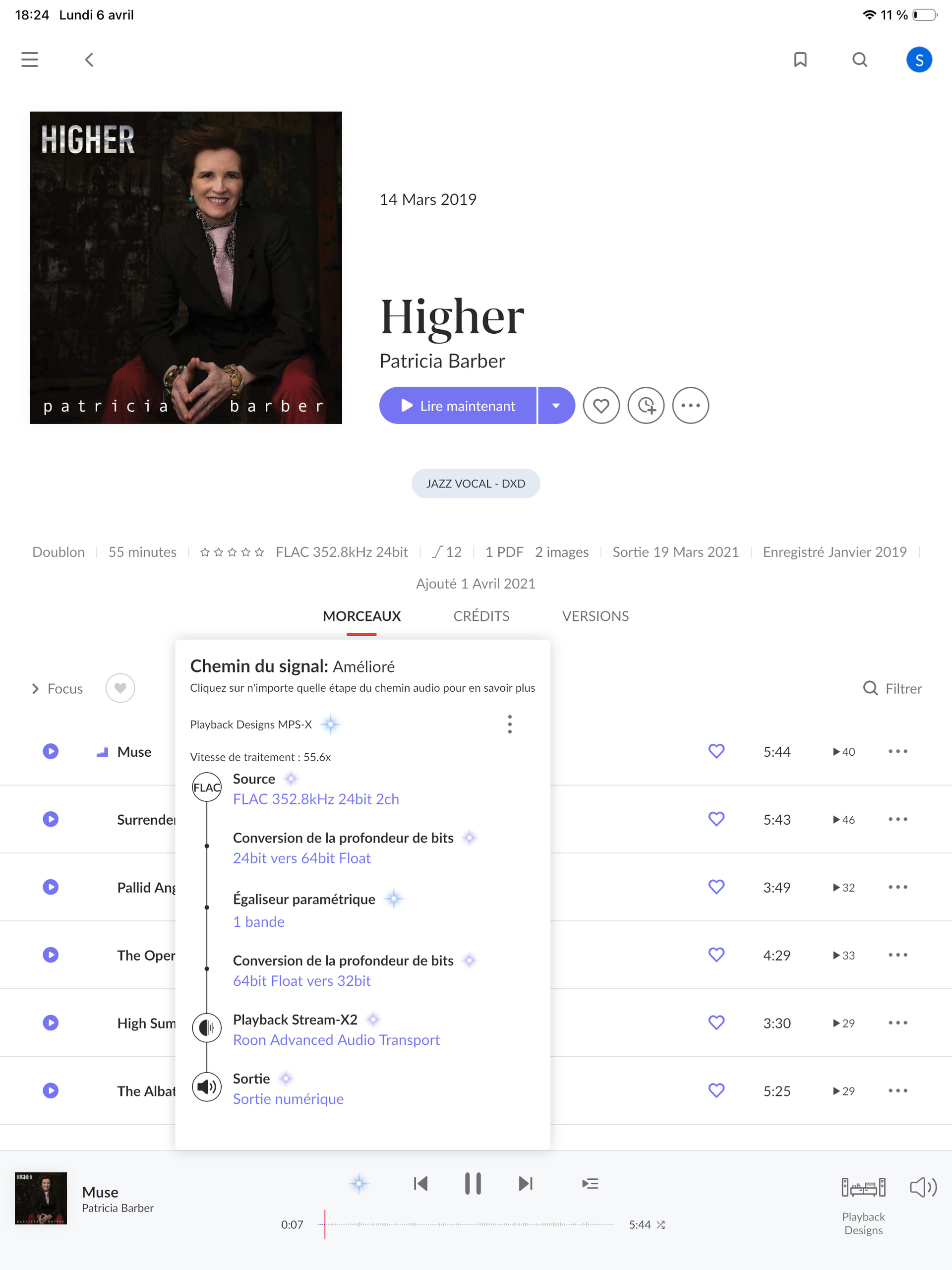
In the meanwhile, the only thing I think could help us here help you might be to share what your Roon playback chain looks like when attempting to play these files, presuming the little magic playback chain dot is clickable when you are trying to play them…
Since the streamer should support 384 kHz, at least on the USB input, perhaps Roon can comment on the capabilities via network / Roon Ready.
Whilst you may think that the network interface should support the same sample rates as USB, this is not always the case (as we’ve seen on other devices.) I couldn’t find specifications related to Roon Ready.
Thanks for writing in and for sharing your report! Thank you @DDPS and @mjw for the assistance as well.
The good news is that I can confirm your Roon Server is reporting that it is indeed capable of playing DXD 24-bit / 352.8 kHz files via Roon Ready.
From your screenshot, I see you have some EQ active. Try enabling “Headroom Management” in the DSP settings and set it to -3dB or -6dB to give the signal room to breathe.
Apologies if this has been glazed over, but how is the streamer connected? If this streamer is feeding a DAC via a Coaxial or Optical cable, you could be hitting a hard ceiling due to the cables themselves.
I’d also check to see if there are any firmware updates available for the streamer.
We’ll be monitoring for your reply and results, thank you!
Can you please try turning off all DSP and show us a screenshot of your Signal Path with all DSP turned off? It looks like in your previous screenshot DSP was still turned on, and this can help us better understand where this is failing. Thanks!